
Tslog
📝 tslog - Universal Logger for TypeScript and JavaScript
Install / Use
/learn @fullstack-build/TslogREADME
📝 tslog: Beautiful logging experience for TypeScript and JavaScript







Powerful, fast and expressive logging for TypeScript and JavaScript
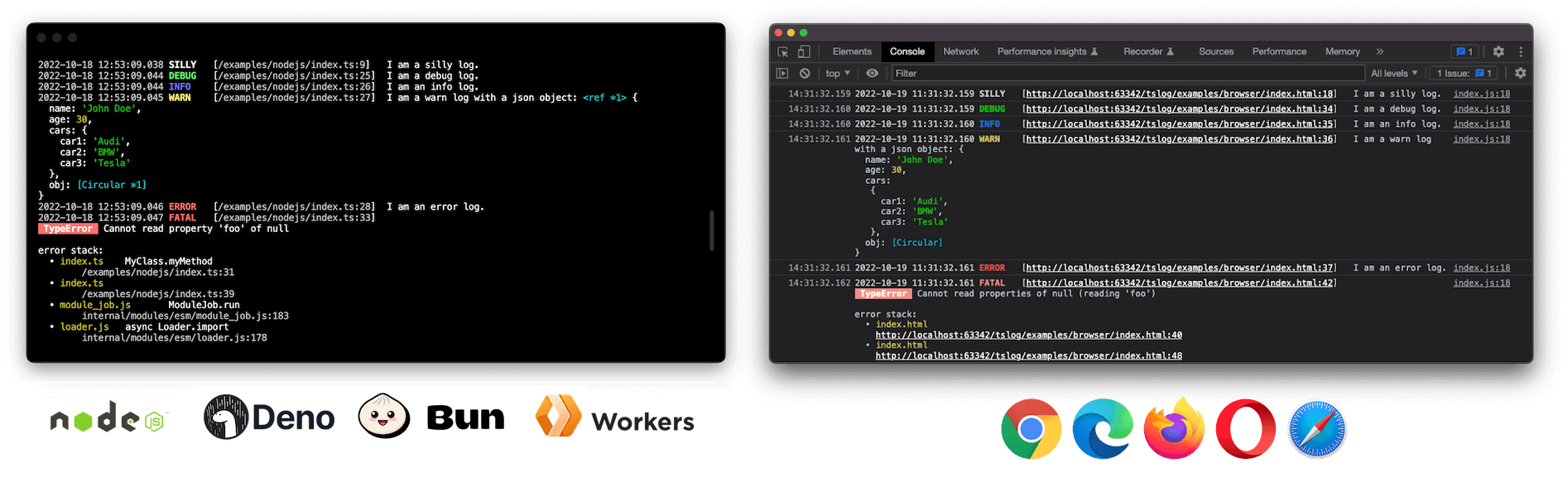
Highlights
⚡ Fast and powerful<br>
🪶 Lightweight and flexible<br>
🏗 Universal: Works in Browsers, Node.js, Deno and Bun<br>
👮️ Fully typed with TypeScript support (native source maps)<br>
🗃 Pretty or JSON output<br>
📝 Customizable log level<br>
⭕️ Supports circular structures<br>
🦸 Custom pluggable loggers<br>
💅 Object and error interpolation<br>
🤓 Stack trace and pretty errors<br>
👨👧👦 Sub-logger with inheritance<br>
🙊 Mask/hide secrets and keys<br>
📦 CJS & ESM with tree shaking support<br>
✍️ Well documented and tested<br>
Example
import { Logger, ILogObj } from "tslog";

const log: Logger<ILogObj> = new Logger();
log.silly("I am a silly log.");
Become a Sponsor
Donations help me allocate more time for my open source work.
Install
npm install tslog
Node.js
Enable native ESM by setting "type": "module" and run Node with source maps for accurate stack traces:
{
  "name": "NAME",
  "version": "1.0.0",
  "type": "module",
  "scripts": {
    "build": "tsc -p .",
    "start": "node --enable-source-maps dist/index.js"
  },
  "dependencies": {
    "tslog": "^4"
  }
}
After building (npm run build), start your app with:
npm start
Other handy entry points:
node --enable-source-maps dist/index.cjs– run the CommonJS bundle.node --enable-source-maps --loader ts-node/esm src/index.ts– execute TypeScript viats-nodein ESM mode.node --enable-source-maps --require ts-node/register src/index.ts– execute TypeScript viats-nodein CommonJS mode.
Deno
// main.ts
import { Logger } from "npm:tslog";

const logger = new Logger();
logger.info("Hello from Deno");
deno run main.ts
# grant optional metadata access: deno run --allow-env main.ts
Bun
// main.ts
import { Logger } from "tslog";

const logger = new Logger();
logger.info("Hello from Bun");
bun run main.ts
# or add "dev": "bun run src/main.ts" to package.json scripts
Browser:
<!doctype html>
<html lang="en">
<head>
<title>tslog example</title>
</head>
<body>
<h1>Example</h1>

<script src="tslog.js"></script>

<script>
  const logger = new tslog.Logger();
  logger.silly("I am a silly log.");
</script>

</body>
</html>
Enable TypeScript source map support:
This feature enables tslog to reference a correct line number in your TypeScript source code.
// tsconfig.json
{
  // ...
  compilerOptions: {
    // ...
    "inlineSourceMap": true,  // <!-- here
    // we recommend using a current ES version
    target: "es2020",
  },
}
Simple example
import { Logger } from "tslog";

const logger = new Logger({ name: "myLogger" });
logger.silly("I am a silly log.");
logger.trace("I am a trace log.");
logger.debug("I am a debug log.");
logger.info("I am an info log.");
logger.warn("I am a warn log with a json object:", { foo: "bar" });
logger.error("I am an error log.");
logger.fatal(new Error("I am a pretty Error with a stacktrace."));
All Features
- Universal: Works in browsers, Node.js, Deno, and Bun
- Tested: Great code coverage, CI
- Super customizable: Every aspect can be overwritten
- Fully typed: Written in TypeScript, with native TypeScript support
- Default log level:
silly,trace,debug,info,warn,error,fatal(different colors) - Customizable log level: BaseLogger with configurable log level
- Pretty & JSON output: Structured/pretty,
JSONor suppressed output - Attachable transports: Send logs to an external log aggregation services, file system, database, or email/slack/sms/you name it...
- Minimum log level per output:
minLevellevel can be set individually per transport - Native source maps lookup: Shows exact position also in TypeScript code (compile-to-JS), one click to IDE position
- Pretty Error: Errors and stack traces printed in a structured way and fully accessible through JSON (e.g. external Log services)
- ES Modules: import syntax with (tree-shaking)
- Object/JSON highlighting: Nicely prints out objects
- Instance Name: (Server-side only) Logs capture instance name (default host name) making it easy to distinguish logs coming from different instances
- Named Logger: Logger can be named (e.g. useful for packages/modules and monorepos)
- Sub-logger with inheritance: Powerful sub-loggers with settings inheritance, also at runtime
- Secrets masking: Prevent passwords and secrets from sneaking into log files by masking them
- Short paths: Paths are relative to the root of the application folder
- Prefixes: Prefix log messages and bequeath prefixes to child loggers
API documentation
tslog >= v4is a major rewrite and introduces breaking changes. <br> Please, follow this documentation when migrating.
<a name="life_cycle"></a>Lifecycle of a log message
Every incoming log message runs through a number of steps before being displayed or handed over to a "transport". Every step can be overwritten and adjusted.
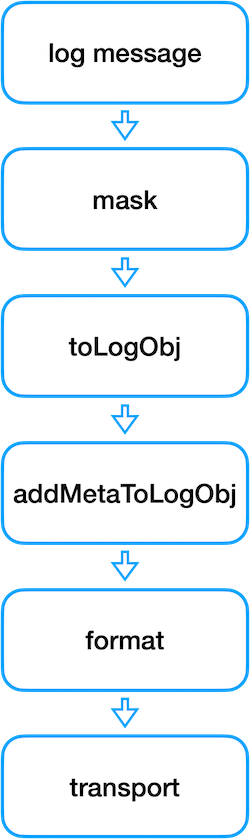
- log message Log message comes in through the
BaseLogger.log()method - mask If masking is configured, log message gets recursively masked
- toLogObj Log message gets transformed into a log object: A default typed log object can be passed to constructor as a second parameter and will be cloned and enriched with the incoming log parameters. Error properties will be handled accordingly. If there is only one log property, and it's an object, both objects (cloned default
logObjas well as the log property object) will be merged. If there are more than one, they will be put into properties called "0", "1", ... and so on. Alternatively, log message properties can be put into a property with a name configured with theargumentsArrayNamesetting. - addMetaToLogObj Additional meta information, like date, runtime and source code position of the log will be gathered and added to the
_metaproperty or any other one configured with the settingmetaProperty. - format In case of "pretty" configuration, a log object will be formatted based on the templates configured in settings. Meta will be formatted by the method
_prettyFormatLogObjMetaand the actual log payload will be formatted byprettyFormatLogObj. Both steps can be overwritten with the settingsformatMetaandformatLogObj. - transport Last step is to "transport" a log message to every attached transport from the setting
attachedTransports. Last step is the actual transport, either JSON (transportJSON), formatted (transportFormatted) or omitted, if its set to "hidden". Both default transports can also be overwritten by the corresponding setting.
❗Performance
By default, tslog is optimized for the best developer experience and includes some default settings that may impact performance in production environments.
To ensure optimal performance in production, we recommend modifying these settings, such as hideLogPositionForProduction(s. below), as needed.
Default log level
tslog comes with default log level 0: silly, 1: trace, 2: debug, 3: info, 4: warn, 5: error, 6: fatal.
Tip: Each logging method has a return type, which is a JSON representation of the log message (
ILogObj).
import { Logger } from "tslog";

const log = new Logger();
log.silly("I am a silly log.");
log.trace("I am a trace log.");
log.debug("I am a debug log.");
log.info("I am an info log.");
log.warn("I am a warn log with a json object:", { foo: "bar" });
log.error("I am an error log.");
log.fatal(new Error("I am a pretty Error with a stacktrace."));
Custom log level
In addition to the default log level, custom log level can be defined in the same way tslog does it under the hood, by extending the BaseLogger and utilizing the log method.
log method expects the following parameters:
- logLevelId - Log level ID e.g. 0
- logLevelName - Log level name e.g. silly
- args - Multiple log attributes that should be logged.
Tip: Also the generic logging method (log()) returns a JSON representation of the log messa
