
DynamoDb.SQL
SQL-like external DSL for querying and scanning Amazon DynamoDB
Install / Use
/learn @fsprojects/DynamoDb.SQLREADME
DynamoDb.SQL (@DynamoDbSQL)
This library gives you the capability to execute query and scan operations against Amazon DynamoDB using a SQL-like syntax by extending the existing functionalities of AmazonDynamoDBClient and DynamoDBContext classes found in the standard .Net AWS SDK.
This guide contains the following sections:
- Basics - how to get started using this library
- Features - what you can do with this library
- Examples - links to examples in F# and C#
You can view the release notes here, and please report any issues here.

Basics
Getting Started
Download and install DynamoDb.SQL using NuGet.
<a href="https://nuget.org/packages/DynamoDb.SQL"><img src="http://theburningmonk.com/images/dynamodb.sql-nuget-install.png" alt="NuGet package"/></a>
Now suppose we have a DynamoDB tabled called GameScores like the following:
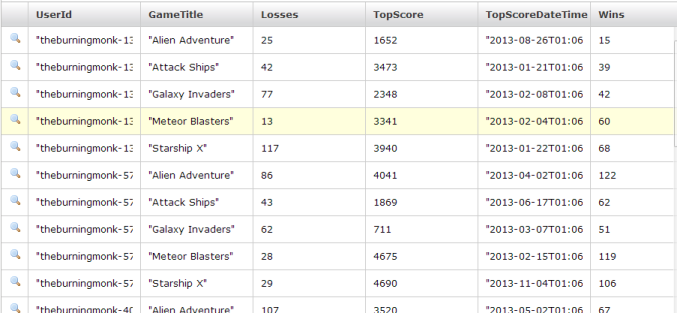
To find all the scores for the player with UserId "theburningmonk-1" we can simply execute the query like the following:
open Amazon.DynamoDBv2
open Amazon.DynamoDBv2.DataModel

let awsKey      = "MY-AWS-KEY"
let awsSecret   = "MY-AWS-SECRET"
let region      = RegionEndpoint.USEast1

let client = new AmazonDynamoDBClient(awsKey, awsSecret, region)
let ctx    = new DynamoDBContext(client)

let query  = "SELECT * FROM GameScores WHERE UserId = \"theburningmonk-1\""
let scores = ctx.ExecQuery<GameScore>(selectQuery)
whilst the above example is in F#, the same extension methods are accessible from C# too, check out the full range of examples in the Examples section.
For a detailed run-down of the syntax please refer to this page.
Features
Simple SQL-like syntax
This library lets you use a SQL-like syntax for performing query and scan operations against DynamoDB. If you're new to DynamoDB and is not clear on the difference between the two, please refer to the DynamoDB documentation here and guidelines here.
Using the appropriate extension methods on AmazonDynamoDBClient and DynamoDBContext you will be able to query/scan your DynamoDB table like this:
let selectQuery = "SELECT * FROM GameScores WHERE UserId = \"theburningmonk-1\""
let response    = client.Query(selectQuery)
Whilst the syntax for both query and scan operations are similar, there are minor differences and some comparisons (such as CONTAINS and IN (...)) are only supported in scan operations by DynamoDB.
For a detailed run-down of the syntax please refer to this page.
Count-only queries
If you only want to find out the number of items that matches some conditions and not the items themselves, then you can save yourself some bandwidth and read capacity units by using a COUNT query:
let countQuery    = "COUNT * FROM GameScores WHERE UserId = \"theburningmonk-1\""
let countResponse = client.Query(countQuery)
Note: count queries are only supported when you're working with the
AmazonDynamoDBCient.
Selecting specific attributes
If you only want to retrieve certain attributes from your query, then you can save yourself some bandwidth and potentially processing power by specifying exactly which attributes you want to retrieve:
let selectQuery = "SELECT UserId, GameTitle, Wins FROM GameScores WHERE UserId = \"theburningmonk-1\""
let response    = client.Query(selectQuery)
Ordering and Limiting
Often you will want to retrieve only the top or bottom X number of items based on the natural sorting order of the range key values. Therefore it often makes sense to combine the ORDER and LIMIT clauses in your query.
For example, in our GameScores table (see above), to find the top 3 scoring games for a given user we can write:
let selectQuery = "SELECT * FROM GameScores WHERE UserId = \"theburningmonk-1\" ORDER DESC LIMIT 3"
let response    = client.Query(selectQuery)
Note: in DynamoDB, you can only order on the range key values hence why there's no option for you to specify what column to order on in the query syntax.
Throttling
As stated in the DynamoDB best practices guide, you should avoid sudden bursts of read activity.
To throttle your query or scan operation, you can use the PageSize option in your query to throttle the amount of read capacity units that your query consumes in one go:
let selectQuery = "SELECT * FROM GameScores WHERE UserId = \"theburningmonk-1\" WITH (PageSize(10))"
let response    = client.Query(selectQuery)
this query will fetch 10 results at a time, if there are more than 10 results available then additional requests will be made behind the scene until all available results have been retrieved.
Note: using the PageSize option means your query or scan will take longer to complete and require more individual requests to DynamoDB.
Parallel scans
If your table is sufficiently large (DynamoDB documentations suggests 20GB or larger), it's recommended that you take advantage of the parallel scans support in DynamoDB to speed up the scan operations.
To use parallel scans, you can use the Segments option in your scan query:
let selectQuery = "SELECT * FROM GameScores WHERE GameTitle = \"Starship X\" WITH (Segments(10))"
let response    = client.Scan(selectQuery)
this query will make ten parallel scan requests against DynamoDB and the operation will complete when all ten 'segments' have completed and returned all their results.
Note: using parallel scan will consume large amounts of read capacity units in a short burst, so you should plan ahead and up the throughput of your table accordingly before starting the parallel scan!
Local Secondary Index support
AWS announced support for Local Secondary Indexes on April 18, 2013, for more details please refer to the DynamoDB documentations page here and guidelines for using Local Secondary Indexes.
Support for local secondary index is available since version 1.2.1 using the INDEX option inside the WITH clause.
For example, suppose the aforementioned GameScores table has a local secondary index called TopScoreIndex:

We can query the table using this index and optionally specify whether to retrieve all attributes or just the attributes projected into the index (any attributes that are not on the index will be retrieved from the table using extra read capacity):
let selectQuery = "SELECT * FROM GameScores
                   WHERE UserId = \"theburningmonk-1\"
                   AND TopScore >= 1000
                   WITH(Index(TopScoreIndex, true))"
let response = client.Query(selectQuery)
For more details, please read this post.
Global Secondary Indexes support
AWS announced support for Global Secondary Indexes on December 12, 2013, for more details please refer to the DynamoDB documentations page here and guidelines for using Global Secondary Indexes.
Global Secondary Indexes, or GSI is supported through the same INDEX option as local secondary index above, the index name specified in the INDEX option can be any local or global index on the table.
For example, to query against the global secondary index GameTitleIndex on our GameScores table (see above):
let selectQuery = "SELECT * FROM GameScores
                   WHERE GameTitle = \"Starship X\"
                   AND TopScore >= 1000
                   WITH(Index(GameTitleIndex, false), NoConsistentRead)"
let response = client.Query(selectQuery)
Important: although the queries look identical, compared
Related Skills
feishu-drive
339.5k|
things-mac
339.5kManage Things 3 via the `things` CLI on macOS (add/update projects+todos via URL scheme; read/search/list from the local Things database)
clawhub
339.5kUse the ClawHub CLI to search, install, update, and publish agent skills from clawhub.com
yu-ai-agent
2.0k编程导航 2025 年 AI 开发实战新项目,基于 Spring Boot 3 + Java 21 + Spring AI 构建 AI 恋爱大师应用和 ReAct 模式自主规划智能体YuManus,覆盖 AI 大模型接入、Spring AI 核心特性、Prompt 工程和优化、RAG 检索增强、向量数据库、Tool Calling 工具调用、MCP 模型上下文协议、AI Agent 开发(Manas Java 实现)、Cursor AI 工具等核心知识。用一套教程将程序员必知必会的 AI 技术一网打尽,帮你成为 AI 时代企业的香饽饽,给你的简历和求职大幅增加竞争力。
