
Macrocalc
Lotus 1-2-3 compatible spreadsheet for terminals with physics unit engine
Install / Use
/learn @freakout42/MacrocalcREADME
mc - MacroCALC is a Lotus 1-2-3 alike character based spreadsheet that supports 100000 rows, 700 columns, 40 functions, display formats, file linking, macro programming, user definable functions and UTF-8 encoded strings. It runs on every terminal or emulation that has a correct terminfo-entry. The user-interface is very convenient and well-known by 1-2-3 users. Function- and arrow-keys and extended video attributes are supported.
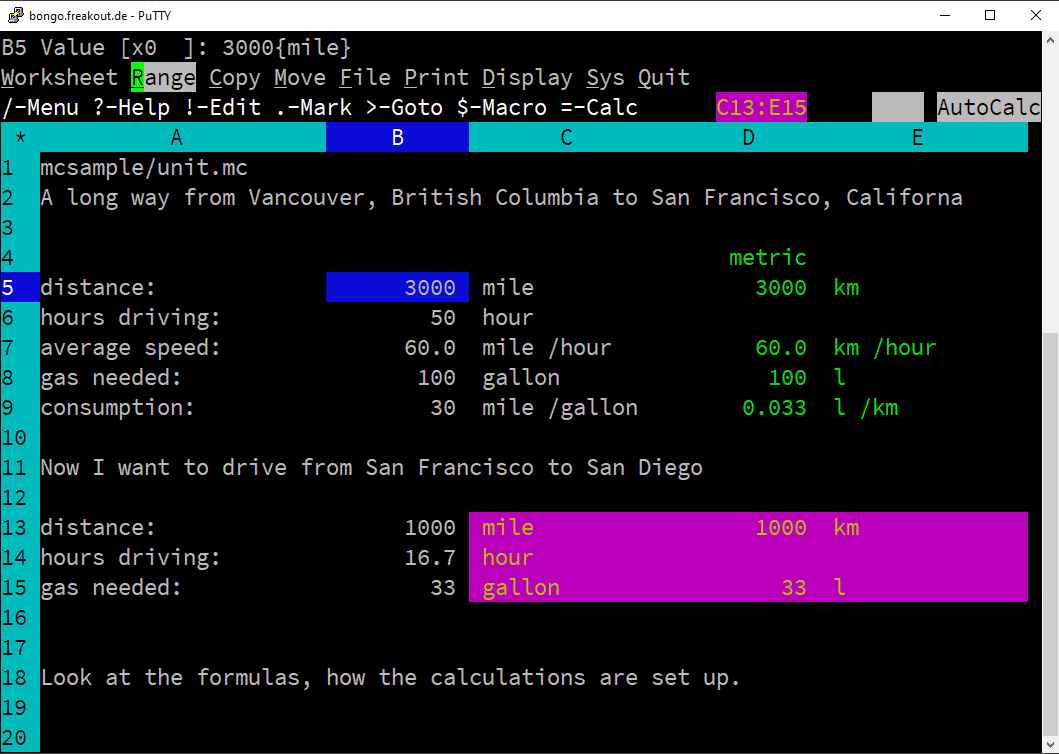
MacroCALC is the only spreadsheet that manages units: 1 mile + 1 km = 1.62 miles; 1 km / 1 hour * 30 sec = 8.33 m. This can be seen as a physical engine. It also has support of complex numbers with complex arithmetic and functions. So sqrt(-1) = i and E ^ (I * PI) + 1 = 0.
6 Install options
-
Build from source und install for one user only without sudo
Building mc needs an ANSI-C compiler with curses-lib, lex and yacc. Clone and./configurefollowed bymake. All programs are build into./dist/arxand can run without sudo-installation directly from the build-directory. To start the spreadsheet simply:dist/arx/bin/321- for a user-install you are done. -
Install systemwide
After build (1.)sudo make installinstalls in/opt/arx/. Nothing outside/opt/arx/will be touched in any way by the installation. Removing mc is simply done by a recursiverm -r /opt/arx. For convenience/opt/arx/binshould be added to the PATH in a system appropriate manner.321ormcwill then work. -
Binary with precompiled tarball
Download the released assetmc-<releasetag>-<platform>-<hardware>.tar.gzfor your platform (lw-Linux l6-Linux64 fb-FreeBSD md-MacOS) and untar to/opt/arx. Add/opt/arx/binto $PATH and you are done to use the system by321ormc. -
RPM package install
Downloadmacrocalc-<releasetag>.i386.rpmand
sudo rpm --nodigest --nofiledigest -i macrocalc-<releasetag>.i386.rpm
sudo ldconfig
After a relogin macrocalc will start by321ormc.
You need i686 glibc installed on 64bit machines:sudo yum install glibc.i686 -
Docker image
docker pull ghcr.io/freakout42/macrocalc:latest
export COLUMNS="$(tput cols)"
export LINES="$(tput lines)"
docker run -e COLUMNS -e LINES -e TERM -ti ghcr.io/freakout42/macrocalc:latest -
Windows .exe Download
https://github.com/freakout42/macrocalc/releases/download/v11.52/mc-11.52-w3-i386.exe.zip
and unzip mc.exe and mc2wks.exe - ideally into a directory on your %PATH%. Start it with any console with full pathname or double-click it with the explorer.
Getting started
Navigate through the sheet with the arrow-keys. The dot (.) marks the
beginning and end of a range, which can be copied or manipulated with the
menu by the slash (/). The apostrophe (') starts a text-cell, any other
key a number or formula. Open "mc" and type (|v| is the down-arrow-key):
. ' h e l l o |v|
you have marked A1 as range starting point and set A1 to text "hello". Lets enter some numbers and a formula:
1 |v| 2 |v| . a 2 + a 3 $ |v|
you have now A2=1 A3=2 A4=3 and A1..A4 as range. Now navigate to B1 and:
/ c |v| 3 |v| 4 |v|
you have copied the range A1..A4 to B1..B4 and set B2=3 B3=4 and B4=5. Why is B4=5 and not 3 or 7? Because you typed $ after a3 this makes it a relative cell reference [+0;-1] and refers to B3 in the copied formula.
License
Simplified BSD License
Copyright (c) 2024, Axel K. Reinhold
All rights reserved.
