
Uphold
A tool for programmatically verifying database backups
Install / Use
/learn @forward3d/UpholdREADME
Uphold
Schrödinger's Backup: "The condition of any backup is unknown until a restore is attempted"
So you're backing up your databases, but are you regularly checking that the backups are actually useable? Uphold will help you automatically test them by downloading the backup, decompressing, loading and then running programmatic tests against it that you define to make sure they really have what you need.
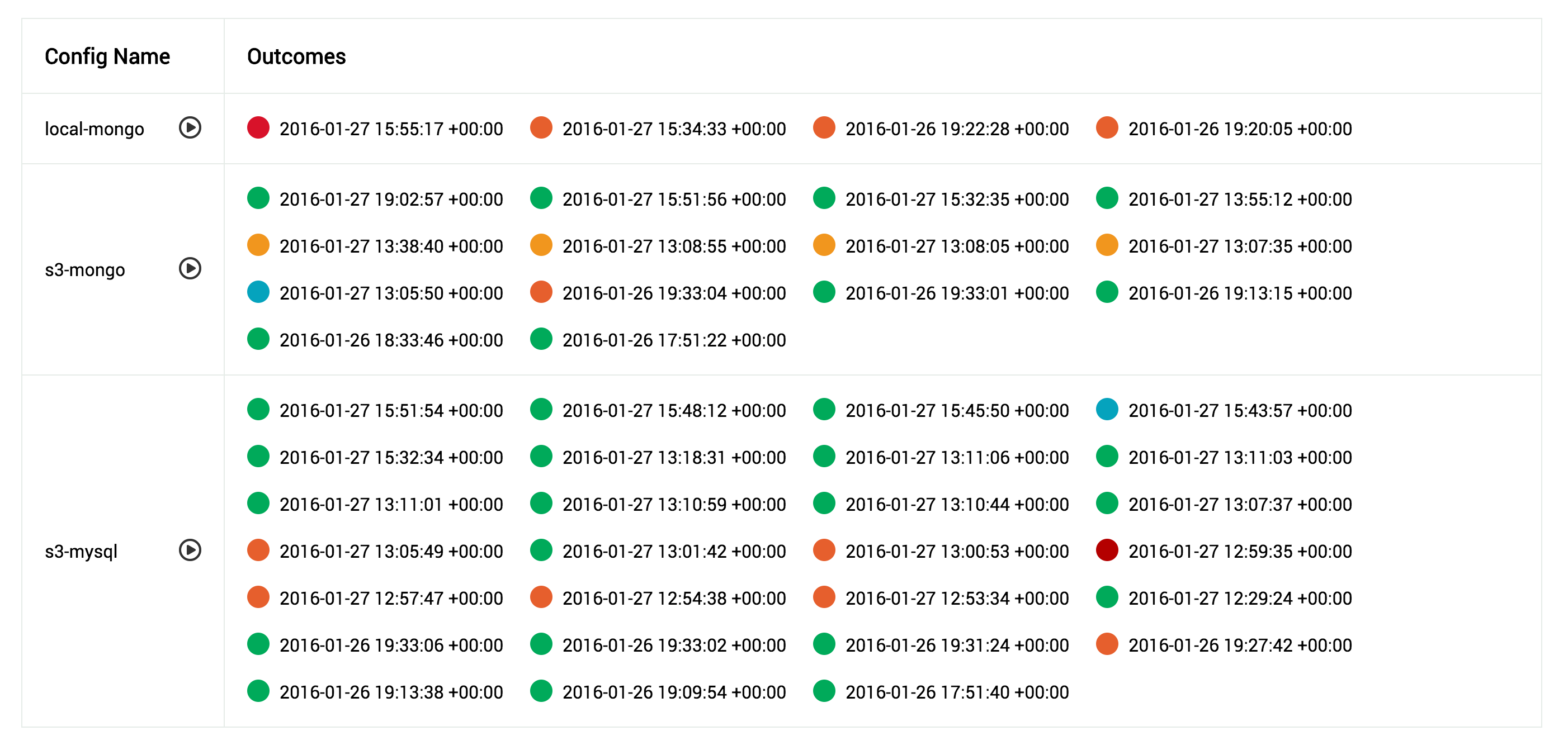
Table of Contents
- Preface
- Prerequisites
- How does it work?
- Installation
- Configuration
- Running
- Scheduling
- API
- Development
Preface
This project is very new and subsequently very beta so contributions and pulls are very much welcomed. We have a TODO file with things that we know about that would be awesome if worked on.
Prerequisites
- Backups
- Docker (>= v1.3.*) with the ability to talk to the Docker API
How does it work?
In order to make the processes are repeatable as possible all the code and databases are run inside single process Docker containers. There are currently three types of container, the ui, the tester and the database itself. Each triggers the next...
uphold-ui
 \
  -> uphold-tester
     \
      -> engine-container
This way each time the process is run, the containers are fresh and new, they hold no state. So each time the database is imported into a cold database.
The output of each process run is a log and a state file and these are stored in /var/log/uphold by default. The UI reads these files to display the state of the runs occurring, no other state is stored in the system.
/var/log/uphold
/var/log/uphold/1453489253_my_db_backup.log
/var/log/uphold/1453489253_my_db_backup_ok
This is the output of a backup run for 'my_db_backup' that was started at 1453489253 unix epoch time. The log file contains the full output of the run, and the state file is an empty file, it's name shows the status of the run...
okBackup was declared good, was transported, loaded and tested successfullyok_no_testBackup was successfully transported and loaded into the DB, but there were no tests to runbad_transportTransport failedbad_engineContainer did not open it's port in a timely mannerbad_testsAt least one of the programmatic tests failedbadAn error occurred either in transport or loading into the db engine
Logs are not automatically rotated or removed, it is left up to you to decide how long you want to keep them. Once they become compressed, they will disappear from the UI. The same goes for the exited Docker containers of 'uphold-tester', they are left on the system incase you wish to inspect them. The database containers however are wiped after they are used.
Installation
Most of the installation goes around configuring the tool, you must create the following directory structure on the machine you want to run Uphold on...
/etc/uphold/
/etc/uphold/conf.d/
/etc/uphold/engines/
/etc/uphold/transports/
/etc/uphold/tests/
/var/log/uphold
Configuration
Create a global config in /etc/uphold/uphold.yml (even if you leave it empty), the settings inside are...
log_level(default:DEBUG)- You can decrease the verbosity of the logging by changing this to
INFO, but not recommended
- You can decrease the verbosity of the logging by changing this to
config_path(default:/etc/uphold)- Generally only overridden in development on OSX when you need to mount your own src directory
docker_log_path(default:/var/log/uphold)- Generally only overridden in development on OSX when you need to mount your own src directory
docker_url(default:unix:///var/run/docker.sock)- If you connect to Docker via a TCP socket instead of a Unix one, then you would supply
tcp://example.com:5422instead (untested)
- If you connect to Docker via a TCP socket instead of a Unix one, then you would supply
docker_container(default:forward3d/uphold-tester)- If you need to customize the docker container and use a different one, you can override it here
docker_tag(default:latest)- Can override the Docker container tag if you want to run from a specific version
docker_mounts(default:none)- If your backups exist on the host machine and you want to use the
localtransport, the folders they exist in need to be mounted into the container. You can specify them here as a YAML array of directories. They will be mounted at the same location inside the container
- If your backups exist on the host machine and you want to use the
ui_datetime(default:%F %T %Z)- Overrides the strftime used by the UI to display the outcomes, useful if you want to make it smaller or add info
If you change the global config you will need to restart the UI docker container, as some settings are only read at launch time.
uphold.yml Example
log_level: DEBUG
config_path: /etc/uphold
docker_log_path: /var/log/uphold
docker_url: unix:///var/run/docker.sock
docker_container: forward3d/uphold-tester
docker_tag: latest
docker_mounts:
  - /var/my_backups
  - /var/my_other_backups
/etc/uphold/conf.d Example
Each config is in YAML format, and is constructed of a transport, an engine and tests. In your /etc/uphold/conf.d directory simply create as many YAML files as you need, one per backup. Configs in this directory are re-read, so you don't need to restart the UI container if you add new ones.
enabled: true
name: s3-mongo
engine:
  type: mongodb
  settings:
    timeout: 10
    database: your_db_name
transport:
  type: s3
  settings:
    region: us-west-2
    access_key_id: your-access-key-id
    secret_access_key: your-secret-access-key
    bucket: your-backups
    path: mongodb/systemx/{date}
    filename: mongodb.tar
    date_format: '%Y.%m.%d'
    date_offset: 0
    folder_within: mongodb/databases/MongoDB
tests:
  - test_structure.rb
  - test_data_integrity.rb
enabledtrueorfalse, allows you to disable a config if needs be
name- Just so that if it's referenced anywhere, you have a nicer name
See the sections below for how to configure Engines, Transports and Tests.
Transports
Transports are how you retrieve the backup file itself. They are also responsible for decompressing the file, the code supports nested compression (compressed files within compressed files). Currently implemented transports are...
- S3
- Local file
Custom transports can also be loaded at runtime if they are placed in /etc/uphold/transports. If you need extra rubygems installed you will need to create a new Dockerfile with the base set to uphold-tester and then override the Gemfile and re-bundle. Then adjust your uphold.yml to use your new container.
Generic Transport Parameters
Transports all inherit these generic parameters...
path- This is the path to the folder that the backup is inside, if it contains a date replace it with
{date}, eg./var/backups/2016-01-21would be/var/backups/{date}
- This is the path to the folder that the backup is inside, if it contains a date replace it with
filename- The filename of the backup file, if it contains a date replace it with
{date}, eg.mongodb-2016-01-21.tarwould bemongodb-{date}.tar
- The filename of the backup file, if it contains a date replace it with
date_format(default:%Y-%m-%d)- If your filename or path contains a date, supply it's format here
date_offset(default:0)- When using dates the code starts at
Date.todayand then subtracts this number, so for checking a backup that exists for yesterday, you would enter1
- When using dates the code starts at
folder_within- Once your backup has been decompressed it may have folders inside, if so, you need to provide where the last directory is, this generally can't be programmatically found as some database backups may contain folders in their own structure.
S3 (type: s3)
The S3 transport allows you to pull your backup files from a bucket in S3. It has it's own extra settings...
region- Provide the region that your S3 bucket resides in (eg.
us-west-2)
- Provide the region that your S3 bucket resides in (eg.
access_key_id- AWS access key that has privileges to read from the specified bucket
secret_access_key- AWS secret access key that has privileges to read from the specified bucket
Paths do not need to be complete with S3, as it provides globbing capability. So if you had a path like this...
my-service-backups/mongodb/2016.01.21.00.36.03/mongodb.tar
Theres no realistic way for us to re-create that date, so you would do this instead...
path: my-service-backups/mongodb/{date}
filename: mongodb.tar
date_format: '%Y.%m.%d'
As the path is sent to the S3 API as a prefix, it will match all folders, the code then picks the first one it matches correctly. So be aware that not b
