
Geotag2kml
Creates a Google Earth .KML file from geotagged photos/videos
Install / Use
/learn @forensenellanebbia/Geotag2kmlREADME
geotag2kml
Description
Blog post: https://forensenellanebbia.blogspot.com/2015/08/geotag2kml-python-script-to-create-kml.html
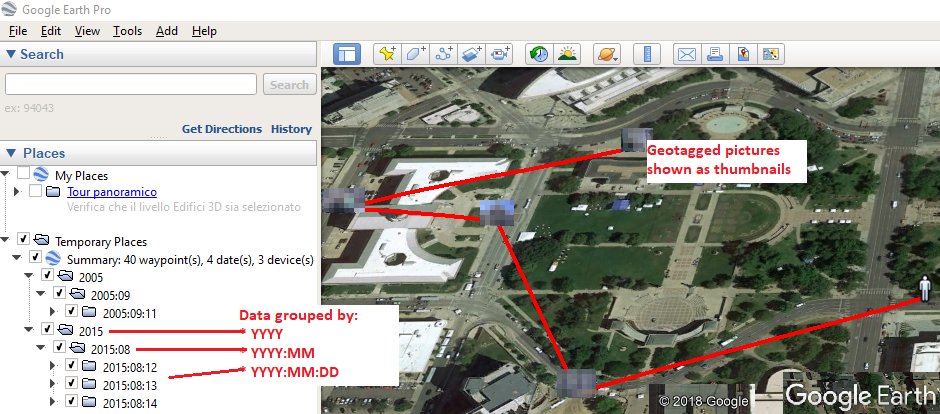
The is a cross-platform script that uses ExifTool to find geotagged files and parse their metadata. It then creates two different Google Earth .KML files to display the photos/videos found.
The .KML file will be structured this way:
- GPS points are grouped and sorted by YYYY | YYYY:MM | YYYY:MM:DD;
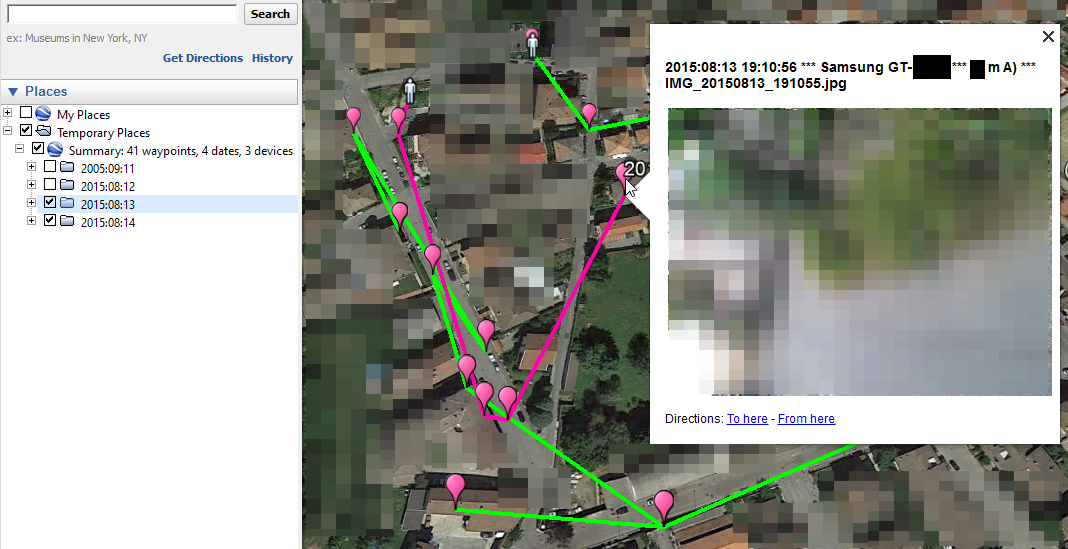
- the first GPS point of each date is indicated with an icon different from the other points of the same date;
- the GPS points occurred on the same date are connected with a colored line;
- placemark names contain: "Timestamp | Make Model | Filename";
- when clicking on a placemark icon, the picture preview appears.
Prerequisites
- Python v3.8+
- Exiftool
- ImageMagick (Win/Mac) or libheif (Ubuntu)
How to install each component
#Python3 dependencies<br>
- pip3 install geopy Pillow randomcolor
#Windows 10 x64<br>
- ExifTool: https://exiftool.org/ (rename the executable to exiftool.exe)
- ImageMagick: https://imagemagick.org/script/download.php#windows (Win64 dynamic at 16 bits-per-pixel component)
#Ubuntu (last tested with Ubuntu 22.04.1 LTS)<br>
#ExifTool
sudo apt install libimage-exiftool-perl -y

#libheif
sudo apt-get install libheif-examples

#Google Earth
wget -O ~/google-earth.deb https://dl.google.com/dl/earth/client/current/google-earth-pro-stable_current_amd64.deb && sudo dpkg -i ~/google-earth.deb
#Mac OS (tested with macOS Big Sur 11.0.1)<br>
- If you're having any issue while installing Pillow, try:
/bin/bash -c "$(curl -fsSL https://raw.githubusercontent.com/Homebrew/install/HEAD/install.sh)" && brew install libjpeg && pip3 install Pillow --user
- ExifTool: https://exiftool.org/ (MacOS Package)
- ImageMagick
brew install imagemagick
How to use the script
Run the script and type the absolute path of the directory to parse. Examples:
- Microsoft Windows: python3 geotag2kml.py C:\MyPhotos
- Ubuntu: python3 geotag2kml.py /home/username/Desktop/Photos
The output files will be saved under the given path.
Related Skills
claude-opus-4-5-migration
83.9kMigrate prompts and code from Claude Sonnet 4.0, Sonnet 4.5, or Opus 4.1 to Opus 4.5
docs-writer
99.3k`docs-writer` skill instructions As an expert technical writer and editor for the Gemini CLI project, you produce accurate, clear, and consistent documentation. When asked to write, edit, or revie
model-usage
339.3kUse CodexBar CLI local cost usage to summarize per-model usage for Codex or Claude, including the current (most recent) model or a full model breakdown. Trigger when asked for model-level usage/cost data from codexbar, or when you need a scriptable per-model summary from codexbar cost JSON.
TrendRadar
49.9k⭐AI-driven public opinion & trend monitor with multi-platform aggregation, RSS, and smart alerts.🎯 告别信息过载,你的 AI 舆情监控助手与热点筛选工具!聚合多平台热点 + RSS 订阅,支持关键词精准筛选。AI 智能筛选新闻 + AI 翻译 + AI 分析简报直推手机,也支持接入 MCP 架构,赋能 AI 自然语言对话分析、情感洞察与趋势预测等。支持 Docker ,数据本地/云端自持。集成微信/飞书/钉钉/Telegram/邮件/ntfy/bark/slack 等渠道智能推送。
