
Icalender
:cn: 一个可以标记日期范围的vue日历插件
Install / Use
/learn @flitrue/IcalenderREADME
icalender
一个可以标记日期范围的vue日历插件
预览
| 预览图 | 说明 |
|:--|:--|
| 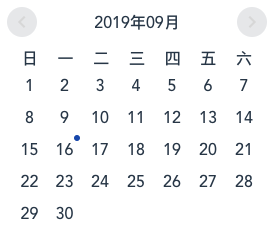 | 没有标记:
marks = [] |
|  | 标记一个日期:
marks = [{start: "2019-09-10", end: "2019-09-10"}] |
| 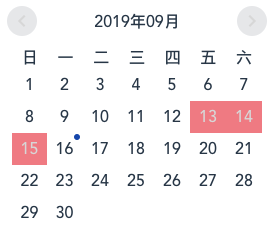 | 标记一个日期范围:
 marks = [{start: "2019-09-13", end: "2019-09-15"}] |
| 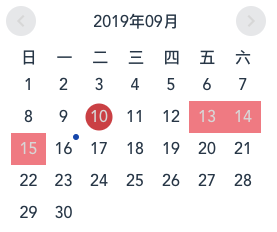 | 混合标记:
marks = [{start: "2019-09-10", end: "2019-09-10"}, {start: "2019-09-13", end: "2019-09-15"}] |
| 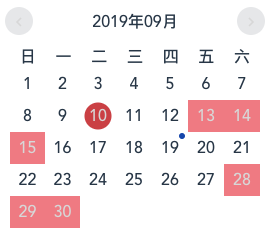
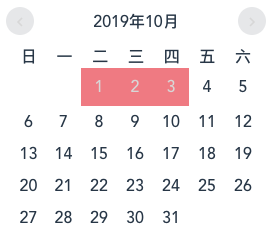 | 跨月标记 :
marks = [{start: "2019-09-10", end: "2019-09-10"}, {start: "2019-09-13", end: "2019-09-15"}, {start: "2019-09-28", end: "2019-10-03"}] |
使用
npm install icalender --save
全局注册组件
import icalender from 'icalender';

Vue.use(icalender);
组件内使用
CommonJS
var icalender = require('icalender');

new Vue({
    components: { icalender },
    data: function () {
        return {
            marks: [
                {
                    start: "2019-09-10",
                    end: "2019-09-10"
                },
                {
                    start: "2019-09-13",
                    end: "2019-09-15"
                },
                {
                    start: "2019-09-28",
                    end: "2019-10-03"
                }
            ]
        };
    },
    template: '<icalender :marks="marks" />'
});
ES6
import icalender from 'icalender';

new Vue({
    components: { icalender },
    data: function () {
        return {
            marks: [
                {
                    start: "2019-09-10",
                    end: "2019-09-10"
                },
                {
                    start: "2019-09-13",
                    end: "2019-09-15"
                },
                {
                    start: "2019-09-28",
                    end: "2019-10-03"
                }
            ]
        };
    },
    template: '<icalender :marks="marks" />'
});
API
Props
| 属性 | 说明 | 类型 | 默认值 |
|:--|:--|:--|:--|
| marks | 可选,标记日期范围的数组,数组成员里必须包含start和end两个对象属性,例如 [{start: "2019-09-13, end: "2019-09-15"}] | Array | [] |
Events
| 事件名 | 说明 | 返回值 | |:--|:--|:--| | on-click | 点击日期时触发 | 返回当前日期的属性 | | forward | 点击向前翻动日历触发 | 返回当前年份和月份 | | back | 点击向后翻动日历触发 | 返回当前年份和月份 |
License
Related Skills
node-connect
345.9kDiagnose OpenClaw node connection and pairing failures for Android, iOS, and macOS companion apps
frontend-design
106.4kCreate distinctive, production-grade frontend interfaces with high design quality. Use this skill when the user asks to build web components, pages, or applications. Generates creative, polished code that avoids generic AI aesthetics.
openai-whisper-api
345.9kTranscribe audio via OpenAI Audio Transcriptions API (Whisper).
qqbot-media
345.9kQQBot 富媒体收发能力。使用 <qqmedia> 标签,系统根据文件扩展名自动识别类型(图片/语音/视频/文件)。
