
WatchOSDeviceSupport
Xcode watchOS DeviceSupport files (2.0 - 9.6)
Install / Use
/learn @filsv/WatchOSDeviceSupportREADME
watchOSDeviceSupport
Xcode watchOS DeviceSupport files (2.0 - 9.6) [iOS | tvOS];
Most recent:</br>
watchOS 9.4, 9.5, 9.6 - Download </br> watchOS 9.1 - Download </br> watchOS 9.0 - Download </br>
watchOS 8+</br>
watchOS 8.7 - Download </br> watchOS 8.5 - Download </br> watchOS 8.3 - Download </br> watchOS 8.0 - Download </br>
watchOS 7+</br>
watchOS 7.4 - Download </br> watchOS 7.3 - Download </br> watchOS 7.2 - Download </br> watchOS 7.1 - Download </br> watchOS 7.0 - Download </br> watchOS 6.2 - Download </br> watchOS 6.1 - Download </br> watchOS 6.0 - Download
Device Support files for Xcode, from watchOS 2.0, up to watchOS 9.6.
How to:
Download version you need listed above; Unzip it; Close Xcode; Copy and paste unziped folder by path: "/Applications/Xcode.app/Contents/Developer/Platforms/WatchOS.platform/DeviceSupport/"
<p align="center">hierarchy like this:</p>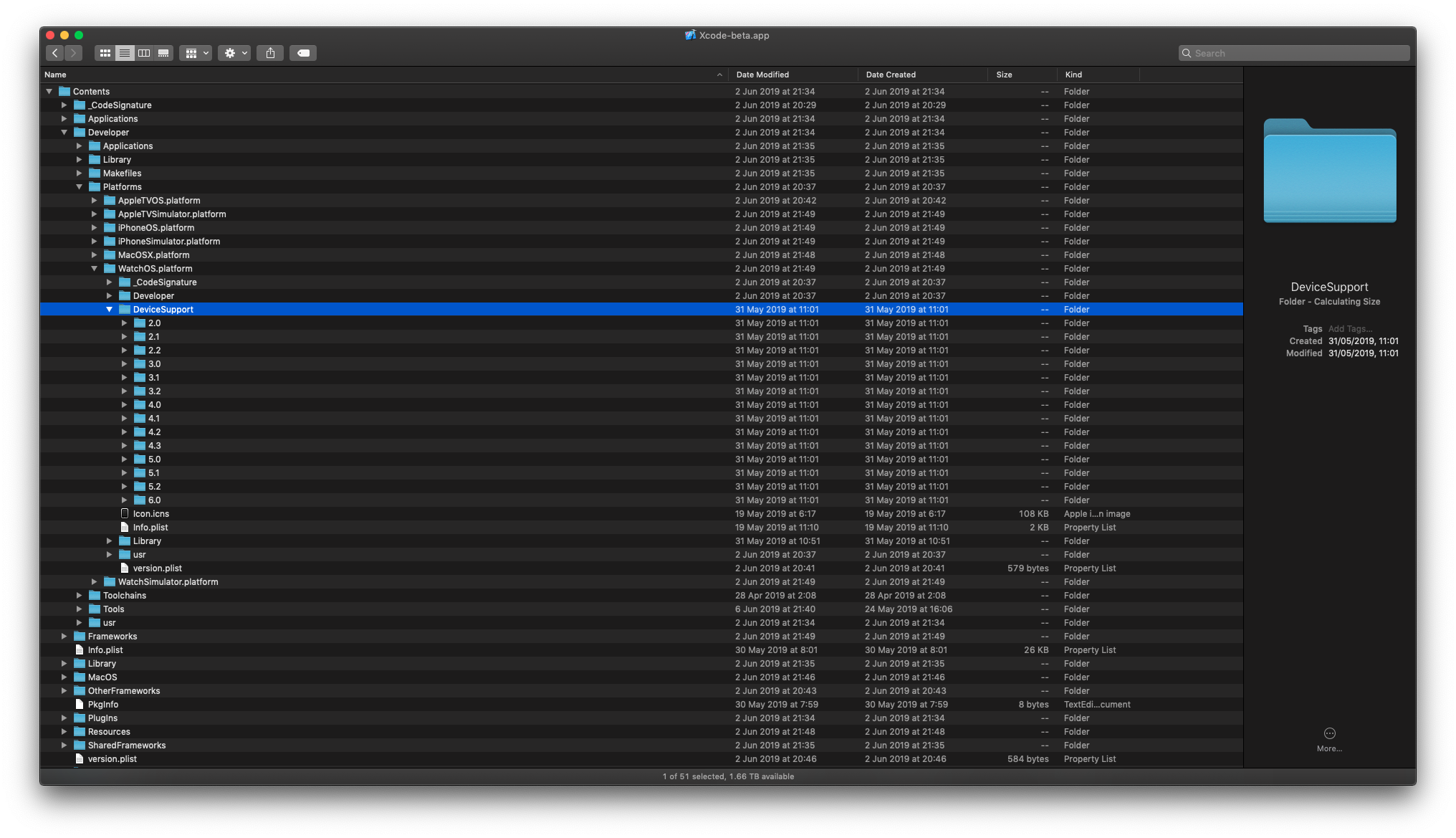
Reopen Xcode; Thank You.
⚠️ Issues & How to fix them:</br>
If you getting alert about downloading support files for WatchOS and after it's downloaded you getting error similar to this: "This scheme builds an embedded Apple Watch app. watchOS 9.1 must be installed in order to run the scheme.": Simply open "Xcode -> Settings... -> Platforms" (and delete here duplicates that marked with red);
Should look like this after clearnup:</br>

Related Skills
openhue
349.0kControl Philips Hue lights and scenes via the OpenHue CLI.
sag
349.0kElevenLabs text-to-speech with mac-style say UX.
weather
349.0kGet current weather and forecasts via wttr.in or Open-Meteo
tweakcc
1.6kCustomize Claude Code's system prompts, create custom toolsets, input pattern highlighters, themes/thinking verbs/spinners, customize input box & user message styling, support AGENTS.md, unlock private/unreleased features, and much more. Supports both native/npm installs on all platforms.

Security Score
Audited on Dec 1, 2025