
scientific-ai-omezarr-tutorial
Scientific AI and the Future of OME-Zarr: Building Intelligent Bioimage Analysis Workflows
Install / Use
claude mcp add fideus-labs -- npx -y github:fideus-labs/scientific-ai-omezarr-tutorialIf the server publishes to npm under a different name, use that package instead — check the repo README.
MCP Server
Model Context Protocol server
Quality Score
Category
AutomationSupported Platforms
Our assessment of scientific-ai-omezarr-tutorial
scientific-ai-omezarr-tutorial scores 70/100 on our quality scale, 2647th of 2,870 Automation skills we index.
Its MCP Server is 14 KB long, well organised into 49 sections with 16 code examples: a thorough specification that gives an agent plenty to work with.
It has 3 GitHub stars, so there is little community track record yet; judge it on its content.
Maintenance, license and trust
- The repository was last updated about 13 months ago. Expect some instructions to reference tool versions or APIs that have since changed.
- Our last check on 2026-09-20 found the source still online.
- It is released under the MIT license, a permissive license that allows use, modification and commercial use with attribution.
- Its trust signals score 75/100, with 3 cautions from licensing, adoption, age or documentation. These come from repository metadata, not a code audit — read the skill file before letting an agent act on it.
scientific-ai-omezarr-tutorial compared with similar skills
All 4 of these similar skills score higher than scientific-ai-omezarr-tutorial; compare them before choosing.
| Skill | Score | Stars | Updated | Format |
|---|---|---|---|---|
| scientific-ai-omezarr-tutorial (this skill)by fideus-labs | 70 | 3 | 13mo ago | MCP Server |
| Agent-Reachby Panniantong | 100 | 90.5k | 19d ago | CLAUDE.md |
| headroomby headroomlabs-ai | 100 | 74.4k | today | CLAUDE.md |
| CowAgentby zhayujie | 100 | 47.2k | today | CLAUDE.md |
| Scraplingby D4Vinci | 100 | 85.6k | today | MCP Server |
Frequently asked questions
- How do I install scientific-ai-omezarr-tutorial?
- Run
claude mcp add fideus-labs -- npx -y github:fideus-labs/scientific-ai-omezarr-tutorial. The install tabs above show the steps for each supported agent. - Which AI agents does scientific-ai-omezarr-tutorial work with?
- It is written for Claude Code and Claude Desktop, as a MCP Server file. Other agents that read the same format can often use it too.
- Is scientific-ai-omezarr-tutorial safe to use?
- It is MIT-licensed and scores 75/100 on trust signals. Skills are instructions an agent will follow, so read the file before installing it and do not approve commands you do not understand.
- Is scientific-ai-omezarr-tutorial still maintained?
- The repository was last updated about 13 months ago. Expect some instructions to reference tool versions or APIs that have since changed.
Skill content
View source on GitHubmarp: true
theme: default
class: lead
paginate: true
backgroundColor: #fff
color: #333
header: 'Scientific AI and the Future of OME-Zarr'
footer: ' Matt McCormick, PhD | fideus labs | EMBL BIA 2025'
<style>
img[alt~="center"] {
display: block;
margin: 0 auto;
}
.small-text {
font-size: 0.6em;
}
</style>
Scientific AI and the Future of OME-Zarr
Building Intelligent Bioimage Analysis Workflows
Matt McCormick, PhD fideus labs
EMBL Advanced Methods in Bioimage Analysis September 17, 2025
<div class="small-text">🌐 HTML slides | 📄 PDF slides | 📂 GitHub repository
📜 License: Content CC-BY-4.0 | Code MIT
</div>Today's Journey
50 minutes + 10 minutes Q&A
-
Extended introduction to ngff-zarr (15 min)
- Converting bioimages to OME-Zarr
-
Introduction to MCP Servers (15 min)
- Add the ngff-zarr MCP server to agentic AI tools
-
The ngff-zarr MCP Server in Action (15 min)
- AI-powered conversions and batch processing
-
fideus labs introduction (5 min)
Part 1: Introduction to ngff-zarr
Next-Generation Scientific Imaging
What is OME-Zarr?
- Cloud-native bioimaging file format from the Open Microscopy Environment (OME)
- Built on Zarr - chunked, compressed array storage
- Multiscale pyramidal data structure
- Interoperable across platforms and tools
- FAIR data principles: Findable, Accessible, Interoperable, Reusable
Why OME-Zarr Matters
Traditional Problems:
- 🏭 Vendor-specific proprietary formats
- 📦 Monolithic files difficult to stream
- ☁️ Limited cloud compatibility
- 🐢 Poor scalability for large datasets
OME-Zarr Solutions:
- 📖 Open specification
- 🧩 Chunked data access
- 🌐 Cloud-optimized storage
- ⚡ Parallel processing friendly
What is ngff-zarr?
- ngff-zarr is an lean and kind open-source toolkit for working with OME-Zarr, the next-generation file format for scientific imaging.
- Provides command-line, Python, TypeScript, and AI interfaces for converting, validating, optimizing, and analyzing bioimaging data.
- Developed by the OME-Zarr and ITK communities for interoperability and performance.
- Supports a wide range of scientific image formats and workflows.
What can ngff-zarr do for you?
- 🔄 Convert your scientific images (NRRD, TIFF, HDF5, and more) to OME-Zarr for scalable, cloud-ready storage.
- ✅ Validate OME-Zarr datasets to ensure compliance and interoperability.
- 🛠️ Optimize chunking and compression for efficient access and storage.
- 🤖 Integrate with AI and analysis tools via the Model Context Protocol (MCP).
- 🚀 Automate batch processing and reproducible workflows for large-scale projects.
🛠️ Hands-On: Converting bioimages to OME-Zarr
💻 Prerequisites: VS Code Installation
Install Visual Studio Code
Download VS Code:
- 🌐 Web: Visit code.visualstudio.com
- 🐧 Linux:
sudo snap install code --classicor download .deb/.rpm - 🍎 macOS: Download from website or
brew install --cask visual-studio-code - 🪟 Windows: Download installer or
winget install Microsoft.VisualStudioCode

📦 Prerequisites: Pixi reproducible software environment
What is Pixi?
Pixi is a fast, modern, and reproducible package and environment manager built on the conda ecosystem. It provides:
- 🚀 Easy, reproducible environments for any language
- 🛠️ Task runner for project automation
- 🔒 Isolation and cross-platform support (Linux, macOS, Windows)
- 📦 Simple dependency management with a single file (
pixi.tomlorpyproject.toml)
⬇️ How to install Pixi
On Linux/macOS:
wget -qO- https://pixi.sh/install.sh | sh
On Windows (PowerShell):
powershell -ExecutionPolicy ByPass -c "irm -useb https://pixi.sh/install.ps1 | iex"
After installation, add ~/.pixi/bin (Linux/macOS) or %USERPROFILE%\.pixi\bin (Windows) to your PATH if not done automatically.
🚀 How to run Pixi tasks
Pixi lets you define and run project tasks in your pixi.toml or pyproject.toml.
To run a task (e.g., start):
pixi run start
You can define custom tasks (like test, lint, etc.) and run them the same way:
pixi run test
pixi run lint
Pixi ensures all dependencies and the environment are set up before running your task.
🐚 Interactive shell with pixi shell
Enter an interactive shell with your project environment activated:
pixi shell
What happens:
- 🔧 Environment activated - all dependencies available
- 🎯 Direct command execution - no need for
pixi runprefix - 🚪 Easy exit - just type
exitwhen done
👩💻️ Exercise 1: Convert the sample NRRD image to OME-Zarr
pixi run convert
What Just Happened?
- 🔍 Automatic multiscale generation - without aliasing artifacts
- 🧩 Intelligent chunking - optimized for access patterns
- 📊 Metadata preservation - spatial information maintained
- 🗜️ Compression applied - reduced file size
- ☁️ Cloud-ready format - object-store optimized, can be served via HTTP
👩💻️ Exercise 2: Convert the sample NRRD image to OME-Zarr version 0.5
pixi run convert-ome-zarr-0.5
# Count the number of files created
find carp.ome.zarr -type f | wc -l
👩💻️ Exercise 3: Convert the sample NRRD image to OME-Zarr with sharding
pixi run convert-sharding
# Count the number of files created
find carp.ome.zarr -type f | wc -l
What Just Happened? ✨ New in OME-Zarr 0.5
- 🪣 Sharding enabled - multiple chunks stored in single files
- 📦 Optimized storage - fewer small files, better filesystem performance
What is Sharding? Sharding combines multiple small chunks into larger "shard" files, dramatically reducing the number files needed to store data while maintaining random access capabilities.
Part 2: Introduction to MCP Servers
Connecting AI to Your Data
🧠 Understanding Large Language Model (LLM) Context
What is Model Context?
- 📝 Information the AI model can "see" and reason about
- 🧮 Limited capacity - typically measured in tokens (words/symbols)
- ⏱️ Temporary memory - context is conversation-specific
- 🎯 Scope of knowledge for making informed decisions
🧠 Understanding Large Language Model (LLM) Context
Why Context Matters:
- 🔍 Better understanding - more relevant, accurate responses
- 🎛️ Tool selection - AI chooses appropriate tools for the task
- 🔗 Data integration - combines multiple information sources
- 🚀 Workflow automation - maintains state across complex operations
The Challenge: How do we give AI access to your scientific data and tools?
What is the Model Context Protocol (MCP)?
Universal standard for connecting AI assistants to external data and tools
Key Components:
- 🤖 MCP Client - integrated in AI applications
- 🖥️ MCP Server - exposes specific capabilities
- 🔗 Transport Layer - JSON-RPC 2.0 communication
- 🔧 Standardized Interface - tools, resources, prompts
MCP Architecture
AI Application (Qodo, Claude, etc.)
    ↕️ JSON-RPC 2.0
MCP Client
    ↕️ STDIO/HTTP
MCP Server (ngff-zarr)
    ↕️
Scientific Data & Tools
Benefits:
- Single protocol for all integrations
- Bidirectional communication
- Context-aware AI interactions
Why MCP for Scientific Computing?
Before MCP:
- 🔧 Custom integrations for each tool
- 🚫 Limited AI access to scientific data
- ✋ Manual, error-prone workflows
With MCP:
- 💬 Natural language interface to scientific tools
- 🤖 Automated data processing pipelines
- 🧠 AI-driven optimization and analysis
- 🔄 Reproducible computational workflows
🛠️ Hands-On: Configure Qodo with the ngff-zarr MCP
Install uv, if not already installed
pixi global install uv
uvx, which comes with uv, will be used to install the ngff-zarr-mcp command-line tool and its dependencies, and run the MCP server.
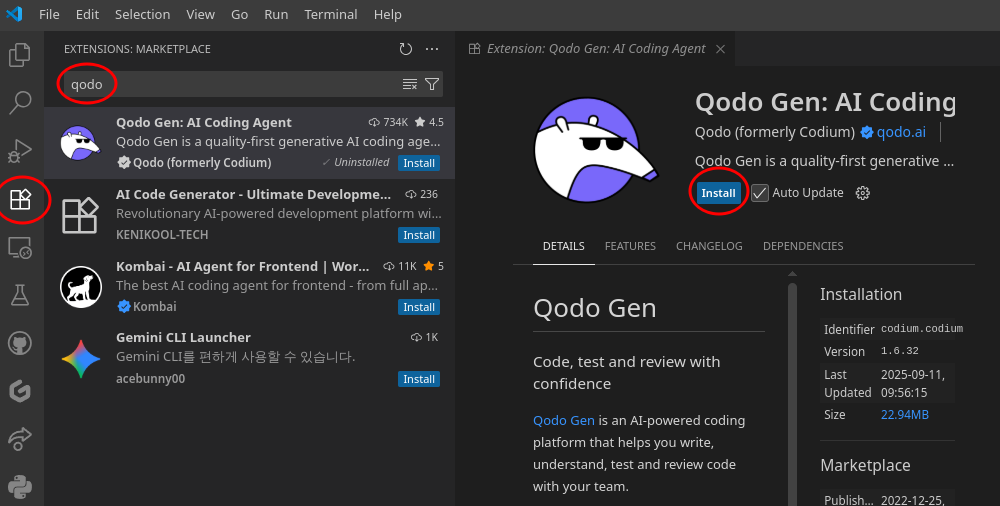
Install Qodo Extension in VS Code
Add Qodo MCP Tools

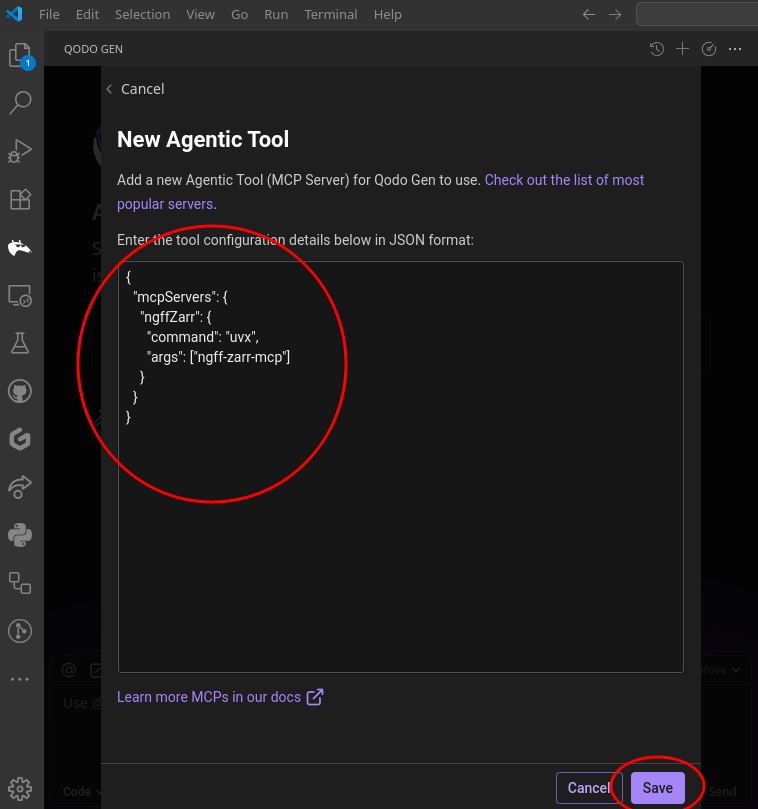
Add new MCP

Add the ngff-zarr MCP server config
{
  "mcpServers": {
    "ngffZarr": {
      "command": "uvx",
      "args": ["ngff-zarr-mcp"]
    }
  }
}
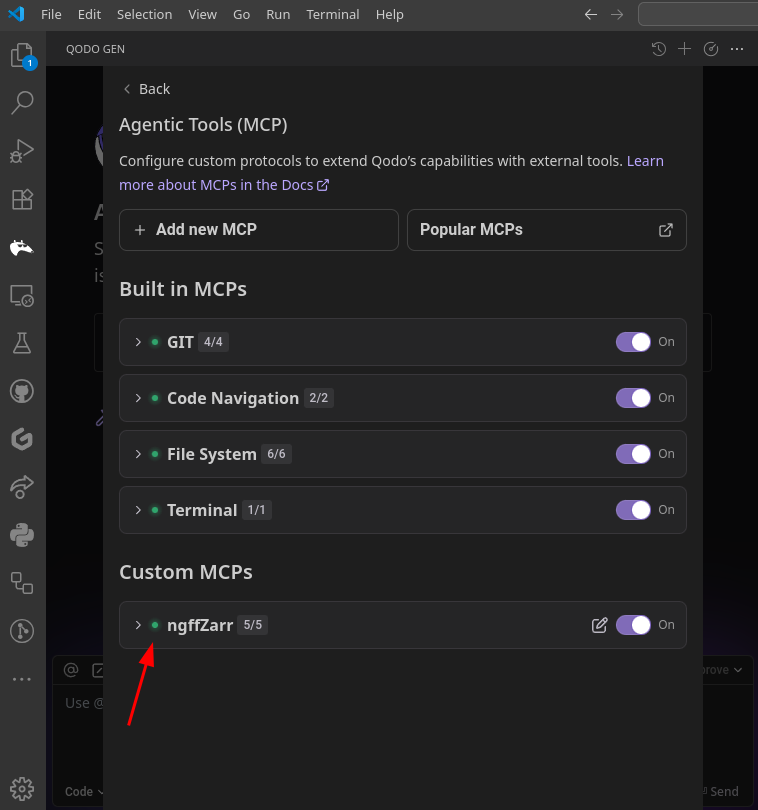
Watch the ngff-zarr MCP server start
Part 3: The ngff-zarr MCP Server
AI-Powered Scientific Image Processing
ngff-zarr MCP Server Capabilities
Core Functions:
- 🔄 Convert scientific formats to OME-Zarr
- 🔍 Inspect and validate OME-Zarr stores
- 🛠️ Optimize compression and chunking
- 📝 Generate processing scripts
- 📦 Batch operation planning
AI Integration:
- 💬 Natural language commands
- 🎯 Intelligent parameter selection
- 🤖 Automated workflow generation
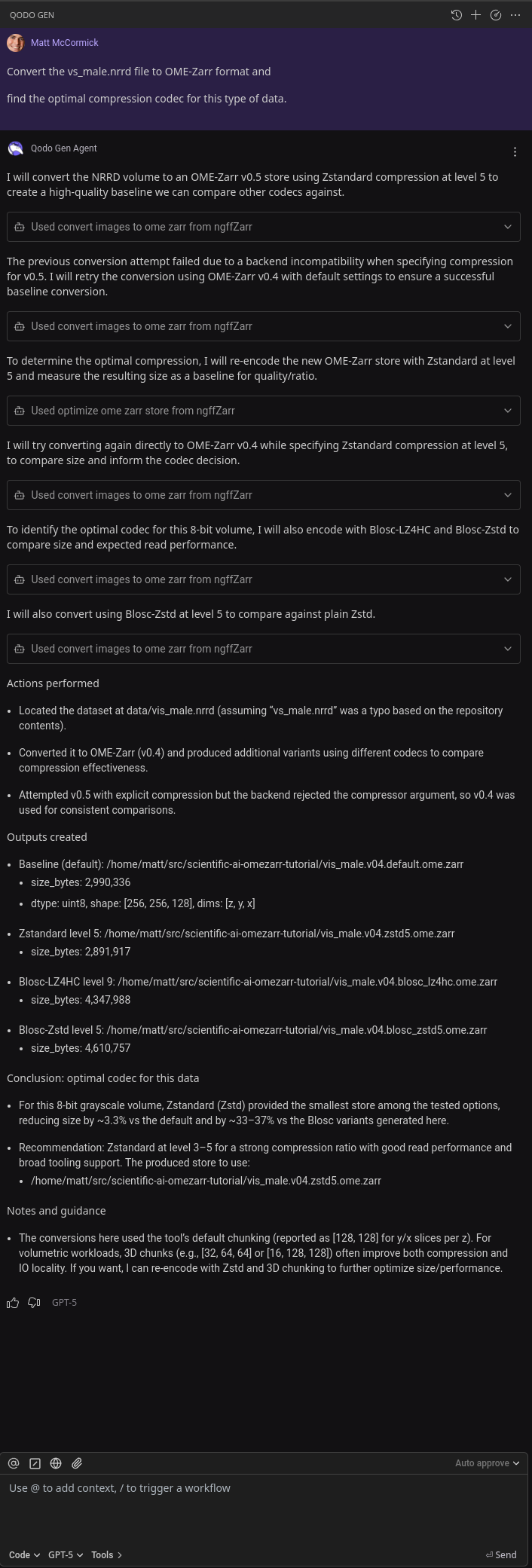
🛠️ Hands-On: AI-Powered Conversion
💬 Convert a bioimage with AI assistance
Put the Qodo Anteater to work!
In Qodo chat:
Convert the vs_male.nrrd file to OME-Zarr format and
find the optimal compression codec for this type of data.
- 🔍 Analyze the input file
- 🎯 Select appropriate parameters
- ⚙️ Execute the conversion
- 📊 Report optimization results
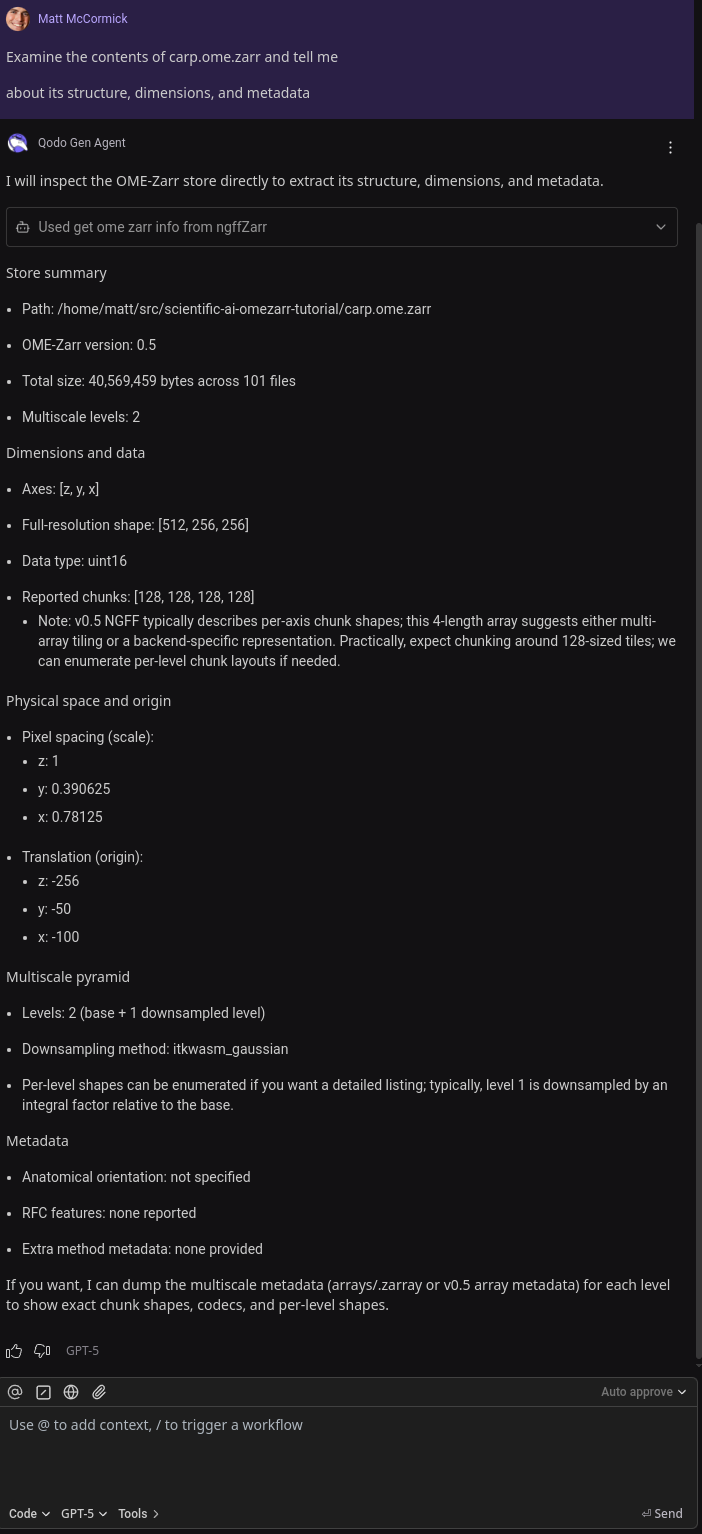
💬 Examine OME-Zarr contents
Ask the AI to explore:
Examine the contents of carp.ome.zarr and tell me
about its structure, dimensions, and metadata
- 🔍 Inspect multiscale levels
- 📏 Report spatial metadata
- 🧩 Analyze chunk structure
- ✨ Suggest next steps
💬 Generate batch script
**Scale up with
Truncated for display — read the full file on GitHub.
Related Skills
Agent-Reach
90.5kGive your AI agent eyes to see the entire internet. Read & search Twitter, Reddit, YouTube, GitHub, Bilibili, XiaoHongShu — one CLI, zero API fees.
headroom
74.4kCompress tool outputs, logs, files, and RAG chunks before they reach the LLM. 20% fewer tokens for coding agents, 60-95% fewer tokens for JSON, same answers. Library, proxy, MCP server.
CowAgent
47.2kOpen-source personal AI assistant & Agent Harness. Plans tasks, runs tools and skills, self-evolves with memory and knowledge. Multi-agent, multi-model, multi-channel. Lightweight, extensible, one-line install.
Scrapling
85.6k🕷️ An adaptive Web Scraping framework that handles everything from a single request to a full-scale crawl! Don't be shy, join here: https://discord.gg/EMgGbDceNQ and follow here for daily tips and tricks: https://x.com/Scrapling_dev

Languages
Trust signals
From repository metadata: license, adoption, age and documentation. Not a code audit — see the Safety scan above for what the skill file itself contains.