
MoveToBeActive
An open source Garmin Watch Face inspired by the design of the Vivomove series, but adding extra data points that are useful for daily usage (like health, weather and communication) on newer Garmin Smartwatches.
Install / Use
/learn @fevieira27/MoveToBeActiveREADME






MoveToBeActive Watch Faces for Garmin
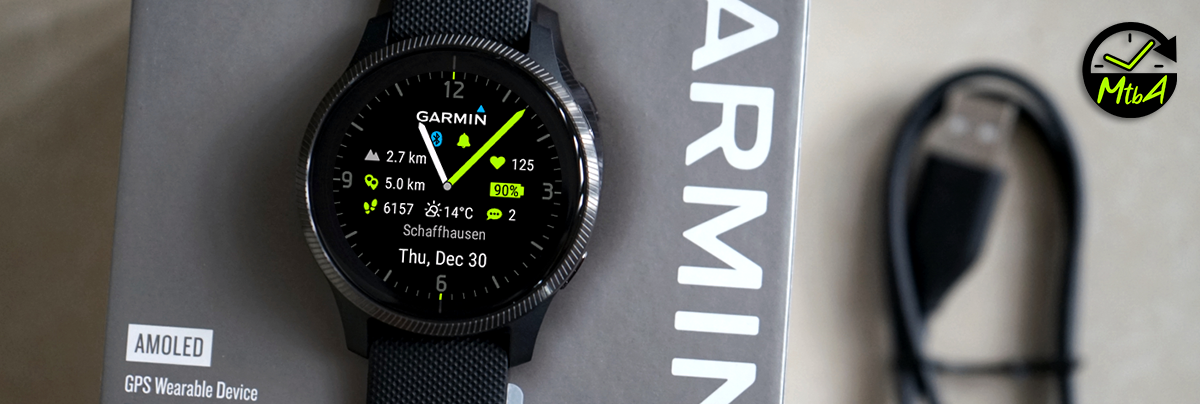
Garmin Watch Face that was inspired by the design of the Vivomove series, adding extra features that will be very useful for my daily type of usage (more health related than activity tracking) and focusing on maximizing battery life.
<img src="https://github.com/fevieira27/MoveToBeActive/blob/main/GitHub/Vivomove.jpg?raw=true" height="270"> <img src="https://github.com/fevieira27/MoveToBeActive/blob/main/GitHub/Arrow.png?raw=true" height="270"> <img src="https://raw.githubusercontent.com/fevieira27/MoveToBeActive/main/GitHub/Home-MtbA%20v6.png" height="270">
<!-- [<img src="https://raw.githubusercontent.com/wwarby/walker/master/supporting-files/available-connect-iq-badge.svg" width="350" href="https://apps.garmin.com/en-US/developer/f959cfb4-acb7-4db5-8dfd-92749316d762/apps">](https://apps.garmin.com/en-US/developer/f959cfb4-acb7-4db5-8dfd-92749316d762/apps) -->Feature listing:
- Analog hands for Hour and Minutes, but not for Seconds to mimic Vivomove HR (and save battery). Design menu has a toggle for thinner, standard or thicker hands (around 20-30% difference between each);
- Current Date with day of the week and Month;
- Garmin Logo that can be hidden on the watch face's config menu;
- Battery indicator with symbol changing colors depending on battery left: Red (less than or equal to 20%), Yellow (between 21 and 40%) and Green (greater than 40%). The text can be displayed as remaining % or estimated number of days until running out;
- Bluetooth indicator: Blue (connected to the phone) or grey (not connected);
- Alarm indicator: Accent color (at least one alarm active) or grey (no alarms);
- Do not Disturb indicator (only shown when mode is activate, also activated during sleep hours);
- Location name of the source of weather data (if available), that can be hidden on the watch face's config menu;
- Current weather condition icon;
- Temperature indicator (if available) in Celsius or Fahrenheit (also dependent on watch's selected units display). The temperature number will become blue when that is the minimum temperature for the day, as well as orange when that is the maximum;
- Colored Tickmarks following selected accent color. Can be turned on and off (showing gray tickmarks);
- Colored AOD Mode: gives the user the option of seeing the AOD mode hands and tickmarks in grayscale or full color (thanks filmo003 for the code);
Available Data Fields:
- Notifications count: Accent color if at least one notification is available or grey if no unread notifications;
- Heart Rate data, showing last available value (not updated every second when not doing an activity, to save battery) and a symbol that is presented with colors from 7 different rate zones, set up by the user on the watch main settings (Settings - User Profile - Heart Rate - Zones - Based On). Color palette for each zone: Resting / Light Load = grey, Moderate Effort = blue, Weight Control = green, Aerobic = yellow, Anaerobic = orange, High effort = light red and Speed = bright red;
- Calories burned;
- Steps: Shows the number of steps on the current day and icon color will also change to the selected Accent when steps goal has been met;
- Blood oxygen percentage: will display the current pulse ox if the sensor is active all the time. However, if sensor is activated only while sleeping or on ad-hoc measurements, data point will show last available value. Color palette doesn't follow accent color and is based on 5 zones: Healthy = green, Normal = blue, Low = yellow, Brain Dysfunction = orange, Cyanosis = red;
- Floors climbed count: Icon will be displayed in grey until floors climbed goal has been met, changing to the Accent color of choice;
- Precipitation percentage: The current chance of rain/snow precipitation (0-100%), with blue tones color palette based on 4 zones: Low = light blue, Moderate = blue, High = dark blue, Very High = purple;
- Humidity percentage: The current relative humidity (0-100%), with color palette based on 3 levels: Healthy = green, Fair = yellow, Poor = red;
- Atmospheric Pressure: The current barometer read in hPa/millibars or calibrated mean at sea-level, with color palette based on 3 levels: High-pressure = blue, Normal = Gray, Low-pressure = orange;
- Solar intensity percentage: Describes the solar sensor's charge efficiency, only available on Solar Charged watches. It will change colors based on 5 different UV intensity zones: Low = green, Moderate = yellow, High = orange, Very High = red, Extreme = violet;
- Intensity Minutes per week: The current number of intensity minutes (moderate + 2x vigorous) during the current week. Symbol will turn from grey to the accent color as soon as the weekly intensity minutes goal is reached;
- Seconds: Available as a data field, will display seconds count of the current time;
- VO2 Max from Running or Cycling (available and 2 separate data fields);
- Body Battery;
- Stress Level;
- Respiration Rate;
- Recovery Time in hours;
- Min/Max Temperature forecasted for the day (only available on the left top and middle data points);
- Wind speed: Current wind speed in km/h or mph (depending on watch's pace unit settings), or m/s if selected on the watch face's settings (only available on the left top and middle data points);
- Elevation (altitude above mean sea level in meters): Derived from the most accurate source (Barometer or GPS) in order of descending accuracy. If no GPS is present, then barometer readings will be used (only available on the left top and middle data points);
- Distance walked/ran on the day (km or miles, dependent on watch's selected unit on general config): Icon will be displayed in grey until steps goal has been met, changing to the Accent color of choice (only available on the left top and middle data points);
- Battery Consumption per day since last charge, displayed in average%/day. For this to work, you need to be using the MoveToBeActive watch face when charging your watch, or else the displayed consumption percentage might be incorrect (with impossible figures) or not shown.
- Weather Forecast that shows either next 2 or 3 hours of weather condition, depending on the location selected by the user. The top left and middle left locations allow 3h, while all the others can only fit 2 hours.
Support this project:
Release notes:
0.1.0 (22/Feb/21)
- [X] Initial public release
0.2.0 (23/Feb/21)
- [X] Added temperature, weather condition and city name, as well as anti-alias for hour and minute hands
0.3.0 (24/Feb/21)
- [X] Correct bug with battery % on Venu and D2 Air devices (font size issue due to bigger resolution)
0.3.5 (25/Feb/21)
- [X] Improve alignment of battery % text and several other icons and texts for different watch sizes and resolutions
0.4.0 (26/Fev/21)
- [X] Add the blood oxygen percentage (on supported watches only) when that is activated (usually during the night), temporarily replacing the floor climb count. When pulse ox is disabled, the floor count will show up again. Useful for people that are using pulse ox 24/7 or for those who wake up during the night (mainly those with sleep apnea) and want to check their current blood oxygen percentage
0.4.5 (04/Mar/21)
- [X] Corrected a bug on the battery icon color and added fixed heart rate zones, in case the user didn't set them up on the watch settings (Settings - User Profile - Heart Rate - Zones - Based On)
0.4.7 (05/Mar/21)
- [X] When the location name has more than 15 digits in length, the country is now being omitted. In case the final string is still bigger than 21 digits, it is being truncated (just in case)
- [X] The floors climbed icon will now turn green when the goal has been reached on that day
- [X] The steps icon will now turn green when the goal has been reached on that day
- [X] The notification icon will be grey when there is no notification and green when at least one notification is available
- [X] Testing a new tone of green, as it was becoming yellow when the backlight was on (transreflective displays only, AMOLED displays will keep the old green tone)
0.5.0 (07/Mar/21)
- [X] Corrected inconsistencies with the length and width of the minute and hour hands across different resolutions
- [X] Redesigned hour and minute hands to have even better anti-aliasing
- [X] Added a menu on the watch face settings ("pencil" icon on the watch face selection screen) with an option to cycle through 8 different accent colors
- [X] The colored icons that indicate goal reached (floor climbed & steps) and notification avilable will now fo
Related Skills
clearshot
Structured screenshot analysis for UI implementation and critique. Analyzes every UI screenshot with a 5×5 spatial grid, full element inventory, and design system extraction — facts and taste together, every time. Escalates to full implementation blueprint when building. Trigger on any digital interface image file (png, jpg, gif, webp — websites, apps, dashboards, mockups, wireframes) or commands like 'analyse this screenshot,' 'rebuild this,' 'match this design,' 'clone this.' Skip for non-UI images (photos, memes, charts) unless the user explicitly wants to build a UI from them. Does NOT trigger on HTML source code, CSS, SVGs, or any code pasted as text.
ui-ux-pro-max-skill
57.9kAn AI SKILL that provide design intelligence for building professional UI/UX multiple platforms
ui-ux-pro-max-skill
57.9kAn AI SKILL that provide design intelligence for building professional UI/UX multiple platforms
onlook
25.0kThe Cursor for Designers • An Open-Source AI-First Design tool • Visually build, style, and edit your React App with AI
