
Feast
The Open Source Feature Store for AI/ML
Install / Use
/learn @feast-dev/FeastREADME









Join us on Slack!
Overview
<a href="https://trendshift.io/repositories/8046" target="_blank"><img src="https://trendshift.io/api/badge/repositories/8046" alt="feast-dev%2Ffeast | Trendshift" style="width: 250px; height: 55px;" width="250" height="55"/></a>
Feast (Feature Store) is an open source feature store for machine learning. Feast is the fastest path to manage existing infrastructure to productionize analytic data for model training and online inference.
Feast allows ML platform teams to:
- Make features consistently available for training and serving by managing an offline store (to process historical data for scale-out batch scoring or model training), a low-latency online store (to power real-time prediction), and a battle-tested feature server (to serve pre-computed features online).
- Avoid data leakage by generating point-in-time correct feature sets so data scientists can focus on feature engineering rather than debugging error-prone dataset joining logic. This ensure that future feature values do not leak to models during training.
- Decouple ML from data infrastructure by providing a single data access layer that abstracts feature storage from feature retrieval, ensuring models remain portable as you move from training models to serving models, from batch models to realtime models, and from one data infra system to another.
Please see our documentation for more information about the project.
📐 Architecture
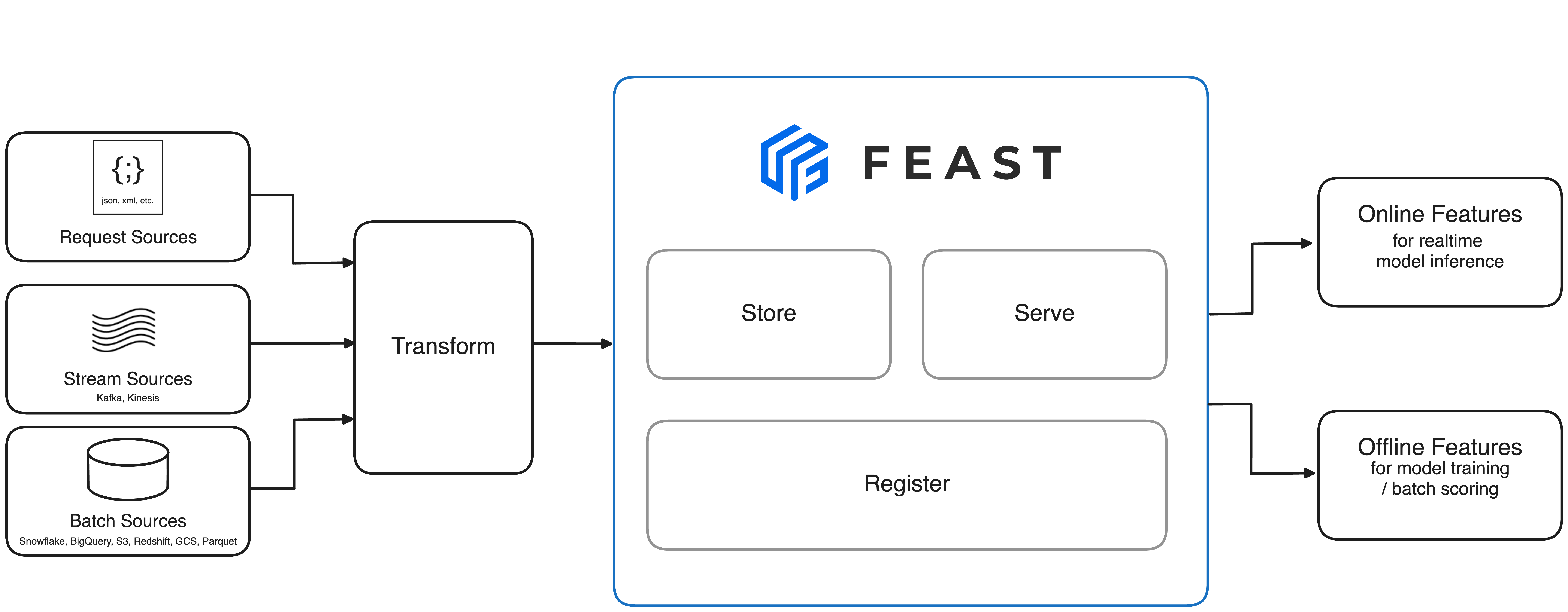
The above architecture is the minimal Feast deployment. Want to run the full Feast on Snowflake/GCP/AWS? Click here.
🐣 Getting Started
1. Install Feast
pip install feast
2. Create a feature repository
feast init my_feature_repo
cd my_feature_repo/feature_repo
3. Register your feature definitions and set up your feature store
feast apply
4. Explore your data in the web UI (experimental)
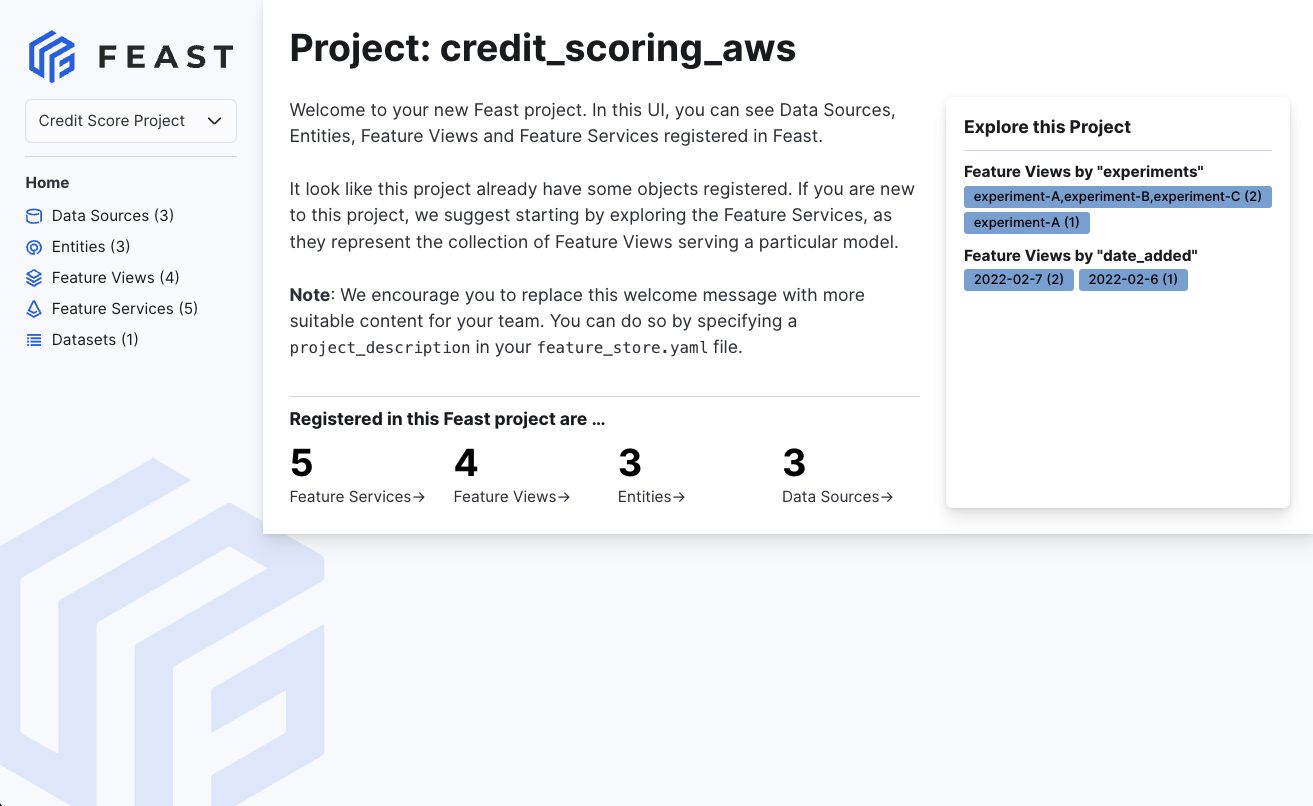
feast ui
5. Build a training dataset
from feast import FeatureStore
import pandas as pd
from datetime import datetime

entity_df = pd.DataFrame.from_dict({
    "driver_id": [1001, 1002, 1003, 1004],
    "event_timestamp": [
        datetime(2021, 4, 12, 10, 59, 42),
        datetime(2021, 4, 12, 8,  12, 10),
        datetime(2021, 4, 12, 16, 40, 26),
        datetime(2021, 4, 12, 15, 1 , 12)
    ]
})

store = FeatureStore(repo_path=".")

training_df = store.get_historical_features(
    entity_df=entity_df,
    features = [
        'driver_hourly_stats:conv_rate',
        'driver_hourly_stats:acc_rate',
        'driver_hourly_stats:avg_daily_trips'
    ],
).to_df()

print(training_df.head())

# Train model
# model = ml.fit(training_df)
            event_timestamp  driver_id  conv_rate  acc_rate  avg_daily_trips
0 2021-04-12 08:12:10+00:00       1002   0.713465  0.597095              531
1 2021-04-12 10:59:42+00:00       1001   0.072752  0.044344               11
2 2021-04-12 15:01:12+00:00       1004   0.658182  0.079150              220
3 2021-04-12 16:40:26+00:00       1003   0.162092  0.309035              959
6. Load feature values into your online store
Option 1: Incremental materialization (recommended)
CURRENT_TIME=$(date -u +"%Y-%m-%dT%H:%M:%S")
feast materialize-incremental $CURRENT_TIME
Option 2: Full materialization with timestamps
CURRENT_TIME=$(date -u +"%Y-%m-%dT%H:%M:%S")
feast materialize 2021-04-12T00:00:00 $CURRENT_TIME
Option 3: Simple materialization without timestamps
feast materialize --disable-event-timestamp
The --disable-event-timestamp flag allows you to materialize all available feature data using the current datetime as the event timestamp, without needing to specify start and end timestamps. This is useful when your source data lacks proper event timestamp columns.
Materializing feature view driver_hourly_stats from 2021-04-14 to 2021-04-15 done!
7. Read online features at low latency
from pprint import pprint
from feast import FeatureStore

store = FeatureStore(repo_path=".")

feature_vector = store.get_online_features(
    features=[
        'driver_hourly_stats:conv_rate',
        'driver_hourly_stats:acc_rate',
        'driver_hourly_stats:avg_daily_trips'
    ],
    entity_rows=[{"driver_id": 1001}]
).to_dict()

pprint(feature_vector)

# Make prediction
# model.predict(feature_vector)
{
    "driver_id": [1001],
    "driver_hourly_stats__conv_rate": [0.49274],
    "driver_hourly_stats__acc_rate": [0.92743],
    "driver_hourly_stats__avg_daily_trips": [72]
}
📦 Functionality and Roadmap
The list below contains the functionality that contributors are planning to develop for Feast.
-
We welcome contribution to all items in the roadmap!
-
Natural Language Processing
- [x] Vector Search (Alpha release. See RFC)
- [ ] Enhanced Feature Server and SDK for native support for NLP
-
Data Sources
- [x] Snowflake source
- [x] Redshift source
- [x] BigQuery source
- [x] Parquet file source
- [x] Azure Synapse + Azure SQL source (contrib plugin)
- [x] Hive (community plugin)
- [x] Postgres (contrib plugin)
- [x] Spark (contrib plugin)
- [x] Couchbase (contrib plugin)
- [x] Kafka / Kinesis sources (via push support into the online store)
-
Offline Stores
-
Online Stores
- [x] Snowflake
- [x] DynamoDB
- [x] Redis
- [x] Datastore
- [x] Bigtable
- [x] SQLite
- [x] Dragonfly
- [x] Azure Cache for Redis (community plugin)
- [x] Postgres (contrib plugin)
- [x] Cassandra / AstraDB (contrib plugin)
- [x] [Scylla
