
Fellmonger
📚 An example of a cross-platform macOS/Windows application developed using Swift 6
Install / Use
/learn @fbarbat/FellmongerREADME
Fellmonger
Fellmonger is an example project that showcases a native desktop application developed using Swift 6, compatible with both macOS and Windows platforms. It’s a native LLM client that supports Ollama, OpenAI, and Anthropic LLMs.


📚 This project is meant to be a learning resource for exploring cross-platform macOS/Windows Swift desktop application development. While primarily for my own learning, I hope it can benefit others too. 😄
The project is complex enough to represent a real application but is still at a prototype level. Many improvements can be made to make it production-ready, including UI/icon polish, feature enhancements, performance optimizations, better error handling and installer improvements.
Architectural decisions involve trade-offs. If you find these patterns useful, great! If you think this is overengineering or not the right tool for the job, that’s okay too. Use whatever fits your development process and team. The most important thing is to ship cool stuff to your users sustainably.
Feel free to create PRs to improve this project so we can discover and document useful patterns!
Demo
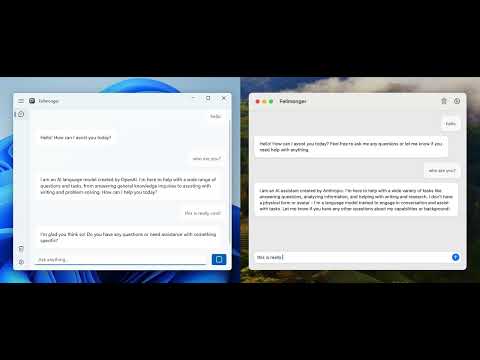
Supported LLM providers
You can select the active LLM provider and specific model name from the app Settings. At least one provider must be configured for the app to work properly.
| Model | Notes | Default model
| - | - | - |
| Ollama | Install Ollama and pull the desired model. By default, Fellmonger will try to use localhost to reach it but you can configure the URL from the Settings. | llama3.1 |
| OpenAI | Get an OpenAI service account key and configure it in Settings. | gpt-4o
| Anthropic | Get an Anthropic service account key and configure it in Settings. | claude-3-5-sonnet-20240620 |
Tech Stack
The cross-platform application was implemented in Swift 6.
- Swift Package Manager
- Swift Concurrency architecture
- Swift Macros
- For Core:
- For macOS:
- Xcode 16.1 Beta targeting macOS 14
- SwiftUI
- For Windows:
Setup for macOS development
From a macOS machine:
- Pull the code
- Open the macOS project in Xcode
- Fix the potential signing issues you might have (select your user)
- Build and run
Setup for Windows development
You will need a Windows machine or a Windows VM. Only x64 is supported, so if you use a Windows VM from a Mac, it will need to be an x64 machine (not ARM).
The requirements are the same than The Browser Company sample Windows app:
- Install latest Swift SDK from thebrowsercompany/swift-build
- Visual Studio Community with C++ build tools
- Make sure to have the appropriate version of the Windows App Runtime installed as mentioned here
VSCode
VSCode is the editor of choice for developing Windows apps on Swift. You can install it from https://code.visualstudio.com/download. Install the Swift extension from Swift Server Work Group.
⚠️ In order for the extension to load the project, you will need to open the Windows Application Package.swift in VSCode first every time you restart VSCode.
-
Building: The build of the Windows applications is done through SPM. This can be done on the command line with
swift buildor in Visual Studio Code withCtrl+Shift+B. -
Debugging: Debugging in VSCode is supported through LLDB. You can simply press
F5or navigate to theRun and Debug(Ctrl+Shift+D) pane.
If you need more guidance about how to setup Windows development, check this blog post about it.
I remember I had to install Python (Swift for Windows dependency) and set up some environment variables after hitting some errors. If you really want to try to build it and these steps are not enough to have it working, please open an issue on this project and I will be happy to add more detailed steps to this guide.
Architectural Patterns
This project explores various architectural patterns and practices for developing a cross-platform Swift application.
Swift Package structure
The project is organized into three main directories:
- Core: Contains the shared code between the Windows and macOS applications.
- MacOS: Contains macOS-specific code.
- Windows: Contains Windows-specific code.
Each directory is structured into several Swift packages:
- Core: The core is small and could fit in a single package well by just using directories instead of subpackages. However, I wanted to split it into packages to excercise that approach which might be useful for more complex applications.
- SwiftExtensions: Swift utility methods and types.
- Settings: Settings model and view models.
- Chat: LLM client implementations and view models.
- MacOS: It's an Xcode project for a macOS application. It contains everything that can't be stored in a Swift package. All of it'
s code was pushed to subpackages.
- MacOSSwiftExtensions: macOS Swift extensions.
- MacOSSettings: macOS views for settings.
- MacOSChat: macOS views for chat.
- MacOSRoot: Root package for the macOS application. This is the only package the Xcode project imports.
- Windows:
- WinUIExtensions: View model data binding utilities. Includes macros for that purpose.
- Application: Single package implementation for the entire app. Buildable with Swift for Windows and contains dependencies on Windows frameworks. Derived from The Browser Company sample Windows app. It could be split down in more packages as the macOS app if needed but I decided to keep it in a single package to constrast it with the multiple package approach. Simplicity is always good, especially if you are not ripping off the benefits of a more modular architecture, for example, by adding Dev Apps in a large team/project.
Modules
In the context of this project, Modules are a variation of the Composition Root pattern. Modules allow Swift packages to export living instances of types, which helps with encapsulation and lifecycle management.
Key points about the Module pattern:
- Swift packages may contain a @MainActor class with the same name as the package, representing the module.
- Modules handle dependency injection manually, making external frameworks unnecessary.
- Modules are retained by clients, ensuring that infrastructure objects are managed by the client while being hidden internally.
- Modules have an init method that may include other modules as dependencies.
Both SettingsModule and ChatModule are examples of this pattern. Both macOS and Windows applications link these modules to their respective views.
MVVM with Observable
This project employs a variation of the MVVM with Observable pattern.

In this approach:
- Models are platform independent and might be one of two types:
- Data exchange models: Value types (
structsandenums) for data crossing the boundaries of the application - Application models: Value types and classes for internal application state that needs to be reused from multiple view models.
- Data exchange models: Value types (
- View Models are headless views that encapsulate UI state and behavior, using models for input or output. These are
@Observable @MainActor classesand platform-independent. - Views only know about the view models’ surface, implemented with
SwiftUIon macOS andWinUI3on Windows.
This approach enables the reuse of models and view models across macOS and Windows applications. Models are implementation details of view models, so they are not necessarily exposed. The trade off here is consistency and reusability over flexibility and auto
