
Boarding
Instantly create a simple signup page for TestFlight beta testers
Install / Use
/learn @fastlane/BoardingREADME
<p align="center"> <img src="https://raw.githubusercontent.com/fastlane/boarding/master/assets/BoardingHuge.png" width="650"> </p>


Get in contact with the developers on Twitter: @FastlaneTools
<p align="center"> <a href="#whats-boarding">Why?</a> • <a href="#getting-started">Getting Started</a> • <a href="#how-does-this-work">Technical Details</a> • <a href="#customize">Customize</a> • <a href="#update-to-a-new-version">Update</a> </p>
<h5 align="center"><code>boarding</code> is part of <a href="https://fastlane.tools">fastlane</a>: connect all deployment tools into one streamlined workflow.</h5>
What's boarding?
Instantly create a simple signup page for TestFlight beta testers.
Have you ever been to an airport, where you had to ask the manager of the airport if you can board now? Once the manager agrees, you'll be carried from your check-in to your gate into your plane.
Because that's what you do right now as an app developer when you want to add a new tester to your TestFlight app: Open Screenshots
Why don't you have a simple web site you can share with potential testers (e.g. email newsletter, Facebook, Twitter) on which people interested in trying out your new app can just board on their own?
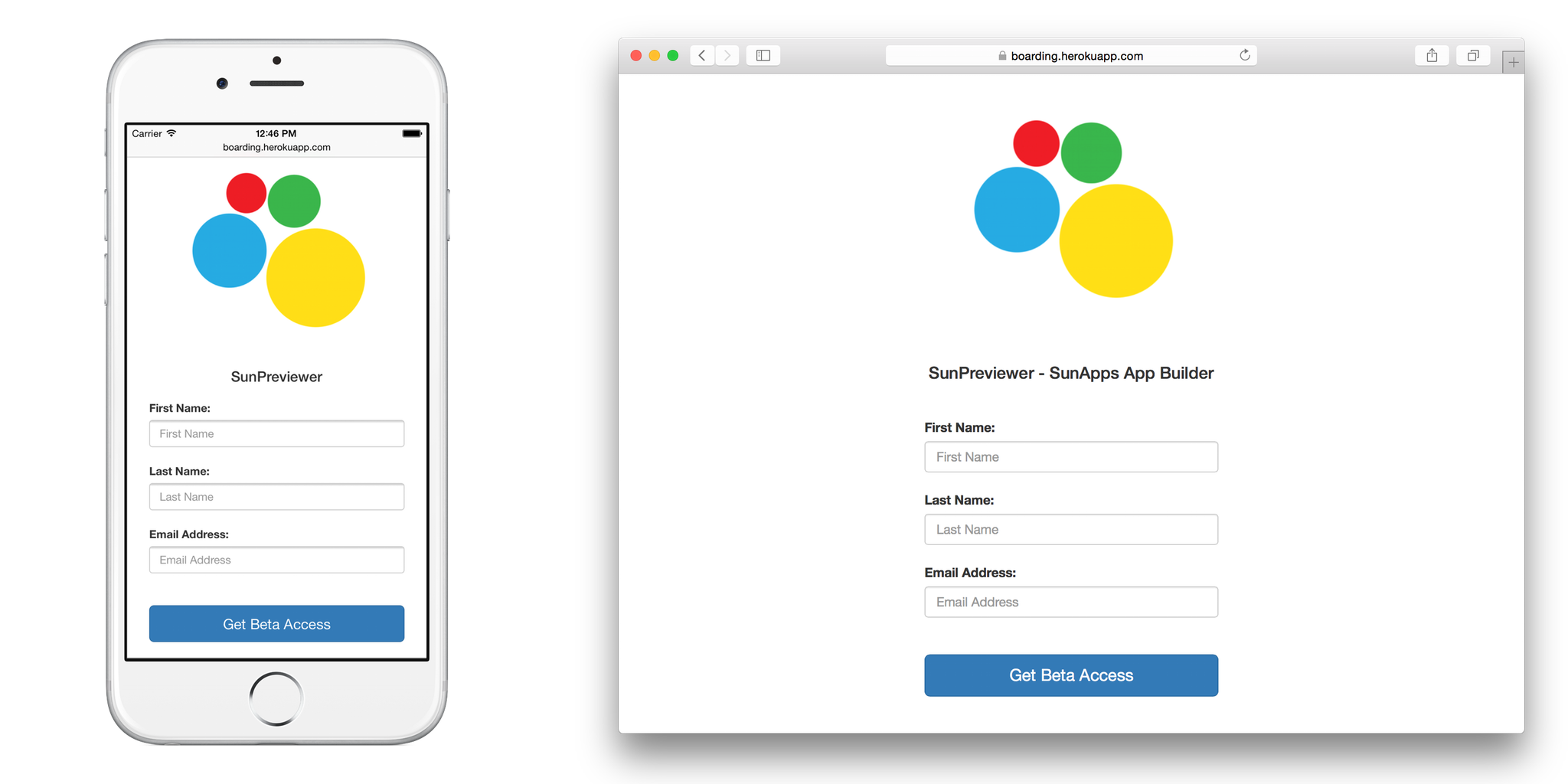
Thanks to spaceship.airforce (oh well, I really talk a lot about flying :rocket:) it is now possible to automate the boarding process for your TestFlight beta testers.
Example
Take a look at this live example page: boarding.herokuapp.com
Like this tool? Be the first to know about updates and new fastlane tools
Getting Started
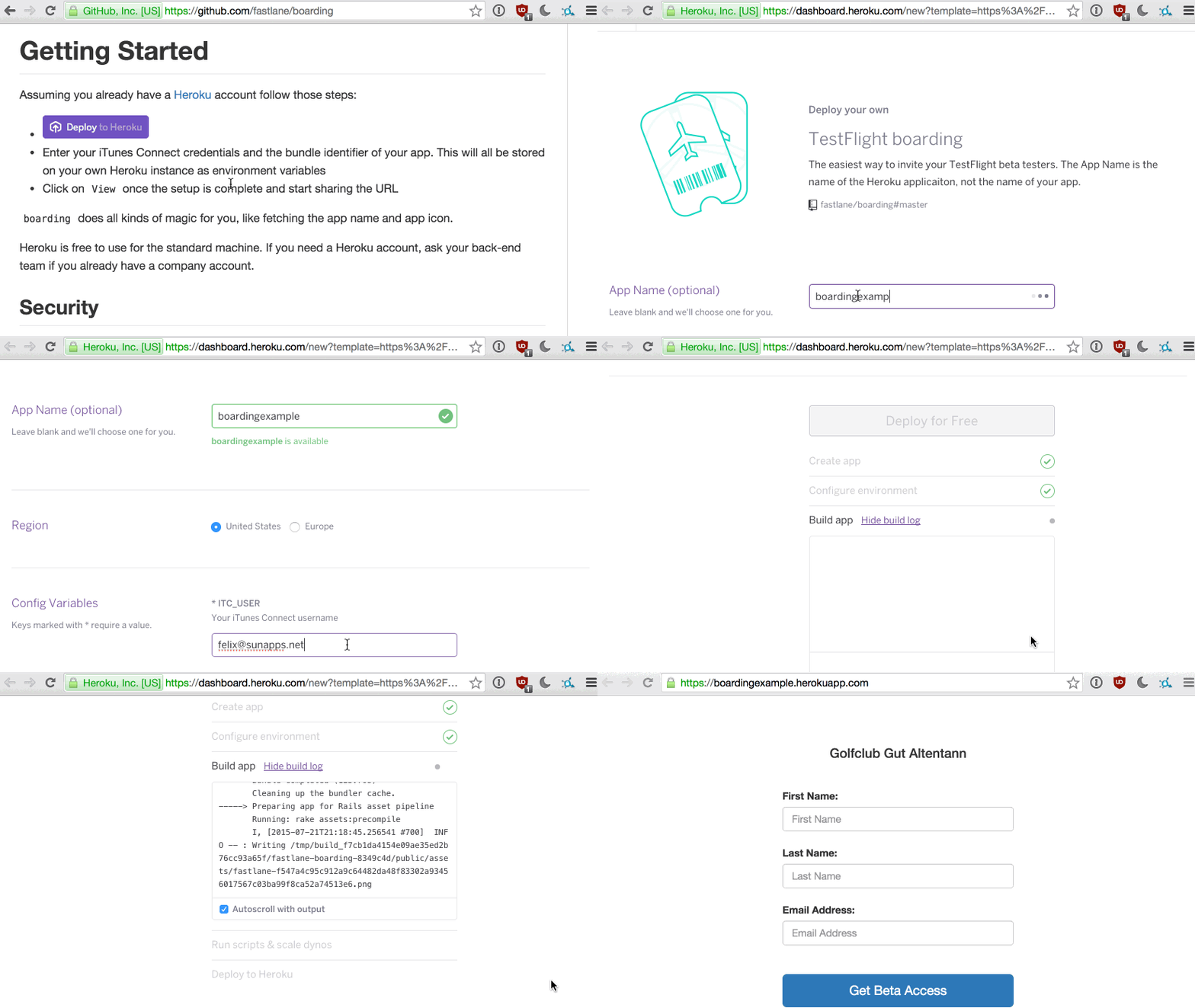
Assuming you already have a Heroku account follow those steps:

- Enter your iTunes Connect credentials and the bundle identifier of your app. This will all be stored on your own Heroku instance as environment variables
- Click on
Viewonce the setup is complete and start sharing the URL
Assuming you already have an Azure account follow those steps:

- Enter your iTunes Connect credentials and the bundle identifier of your app. This will all be stored on your own Heroku instance as environment variables
- It can take up to 5 minutes until everything is loaded.
boarding does all kinds of magic for you, like fetching the app name and app icon.
Heroku is free to use for the standard machine. If you need a Heroku account, ask your back-end team if you already have a company account.
If your account is protected using 2-factor author, follow the 2 step verification guide.
Security
To secure your webpage, you only have to set the ITC_TOKEN environment variable to any password.
- You can send your users the link and tell them the password
- You can send them the direct link including the token like this: https://url.com/?token=[password]
Available environment variables
Required:
ITC_USERiTunes Connect usernameITC_PASSWORDiTunes Connect passwordITC_APP_IDThe Apple ID or Bundle Identifier of your app
Optional:
ITC_TOKENSet a password to protect your website from random people signing upITC_CLOSED_TEXTSet this text to temporary disable enrollment of new beta testersRESTRICTED_DOMAINSet this domain (in the formatdomain.com) to restrict users with emails in another domain from signing up. This list supports multiple domains by setting it to a comma delimited list (domain1.com,domain2.com)FASTLANE_ITC_TEAM_NAMEIf you're in multiple teams, enter the name of your iTC team here. Make sure it matches.FASTLANE_SESSIONYou need to provide a pregenerated session viafastlane spaceauthif you have 2-factor authentication enabled and want to use any actions that communicates with App Store Connect.IMPRINT_URLIf you want a link to an imprint to be shown on the invite page.
Custom Domain
With Heroku you can easily use your own domain, follow this guide.
With Azure you can easily use your own domain, follow this guide.
Alternative Setup Options
- Docker image: emcniece/docker-boarding
How does this work?
boarding is part of fastlane, which helps you automate everything you usually do manually as an iOS developer.
Using spaceship.airforce it is possible to manage testers, builds, metadata, certificates and so much more.
This repository is a simple Rails application with most code in these files:
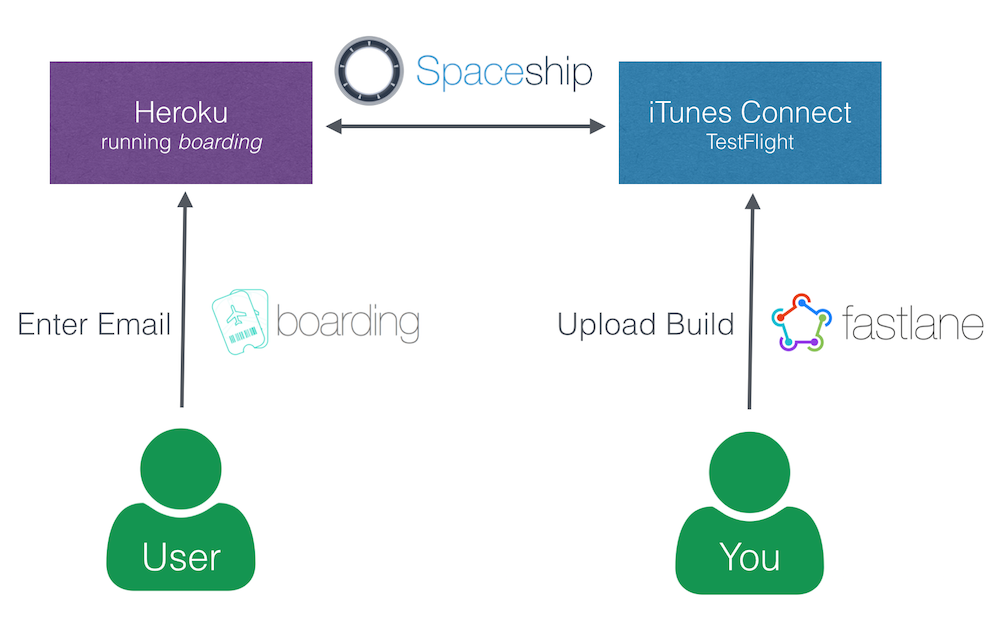
More information about this automation process can be found here.
Customize
If you want to change the design, layout or even add new features:
- Install the Heroku toolbelt and
heroku login - Clone your application using
heroku git:clone --app [heroku_app_name](it will be an empty repo)- You may see a message saying
warning: You appear to have cloned an empty repository.. If so, just continue on with the instructions. This is a known Heroku issue
- You may see a message saying
cd [heroku_app_name]git pull https://github.com/fastlane/boarding- Modify the content, in particular the files that are described above.
- Test it locally by running
ITC_USER="email" ITC_... rails sand opening http://127.0.0.1:3000 - Commit the changes
git push
It is recommended to also store your version in your git repo additionally to Heroku.
Update to a new version
From time to time there will be updates to boarding. There are 2 ways to update your Heroku application:
Recommended: Using the terminal
- Install the Heroku toolbelt and
heroku login - Clone your application using
heroku git:clone --app [heroku_app_name](it will be an empty repo) cd [heroku_app_name]git pull https://github.com/fastlane/boardinggit push
Using Heroku website
- Delete your application on heroku.com
- Create a new boarding application
- Enter your user credentials again
Using Azure website
- Navigate to the Azure Portal
- Login and navigate to your WebApp
- On
Overviewhit the restart button
Managing Azure version
If you installed boarding using the deploy to Azure button, boarding will be deployed in an Azure WebApp for containers.
This means that azure is running the docker-version of boarding.
Setting optional parameters in Azure
In order to set the optional parameters for boarding follow these steps:
- Navigate to the Azure Portal
- Login and navigate to

