<div align="center">
<h1><img src="https://raw.githubusercontent.com/faizul726/faizul726.github.io/refs/heads/main/matject-misc/logo.png" height="54px"></img>Matject v3.7.0 [EOL]</h1>
<p>A smart, highly customizable material.bin replacer for Mincraft Windows.<br>Supports both Minecraft and Minecraft Preview with backup and restore.</p>
<code>Last updated: August 09, 2025</code>
</div>
<br>
Current state of Matject
As you may have seen, Matject is receiving way less updates now.
It's because Matject has peak of its' development thus it requires less maintenance now.
I have decided to abandon Matject because Microsoft as a company is not predictable. In recent Windows update they started silently rejecting PowerShell admin requests and I can't reproduce the issue myself. There will be a lot more issues like this in future and I won't be able to catch up all time.
So, Matject is provided as-is now. I will not be providing any updates for it anymore.
material-updater may stop working because it uses hardcoded values.
Thank you for all the support so far. I greatly appreciate everyone who was involved in the project. The repository will be archived now.
 Shader credit: Sharkitty
💡 How to use? | 🔄 How to remove shaders | 💁♂️ I need help
<div align="center">
<h3>❌ DO NOT MIRROR/REUPLOAD THIS ANYWHERE! ❌</h3>
<b>Matject is now distributed under a license from YSS Group.<br>By using Matject, you agree to the terms stated in <a href=./TERMS.md>TERMS.md</a></b>
</div>
🛠️ Requirements
- IObit Unlocker installed (mandatory, no need to do anything with it afterwards)
- PowerShell (mandatory) (pre installed on most Windows systems by default)
- Ability to read
- Common sense
Sorry for being rude, I am tired of spoonfeeding clueless people.
</br>
📗 Here's what you need to know
-
Only RenderDragon shaders for Windows/Merged are supported.
-
You don't have to open Matject everytime for shaders. It's only needed when you want to apply/swap/remove shaders.
Once shader is applied it will stay until you update the game or use shader removal in Matject.
-
Check out Matject Settings to fine tune it to your needs.
-
Matject doesn't patch Minecraft it dynamically replaces .material.bin files of Minecraft.
-
Matject needs Minecraft to have unmodified materials so backup and shader removal works properly. If you are not sure whether you have original materials or not, use verifyMaterials_vX.XX.XX.bat from https://mcpebd.github.io/materials for your Minecraft version.
-
If you use Microsoft Defender antivirus then make sure to go to Device security -> Core isolation
and turn off "Microsoft Vulnerable Driver Blocklist" and "Local Security Authority protection" to make sure IObit Unlocker doesn't fail silently,
you may need to disable "Memory integrity" as well.
</br>
<details><summary><b>💡 More things you need to know (click to expand)</b></summary>
<hr>
<ul>
<li>If you switch/remove shaders often then it's recommended to use matjectNEXT instead of Auto with these settings:
<ul>
<li><strong>General</strong>
<ul>
<li>Default method: matjectNEXT</li>
<li>Use material-updater to update materials: ON</li>
<li>Disable confirmations: ON</li>
</ul>
</li>
<li><strong>Custom paths</strong>
<ul>
<li>Set custom Minecraft app path (optional)</li>
<li>Set custom Minecraft data path (optional but recommended)</li>
</ul>
</li>
<li><strong>matjectNEXT settings</strong>
<ul>
<li>Just sync and exit: ON</li>
<li>Automatically open Minecraft after sync: ON</li>
</ul>
</li>
<li><strong>Updates & Debug</strong>
<ul>
<li>Run IObit Unlocker as admin: ON</li>
or
<li>Always run Matject as admin: ON</li>
or
<li>Just manually run Matject as admin</li>
</ul>
</li>
</ul>
</li>
<li>If you have installed Minecraft using Bedrock Launcher or some kind of version switcher or have write access to Minecraft app folder then it's recommended to enable Direct Write mode. So, Matject uses tradtional copy/delete commands instead of IObit Unlocker.</li>
<li>If blocks become invisible after injecting, enable material-updater from Matject Settings or use the version which is compatible with your Minecraft version.</li>
<li>Matject can't enable Deferred Rendering/Vibrant Visuals/RTX.</li>
<li>The word "Injection" here means file replacement. So Matject basically uses IObit Unlocker to dynamically replace files.</li>
<li>Matject needs unmodified materials (game files) to begin with. Or the shader removal function will be useless.</li>
<li>Some packs have subpacks which is like settings for resource packs. You can see a gear icon in some activated resource packs</li>
<li>Matject doesn't patch your game. So just removing shader from resource pack won't work. Use Shader Removal of Matject for that.</li>
<li>Always try to use latest version. Matject has a built in updater to update itself.</li>
<li>Matject is universal. It will continue to work fine as long as Mojang doesn't heavily changes how shaders work.</li>
<li>Avoid downloading Matject from random links except <a href=https://github.com/faizul726/matject>github.com/faizul726/matject</a></li>
</ul>
<hr>
</details>
<details><summary><b>⭐ Full feature list (click to expand)</b></summary>
<hr>
<ul>
<li><b>Easy to use:</b> No Command Prompt/Terminal knowledge is required.</li>
<li><b>Highly customizable:</b> Adjustments according to your needs can be made in Matject Settings.</li>
<li><b>Fully offline:</b> Can be used offline. Internet is optionally used to enhance experience.</li>
<li><b>Portable:</b> All necessary files are stored in the same folder as Matject.</li>
<li><b>Fast as jet</b>: Takes less than 60 seconds to apply a shader. </li>
<li><b>Preview support</b>: Also supports Minecraft Preview backups and settings are stored separately for Preview and Release. </li>
<li><b>Automatic backups:</b> Backups are made automatically when game is updated.</li>
<li><b>Restore game files:</b> You can go back to original whenever you want. </li>
<li><b>Automatic processing:</b> MCPACK/ZIPs are automatically processed.</li>
<li><b>Auto shader updater:</b> Shaders can be updated using <a href=https://github.com/mcbegamerxx954/material-updater>material-updater</a> (also fixes invisible blocks).</li>
<li><b>Auto updater:</b> Can automatically update itself if you want.</li>
<li><b>Smart file replacement:</b> Keeps track of modified files and automatically restores when needed.</li>
<li><b>matjectNEXT:</b> Applies shaders based on the first activated pack in Global Resource Packs.</li>
<li><b>Direct write mode:</b> If Minecraft folder is writable, you can enable this option so Matject will use traditional copy/delete commands instead of IObit Unlocker. (you still need to have IObit Unlocker installed because this feature is still not fully tested)</li>
</ul>
<hr>
</details>
<details><summary><b>⚠️ Known issues (click to expand)</b></summary>
<hr>
<ul>
<li>Doesn't work well with long folder path and too many shader files.</li>
<li>Some antivirus may prevent IObit Unlocker from working. (AVG and Norton are known to do this)</li>
<li>Some shaders may cause the game to crash or show red sky. It's not a fault of Matject.</li>
</ul>
<hr>
</details>
<br>
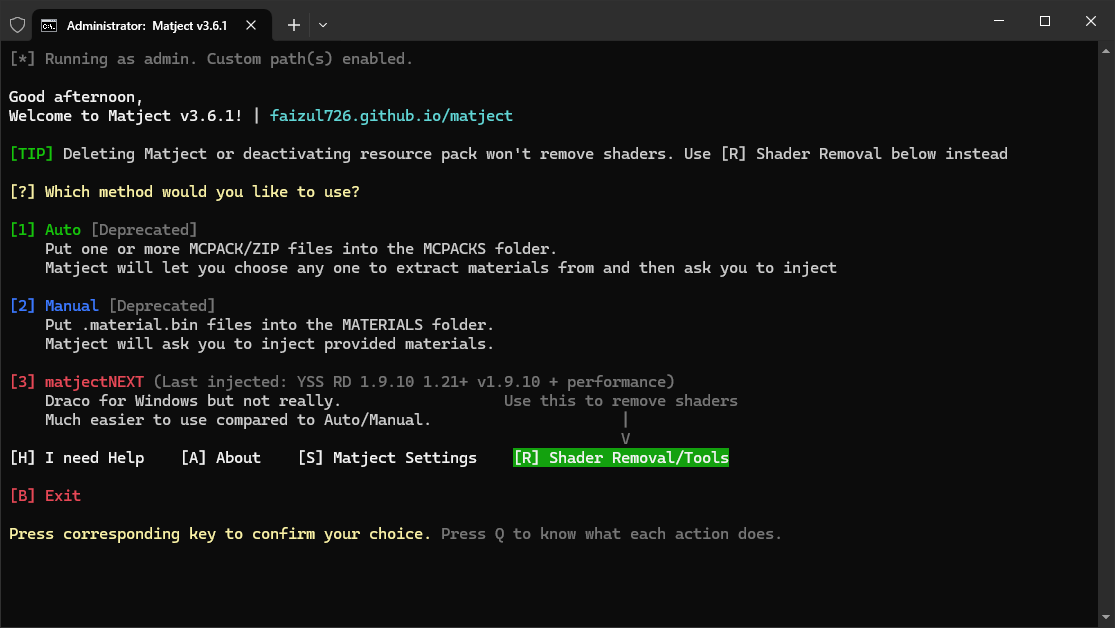
<details><summary><b>🖼️ Screenshots (click to expand)</b></summary>
<!-- Main Image -->
<img src="https://raw.githubusercontent.com/faizul726/faizul726.github.io/main/matject/screenshots/matject_1.png" alt="matject_1">
<!-- Table with Images and Captions -->
<table>
<tr>
<td style="text-align: center;">
<img src="https://raw.githubusercontent.com/faizul726/faizul726.github.io/main/matject/screenshots/matject_2.png" style="width: 100%;" alt="Matject Settings"><br>
<b>Matject Settings</b>
</td>
<td style="text-align: center;">
<img src="https://raw.githubusercontent.com/faizul726/faizul726.github.io/main/matject/screenshots/matject_3.png" style="width: 100%;" alt="Custom paths"><br>
<b>Custom paths</b>
</td>
</tr>
<tr>
<td style="text-align: center;">
<img src="https://raw.githubusercontent.com/faizul726/faizul726.github.io/main/matject/screenshots/matject_4.png" style="width: 100%;" alt="matjectNEXT"><br>
<b>matjectNEXT</b>
</td>
<td style="text-align: center;">
<img src="https://raw.githubusercontent.com/faizul726/faizul726.github.io/main/matject/screenshots/matject_5.png" style="width: 100%;" alt="Restore materials"><br>
<b>Shader removal</b>
</td>
</tr>
</table>
<img src="https://github.com/user-attachments/assets/740da8aa-0177-482a-a065-4f4f48ac857f" style="width: 100%;">
<p align=center><i>You can also call it Matjet because it's as fast as a jet.<br><code>I know I'm exaggerating...</code></i></p>
</details>
<br>
✨ What's new in v3.7.0?
- matjectNEXT is now stable
- Added new matjectNEXT settings
- More user friendly messages
- See full changelog...
</br><br>
💡 Quick Guide
- Install IObit Unlocker
No need to do anything with it afterwards.
</br>

-
Download code as ZIP.
-
Extract the ZIP file.
-
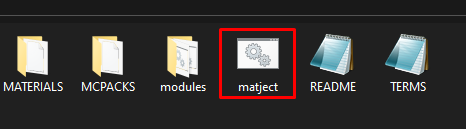
Open matject/matject.bat (with gear icon).
<br>
- Follow on screen instructions (Please READ. I

