
Pacui
Bash script providing advanced Pacman and Yay/Pikaur/Aurman/Pakku/Trizen/Pacaur/Pamac-cli functionality in a simple UI
Install / Use
/learn @excalibur1234/PacuiREADME
[!CAUTION] 🚨 Because of multiple reasons, development of PacUI will no longer continue on Github, but on Codeberg here: https://codeberg.org/excalibur1234/pacui</strong>
PacUI
PacUI provides useful and advanced Pacman and Yay/Pikaur/Aurman/Pakku/Trizen/Paru/Pacaur/Pamac-cli commands in a convenient and easy to use text interface.
PacUI is aimed at experienced/intermediate/advanced users of Arch Linux (and Arch-based distributions, including Manjaro), who have at least basic knowledge of their Linux system, Pacman and Yay/Pikaur/Aurman/Pakku/Trizen/Paru/Pacaur/Pamac-cli. Absolute beginners are probably overwhelmed by the choices PacUI offers.
This fork of an older version of pacli called PacUI follows the KISS principle: The whole script is contained within one file, which consists of easy to read bash code with many helpful comments. PacUI offers many more features over pacli in order to enhance comfort and speed of CLI based package management.
Table of Contents
Screenshots
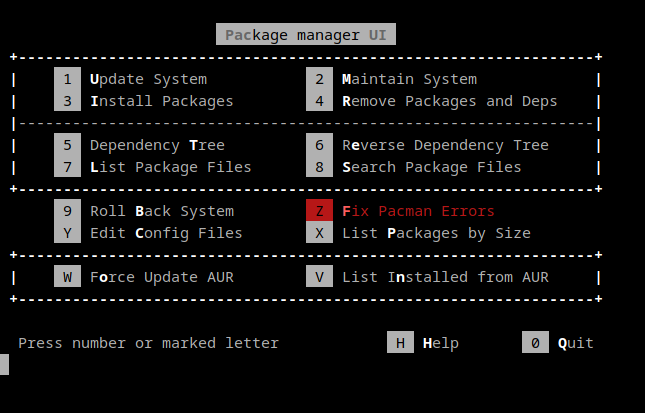
UI of PacUI:
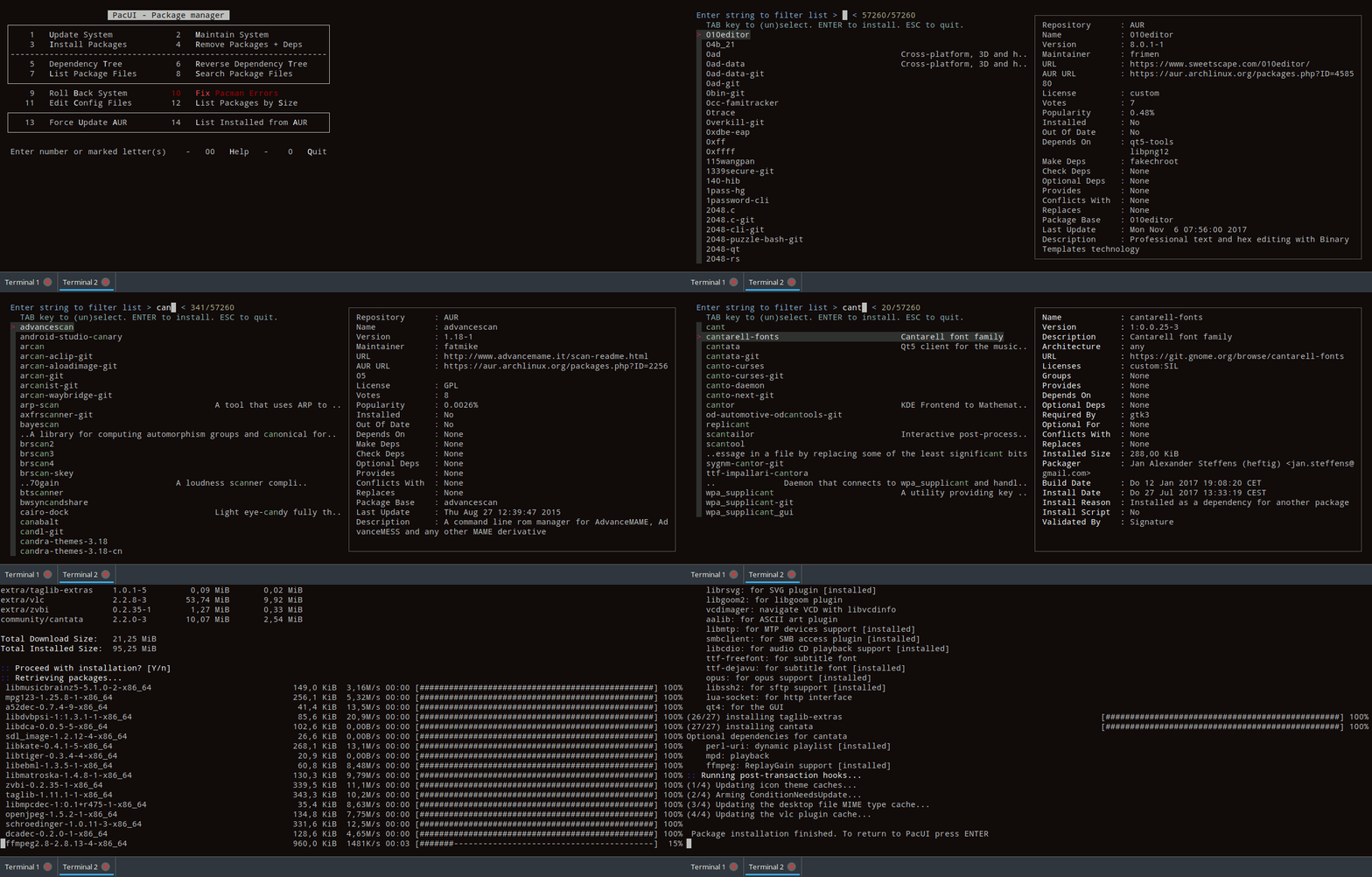
Installing the package "cantata" from system repositories by entering its name:
Installation
Dependencies
PacUI has the following hard dependency:
- sudo
If you want PacUI to fully work, these dependencies are needed as well:
- expac
- fzf
- less
- pacman-contrib (on Arch Linux)
By default, Pacman is used for package management. If you want to enable the use of the AUR, PacUI optionally requires at least one of these AUR helpers:
PacUI supports even more features, if these packages are installed:
- pacman-mirrors (on Manjaro): PacUI uses "pacman-mirrors" to update your list of repository mirrors and automatically choose the fastest one for you. If this is not installed, "rankmirrors" (which is part of "pacman-contrib") gets used instead.
- reflector (on Arch Linux): PacUI uses "reflector" to update your list of repository mirrors and automatically choose the fastest one for you. If this is not installed, "rankmirrors" (which is part of "pacman-contrib") gets used instead.
- flatpak: PacUI uses "flatpak" to update and clean your installed flatpak packages.
- snapd: PacUI uses "snapd" to update and clean your installed snapd packages.
- fwupd: PacUI uses "fwupd" to install firmware updates for your system.
- downgrade: PacUI activates a hidden DOWNGRADE PACKAGES option, which lets you use "downgrade" from within PacUI.
Execute without prior Installation
If possible, read chapter Dependencies first and install any dependencies you need.
pacui file can be downloaded and run without prior installation:
wget https://raw.githubusercontent.com/excalibur1234/pacui/master/pacui
bash pacui
I find this feature of PacUI invaluable for fixing systems. Here are two examples:
-
A large number of updates broke (parts of) the GUI, e.g. xorg, window manager, or desktop environment. In this case, switching to a different tty (with CTRL + ALT + F2), installing PacUI and using "Roll Back System" to roll back all the latest updates can fix the system (temporarily).
-
A broken keyring makes it impossible to apply updates or install any packages. Executing PacUI without prior installation and using "Fix Pacman Errors" (which does not require "expac", "fzf", or "pacman-contrib") to fix the keyring and all related problems is the easiest and fastest solution I know of.
Manual Installation
Please read chapter Dependencies first and decide which packages to install to suit your needs.
PacUI can be manually installed (i.e. executing the same steps as described in the PKBUILD file) as follows:
- Download
pacuifile:
wget https://raw.githubusercontent.com/excalibur1234/pacui/master/pacui
- Install
pacuifile manually:
sudo cp pacui /usr/bin/
- Make
pacuifile executable:
sudo chmod +x /usr/bin/pacui
Manjaro
In Manjaro, you can simply install the stable version of PacUI from the Manjaro repositories:
sudo pacman -S pacui
There is also an (often outdated) development version available:
sudo pacman -S pacui-git
Arch Linux
PacUI is no longer available on the AUR.
PKGBUILDs are still availble (see PKGBUILD_AUR file) and Pacui can be executed without installation or manually installed (see above).
chaotic-aur
Both the stable and -git version of PacUI are in chaotic-aur. After adding chaotic-aur to your list of repositories, PacUI can be installed using the same commands as within Manjaro (see above).
Usage
Start PacUI with UI
After successful installation, type the following command into your terminal in order to start PacUI with a simple UI:
pacui
Start PacUI without UI: Using Options
Using PacUI without its UI requires less keystrokes and can therefore be much quicker. An overview of all PacUI options is displayed with pacui h.
For example, you want to display the Reverse dependency Tree of a package. Please note the marked letters "R" and "T" in PacUI's corresponding UI option. PacUI does not care, whether you use upper or lower case letters as options or whether you use no, one or two dashes in front. Therefore, the following four commands are equivalent:
pacui RTpacui rtpacui -rtpacui --rt
This principle can be used with all of PacUI's options. Here is another random example (of PacUI's hidden LIST PACKAGES BY SIZE option):
pacui LSpacui -LSpacui --LSpacui lspacui -lspacui --ls
Start PacUI without UI: Using Options and Package Names
You can also use package names in addition to options. For example, you want to install the package "cantata". Then, you can use a command like
pacui i cantata
Instead of a list of all available packages, a much shorter already filtered list is displayed. Simply select the "cantata" package you want to install and press ENTER in order to install it.
If an argument contains special characters, it has to be passed on as string. This can be achieved differently depending on the used shell. For example when using regular expressions in zsh in order to search package file names starting with string "archlinux-":
pacui s '^archlinux-'
Start PacUI without UI: Passing Arguments to AUR helper or Pacman
For advanced use (e.g. in scripting or an alias), PacUI can have a "flag" argument, which gets passed directly to an AUR helper and/or Pacman. Examples:
pacui -r 0ad --flag="--noconfirm"pacui u flag --noconfirmpacui --FLAG --asdeps --i --bashpacui b --flag=--noconfirm
Multiple installed AUR helpers
If more than one AUR helper is installed, they are automatically used in the same order as listed above (i.e. Yay is used with priority while Pamac-cli is only used as a last resort). A specific AUR helper can be set with the PACUI_AUR_HELPER environment variable.
Environment variables can typically be set by adding them to your /etc/environment file. If this file exists on your system, it can be selected using PacUI's EDIT CINFIG FILES option:
pacui c
Diff program
As described in Detailed PacUI Help, PacUI uses pacdiff f
