
Colorpicker
jQuery UI widget for color picking with web colors, theme colors, and history (similar to the one in Microsoft Office 2010).
Install / Use
/learn @evoluteur/ColorpickerREADME
evol-colorpicker · 

evol-colorpicker is a web color picker which looks like the one in Microsoft Office 2010. It can be used inline or as a popup bound to a text box. It comes with several color palettes, can track selection history and supports "transparent" color. It is a full jQuery UI widget, supporting various configurations and themes.
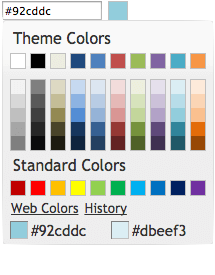
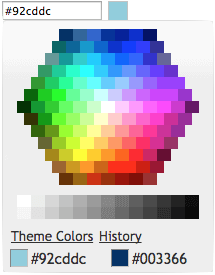
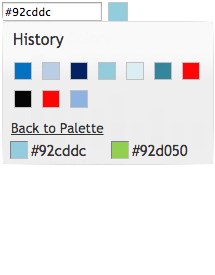
Check the online demo for several examples.
Table of Contents
Encourage this project by becoming a sponsor.
<a name="Installation"></a>
Installation
Download or fork evol-colorpicker at GitHub.
git clone https://github.com/evoluteur/colorpicker
or use the npm package:
npm install evol-colorpicker
or install with Bower:
bower install evol-colorpicker
or use the nuget package:
dotnet add package evol-colorpicker
<a name="Usage"></a>
Usage
First, load jQuery (v3.1 or greater), jQuery UI (v1.12.1 or greater), and the plugin (for earlier version of jQuery-UI, use an earlier version of Colorpicker).
<script
  src="https://ajax.googleapis.com/ajax/libs/jquery/3.7.1/jquery.min.js"
  type="text/javascript"
  charset="utf-8"
></script>
<script
  src="https://ajax.googleapis.com/ajax/libs/jqueryui/1.14.1/jquery-ui.min.js"
  type="text/javascript"
  charset="utf-8"
></script>
<script
  src="js/evol-colorpicker.min.js"
  type="text/javascript"
  charset="utf-8"
></script>
The widget requires a jQuery UI theme to be present, as well as its own included base CSS file (evol-colorpicker.css). Here we use the "ui-lightness" theme as an example:
<link
  rel="stylesheet"
  type="text/css"
  href="http://ajax.googleapis.com/ajax/libs/jqueryui/1.14.1/themes/ui-lightness/jquery-ui.css"
/>
<link href="css/evol-colorpicker.css" rel="stylesheet" type="text/css" />
Now, let's attach it to an existing <input> tag:
<script type="text/javascript">
  $(document).ready(function () {
    $("#mycolor").colorpicker();
  });
</script>

<input style="width:100px;" id="mycolor" />
This will wrap it into a "holder" <div> and add another <div> beside it for the color box:
<div style="width:128px;">
  <input style="width:100px;" id="mycolor" class="colorPicker evo-cp0" />
  <div class="evo-colorind" style="background-color:#8db3e2"></div>
</div>
Using the same syntax, the widget can also be instanciated on a <div> or a <span> tag to show inline. In that case the generated HTML is the full palette.
<a name="Theming"></a>
Theming
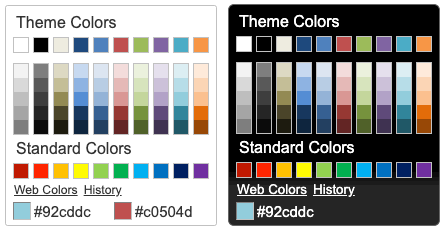
evol-colorpicker is as easily themeable as any jQuery UI widget, using one of the jQuery UI themes or your own custom theme made with Themeroller.
<a name="Options"></a>
Options
evol-colorpicker provides several options to customize its behaviour:
color (String)
Used to set the color value.
$("#mycolor").colorpicker({
  color: "#ffffff",
});
Defaults to null.
defaultPalette (String)
Used to set the default color palette. Possible values are "theme" or "web".
$("#mycolor").colorpicker({
  defaultPalette: "web",
});
Defaults to theme.
displayIndicator (Boolean)
Used to show color value on hover and click inside the palette.
$("#mycolor").colorpicker({
  displayIndicator: false,
});
Defaults to true.
hideButton (Boolean)
When binding the colorpicker to a textbox, a colored button will be added to the right of the textbox unless hideButton is set to true. This option doens't have any effect if the colorpicker is bound to a DIV.
$("#mycolor").colorpicker({
  hideButton: true,
});
Defaults to false.
history (Boolean)
Used to track selection history (shared among all instances of the colorpicker). The history keeps the last 28 colors selections.
$("#mycolor").colorpicker({
  history: false,
});
Defaults to true.
initialHistory (Array strings)
Used to provide a color selection history. Colors are provided as strings of hexadecimal color values.
$("#mycolor").colorpicker({
  initialHistory: ["#ff0000", "#00ff00", "#0000ff"],
});
Defaults to null.
showOn (String)
Have the colorpicker appear automatically when the field receives focus ("focus"), appear only when a button is clicked ("button"), or appear when either event takes place ("both"). This option only takes effect when the color picker is instanciated on a textbox.
$("#mycolor").colorpicker({
  showOn: "button",
});
Defaults to "both".
strings (String)
Used to translate the widget. It is a coma separated list of all labels used in the UI.
$("#mycolor").colorpicker({
  strings:
    "Couleurs de themes,Couleurs de base,Plus de couleurs,Moins de couleurs,Palette,Historique,Pas encore d'historique.",
});
Defaults to "Theme Colors,Standard Colors,Web Colors,Theme Colors,Back to Palette,History,No history yet.".
transparentColor (Boolean)
Allow for selection of the "transparent color". The hexadecimal value for the transparent color is "#0000ffff".
$("#mycolor").colorpicker({
  transparentColor: true,
});
Defaults to false.
<a name="Methods"></a>
Methods
clear()
Clears the color value (and close the popup palette if opened).
$("#mycolor").colorpicker("clear");
enable()
Get the currently selected color value (returned as a string).
$("#mycolor").colorpicker("enable");
disable()
Get the currently selected color value (returned as a string).
$("#mycolor").colorpicker("disable");
isDisabled()
Get the currently selected color value (returned as a string).
$("#mycolor").colorpicker("isDisabled");
val([color])
Get or set the currently selected color value (as a string, ie. "#d0d0d0").
var colorValue = $("#mycolor").colorpicker("val");

$("#mycolor").colorpicker("val", "#d0d0d0");
showPalette()
Show the palette (when using the widget as a popup).
$("#mycolor").colorpicker("showPalette");
hidePalette()
Hide the palette (when using the widget as a popup).
$("#mycolor").colorpicker("hidePalette");
<a name="Events"></a>
Events
change.color
This event is triggered when a color is selected.
$("#mycolor").on("change.color", function (event, color) {
  $("#title").css("background-color", color);
});
mouseover.color
This event is triggered when the mouse moves over a color box on the palette.
$("#mycolor").on("mouseover.color", function (event, color) {
  $("#title").css("background-color", color);
});
<a name="License"></a>
License
Copyright (c) 2025 Olivier Giulieri.
evol-colorpicker is released under the MIT license.
