Nyx
Self-contained script for cleaning forensic traces on Linux, macOS, and Windows.
Install / Use
/learn @evilsocket/NyxREADME
Nyx
Nyx (goddess of the night in Greek mythology) is a self-contained script for cleaning forensic traces on Linux, macOS, and Windows.
<div align="center"> <img alt="Nyx" src="https://raw.githubusercontent.com/evilsocket/nyx/main/logo.png" height="250" /> <br/><br/> <small>Join the project community on our server!</small> <br/><br/> <a href="https://discord.gg/btZpkp45gQ" target="_blank" title="Join our community!"> <img src="https://dcbadge.limes.pink/api/server/https://discord.gg/btZpkp45gQ"/> </a> </div>⚠️ DISCLAIMER: Nyx is alpha software.
Features
The following table details which artifacts are cleaned by each module:
| OS | Module | Artifacts |
|---|---|---|
| Linux | shell | Shell history files (bash, zsh, python, mysql, redis, mongo, docker, IPython, Ruby IRB, PHP, Perl, Erlang, Lua, Julia, Scala, Haskell, Octave, MATLAB, etc.), command histories, recently used files |
| Linux | logs | System logs (auth, syslog, kernel, boot, package managers), web server logs (Apache, Nginx), journald, database logs (MySQL, PostgreSQL, Redis, MongoDB), VPN/proxy logs (OpenVPN, Squid), mail server logs (Postfix, Dovecot), monitoring logs (Elasticsearch, Logstash, Kibana), sysstat |
| Linux | audit | Audit logs, search logs, in-kernel audit rules |
| Linux | temp | Scripts in temp dirs, hidden files, thumbnail caches, core dumps, crash reports, systemd coredumps, trash |
| Linux | network | ARP cache, NetworkManager connections, DHCP leases, database data files (MySQL binary logs, InnoDB logs), VPN configs (OpenVPN, WireGuard), mail server spool files, iptables rules |
| Linux | user | Login records, thumbnails, GTK bookmarks, GNOME Tracker, Zeitgeist, editor traces (VS Code, JetBrains), development tools (Git, SVN, Mercurial, Maven, Gradle, npm, pip, Cargo), cloud services (AWS, Google Cloud, Azure, Kubernetes, Terraform), monitoring tools (Prometheus, Grafana), backup tools (Rsync, Restic, Borg, Duplicity), security tools (Metasploit, Nmap, Aircrack-ng, John the Ripper, Hashcat), messaging/chat (IRC, Weechat, Pidgin, Discord, Slack), virtualization (VMware, VirtualBox, QEMU, Vagrant), network analysis (Wireshark, tcpdump, Ettercap), forensic analysis (Autopsy, Volatility, Sleuth Kit, Foremost), remote access (RDP, VNC, TeamViewer, AnyDesk), system monitoring (htop, Nagios, Zabbix), games/entertainment (Steam, Minecraft, Discord), file sharing (Transmission, qBittorrent, Deluge, aMule), multimedia (VLC, Audacity, GIMP, OBS Studio), productivity (LibreOffice, Thunderbird, Evolution, KeePass) |
| Linux | package | Package caches and logs (APT, YUM, DNF, Pacman) |
| Linux | browser | Firefox (cache, storage, databases), Chrome/Chromium (history, cookies, cache) |
| Linux | ssh | SSH known_hosts, connection logs, auth log entries |
| Linux | container | Docker logs/config, Podman/K8s overlays, libvirt/QEMU logs |
| Linux | systemd | Random seed, live session journals |
| Linux | print | CUPS job history and logs |
| Linux | cicd | CI/CD tools (Jenkins, GitLab Runner, GitHub Actions, CircleCI, Travis CI) |
| Linux | idsips | IDS/IPS logs (Snort, Suricata, OSSEC, Fail2ban, Samhain) |
| Linux | crypto | Cryptocurrency wallets and mining configs (Bitcoin, Ethereum, Monero, XMRig, Electrum) |
| Linux | privacy | Privacy tools (Tor Browser, Tor config, I2P, ProtonVPN, Mullvad, Tails) |
| Linux | pentest | Penetration testing tools (Burp Suite, OWASP ZAP, Cobalt Strike, Empire, BeEF) |
| Linux | osint | OSINT tools (Maltego, SpiderFoot, theHarvester, Recon-ng, Shodan) |
| Linux | iot | IoT/Smart Home (Home Assistant, Mosquitto MQTT, Node-RED, OpenHAB) |
| Linux | ml | ML/AI frameworks (Jupyter, TensorBoard, PyTorch, Keras, MLflow, Weights & Biases) |
| macOS | shell | Shell history files (same as Linux) |
| macOS | macos | .DS_Store files, user trash, Spotlight indexes, QuickLook thumbnails, system logs |
| macOS | audit | BSM audit trail |
| macOS | browser | Safari history and cache |
| macOS | unified | Unified logs (10.12+), diagnostics, log archives |
| macOS | fileevents | FSEvents, quarantine databases |
| macOS | usage | KnowledgeC database, Notification Center, recent items |
| Windows | events | Event logs (Security, System, Application, Sysmon, WinRM, PowerShell/Operational, AppLocker, AMSI) |
| Windows | history | PowerShell/CMD history, prefetch, jump lists, recent documents, Windows Timeline, Search history, IE/Edge history |
| Windows | registry | Registry MRUs, USB history, BAM/DAM, ShellBags, UserAssist, Terminal Server Client, Media Player, Office MRUs |
| Windows | filesystem | USN journal, recycle bin, thumbcache, shortcuts, index files, SRUM database, notification history |
| Windows | temp | Temp files, DNS cache, shadow copies, WER archives, crash dumps, Cortana history, Office telemetry, OneDrive/Teams logs |
| Windows | security | EDR/AV logs (CrowdStrike Falcon, SentinelOne, Carbon Black, McAfee, Symantec), Windows Defender ATP, Firewall logs, WMI activity, BitLocker keys, Group Policy cache, authentication cache, Hyper-V/WSL/Docker logs, FTK Imager artifacts |
| Windows | advanced | Certificates, scheduled tasks, services, wireless profiles, VPN connections, Chrome extensions, cryptographic data, TPM logs, Windows Update logs, Push Notifications, Outlook search, WSA logs, Xbox Game Bar |
Quick Start
Linux/macOS
# Download nyx.sh
wget https://github.com/evilsocket/nyx/raw/refs/heads/main/nyx.sh
chmod +x nyx.sh

# Run with dry-run first
sudo ./nyx.sh --dry-run

# Run all modules
sudo ./nyx.sh --force
Windows
# Download nyx.ps1 (run as Administrator)
Invoke-WebRequest -Uri "https://github.com/evilsocket/nyx/raw/refs/heads/main/nyx.ps1" -OutFile "nyx.ps1"

# Run with dry-run first
.\nyx.ps1 -DryRun

# Run all modules
.\nyx.ps1 -Force

# Enable audit logging
.\nyx.ps1 -Force -LogFile "nyx-audit.log"
Usage
Linux/macOS (nyx.sh)
# Show help
./nyx.sh --help

# List available modules
./nyx.sh --list

# Dry run with verbose output
./nyx.sh --dry-run --debug

# Clean specific modules
sudo ./nyx.sh -m shell,logs

# Force run without confirmation
sudo ./nyx.sh --force
Windows (nyx.ps1)
# Show help
.\nyx.ps1 -Help

# List available modules
.\nyx.ps1 -List

# Dry run with verbose output
.\nyx.ps1 -DryRun -Debug

# Clean specific modules (case-insensitive)
.\nyx.ps1 -Modules EVENTS,TEMP -Force

# Advanced mode with memory hardening
.\nyx.ps1 -Advanced -Force

# Enable comprehensive audit logging
.\nyx.ps1 -Force -LogFile "audit.log" -Debug
Contributors
<a href="https://github.com/evilsocket/nyx/graphs/contributors"> <img src="https://contrib.rocks/image?repo=evilsocket/nyx" alt="nyx project contributors" /> </a>License
nyx is made with ♥ and released under the GPL 3 license.
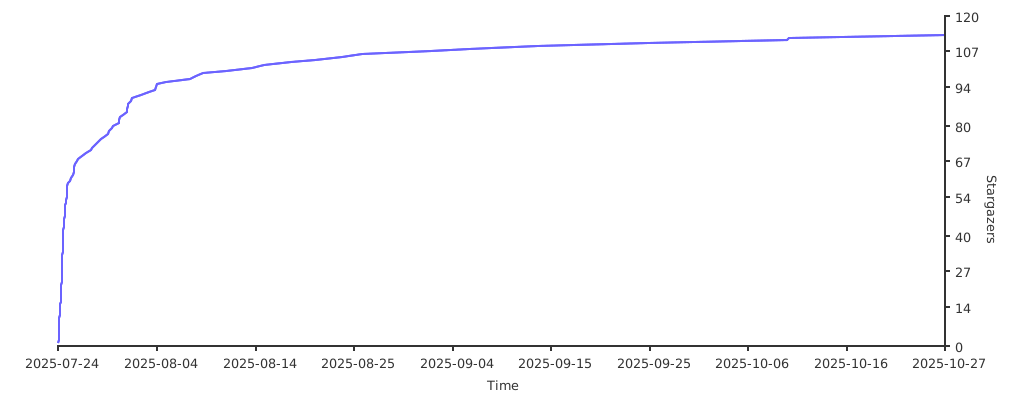
Stargazers over time