
EVCloudKitDao
Simplified access to Apple's CloudKit
Install / Use
/learn @evermeer/EVCloudKitDaoREADME
EVCloudKitDao
<!--- [](https://circleci.com/gh/evermeer/EVCloudKitDao) -->














Discuss EVCloudKitDao : 
What is this
With Apple CloudKit, you can focus on your client-side app development and let iCloud eliminate the need to write server-side application logic. CloudKit provides you with Authentication, private and public database, structured and asset storage services - all for free with very high limits. For more information see Apple CloudKit documentation
This is a library to simplify the access to Apple's CloudKit data and notifications (see a more detailed description below)
- EVCloudKitDao.swift for if you want control over your in app data and notifications.
- EVCloudData.swift will let you handle CloudKit data as easy as possible.
- EVglobal.swift for a couple of easy to use global bridging functions (EVLog and EVtry)
There is a dependency with EVReflection This will automatically be setup if you are using cocoapods.
- EVReflection for if you want easy to use reflection methods. (not only for CloudKit)
See the Quick Help info for method descriptions or the documentation at cocoadocs.org
The AppMessage demo is a complete functional messaging app based on CloudKit:
- News items are fully functional. Just try adding, deleting and updating newsitems from the CloudKit dashboard.
- The Contacts list based on your phone contacts that also have installed the app.
- Chat with someone using text messages, pictures and sending your location
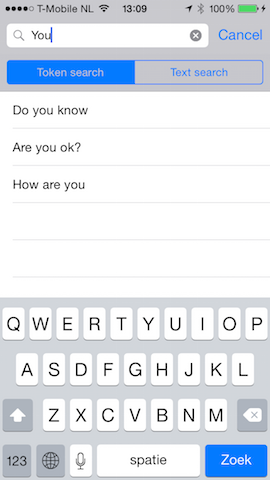
- A search window (async autocomplete) where you can search all chat messages using a tokenized or begiswith query
- It also has TestViewController.swift for an overview of the functionality
I'm looking for feedback. Please let me know if you want something changed or added to the library or the demo.
A picture says more than 1000 words
Here are screenshots of the included demo app chat functionality:



Documentation
Documentation is now available at cocoadocs.org
Main features of EVCloudKitDao:
- simple singleton access to your public or private database and containers (default and named)
- Object mapping: You do not have to parse from and to CKRecord (mapping is based on reflection, including system fields)
- Generic and simplified query handling
- Error handling (separate completionHandler and errorHandler code blocks)
- Storing CKReference objects
- Storing CKAsset objects
- Optionally auto continue reading from cursor (batch query)
- Organising subscription
- Handling incoming notifications
- (Re)setting the badge
Main features of EVCloudData:
- Use just one predicate for a query, subscription and processing incoming notifications.
- it's only one method call with a couple of callback events (optional which to use)
- it will store the fetched data collection in memory.
- notifications will update the data collections and call the appropriate events.
- local updates will also update the data collection and call the appropriate events
- since all data is processed all callback events will be executed on the mainQueue
- caching of the results to a file for speedy app restart. (You can set the caching strategy)
- Internal app notifications using NSNotificationCenter
Main features of EVglobal
- EVLog as a replacement for NSLog which will also output the file, function and line number.
Known issues (Swift limitations)
-
If you add a property to your object of type CKReference, then also add a property of type String for the RecordID.recordName. You could add a setter for populating both properties. Then if you query this using a NSPredicate, then query the string field and not the CKReference field. You have to do this because a NSPredicate works difrently for NSCloudkit than for an object. The EVCloudData class needs them to function in the same way. For a sample, see the Message class.
-
Optional objects properties can now be used. Optional type properties not. Swift is not able to do a .setValue forKey on an optional like Int? or Double? As a workaround for this you could use a NSNumber? This limitation is part of EVReflection
External components for the demo
The AppMessage demo is using the following components which can be installed using CocoaPods. See instructions below. Because of dependency compatibility the AppMessage demo requires Xcode 6.2 or later.
- EVReflection - Swift helper library with reflection functions
- SSASideMenu - A Swift implementation of RESideMenu
- JSQMessagesViewController - An elegant messages UI library
- JSQSystemSoundPlayer - A fancy Obj-C wrapper for iOS System Sound Services
- CRToast - A modern iOS toast view that can fit your notification needs
- UIImage-Resize - Category to add some resizing methods to the UIImage class, to resize it to a given CGSize — or fit in a CGSize keeping aspect ratio
- SwiftLocation - iOS CoreLocation Wrapper made in Swift
- UzysAssetsPickerController - Alternative UIImagePickerController , You can take a picture with camera and choose multiple photos and videos
- VIPhotoView - View a photo with simple and basic interactive gesture
- Async Syntactic sugar in Swift for asynchronous dispatches in Grand Central Dispatch
- PermissionScope - Intelligent iOS permissions UI and unified API
Besides these the dependency to EVCloudKitDao has been skipped by just using the classes directly
- EVCloudKitDao - Simplified access to Apple's CloudKit
Using EVCloudKitDao or EVCloudData in your own App
'EVCloudKitDao' is now available through the dependency manager CocoaPods. You do have to use cocoapods version 0.36. At this moment this can be installed by executing:
[sudo] gem install cocoapods
If you have installed cocoapods version 0.36 or later, then you can just add EVCloudKitDao to your workspace by adding the folowing 2 lines to your Podfile:
use_frameworks!
pod "EVCloudKitDao"
I have now moved on to Swift 2. If you want to use EVCloudKitDao with Swift 1.2, then get that version by using the podfile command:
use_frameworks!
pod 'EVReflection', :git => 'https://github.com/evermeer/EVReflection.git', :branch => 'Swift1.2'
pod 'SwiftTryCatch'
pod 'EVCloudKitDao', '~> 2.6'
Version 0.36 of cocoapods will make a dynamic framework of all the pods that you use. Because of that it's only supported in iOS 8.0 or later. When using a framework, you also have to add an import at the top of yo
Related Skills
node-connect
344.1kDiagnose OpenClaw node connection and pairing failures for Android, iOS, and macOS companion apps
frontend-design
96.8kCreate distinctive, production-grade frontend interfaces with high design quality. Use this skill when the user asks to build web components, pages, or applications. Generates creative, polished code that avoids generic AI aesthetics.
openai-whisper-api
344.1kTranscribe audio via OpenAI Audio Transcriptions API (Whisper).
qqbot-media
344.1kQQBot 富媒体收发能力。使用 <qqmedia> 标签,系统根据文件扩展名自动识别类型(图片/语音/视频/文件)。
