
Authbot
A service to enable web auth and login to a custom domain facilitated via a Telegram bot.
Install / Use
/learn @evanx/AuthbotREADME
authbot
A Telegram bot for auth and login to a web domain.
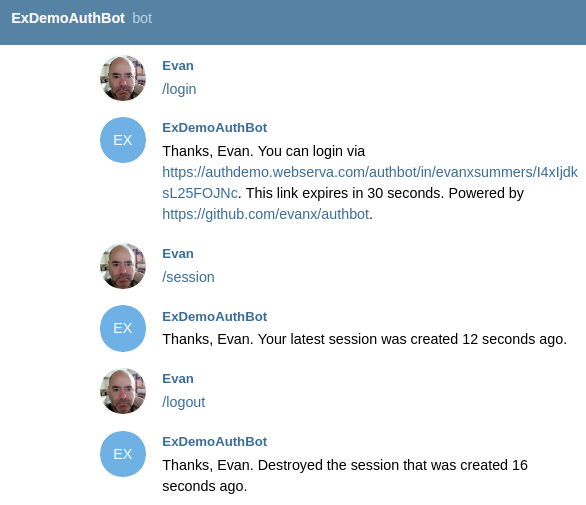
<img src="https://raw.githubusercontent.com/evanx/authbot/master/docs/images/readme/ab001-mobile2.jpg" width="360"/> <hr>This provides a relatively easy way to provide authentication and authorisation for any domain:
- no signup required, just use Telegram
- no email verification required, as you have the authentic Telegram username
- works great on mobile, use the Telegram app
- works great on desktop, use https://web.telegram.org
- minimal code required, just verify the session cookie via Redis
Deploy a bot to authenticate and authorise users for your own domains:
- create an auth bot for your domain e.g.
@adhocDomainAuthBotvia command/newbotto the Telegram@BotFather - configure and deploy this auth bot service on your domain for location
/authbot/e.g. using a Docker image - set the bot webhook via
api.telegram.orgto/authbot/webhook/ - as a user, send the command
/login- voila!
How it works:
- your authbot will reply to the user with a magic pending login link to itself e.g.
/authbot/login/${user}/${token} - the user clicks on that
/authbot/login/link in the chat with the authbot - the authbot HTTP handler for
/authbot/login/will create the session in Redis, set the session cookie on the HTTP response, and redirect to your landing page for auth'ed visitors e.g./auth - your site can verify the session cookie via Redis or HTTPS
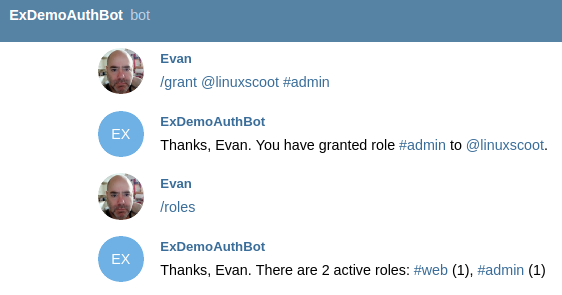
- the original authoritative (admin) Telegram username can authorise other users
Implementation
We use Koa:
async function startHttpServer() {
    api.post('/authbot/webhook/:secret', async ctx => {
        ctx.body = '';
        if (ctx.params.secret !== config.secret) {
            logger.debug('invalid', ctx.request.url);
        } else {
            await handleMessage(ctx.request.body);
        }
    });
    api.get('/authbot/login/:username/:token', async ctx => {
        await handleIn(ctx);
    });
    api.get('/authbot/logout', async ctx => {
        await handleOut(ctx);
    });
Additionally the following endpoint can allow session validation via HTTP:
if (config.sessionRoute) {
    api.get('/authbot-session/:username/:sessionId', async ctx => {
        await handleSession(ctx);
    });
}
where this location is deliberately different from /authbot/ so that it must be specifically allowed e.g. by your Nginx API gateway.
The /authbot/login/ HTTP handler will set the session cookie:
assert.equal(login.username, username, 'username');
assert.equal(login.token, token, 'token');
const sessionId = [token, generateToken(16)].join('_');
const sessionKey = [config.namespace, 'session', sessionId, 'h'].join(':');
const sessionListKey = [config.namespace, 'session', username, 'l'].join(':');
const session = Object.assign({}, login, {started: Date.now()});
const [hmset] = await multiExecAsync(client, multi => {
    multi.hmset(sessionKey, session);
    multi.expire(sessionKey, config.sessionExpire);
    multi.del(loginKey);
    multi.lpush(sessionListKey, sessionId);
    multi.ltrim(sessionListKey, 0, 3);
});
ctx.cookies.set('sessionId', sessionId, {maxAge: config.cookieExpire, domain: config.domain, path: '/'});
ctx.redirect(config.redirectAuth);
For demo purposes we also serve the following landing pages, which would ordinarily be served by the app:
if (config.demo) {
    api.get('/auth', async ctx => {
        await handleAuth(ctx);
    });
    api.get('/noauth', async ctx => {
        await handleNoAuth(ctx);
    });
    api.get('/', async ctx => {
        await handleHome(ctx);
    });
}
where /auth and /noauth are redirects from /authbot/login
The login is created in Redis by the Telegram bot, which provides the /authbot/login/ "magic link."
async function handleTelegramLogin(request) {
    const {username, name, chatId} = request;
    const token = generateToken(16);
    const loginKey = [config.namespace, 'login', username, 'h'].join(':');
    let [hmset] = await multiExecAsync(client, multi => {
        multi.hmset(loginKey, {token, username, name, chatId});
        multi.expire(loginKey, config.loginExpire);
    });
    if (hmset) {
        await sendTelegramReply(request, 'html', [
            `You can login via https://${[config.domain, 'authbot', 'login', username, token].join('/')}.`,
            `This link expires in ${config.loginExpire} seconds.`,
            `Powered by https://github.com/evanx/authbot.`
where a secret token is randomly generated for the "magic link."
function generateToken(length = 16) {
    const letters = 'ABCDEFGHIJKLMNOPQRSTUVWXYZ';
    const charset = '0123456789' + letters + letters.toLowerCase();
    return crypto.randomBytes(length).map(
        value => charset.charCodeAt(Math.floor(value * charset.length / 256))
    ).toString();
}
Config
The default configuration properties are hard-coded as follows:
const configDefault = {
    port: 8080,
    namespace: 'authbot',
    redisHost: '127.0.0.1',
    loginExpire: 30,
    sessionExpire: 300,
    cookieExpire: 60000,
    sendTimeout: 8000,
    redirectAuth: '/auth',
    redirectNoAuth: '/noauth',
    sessionRoute: true,
    loggerLevel: 'debug'
};
where namespace is used to prefix auth bot keys in Redis, for pending logins and active sessions.
The following declares meta information about further required configuration:
const configMeta = {
    domain: {
        description: 'HTTPS web domain to auth access',
        example: 'authdemo.webserva.com'
    },
    bot: {
        description: 'Telegram Bot name i.e. this authbot',
        example: 'ExAuthDemoBot',
        info: 'https://core.telegram.org/bots/api',
        hint: 'https://telegram.me/BotFather'
    },
    secret: {
        description: 'Telegram Bot secret',
        example: 'z7WnDUfuhtDCBjX54Ks5vB4SAdGmdzwRVlGQjWBt',
        info: 'https://core.telegram.org/bots/api#setwebhook',
        hint: 'https://github.com/evanx/random-base56'
    },
    token: {
        description: 'Telegram Bot token',
        example: '243751977:AAH-WYXgsiZ8XqbzcqME7v6mUALxjktvrQc',
        info: 'https://core.telegram.org/bots/api#authorizing-your-bot',
        hint: 'https://telegram.me/BotFather'
    },
    admin: {
        description: 'Authoritative Telegram username i.e. bootstrap admin user',
        example: 'evanxsummers',
        info: 'https://telegram.org'
    },
    hubRedis: {
        required: false,
        description: 'Remote redis for bot messages, especially for development',
        example: 'redis://localhost:6333',
        info: 'https://github.com/evanx/webhook-push'
    }
};
The config is populated from environment variables as follows:
const configKeys = [];
const missingConfigKeys = [];
const config = Object.keys(configMeta)
.concat(Object.keys(configDefault))
.reduce((config, key) => {
    if (process.env[key]) {
        assert(process.env[key] !== '', key);
        config[key] = process.env[key];
        configKeys.push(key);
    } else if (configFile && configFile[key]) {
        config[key] = configFile[key];
        configKeys.push(key);
    } else if (!configDefault[key] && configMeta[key].required !== false) {
        missingConfigKeys.push(key);
    }
    return config;
}, configDefault);
where we check that an environment variable is not empty, for safety sake.
npm start
If we start the service with missing config via environment variables, the following help is printed:
domain e.g. 'authdemo.webserva.com'
  "HTTPS web domain to auth access"
bot e.g. 'ExAuthDemoBot'
  "Telegram Bot name i.e. this authbot"
    see https://core.telegram.org/bots/api
    see https://telegram.me/BotFather
secret e.g. 'z7WnDUfuhtDCBjX54Ks5vB4SAdGmdzwRVlGQjWBt'
  "Telegram Bot secret"
    see https://core.telegram.org/bots/api#setwebhook
    see https://github.com/evanx/random-base56
token e.g. '243751977:AAH-WYXgsiZ8XqbzcqME7v6mUALxjktvrQc'
  "Telegram Bot token"
    see https://core.telegram.org/bots/api#authorizing-your-bot
    see https://telegram.me/BotFather
admin e.g. 'evanxsummers'
  "Authoritative Telegram username i.e. bootstrap admin user"
    see https://telegram.org
hubRedis e.g. 'redis://localhost:6333'
  "Remote hub for bot messages via Redis, especially for development"
    see https://github.com/evanx/webhook-push
Also it prints a npm start CLI using the example config properties:
domain='authdemo.webserva.com' \
bot='ExAuthDemoBot' \
secret='z7WnDUfuhtDCBjX54Ks5vB4SAdGmdzwRVlGQjWBt' \
token='243751977:AAH-WYXgsiZ8XqbzcqME7v6mUALxjktvrQc' \
admin='evanxsummers' \
hubRedis='redis://localhost:6333' \
npm start
where this help is generated from configMeta
Build application container
Let's build our application container:
docker build -t authbot https://github.com/evanx/authbot.git
where the image is named and tagged as authbot
Notice that the default Dockerfile is as follows:
FROM mhart/alpine-node
ADD package.json .
RUN npm install
ADD index.js .
ENV port 8080
EXPOSE 8080
CMD ["node", "--harmony", "index.js"]
Docker run
npm start with missing configs will print help including for Docker run, which you must edit for your environment
i.e. with your own domain, username, bot name, token, secret etc:
  docker run \
    --name authbot_test -d \
    --network host \
    -e NODE_ENV=test \
    -e domain='' \
    -e bot='' \
    -e secret='' \
    -e token='' \
    -e admin='evanxsummers' \
    authbot
