
Errbit
The open source error catcher that's Airbrake API compliant :ukraine:
Install / Use
/learn @errbit/ErrbitREADME
Errbit



The open source, self-hosted error catcher
Errbit is a tool for collecting and managing errors from other applications.
It is Airbrake API compliant, so you can just
point the airbrake gem to your Errbit server (see
howto).
Mailing List
Join the Google Group to receive updates and notifications.
Requirements
The list of requirements to install Errbit are:
- Ruby 4.0
- MongoDB >= 7.0
Installation
Note: This app is intended for people with experience deploying and maintaining Rails applications.
- Install MongoDB
git clone https://github.com/errbit/errbit.gitbundle installbundle exec rails errbit:bootstrapbundle exec rails server
Configuration
Errbit configuration is done entirely through environment variables. See configuration
Deployment
Notice Grouping
The way Errbit arranges notices into error groups is configurable. By default, Errbit uses the notice's error class, error message, complete backtrace, component (or controller), action and environment name to generate a unique fingerprint for every notice. Notices with identical fingerprints appear in the UI as different occurrences of the same error and notices with differing fingerprints are displayed as separate errors.
Changing the fingerprinter (under the "Config" menu) applies to all apps and
the change affects only notices that arrive after the change. If you want to
refingerprint old notices, you can run
bundle exec rails errbit:notice_refingerprint.
Since version 0.7.0, the notice grouping can be separately configured for each app (under the "edit" menu).
Managing apps
An Errbit app is a place to collect error notifications from your external application deployments.
See apps
Authentication
Configuring GitHub authentication
- Set
GITHUB_AUTHENTICATION=true - Register your instance of Errbit at https://github.com/settings/applications/new
If you host Errbit at errbit.example.com, you would fill in:
- After you have registered your app, set
GITHUB_CLIENT_IDandGITHUB_SECRETwith your app's Client ID and Secret key.
When you start your application, you should see the option to Sign in with GitHub on the Login page. You will also be able to link your GitHub profile to your user account on your Edit profile page.
If you have signed in with GitHub, or linked your GitHub profile, and you're working with an App that has a GitHub repo configured, then you will be able to create issues on GitHub. If you use another issue tracker, see Issue Trackers.
You can change the OAuth scope Errbit requests from GitHub by setting
GITHUB_ACCESS_SCOPE. The default ['repo'] is very permissive, but there are a
few others that could make sense for your needs:
GITHUB_ORG_IDis an optional environment variable you can set to your own GitHub organization id. If set, only users of the specified GitHub organization can log in to Errbit through GitHub. Errbit will provision accounts for new users.
Configuring Google authentication
- Set
GOOGLE_AUTHENTICATION=true - Register your instance of Errbit at https://console.developers.google.com/apis/api/plus/overview
If you host Errbit at errbit.example.com, you would fill in:
| Parameter | Value |
|--------------|----------------------------------------------------------------|
| URL | https://errbit.example.com |
| Callback URL | https://errbit.example.com/users/auth/google_oauth2/callback |
- After you have registered your app, set
GOOGLE_CLIENT_IDandGOOGLE_SECRETwith your app's Client ID and Secret key.
When you start your application, you should see the option to Sign in with Google on the Login page. You will also be able to link your Google profile to your user account on your Edit profile page.
Configuring LDAP authentication
- Set
ERRBIT_USER_HAS_USERNAME=true - Follow the devise_ldap_authenticatable setup instructions.
- Set
config.ldap_create_user = trueinconfig/initializers/devise.rb, this enables creating the users from LDAP, otherwise login will not work. - Create a new initializer (e.g.
config/initializers/devise_ldap.rb) and add the following code to enable ldap authentication in the User-model:
Errbit::Config.devise_modules << :ldap_authenticatable
- If you are authenticating by
username, you will need to set the user's email manually before authentication. You must add the following lines toapp/models/user.rb:
def ldap_before_save
  name = Devise::LDAP::Adapter.get_ldap_param(self.username, "givenName")
  surname = Devise::LDAP::Adapter.get_ldap_param(self.username, "sn")
  mail = Devise::LDAP::Adapter.get_ldap_param(self.username, "mail")

  self.name = (name + surname).join(" ")
  self.email = mail.first
end
- Now login with your user from LDAP, this will create a user in the database
- Open a
bundle exec rails consoleand set the admin flag for your user:
user = User.first
user.admin = true
user.save!
Upgrading
When upgrading Errbit, please run:
git pull origin main # assuming origin is the github.com/errbit/errbit repo
bundle install
bundle exec rails db:migrate
bundle exec rails db:mongoid:remove_undefined_indexes
bundle exec rails db:mongoid:create_indexes
bundle exec rails assets:precompile
This will ensure that your application stays up to date with any schema changes.
There are additional steps if you are upgrading from a version prior to v0.4.0.
User information in error reports
Errbit can now display information about the user who experienced an error. This gives you the ability to ask the user for more information, and let them know when you've fixed the bug.
The Airbrake gem will look for current_user or current_member. By default,
it will only send the id of the user, to specify other attributes you can
set config.user_attributes. See the Airbrake wiki for more information.
If user information is received with an error report, it will be displayed under the User Details tab:
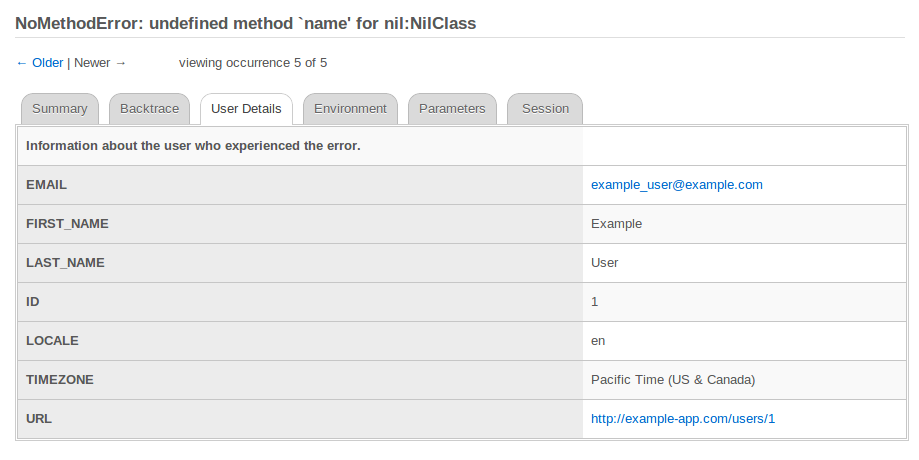
This tab will be hidden if no user information is available.
Configuration
https://github.com/airbrake/airbrake
Javascript error notifications
You can log javascript errors that occur in your application by including the airbrake-js javascript library.
Install airbrake-js according to the docs at and set your project and host as soon as you want to start reporting errors. Then follow along with the documentation at https://github.com/airbrake/airbrake-js/blob/master/README.md
var airbrake = new airbrakeJs.Client({
  projectId: 'ERRBIT API KEY',
  projectKey: 'ERRBIT API KEY (again)',
  reporter: 'xhr',
  remoteConfig: false,
  host: 'https://myerrbit.com'
});
Plugins and Integrations
You can extend Errbit by adding Ruby gems and plugins which are typically gems.
It's nice to keep track of which gems are core Errbit dependencies and which
gems are your own dependencies. If you want to add gems to your own Errbit,
place them in a new file called UserGemfile and Errbit will treat that file
as an additional Gemfile. If you want to use errbit_jira_plugin, just add it
to UserGemfile:
echo "gem 'errbit_jira_plugin'" > UserGemfile
bundle install
Issue Trackers
Each issue tracker integration is implemented as a gem that depends on [errbit_plugin](https://github.c
Related Skills
tmux
334.5kRemote-control tmux sessions for interactive CLIs by sending keystrokes and scraping pane output.
blogwatcher
334.5kMonitor blogs and RSS/Atom feeds for updates using the blogwatcher CLI.
prd
Raito Bitcoin ZK client web portal.
product
Cloud-agnostic Kubernetes infrastructure with Terraform & Helm for homelabs, edge, and production clusters.
