
CMS
CMS and Mobile App Maker. Shovel apps is a web software that lets you create awesome mobile applications for Android, iOS and Windows Phone, with different designs for each platform with the web technologies that you love: HTML, CSS and JavaScript. The whole platform and extensions are developed using Node.JS (JavaScript) and Web Components. Hybrid mobile apps feel like native ones, but are easier to maintain and scale. You have full access to native functionality using generic JavaScript methods (Camera, SD Card, microphone, contacts, etc.).
Install / Use
/learn @engmsaleh/CMSREADME
##Shovel apps CMS
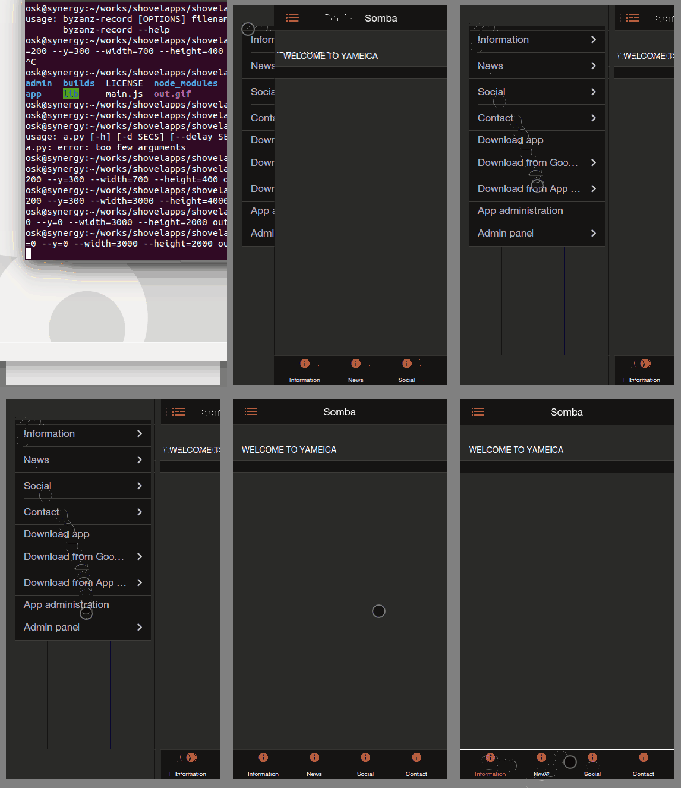
Shovel apps CMS is a small full stack hybrid app. It's a mobile oriented web app with a backend CMS that allows you to configure the app frontend and backend services. From the CMS, you can request Shovel apps platform for a mobile app for iOS 7.x , Windows Phone 8.x and Android 4.x platforms.
- What sorcery is this?
- Installation
- Running
- Rest API Endpoints
- License
- Development
- Plugins
- Roadmap
- You can git clone it and start it as any other node project.
- Customized
- Use plugins that connect your appt to the Shovel apps Platform
- Build Android binariesfiles from the admin CMS
You could think about Shovelapps CMS as A pluggable CMS frontend and backend for mobile apps.
##What does Shovel apps CMS offer?
- A consistent CSS based UI. You don't have to fight with margins, responsivenes and stuff. You use the components in the templates and that's it.
- Easily customizable templates.
- The template is an HTML file. It uses custom elements as
<navbar></navbar><content-block></content-block>,<tab-bar></tab-bar>, etc for simplifying the definition of the app views structure. - The custom elements are defined as a wrapper/facade to simple DIVs with some CSS classes applied
- A backend CMS that lets you defin data objects that the mobile app will consume.
- A plugin mechanism in which you can define plugins in the form of new HTML custom elements attached to custom functionality.
##What sorcery is this?
In brief
- As soon as you
npm startyou get a mobile, responsive iOS7 look-alike web app athttp://localhost:3000. * This is how you final mobile app looks like* - This web app can compile itself to an hybrid mobile app using Shovel apps platform backend service transparently.
- This app uses a local backend (
http://localhost:3000/admin) for its own config and resources. - This app gives you access to a building system that lets you download this app as a mobile binary.
##Installation
You may download or clone the Github hosted source. You get the same code.
###Downloading
or on the command line
$ wget https://github.com/oskosk/shovelapps-CMS/archive/master.zip
###Clone using git
# clone latest release
$ git clone https://github.com/shovelapps/shovelapps-CMS
## Install Shovel CMS dependencies
$ npm install
###Running
$ npm start
We recommend to install nodemon and
# Install node package globally
$ sudo npm install -g nodemon
# run the Shovel apps CMS with
$ nodemon` # instead of `npm start`
Folder structure
Once cloned (or unzipped) you get:
├── admin
│   ├── fonts
│   ├── img
│   └── lib
├── builds
├── lib
├── plugins
├── templates
│   └── starter
└── main.js
Components
Plugins
###Default plugins
###Plugin Interface
plugins/shovelapps-form
API endpoints
GET /
HTML render of the app
GET /admin
This server the Shovel CMS admin backend.
REST API endpoints
POST /api/1/user
Add user
GET /api/1/app/:id/
Get app
GET /api/1/app/
Javascript client API
Internal NodeJS API
##Roadmap
Shovel CMS Frontend App
- Individual styles for each platform (WP8, Android 4.x and iOS >=7).
- Links to Google Play download in left CMS.
- Links to App store download in left CMS.
- Links to Google Play download in left CMS.
- Read plugins.
- Define plugin file structure.
- Non-scalable Android building node.
- Android building nodes.
- Non-scalable iOS building node .
- iOS building nodes.
- Non-scalable Windows Phone building node.
- Windows Phone building nodes.
- Render and cache the frontend (as sailsjs does).
- Implement data binding (maybe via Rivets.js) and attach the binding to socket.io emissions.
###Shovel CMS Admin Backend
- Use memory storage
- Use config files
- Use disk storage
- Use mongodb storage
- Add file based configuration
- Let the user define Data Models
- Let the user define pages inside templated views
License
Shovel apps CMS is distributed as free software under the MIT License.
Copyright (c) 2014 Shovel Apps Inc.
Permission is hereby granted, free of charge, to any person obtaining a copy of this software and associated documentation files (the "Software"), to deal in the Software without restriction, including without limitation the rights to use, copy, modify, merge, publish, distribute, sublicense, and/or sell copies of the Software, and to permit persons to whom the Software is furnished to do so, subject to the following conditions:
The above copyright notice and this permission notice shall be included in all copies or substantial portions of the Software.
THE SOFTWARE IS PROVIDED "AS IS", WITHOUT WARRANTY OF ANY KIND, EXPRESS OR IMPLIED, INCLUDING BUT NOT LIMITED TO THE WARRANTIES OF MERCHANTABILITY, FITNESS FOR A PARTICULAR PURPOSE AND NONINFRINGEMENT. IN NO EVENT SHALL THE AUTHORS OR COPYRIGHT HOLDERS BE LIABLE FOR ANY CLAIM, DAMAGES OR OTHER LIABILITY, WHETHER IN AN ACTION OF CONTRACT, TORT OR OTHERWISE, ARISING FROM, OUT OF OR IN CONNECTION WITH THE SOFTWARE OR THE USE OR OTHER DEALINGS IN THE SOFTWARE.
Related Skills
diffs
341.6kUse the diffs tool to produce real, shareable diffs (viewer URL, file artifact, or both) instead of manual edit summaries.
clearshot
Structured screenshot analysis for UI implementation and critique. Analyzes every UI screenshot with a 5×5 spatial grid, full element inventory, and design system extraction — facts and taste together, every time. Escalates to full implementation blueprint when building. Trigger on any digital interface image file (png, jpg, gif, webp — websites, apps, dashboards, mockups, wireframes) or commands like 'analyse this screenshot,' 'rebuild this,' 'match this design,' 'clone this.' Skip for non-UI images (photos, memes, charts) unless the user explicitly wants to build a UI from them. Does NOT trigger on HTML source code, CSS, SVGs, or any code pasted as text.
openpencil
1.9kThe world's first open-source AI-native vector design tool and the first to feature concurrent Agent Teams. Design-as-Code. Turn prompts into UI directly on the live canvas. A modern alternative to Pencil.
HappyColorBlend
HappyColorBlendVibe Project Guidelines Project Overview HappyColorBlendVibe is a Figma plugin for color palette generation with advanced tint/shade blending capabilities. It allows designers to
