
Rpieasy
Easy MultiSensor device based on Raspberry PI
Install / Use
/learn @enesbcs/RpieasyREADME


To support the development you can:
- Add Python code by Pull Request
RPIEasy
Easy MultiSensor device based on Raspberry PI
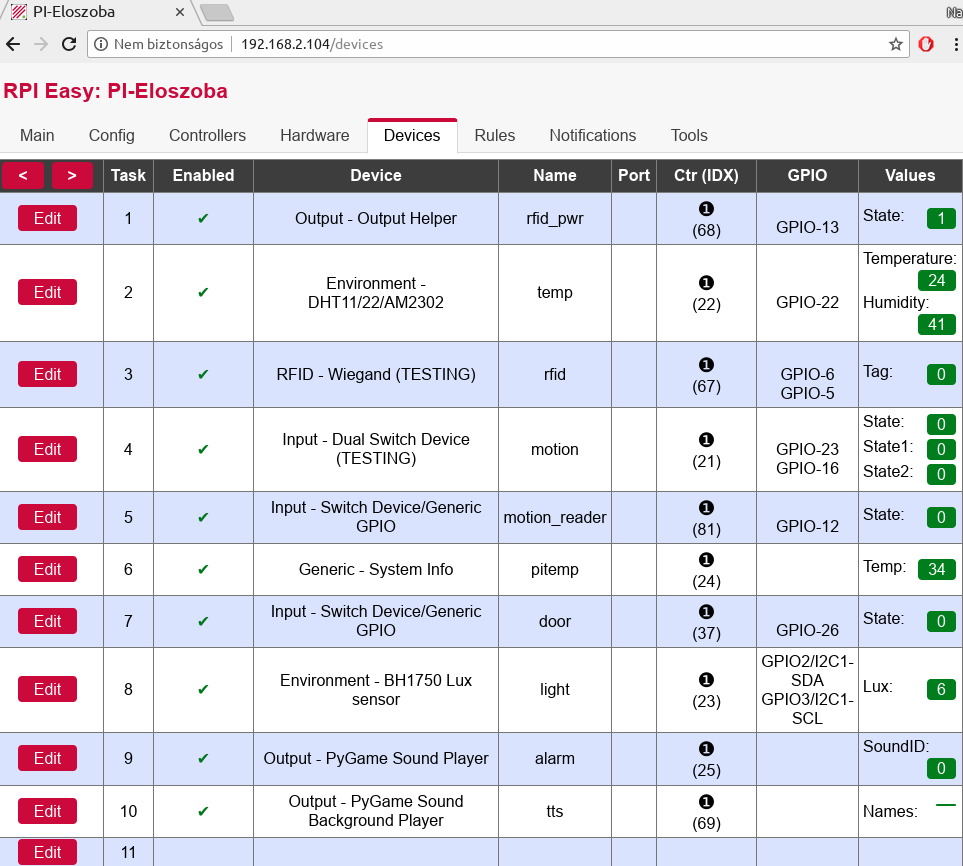
Based on Python 3.x and Raspberry PI (Raspbian Linux) this project tries to mimic the magnificent ESPEasy project functions. Main goal is to create a multisensor device, that can be install and setup quickly.
Requirements
- Debian/Ubuntu/Raspbian Linux
- Python3
Tested with Raspberry Pi Zero W/Raspbian Buster and PC/Ubuntu 20.04. (may work with other Debian/Ubuntu derivatives) For obvious reasons GPIO based devices needs GPIO support, mainly targeted for Raspberry Pi. However experimental Orange Pi, USB FTDI and Rock Pi S GPIO support also added for testing purposes. Some basic devices (dummy, system informations...) and controllers will work on a normal PC.
Installation
sudo apt install git
git clone https://github.com/enesbcs/rpieasy.git
cd rpieasy
sudo ./preinstall.sh
Other dependencies can be reached and installed through the webGUI (See Hardware page) after starting with:
sudo ./RPIEasy.py
Update
There are an external updater and command line manager script by haraldtux:
https://github.com/haraldtux/rpieasy-update
Or you can use the integrated updater at Tools->System Updates, but be warned: save your "data" directory before update if it is containing data that you can't or won't readd manually!
FAQ
In case of questions or problems:
Special Thanks
I would especially like to thank the two biggest supporter, happytm and budman1758 for their ideas and donations which made it possible to acquire a lot of IoT sensors/devices. :)
Related Skills
node-connect
336.5kDiagnose OpenClaw node connection and pairing failures for Android, iOS, and macOS companion apps
claude-opus-4-5-migration
82.9kMigrate prompts and code from Claude Sonnet 4.0, Sonnet 4.5, or Opus 4.1 to Opus 4.5
frontend-design
82.9kCreate distinctive, production-grade frontend interfaces with high design quality. Use this skill when the user asks to build web components, pages, or applications. Generates creative, polished code that avoids generic AI aesthetics.
model-usage
336.5kUse CodexBar CLI local cost usage to summarize per-model usage for Codex or Claude, including the current (most recent) model or a full model breakdown. Trigger when asked for model-level usage/cost data from codexbar, or when you need a scriptable per-model summary from codexbar cost JSON.
