Pyobject
A multifunctional utility tool for operating internal python objects, compatible with nearly all Python 3 versions.
Install / Use
/learn @ekcbw/PyobjectREADME
<span class="badge-placeholder">


pyobject - A multifunctional all-in-one utility tool for managing internal Python objects, compatible with nearly all Python 3 versions and all platforms (Windows, Linux, macOS, etc.).
[English | 中文]
Submodules:
pyobject.__init__ - Displays and outputs attribute values of Python objects.
pyobject.browser - Provides a visual interface to browse Python objects using tkinter.
pyobject.code - Provides tools for manipulating Python native bytecode.
pyobject.search - Implements the utility for locating the path to a specific object.
pyobject.objproxy - Implement a generic object proxy that can replace any Python object, including modules, functions, and classes
pyobject.pyobj_extension - A C extension module offering functions to manipulate low-level Python objects.
Functions:
describe(obj, level=0, maxlevel=1, tab=4, verbose=False, file=sys.stdout):
Printing all attributes of an object in attribute: value format for debugging purpose. The alias is desc().
- maxlevel: The depth of attribute levels to print.
- tab: Number of spaces for indentation, default is 4.
- verbose: Boolean indicating whether to print special methods (e.g.,
__init__). - maxlength: The maximum output length of one object.
- ignore_funcs: If set to True, methods or functions of the object will not be output.
- file: A file-like object for output.
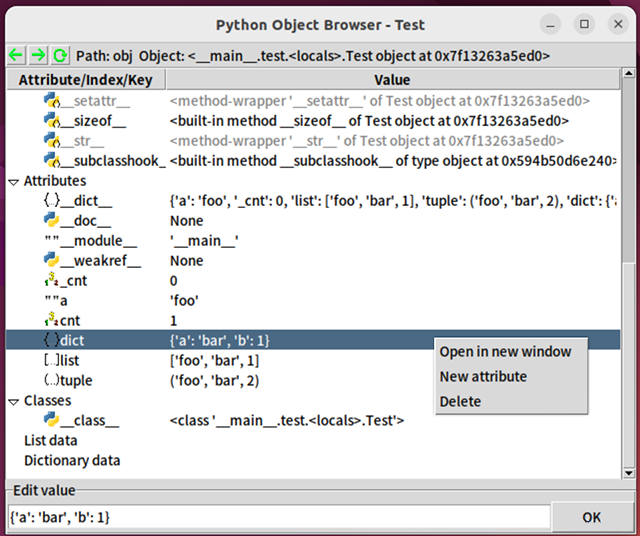
browse(object, verbose=False, name='obj'):
Browse any Python objects in a GUI using tkinter.
- verbose: Same as in
describe(), whether to print special methods.
The GUI of browse() function is:
bases(obj, level=0, tab=4):
Prints base classes and the inheritance order of an object.
- tab: Number of spaces for indentation, default is 4.
Functions for searching objects:
make_list(start_obj, recursions=2, all=False):
Creates a list of objects without duplicates.
- start: The object to start searching from.
- recursion: Number of recursions.
- all: Whether to include special attributes (e.g.,
__init__) in the list.
make_iter(start_obj, recursions=2, all=False):
Similar to make_list, but creates an iterator, which may contain duplicates.
search(obj, start, recursions=3, search_str=False):
Searches for objects starting from a specified starting point. For example, search(os, sys, 3) returns results like ["sys.modules['site'].os", "sys.modules['os']", ...].
- obj: The object to search for.
- start: The starting object.
- recursion: Number of recursions.
- search_str: Whether to search substrings within strings.
Class: pyobject.Code
The Code class provides a wrapper for Python bytecode objects to manipulate them.
Python's internal bytecode object, CodeType (e.g., func.__code__), is immutable. The Code class offers a mutable bytecode object and a set of methods to simplify operations on the underlying bytecode.
Unlike Java bytecode, Python bytecode is not cross-version compatible. Bytecode generated by different versions of the Python interpreter is incompatible.
The Code class provides a universal interface for bytecode, supporting all Python versions from 3.6 to 3.14 (including PyPy's .pyc format), simplifying complex version compatibility issues.
Constructor (def __init__(self, code=None))
The Code class can be initialized with an existing CodeType object or another Code instance. If no argument is provided, a default CodeType object is created.
Attributes
_code: The internal bytecode of the currentCodeobject. Useexec(c._code)orexec(c.to_code())instead of directly usingexec(c).
The following are attributes of Python's built-in bytecode (also attributes of the Code object). While Python's internal CodeType bytecode is immutable and these attributes are read-only, the Code object is mutable, meaning these attributes can be modified:
co_argcount: The number of positional arguments (including those with default values).co_cellvars: A tuple containing the names of local variables referenced by nested functions.co_code: Abytesobject representing the sequence of bytecode instructions, storing the actual binary bytecode.co_consts: A tuple containing the literals used by the bytecode.co_filename: The filename of the source code being compiled.co_firstlineno: The first line number of the source code corresponding to the bytecode. Used internally by the interpreter in combination withco_lnotabto output precise line numbers in tracebacks.co_flags: An integer encoding multiple flags used by the interpreter.co_freevars: A tuple containing the names of free variables.co_kwonlyargcount: The number of keyword-only arguments.co_lnotab: A string encoding the mapping of bytecode offsets to line numbers (replaced byco_linetablein Python 3.10).co_name: The name of the function/class corresponding to the bytecode.co_names: A tuple containing the names used by the bytecode.co_nlocals: The number of local variables used by the function (including arguments).co_stacksize: The stack size required to execute the bytecode.co_varnames: A tuple containing the names of local variables (starting with argument names).
Attributes introduced in Python 3.8 and later:
co_posonlyargcount: The number of positional-only arguments, introduced in Python 3.8.co_linetable: Line number mapping data, introduced in Python 3.10 as a replacement forco_lnotab.co_exceptiontable: Exception table data, introduced in Python 3.11.co_qualname: The qualified name of the bytecode, introduced in Python 3.11.
Methods
Core Methods
exec(globals_=None, locals_=None): Executes the code object within the provided global and local scope dictionaries.eval(globals_=None, locals_=None): Executes the code object within the provided global and local scope dictionaries and returns the result.copy(): Creates a copy of theCodeobject and returns the duplicate.to_code(): Converts theCodeinstance back to a built-inCodeTypeobject, equivalent toc._code.to_func(globals_=None, name=None, argdefs=None, closure=None, kwdefaults=None): Converts the code object into a Python function. The parameters are the same as those used when instantiating Python's built-inFunctionType.get_flags(): Returns a list of flag names for theco_flagsattribute, e.g.,["NOFREE"].get_sub_code(name): Searches for sub-code objects (e.g., functions or class definitions) in theco_constsattribute. This method does not perform recursive searches. Returns the foundCodeobject or raises aValueErrorif not found.
Serialization
to_pycfile(filename): Dumps the code object into a.pycfile using themarshalmodule.from_pycfile(filename): Creates aCodeinstance from a.pycfile.from_file(filename): Creates aCodeinstance from a.pyor.pycfile.pickle(filename): Serializes theCodeobject into a pickle file.
Debugging and Inspection
show(*args, **kw): Internally callspyobject.descto display the attributes of the code object. The parameters are the same as those used indesc().info(): Internally callsdis.show_codeto display basic information about the bytecode.dis(*args, **kw): Calls thedismodule to output the disassembly of the bytecode, equivalent todis.dis(c.to_code()).decompile(version=None, *args, **kw): Calls theuncompyle6library to decompile the code object into source code. (Theuncompyle6library is optional when installing thepyobjectpackage.)
Factory Functions
fromfunc(function): Creates aCodeinstance from a Python function object, equivalent toCode(func.__code__).fromstring(string, mode='exec', filename=''): Creates aCodeinstance from a source code string. The parameters are the same as those used in the built-incompilefunction, which is called internally.
Compatibility Details
- Attribute
co_lnotab: In Python 3.10 and later, attempts to set theco_lnotabattribute will automatically be converted into setting theco_linetableattribute.
Example usage: (excerpted from the doctest):
>>> def f():print("Hello")
>>> c=Code.fromfunc(f) # or c=Code(f.__code__)
>>> c.co_consts
(None, 'Hello')
>>> c.co_consts=(None, 'Hello World!')
>>> c.exec()
Hello World!
>>>
>>> # Save to pickle files
>>> import os,pickle
>>> temp=os.getenv('temp')
>>> with open(os.path.join(temp,"temp.pkl"),'wb') as f:
...     pickle.dump(c,f)
...
>>> # Execute bytecodes from pickle files
>>> f=open(os.path.join(temp,"temp.pkl"),'rb')
>>> pickle.load(f).to_func()()
Hello World!
>>> # Convert to pyc files and import them
>>> c.to_pycfile(os.path.join(temp,"temppyc.pyc"))
>>> sys.path.append(temp)
>>> import temppyc
Hello World!
>>> Code.from_pycfile(os.path.join(temp,"temppyc.pyc")).exec()
Hello World!
Object Proxy Classes ObjChain and ProxiedObj
pyobject.objproxy is a powerful tool for proxying any other object and generating the code that calls the object. It is capable of recording detailed access and call history of the object.
ObjChain is a class encapsulation used to manage multiple ProxiedObj objects, where ProxiedObj is a class that acts as a proxy to other objects.
Example usage:
from pyobject import ObjChain

chain = ObjChain(export_at