
Ponte
Ponte Project
Install / Use
/learn @eclipse-archived/PonteREADME
Ponte

Ponte is a multi-transport Internet of Things / Machine to Machine broker. As the current state it supports MQTT and REST APIs over HTTP and CoAP.
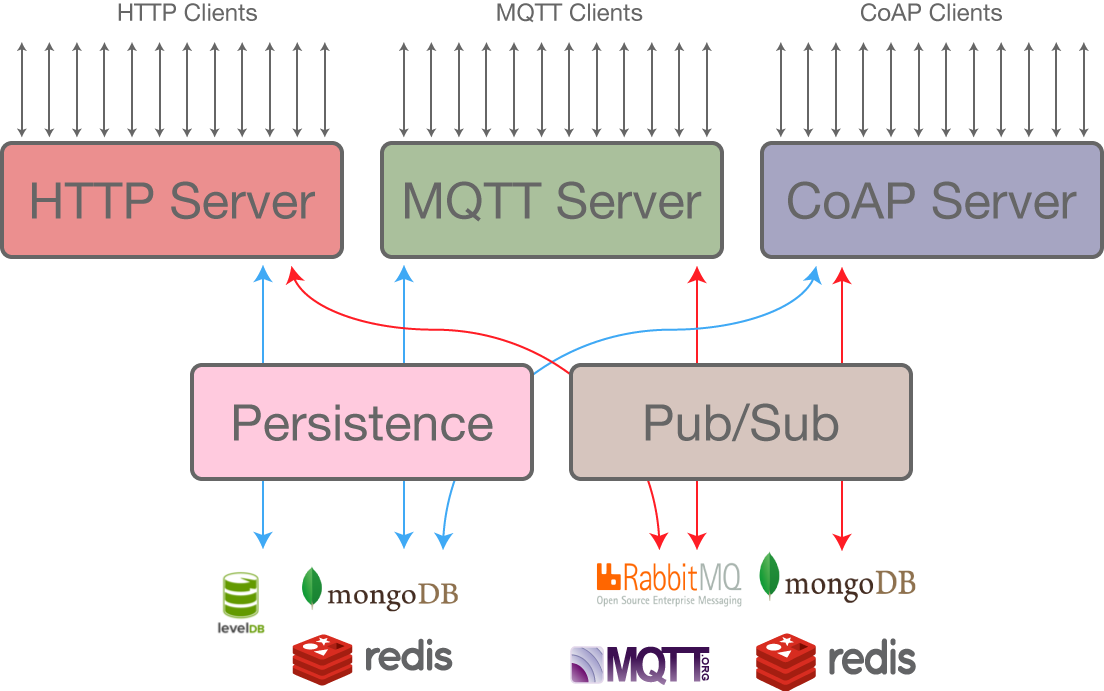
Ponte is under active development, but it should work :). If you plan to use Ponte in production let us know, we'll be more than happy to help you getting started and solve any issue you'll find out.
A test instance of ponte is available at ponte.eclipse.org, on HTTP, MQTT and CoAP standard ports.
Report bugs at the Eclipse Bugzilla and join the mailing list.

Installation
Ponte is a node.js application, so it needs node.js to run. The currently recommended version is node 4.3.1, which is the Longtime Support Version. Ponte is tested against versions 0.12, 4.3.1 and 5. Attention: you should currently not use ponte with node 5.7
$ npm install ponte bunyan -g
$ ponte -v | bunyan
Then you can connect to it with your preferred MQTT, CoAP or HTTP client.
Command Line Options
$ ./bin/ponte --help

  Usage: ponte [options]

  Options:

    -h, --help           output usage information
    -V, --version        output the version number
    -m, --mqtt-port <n>  the mqtt port to listen to
    -p, --http-port <n>  the http port to listen to
    -a, --coap-port <n>  the coap port to listen to
    --host <host>        the host to listen to
    --coap-host <host>   the host to listen to for coap requests
    --mqtt-host <host>   the host to listen to for mqtt requests
    --http-host <host>   the host to listen to for http requests
    -d, --db <path>      the path were to store the database
    -c, --config <c>     the config file to use (override every other option)
    -v, --verbose        set the bunyan log to INFO
    --very-verbose       set the bunyan log to DEBUG
Usage Example
Start ponte:
$ ponte -v | bunyan
Publishing from HTTP to MQTT
Publish from HTTP:
$ curl -X PUT -d 'world' http://localhost:3000/resources/hello
The messages from HTTP are retained, which means that are sent to every new subscriber.
Subscribe using mosquitto_sub (mosquitto):
$ mosquitto_sub -t "hello" -v
hello world
Publishing from MQTT to HTTP
In order to publish a message that can be read from HTTP,
a MQTT client needs to set the retain flag.
This is how it is done using mosquitto_pub:
$ mosquitto_pub -t hello-from-mqtt -m "world" -r
Reading the published value is an HTTP GET away:
$ curl http://localhost:3000/resources/hello-from-mqtt
world
Publishing from CoAP to MQTT
You can send CoAP messages from the command line using coap-cli In the following example we do a CoAP PUT to a resource:
$ echo -n 'world' | coap put coap://localhost/r/hello
Subscribe using mosquitto_sub (mosquitto):
$ mosquitto_sub -t "hello" -v
hello world
Publishing MQTT to CoAP
In order to publish a message that can be read from CoAP,
a MQTT client needs to set the retain flag.
This is how it is done using mosquitto_pub:
$ mosquitto_pub -t hello-from-mqtt -m "world" -r
In order to receive the live updates with CoAP, we need to use the observe switch:
$ coap -o coap://localhost/r/hello-from-mqtt
Embedding
Ponte can be run in embbedded mode, by listening to specific events:
var ponte = require("ponte");
var opts = {
  logger: {
    level: 'info'
  },
  http: {
    port: 3000 // tcp
  },
  mqtt: {
    port: 3001 // tcp
  },
  coap: {
    port: 3000 // udp
  },
  persistence: {
    type: 'level',
    path: './db'
  }
};
var server = ponte(opts);

server.on("updated", function(resource, buffer) {
  console.log("Resource Updated", resource, buffer);
});

// Stop the server after 1 minute
setTimeout(function() {
  server.close(function() {
    console.log("server stopped");
  });
}, 60 * 1000);
Configuration
Configuration with MongoDB
Ponte can be run on top of MongoDB with the following configuration:
module.exports = {
  persistence: {
    // same as http://mcollina.github.io/mosca/docs/lib/persistence/mongo.js.html
    type: "mongo",
    url: "mongodb://localhost:27017/ponte"
  },
  broker: {
    // same as https://github.com/mcollina/ascoltatori#mongodb
    type: "mongo",
    url: "mongodb://localhost:27017/ponte"
  },
  logger: {
    level: 30, // or 20 or 40
    name: "MongoPonte"
  }
};
Launch it with $ ponte -c config.js.
Configuration with Redis
Ponte can be run on top of Redis with the following configuration:
module.exports = {
  persistence: {
    // same as http://mcollina.github.io/mosca/docs/lib/persistence/redis.js.html
    type: "redis",
    host: "localhost"
  },
  broker: {
    // same as https://github.com/mcollina/ascoltatori#redis
    type: "redis",
    host: "localhost"
  },
  logger: {
    level: 20,
    name: "Config Test Logger"
  }
};
Launch it with $ ponte -c config.js.
Configuration with MQTT and Redis
Ponte can be run on top of MQTT broker while using Redis (or similarly MongoDB) with the following configuration:
module.exports = {
  persistence: {
    // same as http://mcollina.github.io/mosca/docs/lib/persistence/redis.js.html
    type: "redis",
    host: "localhost"
  },
  broker: {
    // same as https://github.com/mcollina/ascoltatori#mqtt
    type: "mqtt",
    port: "2883",
    host: "localhost"
  },
  logger: {
    level: 20,
    name: "Config Test Logger"
  }
};
Configuration with authentication and authorization callbacks
module.exports = {
  coap: {
    /**
     * @param {Object} req The incoming message @link https://github.com/mcollina/node-coap#incoming
     * @param {Function} callback The callback function. Has the following structure: callback(error, authenticated, subject)
     */
    authenticate: function(req, callback) {
      // Examples:
      //   Error:             callback(error);
      //   Authenticated:     callback(null, true, { username: 'someone' });
      //   Not authenticated: callback(null, false);
    },
    /**
     * @param {Object} subject The subject returned by the authenticate function
     * @param {string} topic The topic
     * @param {Function} callback The callback function. Has the following structure: callback(error, authorized)
     */
    authorizeGet: function(subject, topic, callback) {
      // Examples:
      //   Error:          callback(error);
      //   Authorized:     callback(null, true);
      //   Not authorized: callback(null, false);
    },
    /**
     * @param {Object} subject The subject returned by the authenticate function
     * @param {string} topic The topic
     * @param {Buffer} payload The payload
     * @param {Function} callback The callback function. Has the following structure: callback(error, authorized)
     */
    authorizePut: function(subject, topic, payload, callback) {
      // Examples:
      //   Error:          callback(error);
      //   Authorized:     callback(null, true);
      //   Not authorized: callback(null, false);
    }
  },
  http: {
    /**
     * @param {Object} req The request object
     * @param {Function} callback The callback function. Has the following structure: callback(error, authenticated, subject)
     */
    authenticate: function(req, callback) {
      // See coap.authenticate
    },
    /**
     * @param {Object} subject The subject returned by the authenticate function
     * @param {string} topic The topic
     * @param {Function} callback The callback function. Has the following structure: callback(error, authorized)
     */
    authorizeGet: function(subject, topic, callback) {
      // See coap.authorizeGet
    },
    /**
     * @param {Object} subject The subject returned by the authenticate function
     * @param {string} topic The topic
     * @param {string} payload The payload
     * @param {Function} callback The callback function. Has the following structure: callback(error, authorized)
     */
    authorizePut: function(subject, topic, payload, callback) {
      // See coap.authorizePut
    }
  },
  mqtt: {
    /**
     * @link https://github.com/mcollina/mosca/wiki/Authentication-&-Authorization
     */
    authenticate: function(client, username, password, callback) {
      // ...
    },
    authorizePublish: function(client, topic, payload, callback) {
      // ...
    },
    authorizeSubscribe: function(client, topic, callback) {
      // ...
    }
  }
}
Launch it with $ ponte -c config.js.
Pub/Sub Brokers
Ponte is based on Ascoltatori, so it supports the same backends:
- RabbitMQ and all implementations of the AMQP protocol.
- Redis, the fabulous key/value store by @antirez.
- Mosquitto and all implementations of the MQTT protocol.
- MongoDB, the documental NoSQL that is revolutionizing how web apps are built.
- ZeroMQ without a central broker, so Ascoltatori can also be used in a P2P fashion.
Persistence
Ponte requires a pe
