
Llmgraph
Create knowledge graphs with LLMs
Install / Use
/learn @dylanhogg/LlmgraphREADME
llmgraph





Create knowledge graphs with LLMs.

llmgraph enables you to create knowledge graphs in GraphML, GEXF, and HTML formats (generated via pyvis) from a given source entity Wikipedia page. The knowledge graphs are generated by extracting world knowledge from ChatGPT or other large language models (LLMs) as supported by LiteLLM.
For a background on knowledge graphs see a youtube overview by Computerphile
Features
- Create knowledge graphs, given a source entity.
- Uses ChatGPT (or another specified LLM) to extract world knowledge.
- Generate knowledge graphs in HTML, GraphML, and GEXF formats.
- Many entity types and relationships supported by customised prompts.
- Cache support to iteratively grow a knowledge graph, efficiently.
- Outputs
total tokensused to understand LLM costs (even though a default run is only about 1 cent). - Customisable model (default is OpenAI
gpt-5-minifor speed and cost).
Installation
You can install llmgraph using pip, ideally into a Python virtual environment:
pip install llmgraph
Alternatively, checkout an example notebook that uses llmgraph and you can run directly in Google Colab.
Example Output
In addition to GraphML and GEXF formats, an HTML pyvis physics enabled graph can be viewed:
Artificial Intelligence example
 <sub>Generate above machine-learning graph:<br />
llmgraph machine-learning "https://en.wikipedia.org/wiki/Artificial_intelligence" --levels 4
<br />View entire graph: <a target="_blank" href="https://blog.infocruncher.com/html/llmgraph/machine-learning_artificial-intelligence_v1.0.0_level4_fully_connected.html">machine-learning_artificial-intelligence_v1.0.0_level4_fully_connected.html</a></sub>
llmgraph Usage
Example Usage
The example above was generated with the following command, which requires an entity_type and a quoted entity_wikipedia souce url:
llmgraph machine-learning "https://en.wikipedia.org/wiki/Artificial_intelligence" --levels 3
This example creates a 3 level graph, based on the given start node Artificial Intelligence.
By default OpenAI is used and you will need to set an environment variable 'OPENAI_API_KEY' prior to running. See the OpenAI docs for more info. The total tokens used is output as the run progresses. For reference this 3 level example used a total of 7,650 gpt-5-mini tokens, which is less than 2 cents as of Oct 2025.
You can also specify a different LLM provider, including running with a local ollama model. You should be able to specify anything supported by LiteLLM as described here: https://docs.litellm.ai/docs/providers. Note that the prompts to extract related entities were tested with OpenAI and may not work as well with other models.
Local ollama/llama2 model example:
llmgraph machine-learning "https://en.wikipedia.org/wiki/Artificial_intelligence" --levels 3 --llm-model ollama/llama2 --llm-base-url http://localhost:<your_port>
The entity_type sets the LLM prompt used to find related entities to include in the graph. The full list can be seen in prompts.yaml and include the following entity types:
automobilebookcomputer-gameconcepts-generalconcepts-sciencecreative-generaldocumentaryfoodmachine-learningmoviemusicpeople-historicalpodcastsoftware-engineeringtv
Required Arguments
entity_type(TEXT): Entity type (e.g. movie)entity_wikipedia(TEXT): Full Wikipedia link to the root entity
Optional Arguments
--entity-root(TEXT): Optional root entity name override if different from the Wikipedia page title [default: None]--levels(INTEGER): Number of levels deep to construct from the central root entity [default: 2]--max-sum-total-tokens(INTEGER): Maximum sum of tokens for graph generation [default: 200000]--output-folder(TEXT): Folder location to write outputs [default: ./_output/]--llm-model(TEXT): The model name [default: gpt-5-mini]--llm-temp(FLOAT): LLM temperature value [default: 1.0]--llm-base-url(TEXT): LLM will use custom base URL instead of the automatic one [default: None]--version: Display llmgraph version and exit.--help: Show this message and exit.
Note: For gpt-5 models only temperature=1 is supported.
More Examples of HTML Output
Here are some more examples of the HTML graph output for different entity types and root entities (with commands to generate and links to view full interactive graphs).
Install llmgraph to create your own knowledge graphs! Feel free to share interesting results in the issue section above with a documentation label :)
Knowledge graph concept example
 <sub>Command to generate above concepts-general graph:<br />
llmgraph concepts-general "https://en.wikipedia.org/wiki/Knowledge_graph" --levels 4
<br />View entire graph: <a target="_blank" href="https://blog.infocruncher.com/html/llmgraph/concepts-general_knowledge-graph_v1.0.0_level4_fully_connected.html">concepts-general_knowledge-graph_v1.0.0_level4_fully_connected.html</a></sub>
Inception movie example
 <sub>Command to generate above movie graph:<br />
llmgraph movie "https://en.wikipedia.org/wiki/Inception" --levels 4
<br />View entire graph: <a target="_blank" href="https://blog.infocruncher.com/html/llmgraph/movie_inception_v1.0.0_level4_fully_connected.html">movie_inception_v1.0.0_level4_fully_connected.html</a></sub>
OpenAI company example
 <sub>Command to generate above company graph:<br />
llmgraph company "https://en.wikipedia.org/wiki/OpenAI" --levels 4
<br />View entire graph: <a target="_blank" href="https://blog.infocruncher.com/html/llmgraph/company_openai_v1.0.0_level4_fully_connected.html">company_openai_v1.0.0_level4_fully_connected.html</a></sub>
John von Neumann people example
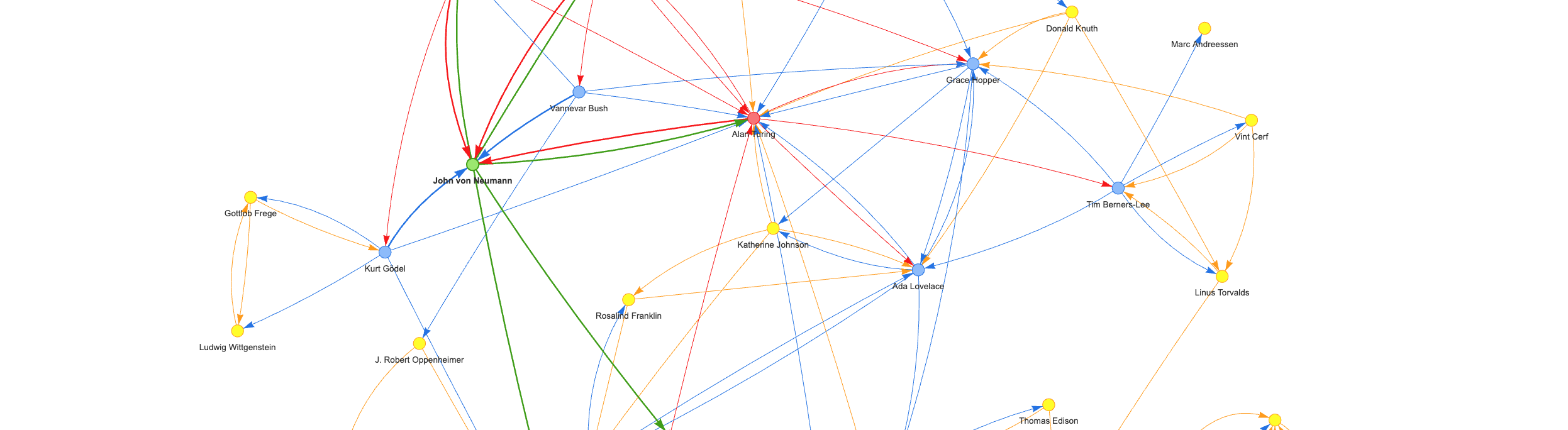 <sub>Command to generate above people-historical graph:<br />
llmgraph people-historical "https://en.wikipedia.org/wiki/John_von_Neumann" --levels 4
<br />View entire graph: <a target="_blank" href="https://blog.infocruncher.com/html/llmgraph/people-historical_john-von-neumann_v1.0.0_level4_fully_connected.html">people-historical_john-von-neumann_v1.0.0_level4_fully_connected.html</a></sub>
Example of Prompt Used to Generate Graph
Here is an example of the prompt template, with place holders, used to generate related entities from a given source entity. This is applied recursively to create a knowledge graph, merging duplicated nodes as required.
You are knowledgeable about {knowledgeable_about}.
List, in json array format, the top {top_n} {entities} most like '{{entity_root}}'
with Wikipedia link, reasons for similarity, similarity on scale of 0 to 1.
Format your response in json array format as an array with column names: 'name', 'wikipedia_link', 'reason_for_similarity', and 'similarity'.
Example response: {{{{"name": "Example {entity}","wikipedia_link": "https://en.wikipedia.org/wiki/Example_{entity_underscored}","reason_for_similarity": "Reason for similarity","similarity": 0.5}}}}
It works well on the primary tested LLM, being OpenAI gpt-5-mini. Results are ok, but not as good using Llama2. The prompt source of truth and additional details can be see in [prom
