
Hits
:chart_with_upwards_trend: General purpose hits (page views) counter
Install / Use
/learn @dwyl/HitsREADME
Hits





Why?
@dwyl we have a few projects on GitHub ... <br />
We want to instantly see the popularity of each of our repos to know what people are finding useful and help us decide where we need to be investing our time.
While GitHub has a basic "traffic" tab which displays page view stats, GitHub only records the data for the past 14 days and then it gets reset. The data is not relayed to the "owner" in "real time" and you would need to use the API and "poll" for data ... Manually checking who has viewed a project is exceptionally tedious when you have more than a handful of projects.
<!-- ### Scratch Your Own Itch? Some people claim that scratching your own itch is a "terrible idea" ... Most of those people have never built anything. We think Jessica Livingston (YCombinator Co-founder) knows more about people successfully building ideas than _anyone_ else. > "_**Solve** a **problem** that you **yourself have** then you will at least know that it's something that **at least one person really wants**. And when you are **part** of the **target market** you will have **insights** about it that you wouldn't otherwise._" ~ **Jessica Livingston** https://youtu.be/a2B4cVFIVpg?t=2m56s Hits solves a problem for _us_ @dwyl and we make the service available to others. We are very much building a "scratcher" for our own itch, and making it available to anyone else who wants it. Read: https://hbr.org/2014/05/when-scratch-your-own-itch-is-dangerous-advice-for-entrepreneurs --> <br />Why Phoenix (Elixir + PostgreSQL/Ecto)?
We wrote our MVP in Node.js, see:
https://github.com/dwyl/hits-nodejs <br />
That worked quite well to test the idea while writing minimal code.
We decided to re-write in Elixir/Phoenix because we want
the reliability and fault tolerance of Erlang,
built-in application monitoring
(supervisor)
and metrics (telemetry)
and the built-in support for highly scalable WebSockets
that will allow us to build an awesome real-time UX!
For more on "Why Elixir?" see: https://github.com/dwyl/learn-elixir/issues/102
<br />What?
A simple & easy way to see how many people have viewed your GitHub Repository.
There are already many "badges" that people use in their repos. See: github.com/dwyl/repo-badges <br /> But we haven't seen one that gives a "hit counter" of the number of times a GitHub page has been viewed ... <br /> So, in today's mini project we're going to create a basic Web Counter. https://en.wikipedia.org/wiki/Web_counter The counter is incremented only when the user agent or the ip addres is different. When testing the counter you can open a new browser to see the badge changed.
A Fully Working Production Phoenix App And Step-by-Step Tutorial?
Yes, that's right! Not only is this a fully functioning web app that is serving millions of requests per day in production right now, it's also a step-by-step example/tutorial showing you exactly how it's implemented.
<br />How?
If you simply want to display a "hit count badge" in your project's GitHub page, visit: https://hits.dwyl.com to get the Markdown!
Run the App on localhost
To run the app on your localhost follow these easy steps:
0. Ensure your localhost has Node.js & Phoenix installed
see: before you start
1. Clone/Download the Code
git clone https://github.com/dwyl/hits.git && cd hits
2. Install the Dependencies
Install elixir/node dependencies and setup Webpack static asset compilation (with hot reloading):
mix deps.get
cd assets && npm install
node node_modules/webpack/bin/webpack.js --mode development && cd ..
3. Create the database
mix ecto.create && mix ecto.migrate
4. Run the App
mix phx.server
That's it! <br />
Visit: http://localhost:4000/ (in your web browser)
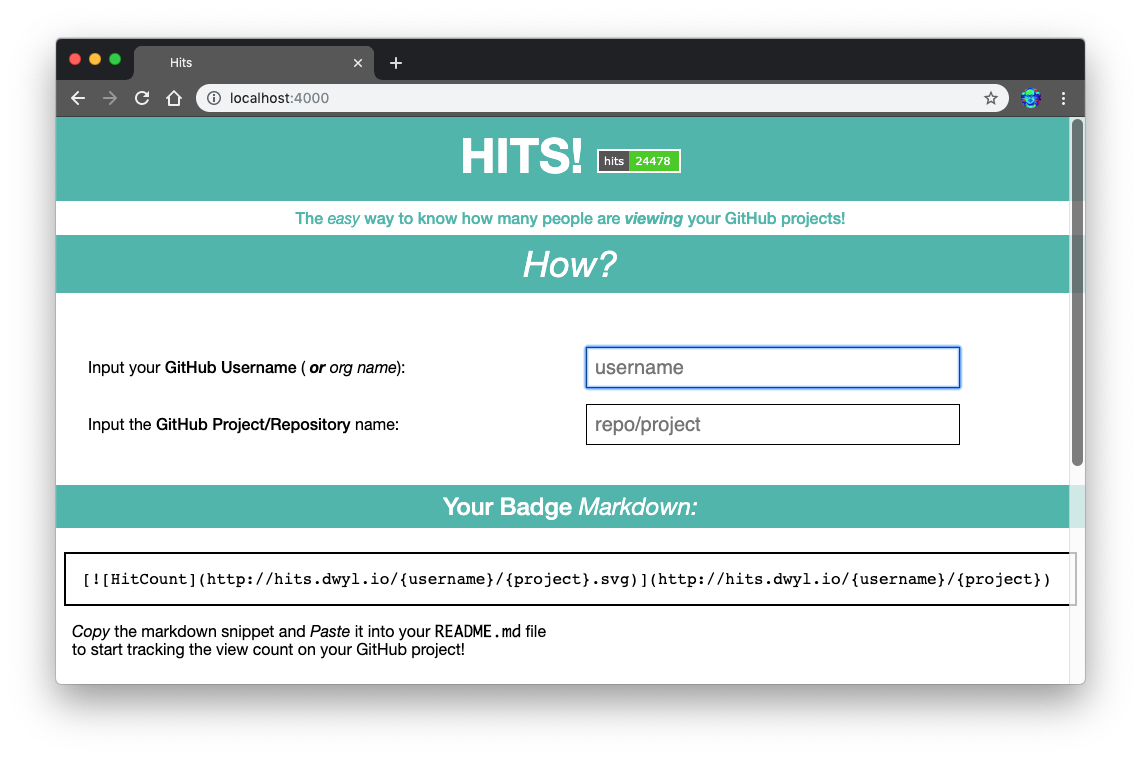
Or visit any endpoint that includes .svg in the url,
e.g: http://localhost:4000/yourname/project.svg

Refresh the page a few times and watch the count go up!

note: the "Zoom" in chrome to 500% for effect.
Now, take your time to peruse the code in /test and /lib,
and ask any questions by opening GitHub Issues:
https://github.com/dwyl/hits/issues
Run the Tests
To run the tests on your localhost, execute the following command in your terminal:
mix test
To run the tests with coverage, run the following command in your terminal:
MIX_ENV=test mix cover
If you want to view the coverage in a web browser:
mix coveralls.html && open cover/excoveralls.html
<br /> <br />
Implementation
This is a step-by-step guide to building the Hits App from scratch in Phoenix.
Assumptions / Prerequisites
- [x]
Elixir&Phoenixinstalled. see: before you start - [x] Basic knowledge/understanding of
Elixirsyntax: https://github.com/dwyl/learn-elixir#how - [x] Basic understanding of
Phoenix: https://github.com/dwyl/learn-phoenix-framework - [x] Basic PostgreSQL knowledge: github.com/dwyl/learn-postgresql
- [x] Test Driven Development (TDD): github.com/dwyl/learn-tdd
Create New Phoenix App
mix phx.new hits
When prompted to install the dependencies:
Fetch and install dependencies? [Yn]
Type Y and the Enter key to install.
You should see something like this in your terminal:
* running mix deps.get
* running cd assets && npm install && node node_modules/webpack/bin/webpack.js --mode development
* running mix deps.compile

We are almost there! The following steps are missing:

    $ cd hits

Then configure your database in config/dev.exs and run:

    $ mix ecto.create

Start your Phoenix app with:

    $ mix phx.server

You can also run your app inside IEx (Interactive Elixir) as:

    $ iex -S mix phx.server
Follow the instructions (run the following commands) to create the PostgreSQL database for the app:
cd hits
mix ecto.create
You should see the following in your terminal:
Compiling 13 files (.ex)
Generated hits app
The database for Hits.Repo has already been created
Run the default tests to confirm everything is working:
mix test
You should see the following output
Generated hits app
...

Finished in 0.03 seconds
3 tests, 0 failures

Randomized with seed 98214
Start the Phoenix server:
mix phx.server
That spits out a bunch of data about Webpack compilation:
[info] Running HitsWeb.Endpoint with cowboy 2.6.3 at 0.0.0.0:4000 (http)
[info] Access HitsWeb.Endpoint at http://localhost:4000

Webpack is watching the files…

Hash: 1fc94cc9b786e491ad40
Version: webpack 4.4.0
Time: 609ms
Built at: 05/05/2019 08:58:46
                Asset       Size       Chunks             Chunk Names
       ../css/app.css   10.6 KiB  ./js/app.js  [emitted]  ./js/app.js
               app.js   7.26 KiB  ./js/app.js  [emitted]  ./js/app.js
       ../favicon.ico   1.23 KiB               [emitted]
        ../robots.txt  202 bytes               [emitted]
../images/phoenix.png   13.6 KiB               [emitted]
   [0] multi ./js/app.js 28 bytes {./js/app.js} [built]
[../deps/phoenix_html/priv/static/phoenix_html.js] 2.21 KiB {./js/app.js} [built]
[./css/app.css] 39 bytes {./js/app.js} [built]
[./js/app.js] 493 bytes {./js/app.js} [built]
    + 2 hidden modules
Child mini-css-extract-plugin node_modules/css-loader/dist/cjs.js!css/app.css:
    [./node_modules/css-loader/dist/cjs.js!./css/app.css] 284 bytes {mini-css-extract-plugin} [built]
    [./node_modules/css-loader/dist/cjs.js!./css/phoenix.css] 10.9 KiB {mini-css-extract-plugin} [built]
        + 1 hidden module
Visit the app in your web browser to confirm it's all working:
http://localhost:4000

The default Phoenix App home page should be familiar to you if you followed our Chat example/tutorial github.com/dwyl/phoenix-chat-example
Create the Static Home Page
In order to hel
Related Skills
node-connect
340.5kDiagnose OpenClaw node connection and pairing failures for Android, iOS, and macOS companion apps
frontend-design
84.2kCreate distinctive, production-grade frontend interfaces with high design quality. Use this skill when the user asks to build web components, pages, or applications. Generates creative, polished code that avoids generic AI aesthetics.
openai-whisper-api
340.5kTranscribe audio via OpenAI Audio Transcriptions API (Whisper).
commit-push-pr
84.2kCommit, push, and open a PR
