
Firewall
ASP.NET Core middleware for IP address filtering.
Install / Use
/learn @dustinmoris/FirewallREADME
 Firewall
ASP.NET Core middleware for request filtering.
Firewall adds IP address-, geo-location and custom filtering capabilities to an ASP.NET Core web application which gives control over which connections are allowed to access the web server.
Table of contents
About
Firewall is an ASP.NET Core middleware which enables IPv4 and IPv6 address-, geo-location and other request filtering features.
Request filtering can be added as an extra layer of security to a publicly exposed API or to force all API access through a certain set of proxy servers (e.g. Cloudflare).
How is it different to ASP.NET Core's IP safelist feature?
Simply ASP.NET Core's safelist feature doesn't support IPv4 and IPv6 address ranges specified through CIDR notations, which makes is somewhat less usable in the real world where a web application might need to "safelist" a CIDR notation as part of its security configuration.
Using with Cloudflare
Cloudflare is a popular internet service which provides enhanced performance and security features to any website. It is currently being used by more than 8 million websites world wide and requires no additional hardware or software as it operates at the DNS level.
The typical request flow for a website which is not protected by Cloudflare looks a little bit like this:
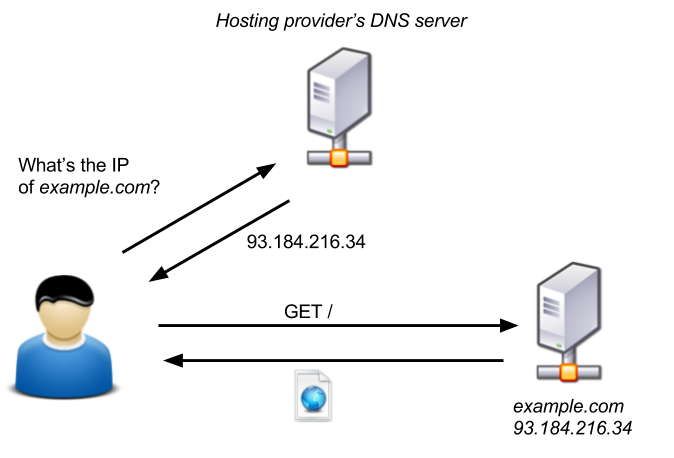
Image source: blog.christophetd.fr
When a website is protected by Cloudflare then Cloudflare essentially acts as a man in the middle, shielding a website from all sorts of malicious internet activity and giving a website administrator enhanced performance and security features such as HTTPS, Caching, CDNs, API rate limiting and more:
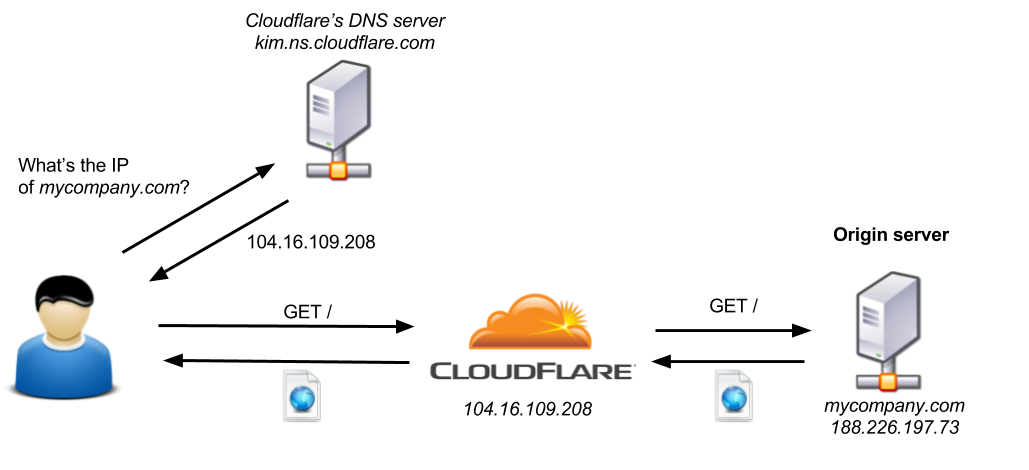
Image source: blog.christophetd.fr
The only problem with this configuration is that an attacker can still access the origin server by sending requests directly to its IP address and therefore bypassing all additional security and performance layers provided by Cloudflare.
In order to prevent anyone from talking directly to the origin server and forcing all access through Cloudflare one has to block all IP addresses which do not belong to Cloudflare.
Cloudflare maintains two public lists of all their IPv4 and IPv6 address ranges which can be used to configure an origin server's IP address filtering.
Firewall supports IP filtering for Cloudflare out of the box.
Getting Started
First install the Firewall NuGet package using PowerShell:
PM> Install-Package Firewall
...or via the dotnet command line:
dotnet add [PROJECT] package Firewall --package-directory [PACKAGE_CIRECTORY]
Then add the Firewall middleware to your ASP.NET Core Startup class:
using Firewall;

namespace BasicApp
{
    public class Startup
    {
        public void Configure(IApplicationBuilder app)
        {
            var allowedIPs =
                new List<IPAddress>
                    {
                        IPAddress.Parse("10.20.30.40"),
                        IPAddress.Parse("1.2.3.4"),
                        IPAddress.Parse("5.6.7.8")
                    };

            var allowedCIDRs =
                new List<CIDRNotation>
                    {
                        CIDRNotation.Parse("110.40.88.12/28"),
                        CIDRNotation.Parse("88.77.99.11/8")
                    };

            app.UseFirewall(
                FirewallRulesEngine
                    .DenyAllAccess()
                    .ExceptFromIPAddressRanges(allowedCIDRs)
                    .ExceptFromIPAddresses(allowedIPs));

            app.Run(async (context) =>
            {
                await context.Response.WriteAsync("Hello World!");
            });
        }
    }
}
Documentation
Basics
Firewall uses a rules engine to configure request filtering. The FirewallRulesEngine helper class should be used to configure an object of IFirewallRule which then can be passed into the FirewallMiddleware:
var rules =
    FirewallRulesEngine
        .DenyAllAccess()
        .ExceptFromCloudflare()
        .ExceptFromLocalhost();

app.UseFirewall(rules);
Currently the following rules can be configures out of the box:
DenyAllAccess(): This is the base rule which should be used at the beginning of the rules configuration. It specifies that if no other rule can be met by an incoming HTTP request then access should be denied.ExceptFromLocalhost(): This rule specifies that HTTP requests from the local host should be allowed. This might be useful when debugging the application.ExceptFromIPAddresses(IList<IPAddress> ipAddresses): This rule enables access to a list of specific IP addresses.ExceptFromIPAddressRanges(IList<CIDRNotation> cidrNotations): This rule enables access to a list of specific IP address ranges (CIDR notations).ExceptFromCloudflare(string ipv4Url = null, string ipv6Url = null): This rule enables access to requests from Cloudflare servers.ExceptFromCountry(IList<CountryCode> allowedCountries): This rule enables access to requests which originated from one of the specified countries.ExceptWhen(Func<HttpContext, bool> filter): This rule enables a custom request filter to be applied (see Custom Filter Rules for more info).
A HTTP request only needs to satisfy a single rule in order to pass the Firewall access control layer. The reverse order of the rules specifies the order in which an incoming HTTP request gets validated. It is advisable to specify simple/quick rules at the end as they will get executed first.
Cloudflare Support
If an ASP.NET Core web application is going to sit behind Cloudflare then Firewall can be configured with the built-in ExceptFromCloudflare() Firewall rule:
using Firewall;

namespace BasicApp
{
    public class Startup
    {
        public void Configure(IApplicationBuilder app)
        {
            app.UseFirewall(
                FirewallRulesEngine
                    .DenyAllAccess()
                    .ExceptFromCloudflare());

            app.Run(async (context) =>
            {
                await context.Response.WriteAsync("Hello World!");
            });
        }
    }
}
The ExceptFromCloudflare() configuration method will automatically pull the latest list of IPv4 and IPv6 address ranges from Cloudflare and register the FirewallMiddleware with those values.
Optionally one can specify custom URLs to load the correct IP address ranges from:
using Firewall;

namespace BasicApp
{
    public class Startup
    {
        public void Configure(IApplicationBuilder app)
        {
            app.UseFirewall(
                FirewallRulesEngine
                    .DenyAllAccess()
                    .ExceptFromCloudflare(
                        ipv4ListUrl: "https://www.cloudflare.com/ips-v4",
                        ipv6ListUrl: "https://www.cloudflare.com/ips-v6"
                    ));

            app.Run(async (context) =>
            {
                await context.Response.WriteAsync("Hello World!");
            });
        }
    }
}
Custom Rules
Custom Firewall rules can be added by creating a new class which implements IFirewallRule.
For example, if one would like to create a new Firewall rule which filters requests based on Cloudflare's CF-IPCountry HTTP header, then you'd start by implementing a new class which implements the IFirewallRule interface:
public class IPCountryRule : IFirewallRule
{
    private readonly IFirewallRule _nextRule;
    private readonly IList<string> _allowedCountryCodes;

    public IPCountryRule(
        IFirewallRule nextRule,
        IList<string> allowedCountryCodes)
    {
        _nextRule = nextRule;
        _allowedCountryCodes = allowedCountryCodes;
    }

    public bool IsAllowed(HttpContext context)
    {
        const string headerKey = "CF-IPCountry";
Related Skills
healthcheck
345.4kHost security hardening and risk-tolerance configuration for OpenClaw deployments
node-connect
345.4kDiagnose OpenClaw node connection and pairing failures for Android, iOS, and macOS companion apps
prose
345.4kOpenProse VM skill pack. Activate on any `prose` command, .prose files, or OpenProse mentions; orchestrates multi-agent workflows.
frontend-design
104.6kCreate distinctive, production-grade frontend interfaces with high design quality. Use this skill when the user asks to build web components, pages, or applications. Generates creative, polished code that avoids generic AI aesthetics.
