
FlubuCore
A cross platform build and deployment automation system for building projects and executing deployment scripts using C# code.
Install / Use
/learn @dotnetcore/FlubuCoreREADME
FlubuCore





- Introduction
- Features and Advantages
- Getting Started
- Examples
- Contributing
- Backers and Sponsors
- Acknowledgements
Introduction
"FlubuCore - Fluent Builder Core" is a cross platform build and deployment automation system. You can define your build and deployment scripts in C# using an intuitive fluent interface. This gives you code completion, IntelliSense, debugging, FlubuCore custom analyzers, and native access to the whole .NET ecosystem inside of your scripts.
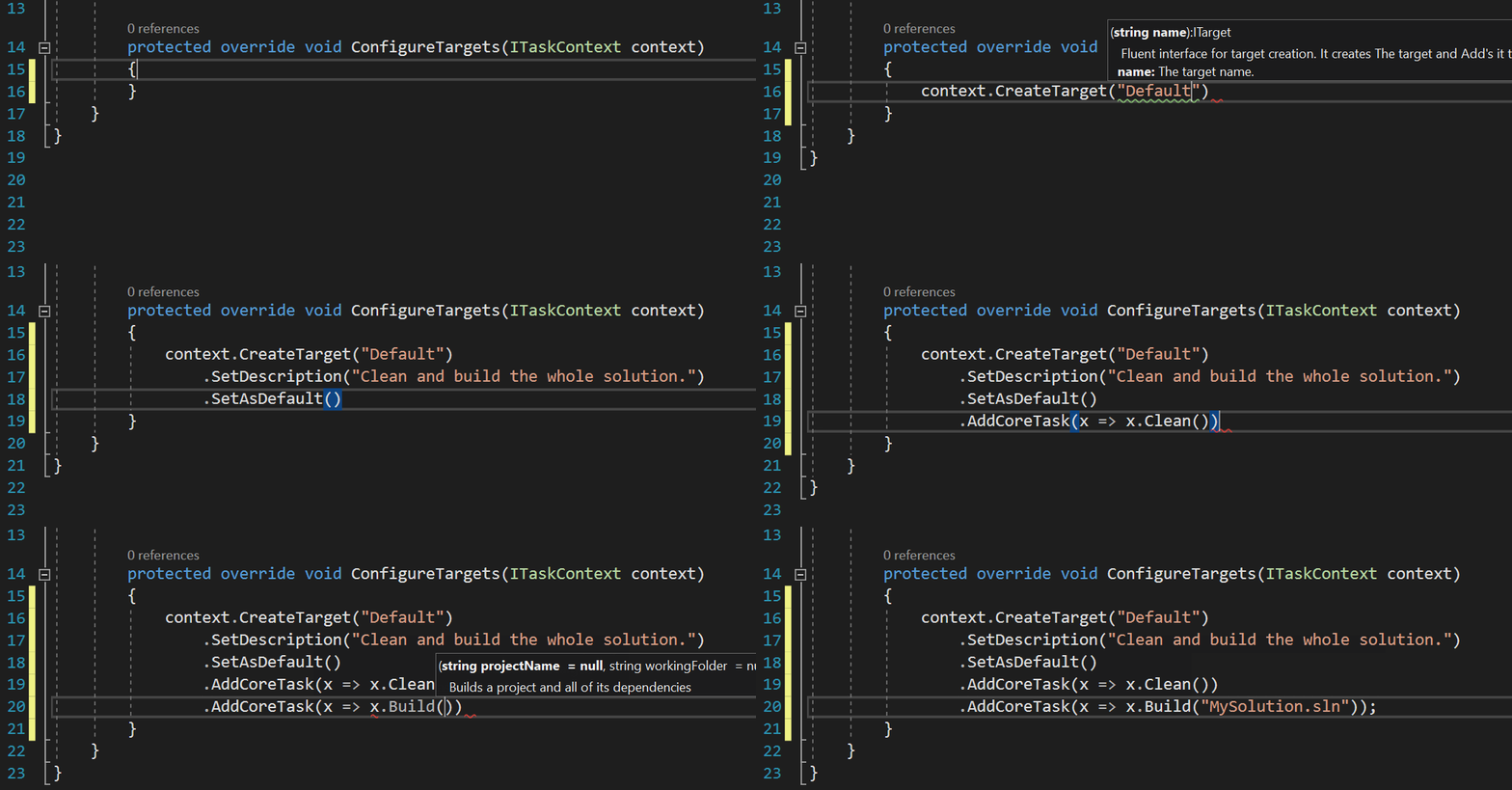
FlubuCore offers a .net (core) console application that uses power of roslyn to compile and execute scripts. Above example can be run from console with:
- FlubuCore runner (.NET 4.62+)
flubu.exe Default - FlubuCore dotnet cli tool (.NET Core 1.0+)
dotnet flubu Default - FlubuCore local or global tool (.NET Core 2.1+)
flubu Default
Features and Advantages
- Intuitive an easy to learn. C#, fluent interface, and IntelliSense make even most complex script creation a breeze.
    [FromArg("nugetKey", "Nuget api key for publishing Flubu nuget packages.")]
    public string NugetApiKey { get; set; }

    protected override void ConfigureTargets(ITaskContext context)
    {
        var pack = context.CreateTarget("Pack")
            .SetDescription("Prepare's nuget package.")
            .AddCoreTask(x => x.Pack()
                .NoBuild()
                .OutputDirectory(OutputDirectory)
                .WithArguments("--force")); //you can add your own custom arguments on each task

        var branch = context.BuildSystems().Travis().Branch;

        var nugetPush = context.CreateTarget("Nuget.publish")
            .SetDescription("Publishes nuget package.")
            .DependsOn(pack)
            .AddCoreTask(x => x.NugetPush($"{OutputDirectory}/NetCoreOpenSource.nupkg")
                .ServerUrl("https://www.nuget.org/api/v2/package")
                .ApiKey(NugetApiKey)
            )
            .When(c => c.BuildSystems().RunningOn == BuildSystemType.TravisCI
                        && !string.IsNullOrEmpty(branch)
                        && branch.EndsWith("stable", StringComparison.OrdinalIgnoreCase));
    }
- Large number of often used built-in tasks like e.g. versioning, running tests, creating deployment packages, publishing NuGet packages, docker tasks, git tasts, sql tasks, npm tasks, executing PowerShell, managing IIS scripts and many more.
context.CreateTarget("build")
   .AddTask(x => x.GitVersionTask())
   .AddTask(x => x.CompileSolutionTask("MySolution.sln").BuildConfiguration("Release");

context.CreateTarget("run.tests")
   .AddTask(x => x.XunitTaskByProjectName("MyProject").StopOnFail())
   .AddTask(x => x.NUnitTask(NunitCmdOptions.V3, "MyProject2").ExcludeCategory("Linux"))
   .AddCoreTask(x => x.CoverletTask("MyProject.dll"));
context.CreateTarget("DoExample")
        .Do(c =>
        {
            // write your awesome code.
            File.Copy("NotSoAwesome.txt", Path.Combine(OutputDirectory, "JustAnExample.txt") );
            // Access flubu built in tasks in DO if needed.
            c.Tasks().GenerateT4Template("example.TT").Execute(c);
        })
        .AddTask(x => x.CompileSolutionTask())
        .Do(NuGetPackageReferencingExample);
- assembly references and nuget packages are loaded automatically when script is used together with project file. When script is executed alone (for example when deploying with FlubuCore script on production environment) references can be added with attributes.
[NugetPackage("Newtonsoft.json", "11.0.2")]
[Assembly(".\Lib\EntityFramework.dll")]
public class BuildScript : DefaultBuildScript
{
   public void NuGetPackageReferencingExample(ITaskContext context)
    {
        JsonConvert.SerializeObject("Example");
    }
}
context.CreateTarget("Run.Libz")
    .AddTask(x => x.RunProgramTask(@"packages\LibZ.Tool\1.2.0\tools\libz.exe")
        .WorkingFolder(@".\src")
        .WithArguments("add")
        .WithArguments("--libz", "Assemblies.libz"));
public class SimpleScript : DefaultBuildScript
{
   [FromArg("c", "The configuration to use for building the project.")]
   public string Configuration { get; set; } = "Release"

   [FromArg("sn", "If true app is deployed on second node. Otherwise not.")]
   public bool deployOnSecondNode { get; set; }

   protected override void ConfigureTargets(ITaskContext context)
   {
        context.CreateTarget("build")
           .AddCoreTask(x => x.Build()
               .Configuration(Configuration)
               .ForMember(x =>  x.Framework("net462"), "f", "The target framework to build for."));
   }
}
flubu build -c=Debug -f=netcoreapp2.0
-
Extending FlubuCore fluent interface by writing your own tasks within FlubuCore plugins.
public class ExampleFlubuPluginTask : TaskBase<int, ExampleFlubuPluginTask> { protected override int DoExecute(ITaskContextInternal context) { // Write your task logic here. return 0; } } -
Growing list of FlubuCore plugins complements built in tasks.
-
Asynchronous or parallel execution of tasks, target dependencies and custom code.
context.CreateTarget("Run.Tests") .AddTaskAsync(x => x.NUnitTaskForNunitV3("TestProjectName1")) .AddTaskAsync(x => x.NUnitTaskForNunitV3("TestProjectName1")) .AddTaskAsync(x => x.NUnitTaskForNunitV3("TestProjectName3")); -
Override existing options or add additional options to tasks through console
context.CreateTarget("Example")`
   .AddCoreTask(x => x.Build("MySolution.sln").Configuration("Release");
flubu example --configuration=Debugflubu would execute
dotnet build MySolution.sln --configuration Debug -
Full .NET Core support including the local and global CLI tool
dotnet tool install --global FlubuCore.Tool flubu compile -
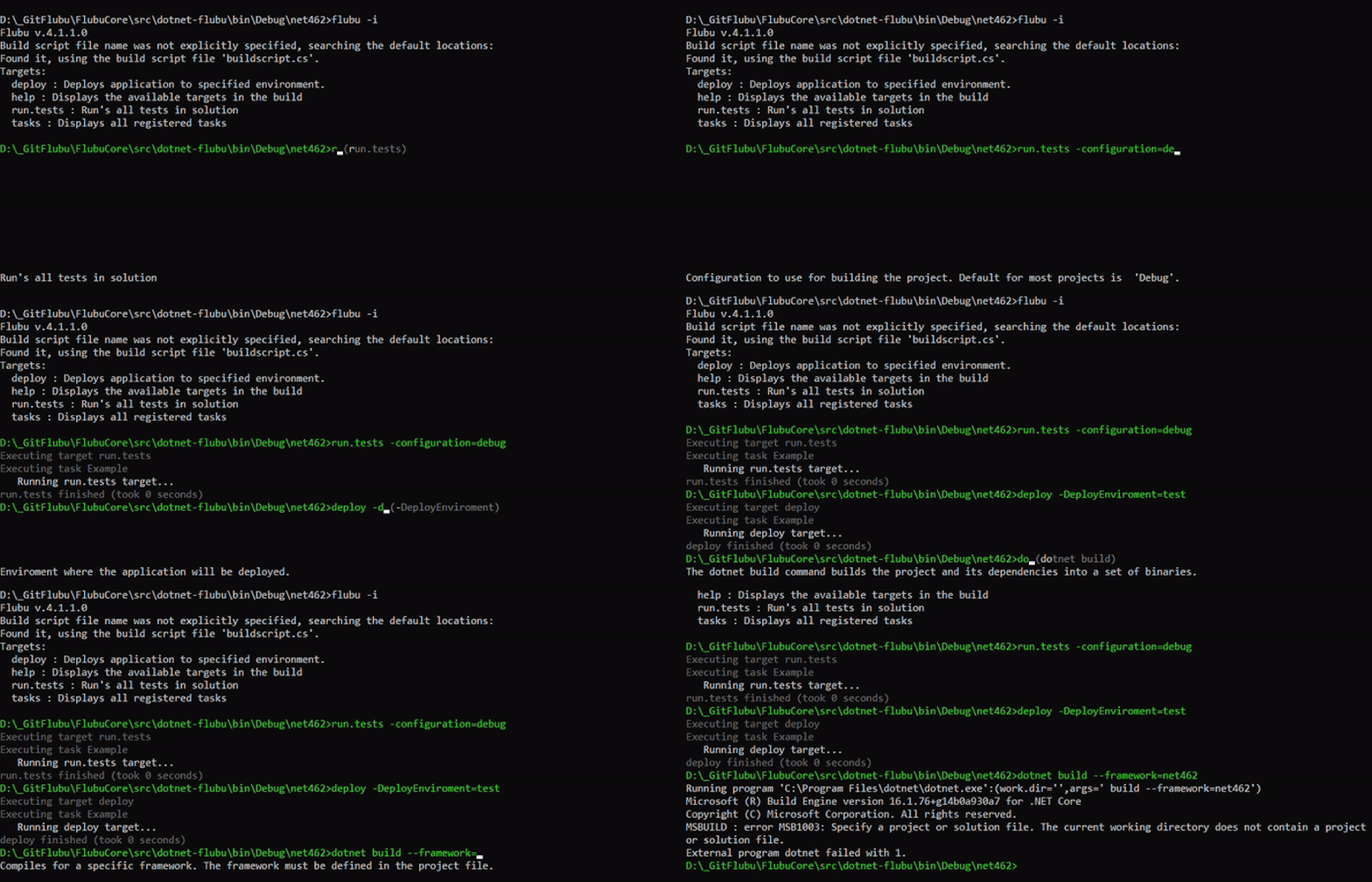
FlubuCore interactive mode which offers target tab completition, options tab completition, toogle targets/options, executed commands history. It is also possible to execute external commands and operable programs. For some of them FlubuCore offers tab completion with help displayed at the bottom of console out of the box(such as dotnet, git..)
-
Possibility to test and debug your build scripts.
context.WaitForDebugger(); -
Easily automate deployments remotely via the FlubuCore Web API.
-
Possibility to use FlubuCore tasks in any other .NET application.
-
Execute script in your console application or pack it as global tool
-
Improved developer experience with FlubuCore custom analyzers.

Getting Started
Using FlubuCore is straightforward and very simple :-) It is also fully and throughly documented.
The Getting Started chapter in [FlubuCore Documentat
