
HorizonUIPluginDemo
UnrealEngine Marketplace Plugin
Install / Use
/learn @dorgonman/HorizonUIPluginDemoREADME
public feed: nuget.org

Note:
master branch may be unstable since it is in development, please switch to tags, for example: editor/hsgame/4.25.0.290
How to Run Demo Project before purchase:(Only for Win64 editor build, no source code)
- Double click install_game_package_from_nuget_org.cmd, and check if UE4Editor-*.dll are installed to Binaries\Win64 and Plugins\HorizonUIPlugin\Binaries\Win64\
- Double click HorizonUIPluginDemo.uproject
          HorizonUIPlugin
             5.7.0
     http://dorgon.horizon-studio.net
      	dorgonman@hotmail.com
System Requirements
Supported UnrealEngine version: 4.11-5.7
Installation Guide
If you want to use plugins in C++, you should add associated module to your project's YOUR_PROJECT.Build.cs: PublicDependencyModuleNames.AddRange(new string[] { "HorizonUI"});
User Guide: HorizonFlipbookWidget
This widget support using PaperFlipbook directly in UMG!
User Guide: HorizonDialogueMsgTextBlock
example 1: rich text simple
<text color="#77FF77AA" shadowColor="#FF0000FF" shadowOffset="[4,3]">This is rich text simple test:</text>
<br/>
<text color="#FF0000AA">This is strawberry:</text><img filePath="Texture2D'/Game/Item/I_C_Strawberry.I_C_Strawberry'" size="[100, 100]" /><br/>
<text color="#0000FFFF">This is Watermellon:</text><img color="#FF00FF77" filePath="/Game/Item/I_C_Watermellon" size="[100, 100]" /> <br/>
<text color="#FFFF00FF">This is animated man using material:</text><img filePath="Material'/Game/Material/mat_flipbook.mat_flipbook'" size="[100, 100]" /> <br/>
note: both Texture2D'/Game/Item/I_C_Strawberry.I_C_Strawberry' and /Game/Item/I_C_Strawberry.I_C_Strawberry can work correctly
example 1: rich text simple using style feature
<text style="MyStyle0">This is rich text test using style:</text>
<br/>

<text style="MyStyle1">This is strawberry:</text><img style="MyStyle2" /><br/>

<text style="MyStyle3">This is Watermellon:</text><img style="MyStyle4"/> <br/>


<text style="MyStyle5">This is animated man using material:</text><mat style="MyStyle6" /> <br/>

<text style="MyStyle7">HorizonFlipbookWidget(use tag pfb) Only Supported by using style:</text><pfb style="MyStyle7" /> <br/>
MyStyle0 ~ MyStyle7 is a array that can be setted in UMG editor under HorizonPlugin/Style section ref: https://drive.google.com/file/d/0BwANUSGaSQn-SlJZWUF5LWJHQTA/view?usp=sharing
By using style="YOUR_STYLE_NAME", you can use the style setting for your RichText block. *note: HorizonFlipbookWidget can only use style to work correctly. (Use filePath will not compute UV and Size for HorizonFlipbookWidget correctly.) example 2: rich text font
<text>This is Default Font</text><br/>
<text fontPath="/Engine/EngineFonts/Roboto" fontType="Regular" fontSize="30">This is Roboto Regular fontSize=30</text><br/>
<text fontPath="/Engine/EngineFonts/Roboto" fontType="Italic" color="#FF0000AA">This is Roboto Italic</text><br/>
<text fontPath="/Engine/EngineFonts/Roboto" fontType="Bold Italic"  fontSize="40" color="#FF3366AA">This is Roboto Bold Italic fontSize=40</text><br/>
<text fontPath="/Engine/EngineFonts/Roboto" fontType="Light" color="#FFFF00AA">This is Roboto Light</text><br/>
<text fontPath="/Engine/EngineFonts/RobotoTiny" fontType="Light" color="#FF0A40AA">This is RobotoTinyLight</text><br/>
example 3: padding
<text fontSize="55">Test case:</text>
<text padding-right="5" padding-top="20">
 <text padding-left="5">padding text block</text>
 <img filePath="/Game/Material/mat_flipbook"/>
 <img filePath="/Game/Item/I_C_Watermellon" size="[100,100]" />
</text>
<text>after padding</text>
example 4: special character following character will be replaced:
== " "
" == "
& == "&"
' =="'"
< == "<"
> ==">"
sample:
<text> == " "</text><br/>
<text> " == " </text><br/>
<text> & == "&"</text><br/>
<text> '" =="'"</text><br/>
<text> < == "<"</text><br/>
<text> > =="> "</text><br/>
example 5: hyperlink
<a href="Seg1ClickMessage" bgColor="#555555FF" hoverColor="#FFFF0055"
filePath="Blueprint'/Game/UMG/DialogueMsgTextTest/ButtonStyle/BP_DialogueBackgroundButtonStyle1.BP_DialogueBackgroundButtonStyle1'">
<text color="#FF0000FF"> Test Click Seg1  </text>
</a>
<br />

<a href="Seg2ClickMessage" bgColor="#FF0000FF" hoverColor="#FFFF0055"
 filePath="Blueprint'/Game/UMG/DialogueMsgTextTest/ButtonStyle/BP_DialogueBackgroundButtonStyle2'">
<text color="#00FF00FF"> Test Click Seg2  </text>
</a>

<br />

<a href="Seg3ClickMessage" bgColor="#FF0000FF" hoverColor="#FFFF0055"
filePath="/Game/UMG/DialogueMsgTextTest/ButtonStyle/BP_DialogueBackgroundButtonStyle3">
<text color="#0000FFFF"> Test Click Seg3  </text>
</a>
When you click, you will receive info assigned in href if you bind button's click callback.
Please check WidgetBlueprint'/Game/UMG/DialogueMsgTextTest/Tuto8_HyperText.Tuto8_HyperText'
example 6: sound
<text style="MyStyle3">HorizonFlipbookWidget( use tag pfb ) Only Supported by using style:</text>
<pfb sound="SoundWave'/Engine/VREditor/Sounds/UI/Click_on_Button.Click_on_Button'"
soundVolumn="0.5" soundPitch="0.1" soundStartTime="0.05" style="MyStyle4" /> <br/>
<text>
example 7: Custom Event && Callback
Please Check WidgetBlueprint'/Game/UMG/DialogueMsgTextTest/Tuto06_EventTrigger.Tuto06_EventTrigger'
<text eventName="Seg1", eventPayload="{"A":"Data1", "B":"Data2"}">This is simple test: </text>
<text eventName="Seg2">12345678910
11121314151617181920</text>
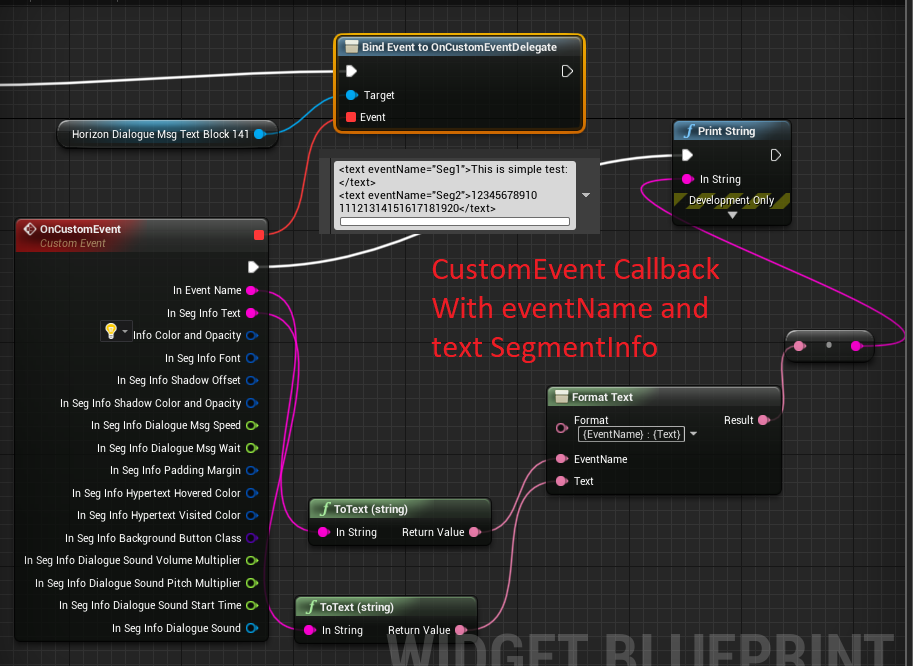
example 7: RubyText
<text style="test">
<text>Test </text>
<text ruby.text="furigana">RubyText</text>
<br/>
<text ruby.text="ふ">振</text>
<text>り</text>
<text ruby.text="がな">仮名</text>
<br/>
<text ruby.text="ㄨㄛˇㄕˋ">我是</text>
<text ruby.text="變態">紳士</text>
</text>
example 8: Decorator
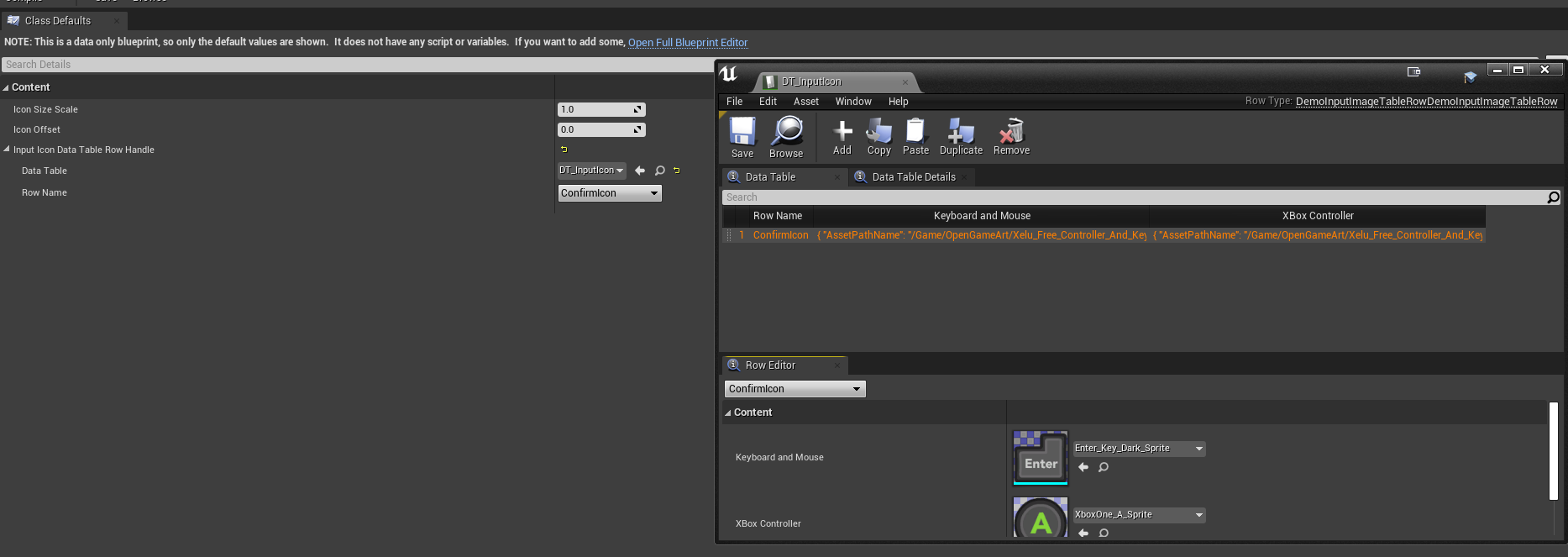
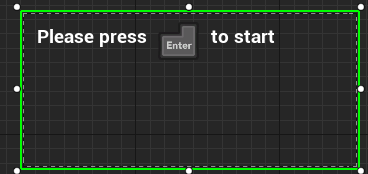
We can implement our own logic in Decorator, ex: Load InputIcon from DataTable.
<text> Please press </text>
<img eventPayload="ConfirmIcon" padding-top="-15"/>
<text> to start </text>

example 9: New Page Tag
<p style="Page1">
<text>Page1 Test </text>
<br/>
<text>Page1.1 </text>
<br/>
<text>Page1.2 </text>

</p>

<p style="Page2">
<text>Page2 Test</text>
<br/>
<text>Page2.1 </text>
<br/>
<text>Page2.2 </text>

</p>
<p style="Page3">
<text>Page3 Test</text>
<br/>
<text>Page3.1 </text>
<br/>
<text>Page3.2 </text>
</p>
example 10: Space Decorator
We can use HorizonDialogueMsgSpaceDecorator to automatically append space between segment without using
Here is example:
<text tag="WithSpaceL">With SpaceDecorator,</text>
<text>Msg1, </text>
<text>Msg2, </text>
<text>and Msg3 </text>
<text tag="NoSpaceL">.</text>
Possible tag are: NoSpaceR, NoSpaceL and NoSpace, WithSpaceL, WithSpaceR, WithSpace. NoSpace means we apply NoSpaceR and NoSpaceL rule at same time to the segment. WithSpace means we apply WithSpaceR and WithSpaceL rule at same time to the segment.
Generally we will want to create Blueprint that inherited from HorizonDialogueMsgSpaceDecorator, so we can adjust FirstLineSpaceL and Space property to Fullwidth/Halfwidth space character, the properties are FText so they can also be localized for different language using Unreal Localization tool. (ex: English use Halfwidth and Chinese use Fullwidth)

example 11: Text Replace Decorator: Read value from CurveTable
Decorator also help you reading External Source and put the value into your text. Please check this demo project to see how to implement it for your project.
Basically, we should create a Blueprint that inherited from DemoDialogueMsgReplaceDecorator, and configure your game data there, see /Game/UMG/DialogueMsgTextTest/Decorator/BP_MsgReplaceCurveTableDecorator:
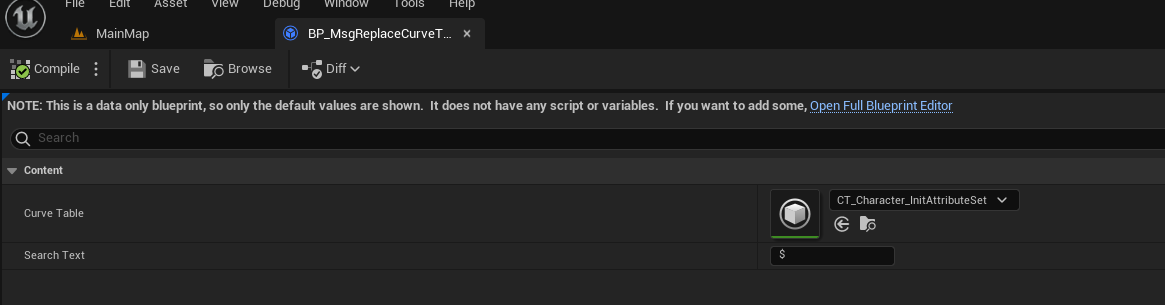
After apply the decorator, you will get following result:
<text>The Message with special character '$' will be replaced by finding value in eventPayLoad from CurveTable(</text>
<text tag="NoSpace" eventPayLoad="Default.HorizonUIDemoAttributeSet.Health, 1.4">$</text>
<text>), and we can have multiple blocks and Decorators</text>
<img eventPayload="ConfirmIcon" padding-top="-15" size="[100, 100]/>
<text tag="NoSpaceL">.</text>
.
qqbot-media
351.8kQQBot 富媒体收发能力。使用 <qqmedia> 标签,系统根据文件扩展名自动识别类型(图片/语音/视频/文件)。
