
AInotate
Annotated screenshots for AI agents: Skitch-style arrows, numbered steps, boxes, labels, solid redaction
Install / Use
claude mcp add dontpayfull -- npx -y github:dontpayfull/AInotateIf the server publishes to npm under a different name, use that package instead — check the repo README.
MCP Server
Model Context Protocol server
Quality Score
Category
AI & Machine LearningSupported Platforms
Our assessment of AInotate
AInotate scores 81/100 on our quality scale, 727th of 948 AI & Machine Learning skills we index.
Its MCP Server is 16 KB long, well organised into 9 sections with 5 code examples: a thorough specification that gives an agent plenty to work with.
It has 10 GitHub stars, so there is little community track record yet; judge it on its content.
Maintenance, license and trust
- The repository was last updated 25 days ago, so AInotate is actively maintained.
- It is released under AGPL-3.0, a copyleft license: you can use it, but modified versions you distribute must carry the same license.
- Its trust signals score 97/100, with no cautions. These come from repository metadata, not a code audit — read the skill file before letting an agent act on it.
Safety scan
No issues foundOur scan of the whole file found no instruction hijacking, hidden characters, credential access, data exfiltration or destructive commands. An AI review of the same text found nothing harmful.
AI review by kimi-k2.7-code on 2026-11-13. Automated pattern scan on 2026-11-13. It catches known dangerous patterns, not every risk — read a skill before letting an agent act on it.
AInotate compared with similar skills
All 4 of these similar skills score higher than AInotate; compare them before choosing.
| Skill | Score | Stars | Updated | Format |
|---|---|---|---|---|
| AInotate (this skill)by dontpayfull | 81 | 10 | 25d ago | MCP Server |
| claude-memby thedotmack | 100 | 117.9k | today | CLAUDE.md |
| Agent-Reachby Panniantong | 100 | 112.7k | 10d ago | CLAUDE.md |
| Understand-Anythingby Egonex-AI | 100 | 93.0k | 2d ago | CLAUDE.md |
| rufloby ruvnet | 100 | 82.0k | today | CLAUDE.md |
Frequently asked questions
- How do I install AInotate?
- Run
claude mcp add dontpayfull -- npx -y github:dontpayfull/AInotate. The install tabs above show the steps for each supported agent. - Which AI agents does AInotate work with?
- It is written for Claude Code, Claude Desktop and Gemini CLI, as a MCP Server file. Other agents that read the same format can often use it too.
- Is AInotate safe to use?
- Our scan of the whole file found no instruction hijacking, hidden characters, credential access, data exfiltration or destructive commands. An AI review of the same text found nothing harmful. It is AGPL-3.0-licensed and scores 97/100 on trust signals. Skills are instructions an agent will follow, so read the file before installing it and do not approve commands you do not understand.
- Is AInotate still maintained?
- The repository was last updated 25 days ago, so AInotate is actively maintained.
Skill content
View source on GitHubAnnotated screenshots for AI agents: the agent shows you the button instead of describing where it is.
Website · Get started · Privacy





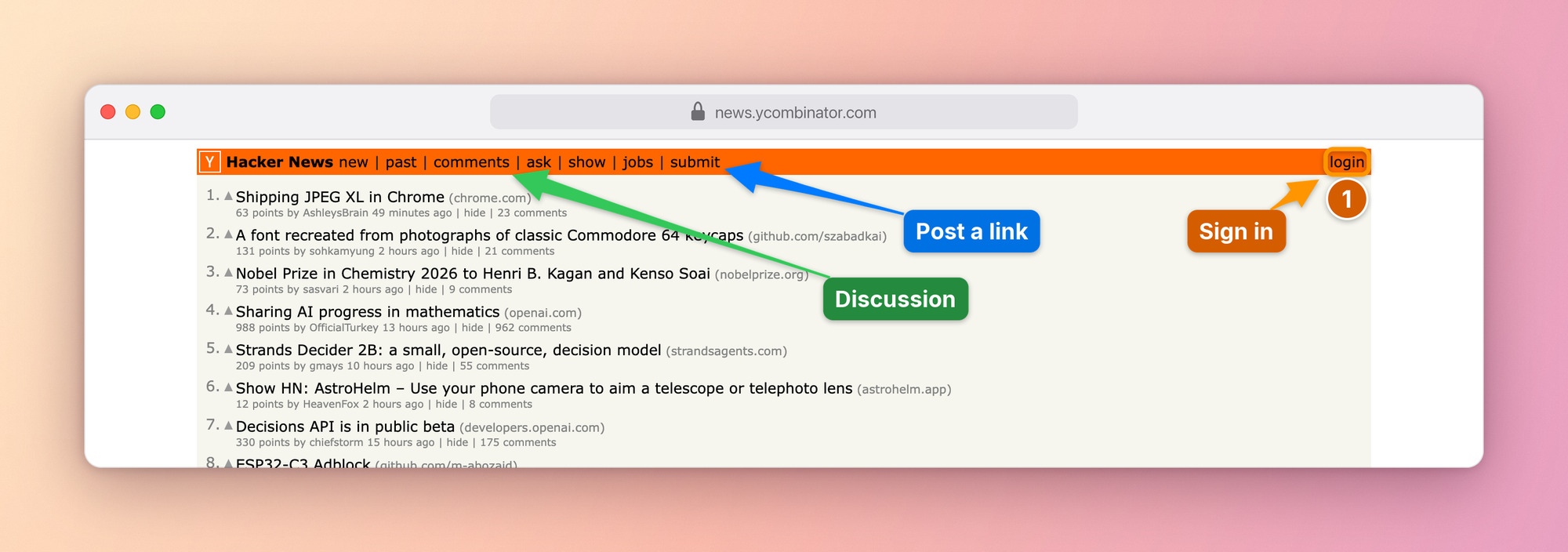
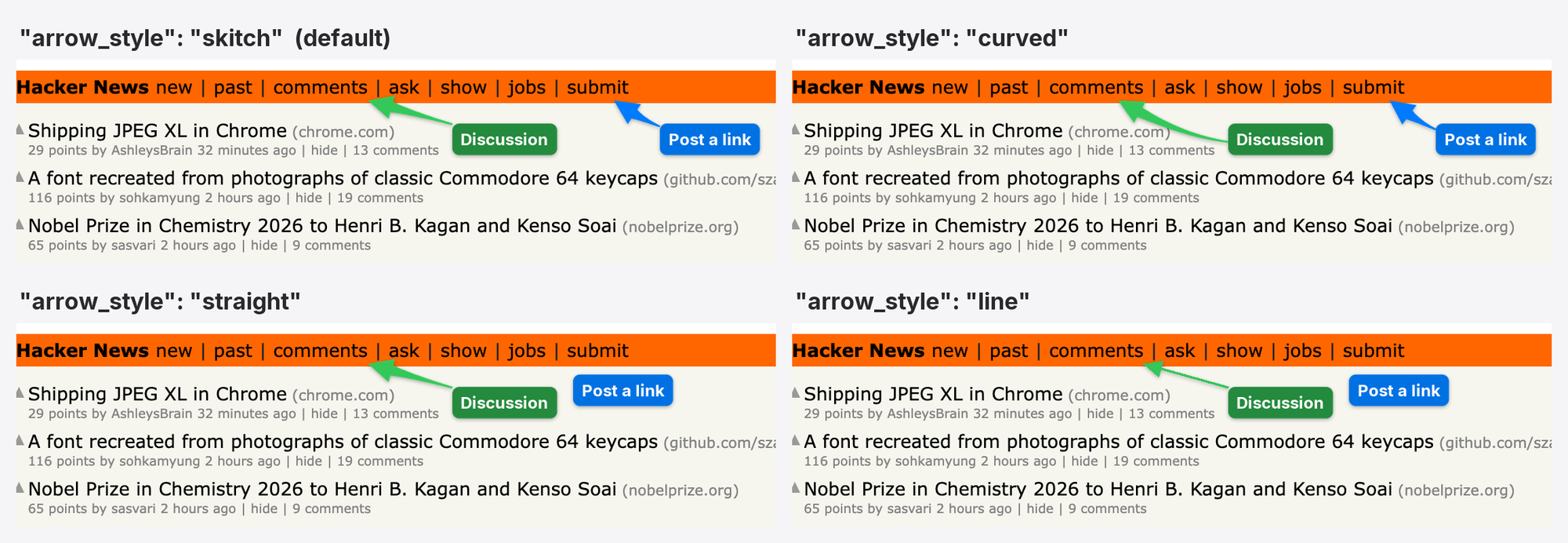
Ask an agent how to post a link on Hacker News and you usually get directions: the orange bar at the top, the last link after jobs. With AInotate it sends the picture above instead and says "click submit, where the blue arrow points".
It captures a web page, a window or a screenshot you already have, finds the elements you mean, draws numbered steps, arrows, boxes and labels where they hide the least, blacks out emails and tokens, and looks at the result before sending it. It works in Claude Code, Cowork, Claude Desktop, Codex, Gemini CLI, Cursor and any other MCP client, and from the command line or Python.
We built it at DontPayFull because our own agents kept answering "where is it?" with a paragraph. A picture with a number on the right button settles the question in a second, in a chat, a ticket or a guide.
What it is for
- "Where is it?" Settings, menus, buttons that hide behind icons. The agent answers with the screen itself, the control boxed and numbered.
- "Walk me through it." One image per step, in the order to follow;
ainotate guideturns them into a Markdown, HTML or PDF guide. - "Your turn." A permission switch, a 2FA code, a payment or consent screen: the agent does not click for you. It shows exactly what to press and says what the click does.
- Bug reports and tickets. What is wrong, outlined in red, what is right in green, emails and tokens blacked out before anyone sees them.
- Docs and changelogs. Screenshots that point at the thing the text talks about, re-shot from the same spec when the UI changes; before and after plates for a change.
Set it up in your agent
1. Install, one of:
| With | Command |
|---|---|
| Homebrew (macOS) | brew install dontpayfull/tap/ainotate |
| pipx or uv (Python 3.10+) | pipx install "ainotate[all]" or uv tool install "ainotate[all]" |
| Claude plugin | only uv: step 2 brings AInotate along |
| Claude Desktop extension | nothing to install first |
Then ainotate doctor checks the machine and prints the exact fix for
anything missing, including the one command that downloads Chromium for
web capture. To update later: brew upgrade ainotate, pipx upgrade ainotate or uv tool upgrade ainotate; the plugin with /plugin marketplace update ainotate; the Desktop extension by opening the newer
.mcpb from Releases.
2. Connect it to the agent you use:
| Agent | How |
|---|---|
| Claude Code | /plugin marketplace add dontpayfull/AInotate, then /plugin install ainotate@ainotate: skill and MCP server in one step |
| Cowork | Customize > Plugins > Add marketplace > dontpayfull/AInotate, then install AInotate |
| Claude Desktop | download ainotate-<version>.mcpb from Releases and open it: a one-click extension |
| Codex | codex plugin marketplace add dontpayfull/AInotate, then codex plugin add ainotate@ainotate: skill and MCP server |
| Gemini CLI | gemini extensions install https://github.com/dontpayfull/AInotate: skill and MCP server |
| Cursor |  (needs uv), plus the skill below |
| VS Code, Cline, other MCP clients | command
ainotate, arguments mcp (stdio); also listed in the MCP Registry as io.github.dontpayfull/ainotate; agents can follow llms-install.md |
{"mcpServers": {"ainotate": {"command": "ainotate", "args": ["mcp"]}}}
AInotate runs on your own computer: Cowork reaches it through the Claude
desktop app, so keep the app open while a task uses it. The plugin runs
AInotate with uvx, pinned to its release, so it needs
uv.
The skill teaches an agent when and how to annotate: pick a source, find exact positions, annotate, read the image to verify, deliver. The plugin brings it along; without the plugin it ships with the package:
ainotate install-skill             # Claude Code and Codex (~/.claude/skills, ~/.agents/skills)
ainotate install-skill --zip ~/Desktop   # a ZIP for Claude Desktop, Cowork, claude.ai:
                                         # Customize > Skills > Upload a skill
npx skills add dontpayfull/AInotate      # any agent the skills CLI knows (Cursor, Windsurf, ...)
Config paths for every OS, permissions and the tool list: skills/ainotate/references/mcp.md.
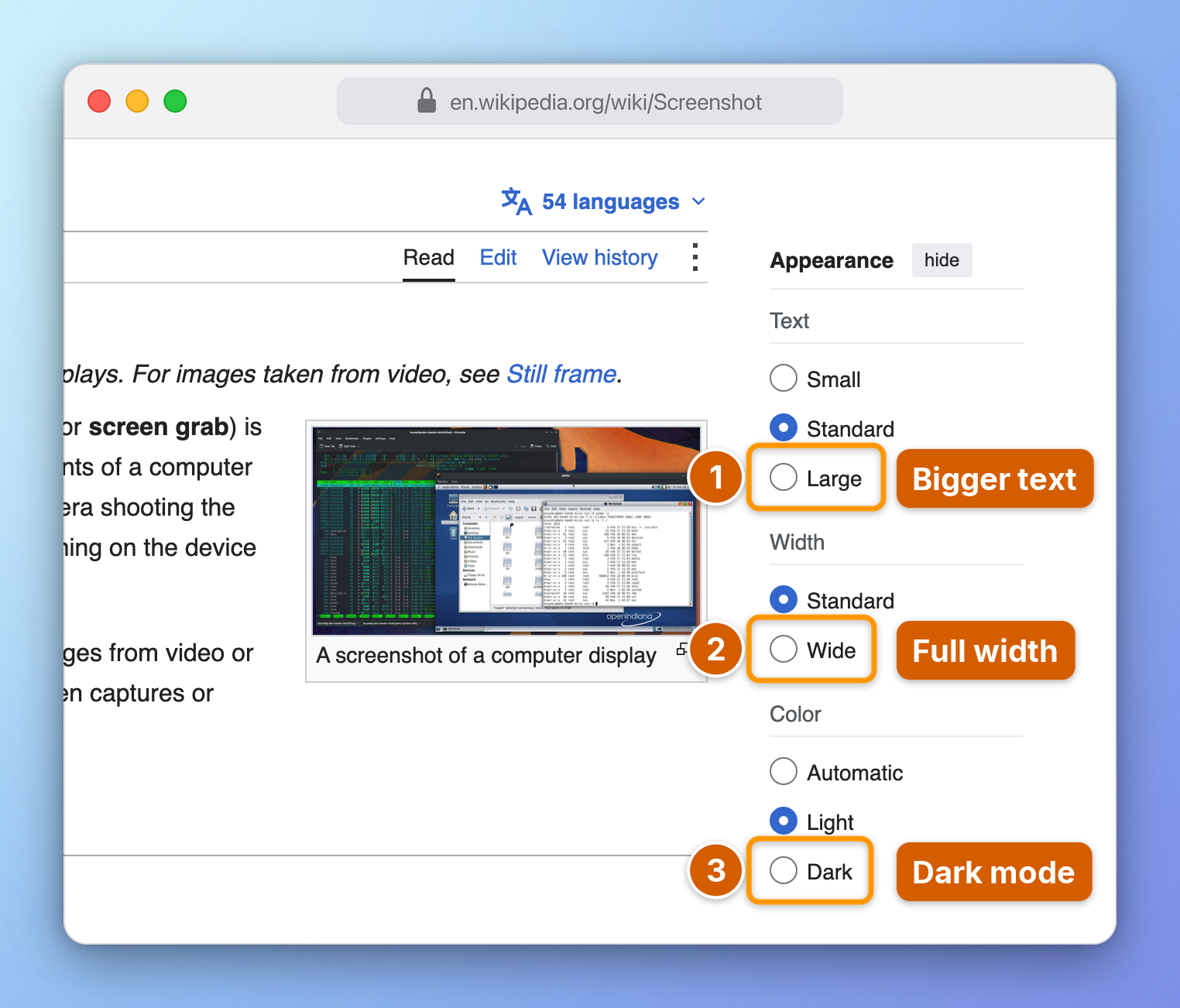
3. Ask. "Show me where to switch Wikipedia to dark mode." The agent captures the page, annotates it, checks it and sends the image. With the skill it also does this on its own whenever an answer depends on where something is on the screen: a "how do I" question, a visual bug, a before/after of a change.
Gallery
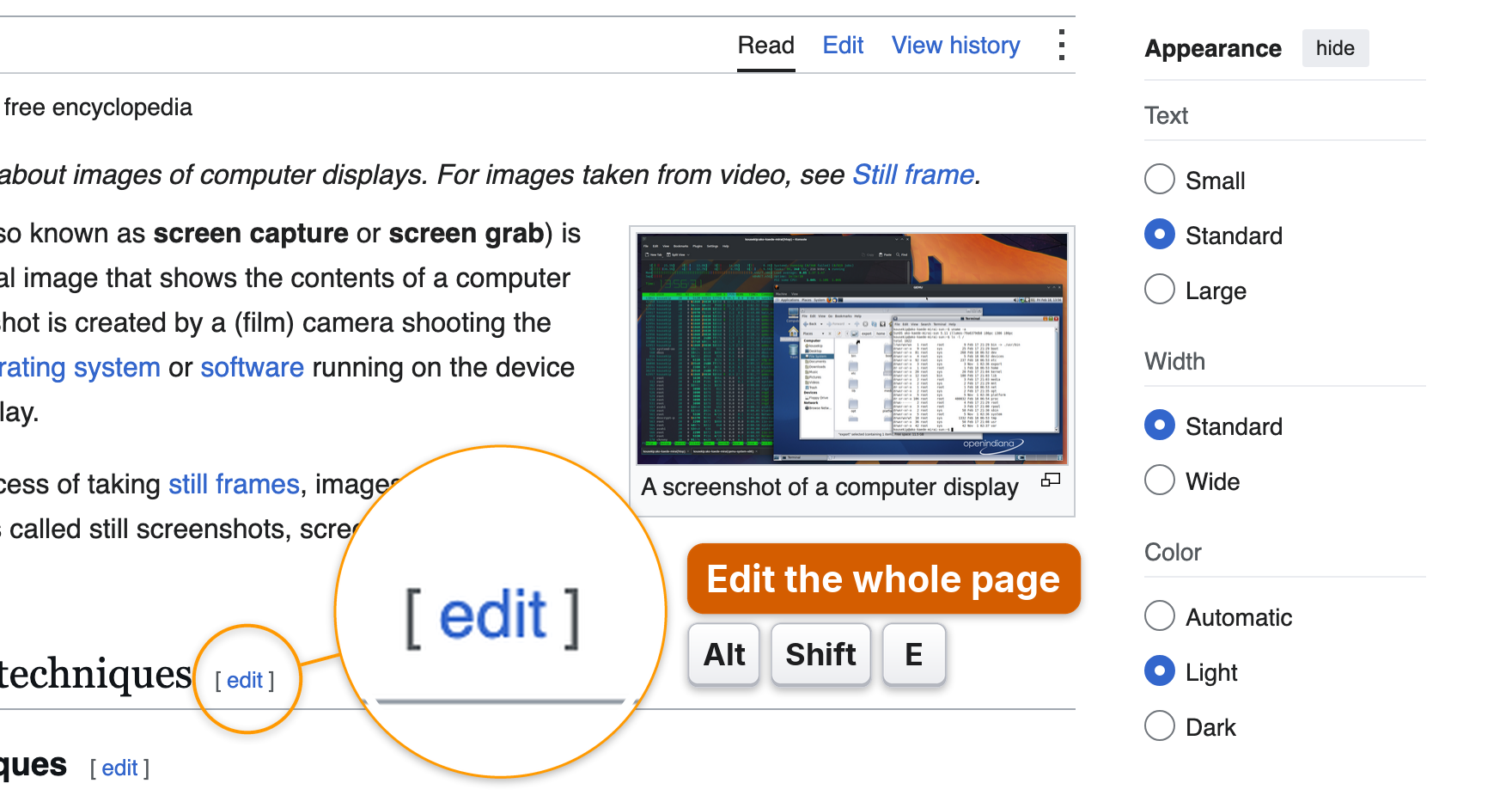
Every image below was made in one shoot call against a public site:
open the page, find the elements, place the labels, draw, frame. The specs
are in docs/images/specs.
| | |
|---|---|
|  |
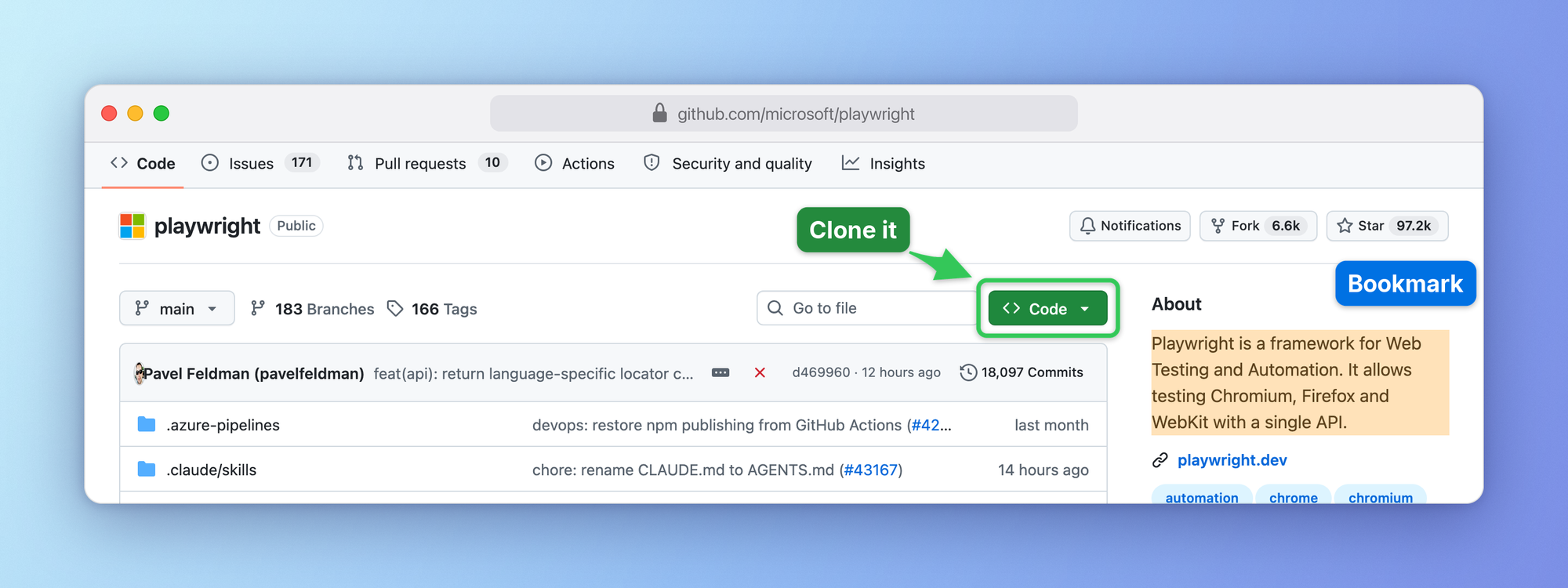 |
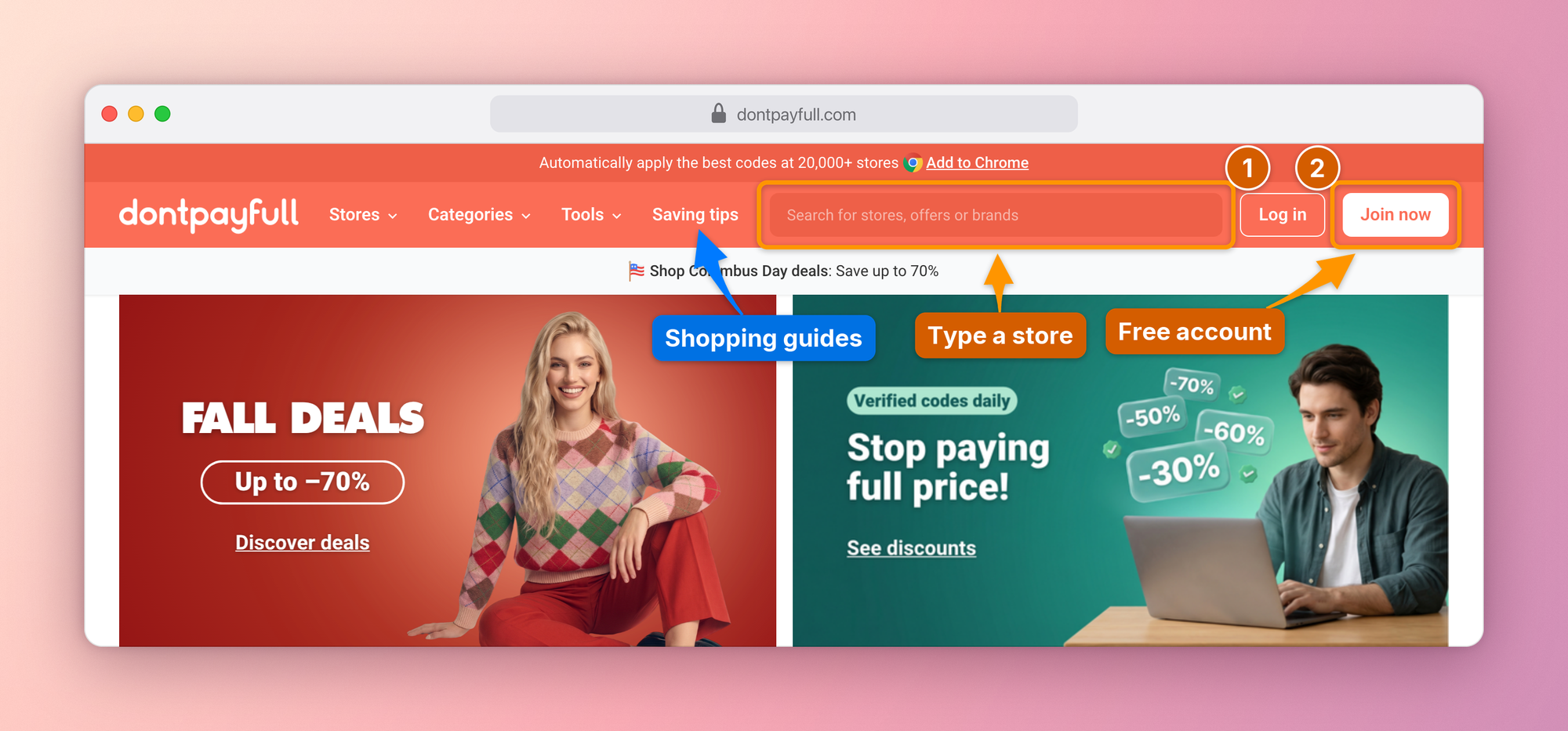
| Numbered steps on the busy header of DontPayFull, coupons for 20,000+ stores | Box, arrow and highlight on GitHub |
|
 |
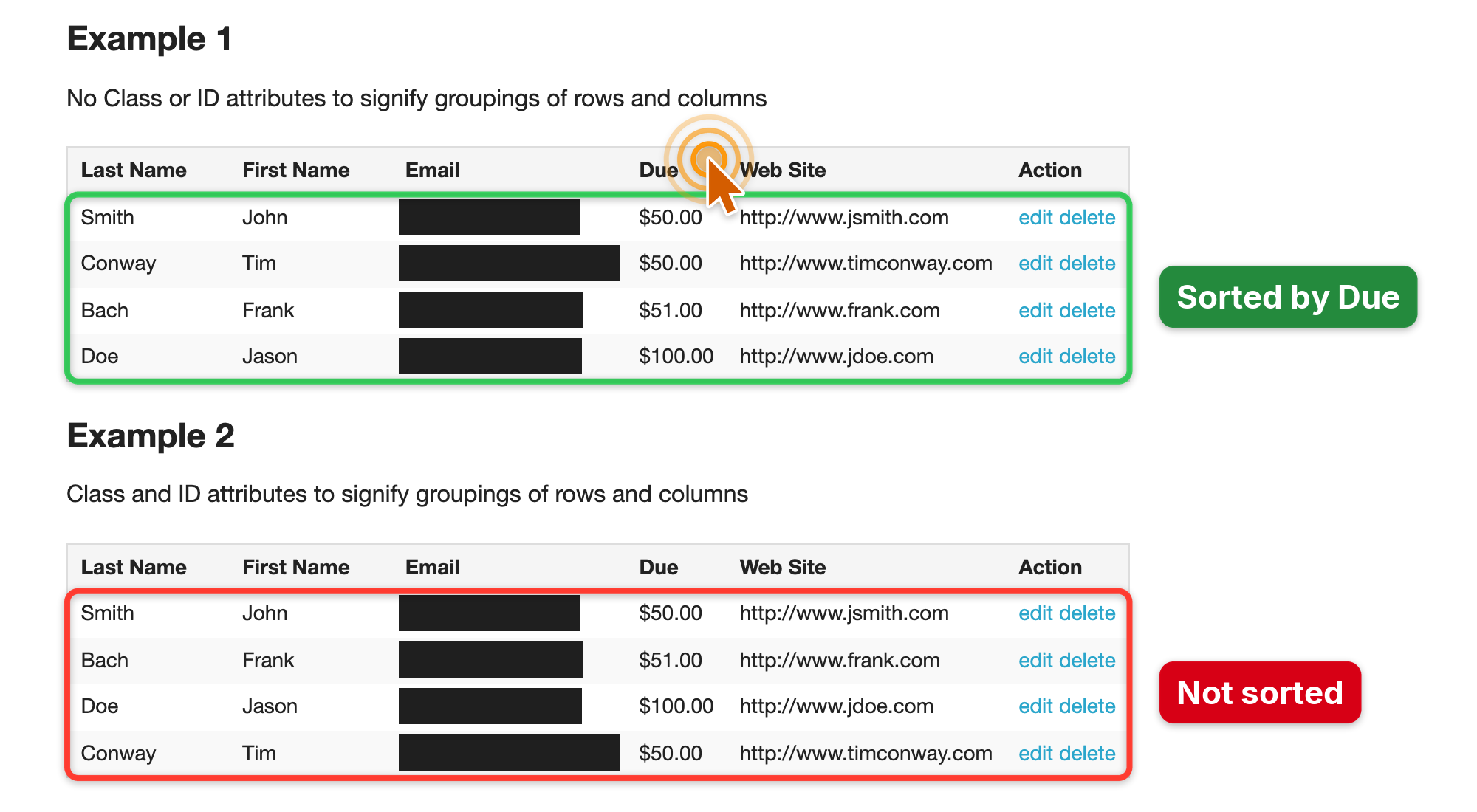 |
| Step-by-step guide with browser chrome and a gradient frame | Bug report, emails redacted automatically by the privacy scan |
|
 |
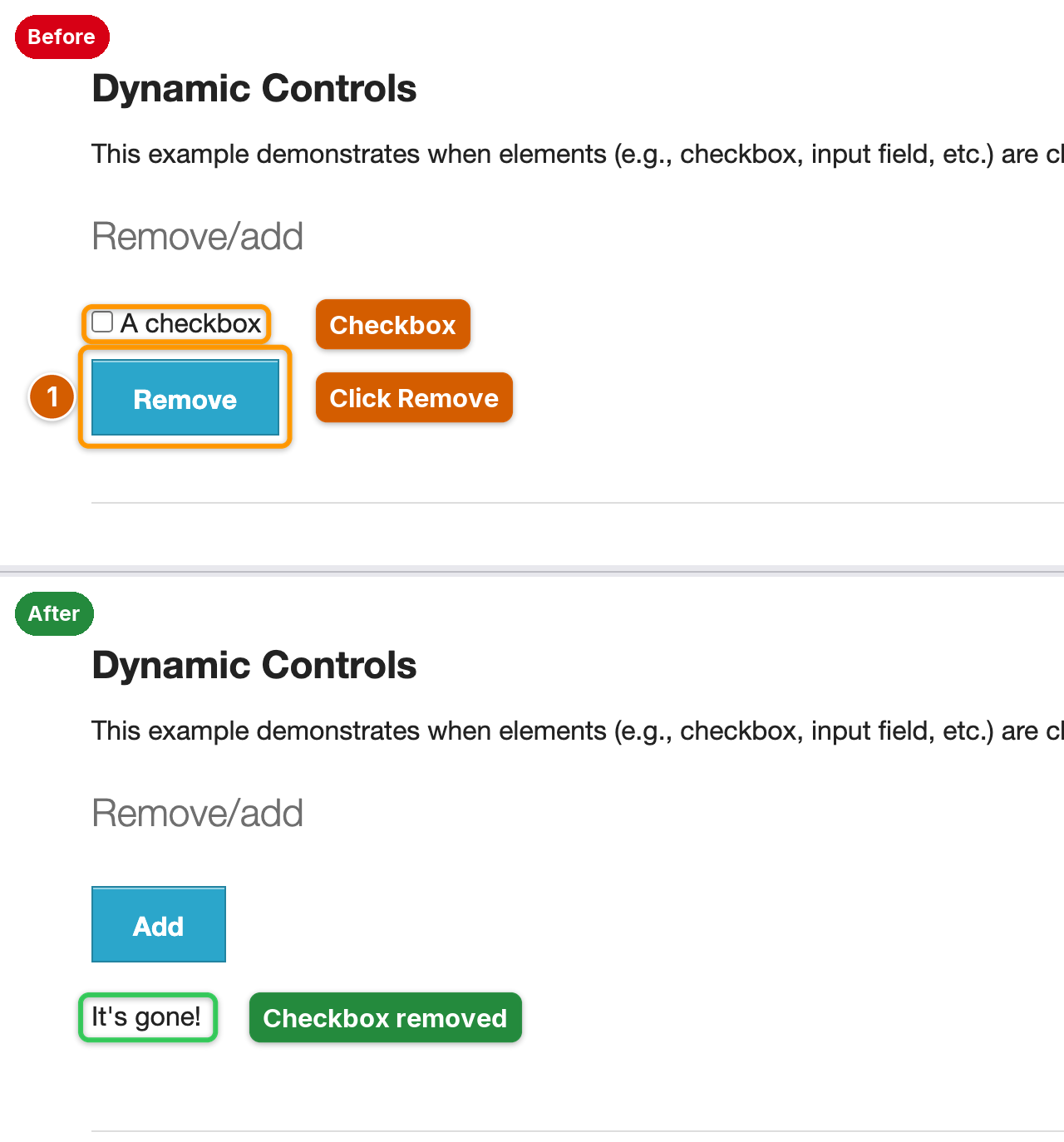 |
| Magnifier and keycaps for tiny controls and shortcuts | Before / after plate from two shots |
Labels that stay off the content

A label dropped at a fixed spot next to its target usually lands on the text the reader needs. AInotate places every label itself:
- It maps the page content first (text, icons, lines, images) and tries hundreds of spots per label. Empty space near the target wins; a spot over text is used only when the frame has no free room.
- Arrows are priced too: a long arrow, or one that crosses text, another label or another mark, loses to a shorter, cleaner one. When the straight path crosses text, the arrow curves around it.
- All labels are planned together, so the first one cannot take the only clean spot a later one needs.
- Step badges sit on the corner of their box that covers the least.
The image is never enlarged to make room. If a label still has to cover
something, AInotate says so in a warning, and label_at pins a label
exactly where you want it.
From the command line
Save this as hn.json:
{"url": "https://news.ycombinator.com",
 "frame": {"chrome": "browser"},
 "marks": [
  {"type": "step", "n": 1, "target": {"text": "new", "exact": true},
   "label": "Newest"},
  {"type": "step", "n": 2, "target": {"text": "login"},
   "label": "Sign in"}]}
ainotate shoot hn.json --draft # temp file; drop --draft to save
The output path is printed on stdout. Images are saved to
~/Pictures/AInotate unless you configure another folder. ainotate --help
lists every command (capture, annotate, locate by OCR, grid, zoom, window
capture with UI element targets, elements, guide, compare, animate, copy,
install-skill); the full spec is in
skills/ainotate/references/spec.md. Exit codes: 0 ok,
1 cannot save, 2 invalid spec, 3 cannot draw, 4 capture failed or an
optional dependency is missing, 5 ambiguous text target, 6 target not
found.
Python. The same pipeline is importable:
from ainotate.shoot import shoot
res = shoot({"url": "https://en.wikipedia.org/wiki/Screenshot",
             "marks": [{"type": "box",
                        "target": {"text": "View history"},
                        "label": "Past edits"}]}, draft=True)
print(res.paths[0], res.redactions)
Features
- Marks: numbered
step,box,arrow,clickripple,keys(keycaps),magnify(loupe),highlight,spotlight,text, solidredact, and decorativeblur/pixelate. - Placement that reads well:
Truncated for display — read the full file on GitHub.
Related Skills
claude-mem
117.9kPersistent Context Across Sessions for Every Agent – Captures everything your agent does during sessions, compresses it with AI, and injects relevant context back into future sessions. Works with Claude Code, OpenClaw, Codex, Gemini, Hermes, Copilot, OpenCode + More
Agent-Reach
112.7kGive your AI agent eyes to see the entire internet. Read & search Twitter, Reddit, YouTube, GitHub, Bilibili, XiaoHongShu — one CLI, zero API fees.
Understand-Anything
93.0kGraphs that teach > graphs that impress. Turn any code into an interactive knowledge graph you can explore, search, and ask questions about. Works with Claude Code, Codex, Cursor, Copilot, Gemini CLI, and more.
ruflo
82.0k🌊 The original agent harness. Deploy intelligent multi-player swarms, coordinate autonomous workflows, and build conversational AI systems. Features adaptive memory, self-learning intelligence, federation, vector RAG integration, and native Claude Code / Codex / Hermes and many more Integrated

Languages
Trust signals
From repository metadata: license, adoption, age and documentation. Not a code audit — see the Safety scan above for what the skill file itself contains.