
EM3DVP
EM3DVP: a Visual Package for 3D Geo-Electromagnetic modeling and inversion
Install / Use
/learn @dong-hao/EM3DVPREADME
EM3DVP:
a Visual Package for 3D Geo-Electromagnetic modeling and inversion
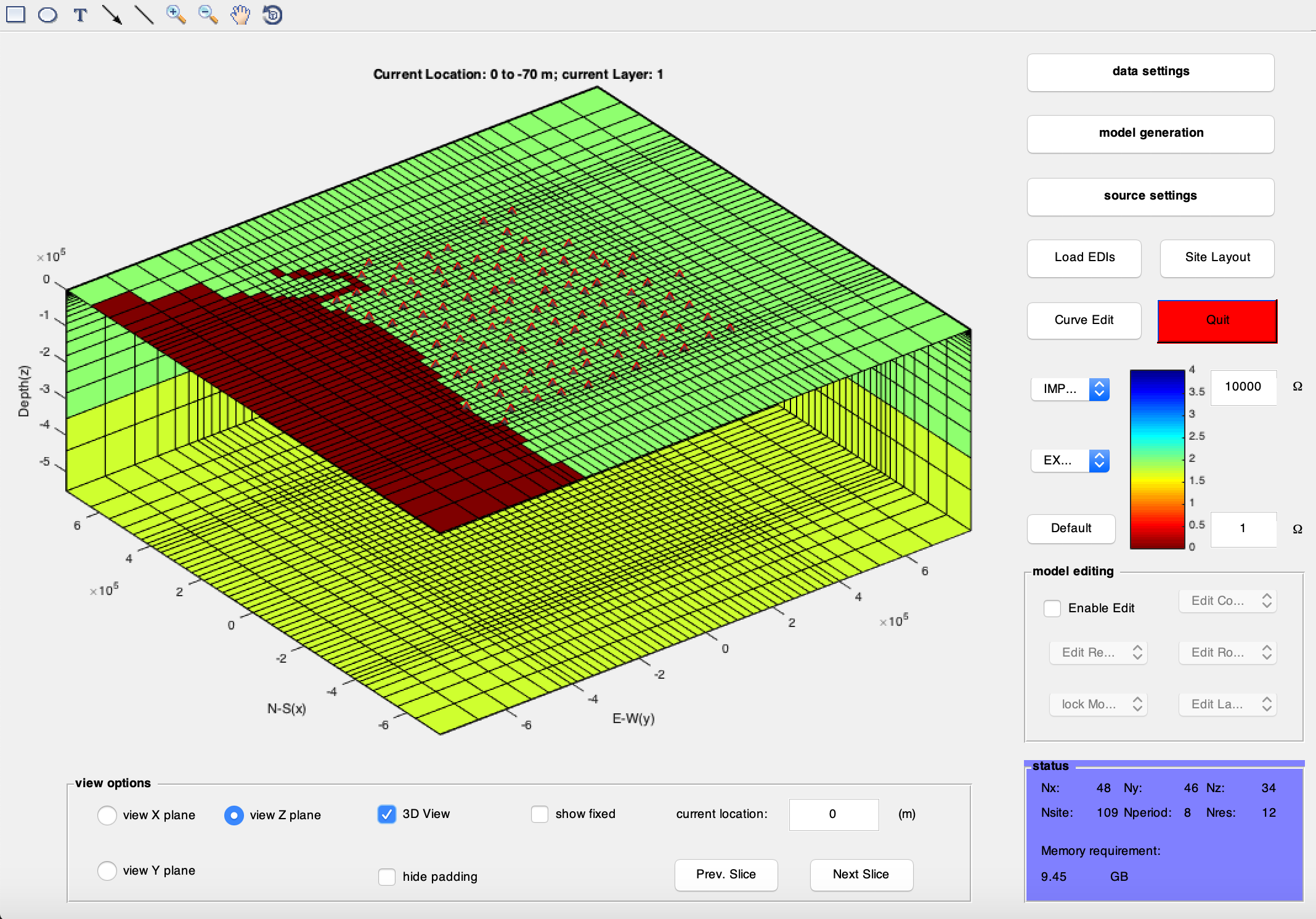
EM3DVP is a package of Matlab scripts. Its primary goal is to provide the users of EM methods an easy-to-use and (hopefully) comprehensive GUI to prepare the input model, data and parameter files for the 3D inversion codes, as well as an interface to plot the result models and responses. Note that this apparently works only for structured mesh.
something like a disclaimer
I wrote the package just for the convenience of myself and my colleagues/students in our group. Those who want to try this script are free to use it on academic/educational cases. But of course, I cannot guarantee the script to be working properly and calculating correctly (although I wish so). Have you any questions or suggestions, please feel free to contact me (but don't you expect that I will reply quickly!).
HOW TO GET IT
git clone https://github.com/dong-hao/EM3DVP/ your_local_folder
UNITS
The internal unit here is the 'practical' one, as used in most survey files (mV/km/nT) for E/B. To convert to Ohm (used by Weerachai's code) one needs to multiply the values by ~796. To convert to V/m/T (used by ModEM) one needs to multiply the values by 0.001
SIGN
The internal time harmonic sign convention is plus (+), or exp(i\omega t). Be careful when you need to deal with data with (-) convention.
ERRORS
Currently the internal error here is standard deviation, it worths noting that most of the survey file formats use variance (this code used variances as well before 2017). WARNING: I haven't touched that part for WSINV3D format, there must be some potential bugs lurking somewhere.
HOW TO GET UPDATED
cd to_you_local_folder
git pull
MISC NOTES
I decided to use a new system of version as the package name keeps going longer... Now I simply call it EM3DVP... Also, I tried to remove any rude words within my comments... If you found some part of the comments uncomfortable, please let me know.
Release History
- 0.0.9
- a quick bug fix for an import/export bug for tipper data as ModEM list file - the bug could lead to a sign problem when importing data from the "site location" panel
- 0.0.8
- a bug fix for the automatic bathymetry/topography configuration (probably been around for a couple of years) - this deals with the NaN values after generating the topography/bathymetry, when the DEM coverage is insufficient.
- 0.0.72
- new feature implementation to be compatible with data files with additional Azimuth information - note here we don't have any use of those info in the code, yet.
- 0.0.71
- fixed an issue for the RMS calculation when loading a data file without impedance/tipper components.
- 0.0.7
- a couple of minor fixes in the profile section interface - fixed the output for the xyz and loc files.
- 0.0.6
- a couple of bug fixes when adding topography/bathymetry to the model - fixed a bug when locating which mesh grid a site is, and correct the site elevation so that the elevation is consistent with the model air/sea layer depth. Another quick fix is for the callback when one inputs the centre/reference point for the projection. Also modified the site projection strategy to use the median location of the stations as the center/reference coordinate when the study region is small enough (< 1 by 1 degree).
- 0.0.5
- a couple of new features - now supports "Anisotrophy" features by generating high/low resistivity fine stripes, which cannot be resolved by isotropic modelling. Also updated a long forgoten feature to extract 1D layered resistivity at a given surface point of 3D model.
- 0.0.4
- bug fixes and a couple of features - adding the function to build a tear layer with a boundary file; adding the option to export the induction vector information to be plotted with third party programes (e.g. GMT); the program now display the RMS in a different manner - the RMSs for tipper and impedance are now displayed in separate values.
- 0.0.3
- fixed an old (and purely cosmetic) bug in displaying the errorbar for impedance phases. This was not of importance as it did not affect the actual errorbar in the outputted data.
- 0.0.2
- some minor modifications mostly for dealing with poorly formatted data and model files
- 0.0.1
- initial implement
Contact
DONG Hao – donghao@cugb.edu.cn
China University of Geosciences, Beijing
Distributed under the GPL v3 license. See LICENSE for more information.
[https://github.com/dong-hao/EM3DVP]
Contributing
Those who are willing to contribute are welcomed to try - but I probably won't have the time to review the commits frequently (not that I would expect there will be any).
- Fork it (https://github.com/dong-hao/EM3DVP/fork)
- Create your feature branch (
git checkout -b feature/somename) - Commit your changes (
git commit -am 'Add some features') - Push to the branch (
git push origin feature/somename) - Create a new Pull Request - lather, rinse, repeat
Commercial Usage
Commercial usage is not forbidden by the license - but you are recommended to contact Dr. Naser Meqbel for his more advanced GUI. You will get a more robust software with more useful features. Visit his website: http://www.consulting-geo.com for details. I should ask him for affiliate commission (reads: money) for posting his link here!
Getting Started
a. prerequisite
Modelling: You can begin your modelling from (literally) scratch with EM3DVP. However, if you plan to include topography/bathymetry in your model, you will need digital elevation data in .xyz format (lon lat elev) for EM3DVP to read. If you have designed your site distribution in other software, you will also have to convert them into xyz format (Northing Easting Elevation). Pre-existed ModEM/WSINV3D/WinGlink Models can be imported.
inversion: you will need your MT field data files (.EDI files) as well as the digital elevation file or model files, as described in modelling part.
b. prepare input files for forward/inversion
load data: click the "Load EDIs" button on the "model creating interface" to load EDI files in a GUI file manager. Alternately, you can click the "IMPORT" pop-up menu to import ModEM or WSINV3D data. Once you loaded the data, the sites will be automatically projected from Geological coordinates using UTM projection. A default model will also be automatically generated for the sites.
in "data settings" interface:
site projection: you can manually select the projection "zero point" using "fixed" radio button and arbitrary LAT/LON as project centre. If "automatic" is selected, the middle value of LAT/LON from all sites will be used as the project centre.
data selection: you can select data responses used in forward/inversion in "data select" box. tick "Zxx&Zyy" for diagonal impedances, "Zxy&Zyx" for off-diagonal impedances, and "Tx&Ty" for tippers. Select the period range with the upper and lower bond after "Periods:" in "data select" box. Set the number of periods per octave after "Periods/Octave:".
error setting: you can manually set data error with the "fixed" radio button in "data error" box. Given error will be used for diagonal, off-diagonal impedances and tipper respectively. If "from data" is selected, original data error will be used.
in "model generation" interface model parameter: you can manually set the model mesh parameters in "model generation" interface X,Y,Z are the Northing, Easting and Vertical coordinates respectively. By hitting "generate", a new homogeneous half space model will be generated using the following parameters, as described below. x block width: width of the x blocks within the core area. x outcore blocks: number of x blocks out of the core area. x outcore step: increasing step for x blocks out of the core. y block width: width of the y blocks within the core area. y outcore blocks: number of y blocks out of the core area. y outcore step: increasing step for y blocks out of the core. y block width: width of the y blocks within the core area. y outcore blocks: number of y blocks out of the core area. y outcore step: increasing step for y blocks out of the core. z first thickness: thickness of the first z layer. z incore step: increasing step for z layers within the core. z incore layers: number of z layers within the core area. z outcore step: increasing step for z layers out of the core. z outcore layers: number of z layers out of the core area. background res.: default resistivity of the generated model.
model display: you can plot the 3d model slices in X, Y or Z plane by selection in the "view option" box. By clicking the "Prev. slice" or "Next slice" button, you can browse through the model slice by slice. The current slice location is displayed on the top of the model plot. Some brief information of the model and data is displayed at the bottom-right corner of the interface. model editing: you can manually edit the model mesh and the model resistivity by enabling the "model editing" box. use the "edit column", "edit row" and "edit layer" pop-up menus to edit the different direction of meshes. use the "Edit resist." pop-up menu to edit the resistivity of the model.
Bathymetry or topography can also be automatically added to the model by using the "Edit resist." -> "Add Topo"/"Add Bathy." pop-up menu. You will be prompted to load the digital elevation data file afterwards. use the "Lock model" pop-up menu to prevent part of the model from changing in inversions.
data editing: you can display the data curve and mask data (site-wise) by clicking the "Curve edit" button and calling the Curve Editor interface. save input files: you can export the input files needed for WSINV3D or ModEM from the "EXPORT" pop-up menu.
c. run the forward/inversion
Please note that even th
Related Skills
node-connect
349.0kDiagnose OpenClaw node connection and pairing failures for Android, iOS, and macOS companion apps
frontend-design
109.4kCreate distinctive, production-grade frontend interfaces with high design quality. Use this skill when the user asks to build web components, pages, or applications. Generates creative, polished code that avoids generic AI aesthetics.
openai-whisper-api
349.0kTranscribe audio via OpenAI Audio Transcriptions API (Whisper).
qqbot-media
349.0kQQBot 富媒体收发能力。使用 <qqmedia> 标签,系统根据文件扩展名自动识别类型(图片/语音/视频/文件)。
