
HeadFirstAndroid
Source code for the book Head First Android Development by O’Reilly Media
Install / Use
/learn @dogriffiths/HeadFirstAndroidREADME
Table of contents
<a name="sec-1"></a>Chapter 1: Getting started
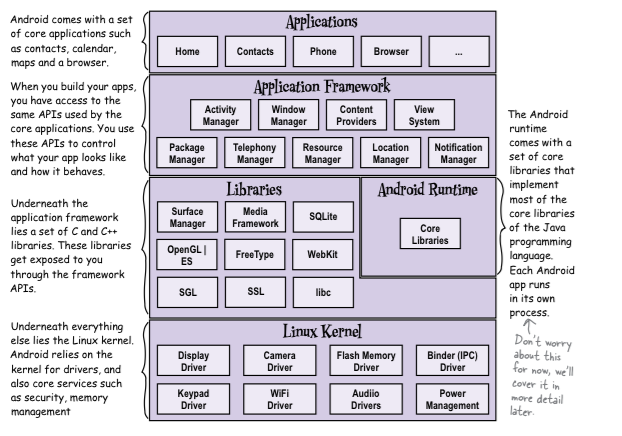
Android has been taking the world by storm. Everybody wants a smart phone or tablet, and Android devices are hugely popular. In this book we’ll teach you how to develop your own apps, and we’ll start by getting you to build a basic app and run it on an Android Virtual Device. Along the way you’ll meet some of the basic components of all Android apps such as activities and layouts. All you need is a little Java know-how…
Apps you'll build:
<a name="sec-1-2"></a>Chapter 2: Building Interactive Apps
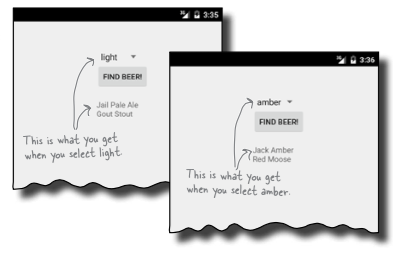
Most apps need to respond to the user in some way. And in this chapter you’ll see how you can make your apps a bit more interactive. You’ll see how you can get your app to do something in response to what the user does, and how to get your activity and layout talking to each other like best buddies. And along the way we’ll take you a bit deeper into how Android actually works by introducing you to R, the hidden gem that glues everything together.
Apps you'll build:
<a name="sec-1-3"></a>Chapter 3: Multiple activities and intents
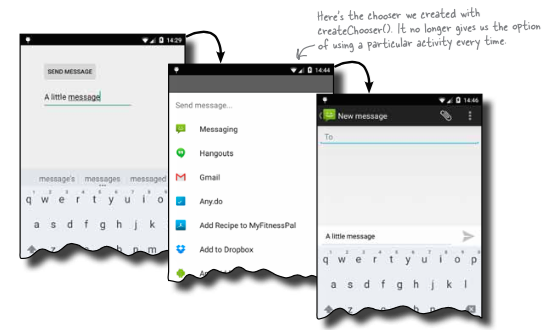
Most apps need more than one activity. So far we’ve just looked at single-activity apps, which is fine for simple apps. But when things get more complicated, just having the one activity won’t cut it. We’re going to show you how to build apps with multiple activities, and how you can get your apps talking to each other using intents. We’ll also look at how you can use intents to go beyond the boundaries of your app and make activities in other apps on your device perform actions. Things just got a whole lot more powerful…
Apps you'll build:
<a name="sec-1-4"></a>Chapter 4: The activity lifecycle
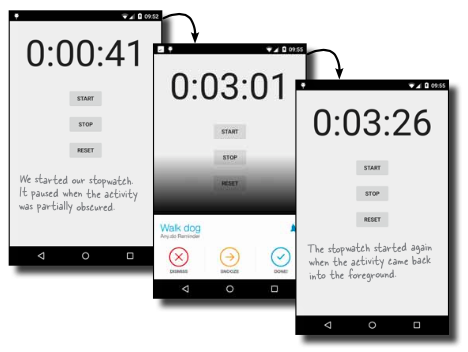
Activities form the foundation of every Android app. So far you’ve seen how to create activities, and made one activity start another using an intent. But what’s really going on beneath the hood? In this chapter we’re going to dig a little deeper into the activity lifecycle. What happens when an activity is created and destroyed? Which methods get called when an activity is made visible and appears in the foreground, and which get called when the activity loses the focus and is hidden? And how do you save and restore your activity’s state?
Apps you'll build:
<a name="sec-1-5"></a>Chapter 5: The user interface
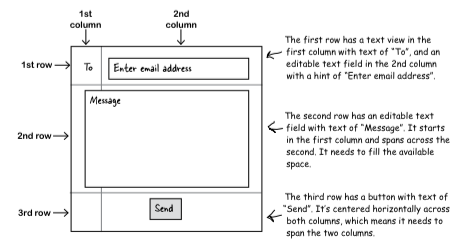
Let’s face it, you need to know how to create great layouts. If you’re building apps you want people to use, you need to make sure they look just the way you want. So far we’ve only scratched the surface when it comes to creating layouts, so it’s time to look a little deeper. We’ll introduce you to more types of layout you can use, and we’ll also take you on a tour of the main GUI components and how you use them. By the end of the chapter you’ll see that even though they all look a little different, all layouts and GUI components have more in common than you might think.
<a name="sec-1-6"></a>Chapter 6: List views and adapters
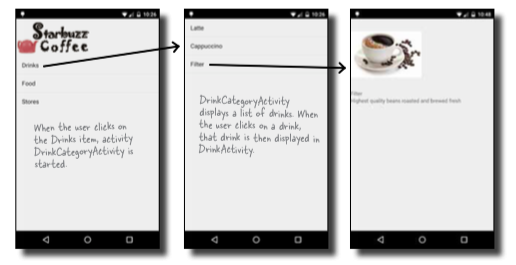
Want to know how to best structure your Android app? You’ve learned some of the basic pieces that are user to build apps, and now it’s time to get organized. In this chapter we’ll show you how you can take a bunch of ideas and structure them to build an awesome app. We’ll show you how lists of data can form the core part of your app design, and how linking them together can create a powerful and easy-to-use app. Along the way, you get your first glimpse of using event listeners and adapters to make your app more dynamic.
Apps you'll build:
<a name="sec-1-7"></a>Chapter 7: Fragments
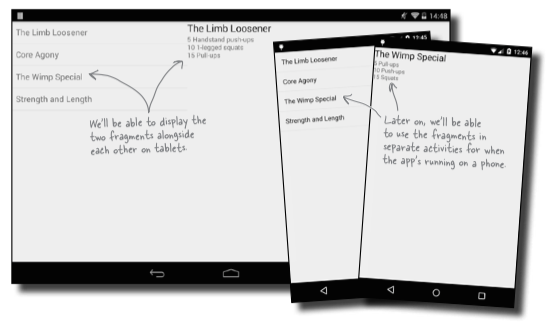
You’ve seen how to create apps that work in the same way irrespective of the device they’re running on. But what if you want your app to look and behave differently depending on whether it’s running on a phone or a tablet? In this chapter we’ll show you how to make your app choose the most appropriate layout for the device screen size. We’ll also introduce you to fragments, a way of creating modular code components that can be reused by different activities.
Apps you'll build:
<a name="sec-1-8"></a>Chapter 8: Nested fragments
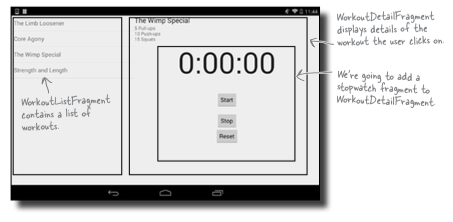
You’ve seen how using fragments in activities allow you to reuse code and make your apps more flexible. In this chapter we’re going to show you how to nest one fragment inside another. You’ll see how to use the child fragment manager to tame unruly fragment transactions. And along the way you’ll see why knowing the differences between activities and fragments is so important.
Apps you'll build:
<a name="sec-1-9"></a>Chapter 9: Action Bars
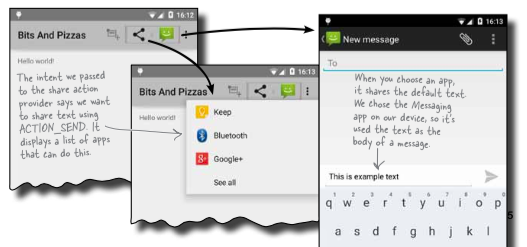
Everybody likes a shortcut. And in this chapter you’ll see how to add shortcuts to your apps using action bars. We’ll show you how to start other activities by adding action items to your action bar, how to share content with other apps using the share action provider, and how to navigate up your app’s hierarchy by implementing the action bar’s Up button. Along the way you’ll see how to give your app a consistant look and feel using themes, and introduce you to the Android support library package.
Apps you'll build:
<a name="sec-1-10"></a>Chapter 10: Navigation Drawers
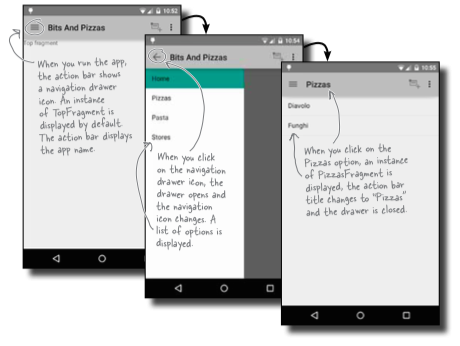
Apps are so much better when they’re easy to navigate. In this chapter we’re going to introduce you to the navigation drawer, a slide-out panel that appears when you swipe your finger or click an icon on the action bar. We’ll show you how to use it to display a list of links that take you to all the major hubs of your app. You’ll also see how switching fragments makes those hubs easy to get to and fast to display.
Apps you'll build:
<a name="sec-1-11"></a>Chapter 11: SQLite databases
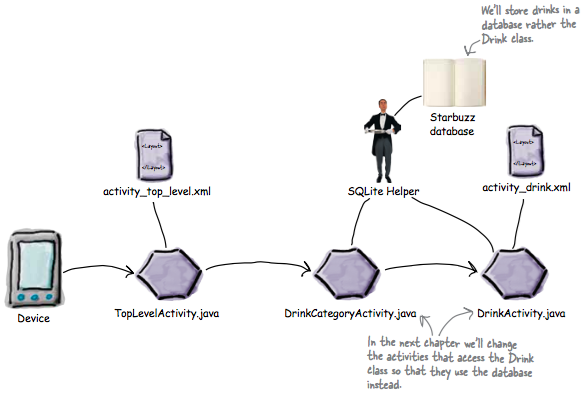
If you’re recording high scores or saving tweets, your app will need to store data. And on Android you usually keep your data safe inside a SQLite database. In this chapter, we’ll show you how to create a database, add tables to it, and prepopulate it with data, all with the help of the friendly SQLite helper. You’ll then see how you can cleanly roll out upgrades to your database structure, and how to downgrade it if you need pull any changes.
Apps you'll build:
<a name="sec-1-12"></a>Chapter 12: Cursors and AsyncTasks
So how do you connect your app to a SQLite database? So far you’ve seen how to create a SQLite database using a SQLite helper. The next step is to get your activities to access it. In this chapter you’ll find out how to us
