
Bin
Useful scripts and configs for Linux users
Install / Use
/learn @dmi3/BinREADME
Useful scripts for Linux users
See my Fish config for more CLI awesomness
wa
Description
<img src="https://developer.run/pic/wa_full.png"/> <img src="https://developer.run/pic/wa.png"/> <img src="https://developer.run/pic/wa2.png"/>Using Wolfram Alpha in command line. See blog post for description and more ideas.
Requirements
- Make sure to configure variables in script
- Put api key in
APPID - For
VIEWER, you can use text only api and optionaly use terminal that supports images orsudo apt-get install imagemagickto view images. - Configure
BGandFGvariables depending on color scheme
Usage
➤ wa helsinki to dublin plane
2 hours 20 minutes
➤ wa time in dublin
5:37:57 pm GMT; Friday, January 27, 2017
➤ wa 15.36 english money to eur
14.35 euros
➤ wa days till nov 16
293 days
➤ wa 154Mbit/s to MB/s
19.2 megabytes per second
➤ wa brick red hex
#AB0303
➤ wa weather in moscow
9 degrees Celsius and cloudy, with light winds✖
➤ wa plot x=y^2
[...draws plot if supported]
➤ # many many more usages... https://www.wolframalpha.com/examples/
volume
Decription
Script to control audio volume from console, hotkeys, e.t.c. Also shows nice Notify OSD buble with current volume value
Requirements
sudo apt-get install pulseaudio notify-osd
Usage
volume (up|down|mute)
$volume without trailing %
kbecho.py p ${volume%?}
<hr/>vlc-now.sh
Description
Show file or stream currently playing in VLC. Works well with (with xfce4-genmon-plugin). See playerctl -h for another players.
Requirements
sudo apt-get install vlc playerctl
Usage
vlc-nowIncludes useful functions- `cutExt() {
- `wrapInBrackets() {
- `basename() {
- `urlDecode() {
url-preview-md.py
Decription
Wrapper around webpreview. Takes url, downloads a preview image (or image iself, if url points to image) and returns formatted markdown with page title and description. Useful with clipboard manager. Read more
Requirements
pip install webpreview
Usage
$ url-preview-md.py img_directory url
$ url-preview-md.py ~/img http://developer.run/70
[Markdown Url Preview](http://developer.run/70) Markdown Url Preview in text editor.

If you have raindrop.io api key, add it as last argument to try it if webpreview finds nothing useful
$ url-preview-md.py ~/img http://developer.run/70 e2b0e47c-8a03-11ef-b1b2-13950b80fc62
tray-unread.sh
<img src="https://developer.run/pic/tray-unread.gif"/>Decription
Update tray icon depending on script result. Current example shows unread mail count for Evolution mail (for those poor souls who need exchange but don't have web client), but actually it can check and notify about literally anything! Another example shows Git repository status.
On click simulates some keypresses to mark all mail as read.
Read more:
- https://sourceforge.net/p/yad-dialog/wiki/NotificationIcon/
- https://dset0x.github.io/mail-counting.html
Requirements
sudo apt-get install yad- For Evolution
sudo apt-get install sqlite3 wmctrl xdotool
Usage
tray-unread.sh
tray-git-status.sh
Decription
Update tray icon depending if there are changes in Git repository. ⚠ Note that it does not show any icon if repository is in sync Check for new changes every 10 minutes. See also git-sync
See https://stackoverflow.com/a/3278427/18078777
Requirements
sudo apt-get install yad git
Usage
tray-git.sh
translation-insert.sh
Decription
Prompts for text. Then inputs translation. Works in any application.
Requirements
- Setup https://github.com/dmi3/bin/blob/master/yandex-translate.sh
sudo apt-get install zenity xsel
Usage
- Bind script to hotkey in your DE. After input wait couple of seconds for translation to appear.
translate-yandex.sh
Decription
CLI Yandex Translate API ru↔en. Automatically detects language. Translates any language to Russian, and Russian to English.
Usage
yandex-translate.sh cat is a small, typically furry, carnivorous mammal # en → ru
yandex-translate.sh die Hauskatze ist eine Unterart der Wildkatze # de → ru
yandex-translate.sh кот это маленькое, пушистое и очень хитрое млекопитающее # ru → en
translate-selection.sh
Decription
Show popup with translation of selected text. Works in any application.
Requirements
- Setup https://github.com/dmi3/bin/blob/master/yandex-translate.sh
sudo apt-get install zenity xsel
Usage
- Bind script to hotkey in your DE.
- Select any text. Press hotkey.
top10tracks.sh
Decription
Prints top 10 track of artist
Usage
top10tracks.sh Mick Gordon
<hr/>tomatych.py
<img src="http://developer.run/pic/tomatych.png"/>Description
- Simple Hackable Pomodoro Timer with optional Slack and Habitica integrations.
- Intended to be hacked and modified to fit your specific vision of how Pomodoro timers should work.
- Moved to separate repo
todo
Wunderlist CLI for adding todos
Decription
Wrapper for wl for adding todos with more convenient syntax Read More
Instalation
- ⚠ Make sure Fish shell > 2.3.0
curl https://raw.githubusercontent.com/dmi3/bin/master/todo --create-dirs -o ~/bin/todocurl https://raw.githubusercontent.com/dmi3/bin/master/config/fish/completions/todo.fish --create-dirs -o ~/.config/fish/completions/todo.fish- https://developer.wunderlist.com/apps
[CREATE APP](Put https://wunderlist.com to bothAPP URLandAUTH CALLBACK URL)- Set enviroment variables in this script ↓ (line 31)
- Add more list shortcuts ↓ (line 39)
Usage
 todo buy stuff --life --on next monday
 todo resolve issue --work --star
 todo --work meet customer --on jan 7
timer
Decription
Simple timer with sound and dialog window notification. To remind you to turn stove off :). Replace pc_up.wav to any available audiofile.
Requirements
sudo apt-get install dunst aplay
Usage
timer 6 # i.e. notify after 6 minutes
temp.sh
Decription
Shows CPU, System and GPU temperature
Requirements
sudo apt-get install jq lm-sensors nvidia-smi
Usage
temp
<hr/>status.sh
Description
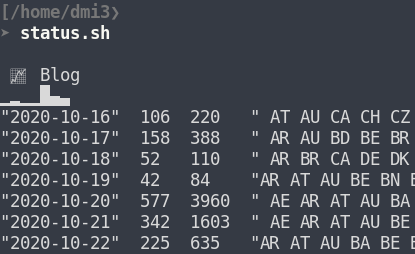
CLI web stats dashboard. Visualizes GitHub followers, top GitHub repos and last 500 blog hits
with top pages and refferers. Works well in addition to headlines.sh and newsbeuter -x reload -x print-unread 2> /dev/null Read more
Requirements
- spark (the other spark, not the behemoth one)
sudo apt-get install jq
Usage
- Set
URL,GITHUB_ID,PARSE_APP_IDandPARSE_MASTER_KEY` variables status.sh
sssh2
Decription
Like sssh, in addition:
hostnameparameter of ssh command will appear in title.- Useful when calling by nickname from local
~/.ssh/configi.e.ssh server_nickname, and change of server hostname is not an option.
- Useful when calling by nickname from local
- If command supports tunneling, display it in title
- I.e.
ssh -L 80:localhost:80 server_nicknamewill set titleuser@[80]server_nickname - Avoid accidental closing of such tabs
- I.e.
- Appends some useful aliases to existing
~/.bashrc - Preserves command history on multiple sessions
Usage
See sssh
<hr/>sssh
Decription
Script to change your terminal title to user@host when connecting to ssh and changing
it back after exiting. Additionally sets green prompt on remote host.
Useful for Keepassx and visual distinction to avoid notorious "wrong window" problem.
Also works when connecting Fish → Bash
If you want hostname from local ~/.ssh/config fil
Related Skills
node-connect
346.4kDiagnose OpenClaw node connection and pairing failures for Android, iOS, and macOS companion apps
frontend-design
107.2kCreate distinctive, production-grade frontend interfaces with high design quality. Use this skill when the user asks to build web components, pages, or applications. Generates creative, polished code that avoids generic AI aesthetics.
openai-whisper-api
346.4kTranscribe audio via OpenAI Audio Transcriptions API (Whisper).
qqbot-media
346.4kQQBot 富媒体收发能力。使用 <qqmedia> 标签,系统根据文件扩展名自动识别类型(图片/语音/视频/文件)。
