
Dudestack
A toolkit for creating a new professional WordPress project with deployments. Originally based on Roots/bedrock.
Install / Use
/learn @digitoimistodude/DudestackREADME
Dudestack


Dudestack is a modern WordPress toolkit that helps you get started with the best development tools and project structure - just like Bedrock.
The idea is to have just one command for starting the project. Saves dozens of hours easily in each project start when DRY (Dont-Repeat-Yourself) stuff are fully automated!
After setting up, you can start a new project just by running:
createproject
TL;DR: You can test dudestack right away in just two minutes by following our Air starter theme instructions.
Please note: The main focus of dudestack is on how it works for our company and staff. This means it may not work for you without tweaking. Please ask a question by addressing an issue if something goes south.
<img width="830" height="606" alt="497078890-cb12bbb1-9563-4ef8-8694-99927f5f10ca" src="https://github.com/user-attachments/assets/26b7dd4d-5aaf-4ba8-abe8-44b042842bcc" />Documentation & guides
- See Wiki
- Currently we have only comprehensive written tutorial In English and for Windows (WSL)
Table of contents
- Background
- How it's different, why should I use this?
- Features
- Requirements
- Installation
- Documentation
Background
We're constantly developing our development workflow. Honestly, we've been through hundreds of articles, tools and scripts. Went with regular WordPress structure, different wp-configs and Dandelion for a long time, but realized in some point we have to get some sense to it all. Setting up things should not be the most time consuming task when starting a new project.
We love Bedrock, which is a is a modern WordPress stack that helps you get started with the best development tools and project structure. Bedrock contains the tools we've been already using, but more. In fact, we are proud to say that most of this stack is based on Bedrock.
Like bedrock, dudestack saves you hours when starting a new project.
How it's different, why should I use this?
Well, this is mainly a toolbox for a web design/development agency for a local Finnish WordPress-company, Digitoimisto Dude Oy as well as backup purposes and to show off how we roll. You should use this only if you really like how we do things.
Despite the fact we love most of Bedrock, we noticed there are some things we don't like.
- Stuff were originally in
app/by default, then inweb/. We prefercontent/, like it waswp-contentfor a reason. It describes it better, since we do not want this to be too programming-oriented, but more front end developer -friendly (for developing WordPress themes and functions) - Composer modifications, for installing more packages, like Finnish based language packs etc. that are not originally part of Bedrock
- Automation. I mean composer's
create-projectis awesome, but we need more. You still need to do stuff aftercreate-projectand ourcreateproject-starting script is designed for automating the rest. - Baked in local server environment settings for our native macOS LEMP server
Features
- HTTPS support
- Designed for pure WordPress development
- Fast and easy templates for development and deployment
- Customizable bash script for creating new WordPress project automation
- Automatic Github repo initialization
- Automatic MySQL-database generation
- Automatic Project-related host settings for development server
- Cleaning default WordPress stuff with wp-cli
- Capistrano 3 deployment templates bundled in bin/createproject.sh
- Composer to take care of WordPress installation and plugin dependencies and updates
- Dotenv-environments for development, staging and production
- Supports local LEMP (macOS / Windows) development environments
Requirements
- mkcert
- Composer v2
- Basic knowledge about bash scripting, deployment with capistrano, npm packages, bundle, composer etc.
- Local server environment macos-lemp. Can possibly be configured for MAMP or even Docker (we have no experience or support for 3rd party environments).
- GitHub account
- Unix-based OS or Windows WSL
- Optional: Access to staging and production servers that supports sftp and git
- Projects located under $HOME/Projects
- Git
- PHP >= 8.3
- Ruby >= 2.6
- Perl
Installation
- Install prequisites,
xcode-select --installand homebrew with latest updates - Install latest Composer and mkcert
- Clone this repo to your ~/Projects directory:
mkdir -p $HOME/Projects && cd $HOME/Projects && git clone git@github.com:digitoimistodude/dudestack.git
- Go to dudestack directory and run setup script:
cd $HOME/Projects/dudestack/bin && bash macos.sh
If you use WSL/Windows:
cd $HOME/Projects/dudestack/bin && bash wsl.sh
Documentation
Starting a new project with createproject bash script
Creating a new project has a lot of configs to do. We wanted to automate most of it by creating a bash script called createproject.sh. The script assumes:
- You are using staging server like customer.example.com and you store your customers' sites like customer.example.com/customerone. Your staging server user has proper permissions like making changes to /tmp
- You are using separate production server that may necessarily not have all the permissions like writing in /tmp dir
- You use native macOS LEMP
- Your repositories are stored in GitHub
- Your project hostname is project.test
- You are fine with gulp, npm and webpack
- WordPress dependencies are controlled by composer
What createproject.sh does
When you run createproject it looks like this:
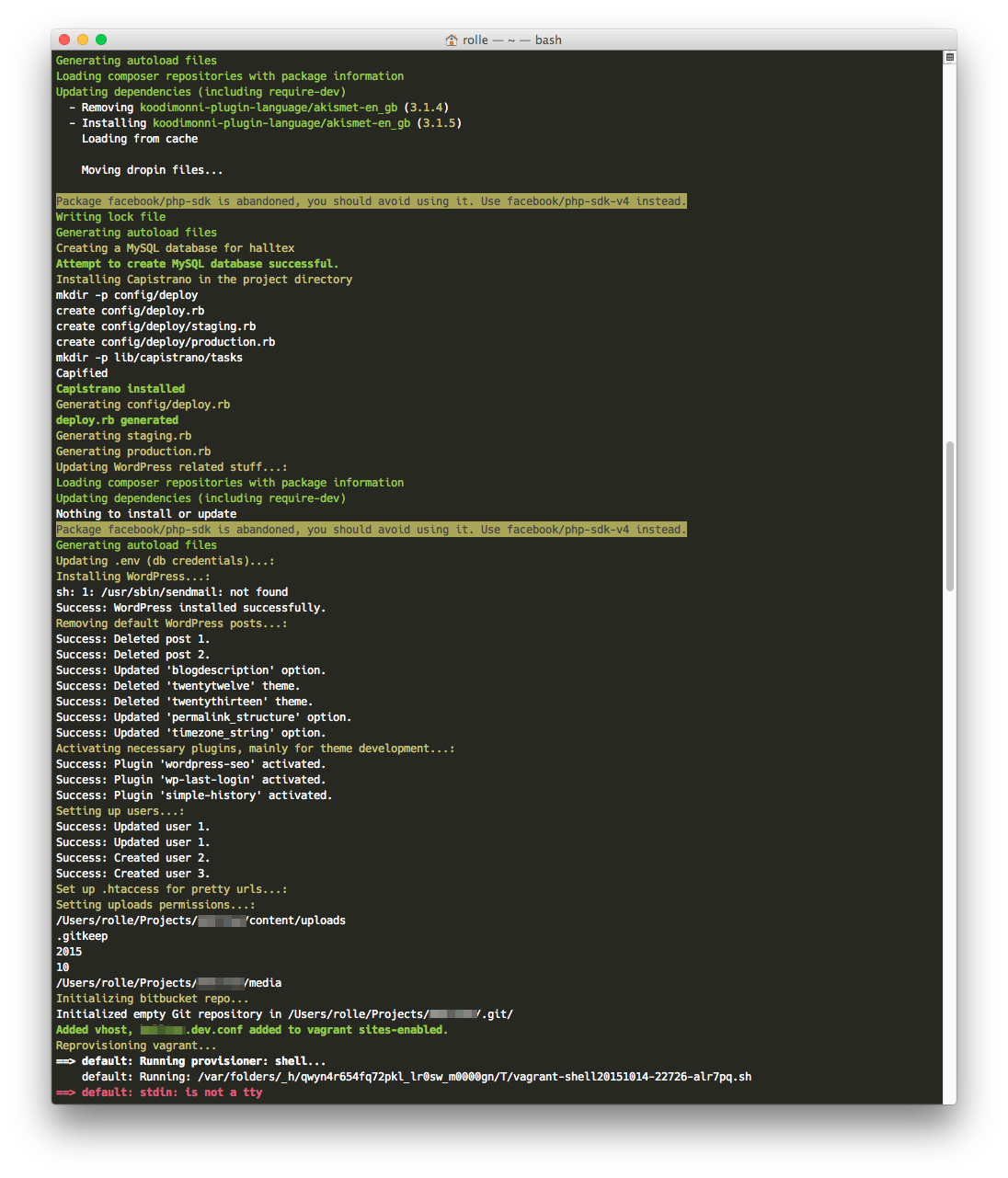
- First it runs
composer create-projectwith dudestack settings - Installs our default WordPress plugins and updates them
- Creates MySQL repository automatically with project name (assumes by default that you have macos-lemp installed)
- Installs capistrano deployment tool
- Generates default capistrano configs (config/deploy.rb, config/deploy/staging.rb, config/deploy/production.rb) with your GitHub project details and paths
- Sets up WordPress configs (wp-config credentials to .env) and salts automatically
- Installs WordPress under its own subdirectory /wp (thus, admin located in example.test/wp/wp-admin)
- Sets up default admin user as not "admin" for security (extra users can be configured in bin/createproject.sh)
- Removes default WordPress posts, themes and plugins and everything else not so useful
- Activates default plugins, timezones, permalinks
- Flushes rewrites, adds support for permalinks and webfonts
- Sets up file permissions
- Inits a GitHub repository
- Creates a HTTPS certificate
- Sets up a virtual host for development environment
- Updates /etc/hosts file
- Restarts development server
What you most probably need to edit in every project
- After running
createprojectyou should run newtheme.sh under air-light/bin. This will generate the WordPress theme with built-in gulp, stylelint, webpack, etc. for modern WordPress Theme development - To release your project staging/production: Production server SSH-credentials and paths in config/deploy/production.rb because they are usually different in every project. If you have the same directory structure on your servers, you can edit bin/createproject.sh so you don't repeat yourself in every project.
- You will need gulp or grunt so if you are not using our starter theme air-light, you'll need to set up your own build tools for modern WordPress theme development
Please note:
- Dudestack is only a starter package without ANY theme configs. We leave theme development up to you entirely. We hav
