
AndroidExpandingViewLibrary
This is a library to help creating expanding views with animation in Android
Install / Use
/learn @diegodobelo/AndroidExpandingViewLibraryREADME

About the Library
inspiration
This library is strongly inspired in this concept from Hila Peleg in dribble. See it below
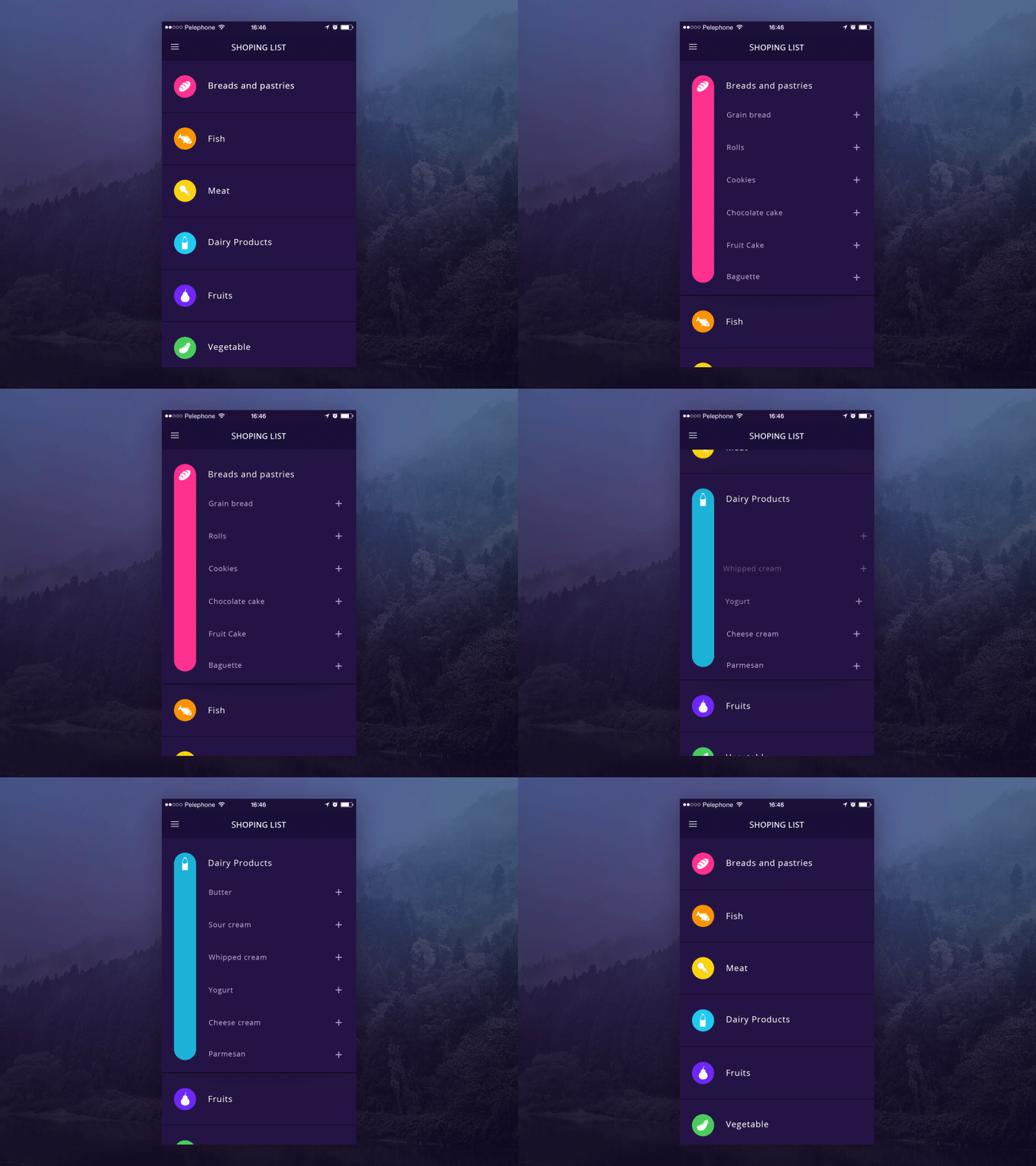
Working example
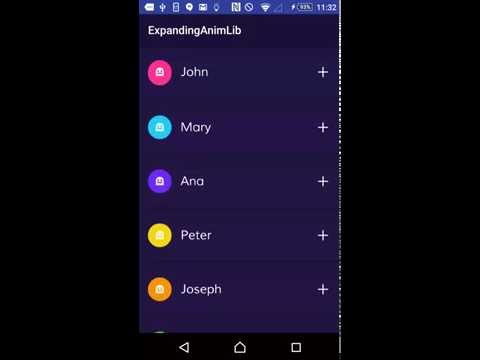
For more details on how to use this library please refer to the example in this repository. You can see a video of the example working here:
Adding the Library to gradle file
dependencies {
    compile 'com.diegodobelo.expandingview:expanding-view:0.9.4'
}
Using the Library
Layouts
First of all include the ExpandingList in your Activity (or Fragment) layout. This will be the list of items (ExpandItem):
<com.diegodobelo.expandingview.ExpandingList
        android:id="@+id/expanding_list_main"
        android:layout_width="match_parent"
        android:layout_height="match_parent"/>
Now create a new layout (xml) file to represent the item (such as res/layout/expanding_item.xml). This will be the Item (header) that can be expanded to show sub items:
<RelativeLayout xmlns:android="http://schemas.android.com/apk/res/android"
    xmlns:app="http://schemas.android.com/apk/res-auto"
    android:layout_width="match_parent"
    android:layout_height="94dp">
    <TextView
        android:id="@+id/title"
        android:layout_width="wrap_content"
        android:layout_height="wrap_content"
        android:layout_centerVertical="true"
        android:gravity="center_vertical|left"
        android:textSize="22sp"/>
</RelativeLayout>
Create another layout file to represent the sub items (such as /res/expanding_sub_item.xml). This will be the sub items that will be shown when the Item is expanded:
<RelativeLayout xmlns:android="http://schemas.android.com/apk/res/android"
    xmlns:app="http://schemas.android.com/apk/res-auto"
    android:layout_width="match_parent"
    android:layout_height="48dp">
    <TextView
        android:id="@+id/sub_title"
        android:layout_width="match_parent"
        android:layout_height="match_parent"
        android:layout_centerVertical="true"
        android:layout_marginLeft="8dp"
        android:textSize="18sp"
        android:gravity="center_vertical|left"/>
</RelativeLayout>
Now create a layout file (such as /res/expanding_layout.xml) to represent the whole item, including both item layout and sub item layout. We will explain each custom attribute later:
<com.diegodobelo.expandingview.ExpandingItem
    xmlns:android="http://schemas.android.com/apk/res/android"
    xmlns:app="http://schemas.android.com/apk/res-auto"
    android:layout_width="match_parent"
    android:layout_height="wrap_content"
    app:item_layout="@layout/expanding_item"
    app:sub_item_layout="@layout/expanding_sub_item"
    app:indicator_size="42dp"
    app:indicator_margin_left="16dp"
    app:indicator_margin_right="16dp"
    app:show_indicator="true"
    app:show_animation="true"
    app:start_collapsed="true"
    app:animation_duration="250"/>
Note that we included expanding_item and expanding_sub_item layouts created before.
Java code
Now that you have all the required layouts you are able to use them in Java code. Let's start inflating the ExpandingList:
ExpandingList expandingList = (ExpandingList) findViewById(R.id.expanding_list_main);
Create a new ExpandingItem in the ExpandingList. This method receives the expanding_layout created before. Yes! We can have different layouts for different items in the same list. The items will be created based on expanding_item layout and the sub items will be created based on expanding_sub_item layout:
ExpandingItem item = expandingList.createNewItem(R.layout.expanding_layout);

/*ExpandingItem extends from View, so you can call
findViewById to get any View inside the layout*/
(TextView) item.findViewById(R.id.title)).setText("It Works!!");
Let's create the sub items. There is a method to create items in batch:
//This will create 5 items
item.createSubItems(5);

//get a sub item View
View subItemZero = item.getSubItemView(0);
((TextView) subItemZero.findViewById(R.id.sub_title)).setText("Cool");

View subItemOne = item.getSubItemView(1);
((TextView) subItemOne.findViewById(R.id.sub_title)).setText("Awesome");

...
For each item you can set the indicator color and the indicator icon:
item.setIndicatorColorRes(R.color.blue);
item.setIndicatorIconRes(R.drawable.ic_icon);
ExpandingItem layout attributes
Attribute Name | Type | Default Value | Meaning | Mandatory ---------------------- | ------------ | ------------- | --------------------------------------------------------------------| -------- item_layout | reference | | The layout for the Item (header). | Yes sub_item_layout | reference | | The layout for the sub items. | Yes separator_layout | reference | | A layout to separate items. | No indicator_size | dimension | 0dp | The indicator size in dp. | No indicator_margin_left | dimension | 0dp | The margin between the indicator and its left. | No indicator_margin_right | dimension | 0dp | The margin between the indicator and its right. | No show_indicator | boolean | true | true if you want to show the indicator. false otherwise. | No show_animation | boolean | true | true if you want to show animations. false otherwise. | No start_collapsed | boolean | true | true if you want the sub views to start collapsed. false otherwise. | No animation_duration | integer | 300ms | The animations duration in milliseconds. | No
ExpandingList public methods
public void createNewItem(int layoutId)
Method to create and add a new item.
- Parameters:
layoutId— The item Layout
public void removeItem(ExpandingItem item)
Method to remove an item.
- Parameters:
item— The item to be removed, of type {@link ExpandingItem}
public void removeAllViews()
Method to remove all items.
ExpandingItem getItemByIndex(int index)
Method to get an Item from the ExpandingList by its index.
- Parameters:
index— The index of the item. - Returns: An {@link ExpandingItem} in the list.
public int getItemsCount()
Return how many items exists in the list.
- Returns: Items count.
ExpandingItem public methods
public void setStateChangedListener(OnItemStateChanged listener)
Set a listener to listen item stage changed.
- Parameters:
listener— The listener of type {@link OnItemStateChanged}
public boolean isExpanded()
Tells if the item is expanded.
- Returns: true if expanded. false otherwise.
public int getSubItemsCount()
Returns the count of sub items.
- Returns: The count of sub items.
public void collapse()
Collapses the sub items.
public void toggleExpanded()
Expand or collapse the sub items.
public void setIndicatorColorRes(int colorRes)
Set the indicator color by resource.
- Parameters:
colorRes— The color resource.
public void setIndicatorColor(int color)
Set the indicator color by color value.
- Parameters:
color— The color value.
public void setIndicatorIconRes(int iconRes)
Set the indicator icon by resource.
- Parameters:
iconRes— The icon resource.
public void setIndicatorIcon(Drawable icon)
Set the indicator icon.
- Parameters:
icon— Drawable of the indicator icon.
@Nullable public View createSubItem()
Creates a sub item based on sub_item_layout Layout, set as ExpandingItem layout attribute.
- Returns: The inflated sub item view.
@Nullable public View createSubItem(int position)
Creates a sub item based on sub_item_layout Layout, set as ExpandingItem layout attribute. If position is -1, the item will be added in the end of the list.
- Parameters:
position— The position to add the new Item. Position should not be greater than the list size. - Returns: The inflated sub item view.
public void createSubItems(int count)
Creates as many sub items as requested in {@param count}.
- Parameters:
count— The quantity of sub items.
public View getSubItemView(int position)
Get a sub item at the given position.
- Parameters:
position— The sub item position. Should be > 0. - Returns: The sub item inflated view at the given position.
public void removeSubItemAt(int position)
Remove sub item at the given position.
- Parameters:
position— The position of the item to be removed.
public void removeSubItemFromList(View view)
Remove the given view representing the sub item. Should be an existing sub item.
- Parameters:
view— The sub item to be removed.
public void removeSubItem(View view)
Remove the given view representing the sub item, with animation. Should be an existing sub item.
- Parameters:
view— The sub item to be removed.
public void removeAllSubItems()
Remove all sub items.
License
 Copyright (c) 2016, Diego Bezerra <diego.bezerra@gmail.com>
 Per
Related Skills
node-connect
354.3kDiagnose OpenClaw node connection and pairing failures for Android, iOS, and macOS companion apps
frontend-design
112.3kCreate distinctive, production-grade frontend interfaces with high design quality. Use this skill when the user asks to build web components, pages, or applications. Generates creative, polished code that avoids generic AI aesthetics.
openai-whisper-api
354.3kTranscribe audio via OpenAI Audio Transcriptions API (Whisper).
qqbot-media
354.3kQQBot 富媒体收发能力。使用 <qqmedia> 标签,系统根据文件扩展名自动识别类型(图片/语音/视频/文件)。
