
Ubercluster
Simple multi-clustering tool for DRMAA2 enabled cluster schedulers and more...
Install / Use
/learn @dgruber/UberclusterREADME
ubercluster


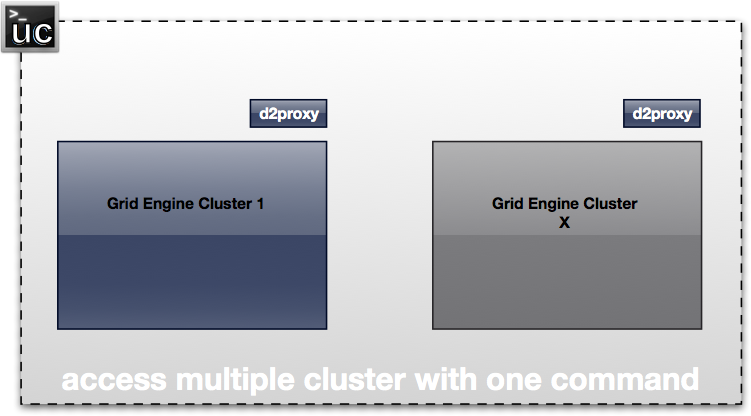
Simple multi-clustering tool based on an open standard for job submission and cluster monitoring (DRMAA2). Works on top of supported cluster schedulers, like Univa Grid Engine but also for Cloud Foundry tasks or local Docker containers.
It consists of following components:
- uc
 : Main command line tool to interact with the compute clusters (show status / start jobs). Pure Go - can run everywhere where you can compile Go (MacOS / Linux / Windows / ...). Communicates with proxies.
 - d2proxy: Proxy which runs on a submit host of a compute cluster (Grid Engine cluster). Based on Go DRMAA2 (which is based on the DRMAA2 C API).
- d1proxy: Proxy for DRMAA (version 1) compatible clusters. Does not support most concepts but job submission works. Good starting point if you want to create your own proxy (which is btw. extremely easy).
- cf-tasks: Proxy which emits Cloud Foundry tasks as jobs.
- dockerproxy: Proxy which runs Docker containers as jobs.
- processProxy: Proxy which starts local processes as jobs.
Compilation of DRMAA2 Proxy
Make sure you have a cluster scheduler supporting DRMAA2 C API (like Univa Grid Engine) installed. This tool is working on top of the Go DRMAA2 API (which accesses the C API). Hence during compile/runtime the tool needs access to drmaa2.h (which comes with Univa Grid Engine for example / $SGE_ROOT/include) and libdrmaa2.so ($SGE_ROOT/lib/lx-amd64).
Update: Removed DRMAA2 C dependencies from uc tool. Hence those requirements are only needed for the DRMAA2 proxy (d2proxy) tool.
Go to cmd/d2proxy
$ source path/to/your/GE/installation
$ godep restore
$ ./build
Compilation of Cloud Foundry or Docker Proxy
Go to cmd/cf-tasks or cmd/dockerproxy
$ go install
Installation uc
Go to cmd/uc
$ go install
Example usage
Start your proxy - one per cluster:
$ source path/to/your/GE/installation

$ d2proxy &
or for listening on port 8282
$ d2proxy -port=":8282" &
Or a local Docker Proxy:
$ dockerproxy --otp "supersecret"
Start a Docker container:
$ uc --otp=supersecret run --arg 120 --category "ubuntu:latest" /bin/sleep
Test the proxies by opening the address in the webbrowser.
Example:
$ firefox http://localhost:8888/v1/msession/jobinfos
Update config.json
The config.json file (an example can be found in the uc directory) contains the contact details of the proxies used by uc. First uc scans the current working directory, then $HOME/.ubercluster/config.json, and finally /etc/ubercluster/config.json. The file can contain the locations of different proxies. The default entry is the cluster/proxy which is used when no other is specified as --cluster parameter of uc.
Examples
List all jobs of your default cluster
$ uc show job
List all running jobs of cluster "cluster1" (from config)
$ uc --cluster=cluster1 show job --state=r

job_number:		    3000000003
state:			    Running
submission_time:	2014-12-06 18:02:59 +0100 CET
dispatch_time:		2014-12-06 18:03:00 +0100 CET
finish_time:		-
owner:			    daniel
slots:			    1
allocated_machines:	u1010
exit_status:		-1

job_number:		    3000000004
state:			    Running
submission_time:	2014-12-06 18:03:01 +0100 CET
dispatch_time:		2014-12-06 18:03:10 +0100 CET
finish_time:		-
owner:			    daniel
slots:			    1
allocated_machines:	u1010
exit_status:		-1
Let a simple process run in default cluster
$ uc run --arg=123 /bin/sleep
Upload the job file and execute it
With recent check-ins also file staging is partially supported. By using the upload flag of the run command, the file is first uploaded to the "uploads" directory (per default a subdirectory of where you are starting the proxy) by http, then marked as executable.
Other file staging capabilities are accessible by the uc fs command.
$ uc run --upload=testjob.sh testjob.sh
...and now let it run in the "cluster1" cluster, adding a job name and selecting a queue (default is "all.q"):
$ uc --cluster=cluster1 run --queue=all.q --name=MyName --arg=123 /bin/sleep
...more submission command parameters
Since submission commands are never enough, always needs to be extended, ..., and are different between versions of cluster schedulers let's keep it simple. uc supports DRMAA2 job categories, which are names referencing a particular set of submission parameters. Univa Grid Engine >= 8.2 encodes job categories as job classes. In uc you can request such job categories / classes with the --category parameter.
$ uc run --help
usage: uc [<flags>] run [<flags>] <command>

Submits an application to a cluster.

Flags:
  --arg=ARG            Argument of the command.
  --name=NAME          Reference name of the command.
  --queue=QUEUE        Queue name for the job.
  --category=CATEGORY  Job category / job class of the job.
  --alg=ALG            Automatic cluster selection when submitting jobs ("rand", "prob", "load")
  --upload=UPLOAD      Path to job which is uploaded before execution.


Args:
  <command>  Command to submit.
List all hosts of default cluster:
$ uc show machine

HOSTNAME ARCH NSOC NCOR NTHR LOAD MEMTOT SWAPTO
u1010 x64 1 4 4 0.080000 504184 911731
...
Get full command description...
$ uc --help
usage: uc [<flags>] <command> [<flags>] [<args> ...]

A tool which can interact with multiple compute clusters.

Flags:
  --help               Show help.
  --verbose            Enables enhanced logging for debugging.
  --cluster="default"  Cluster name to interact with.
  --otp=OTP            One time password ("yubikey") or shared secret.

Commands:
  help [<command>]
    Show help for a command.

  show job [<flags>] [<id>]
    Information about a particular job.

  show machine [<name>]
    Information about compute hosts.

  show queue [<name>]
    Information about queues.

  show categories [<name>]
    Information about job categories

  run [<flags>] <command>
    Submits an application to a cluster.

  terminate job [<jobid>]
    Terminates (ends) a job in a cluster.

  suspend job [<jobid>]
    Suspends (pauses) a job in a cluster.

  resume job [<jobid>]
    Resumes a suspended job in a cluster.

  fs ls
    List all files in staging area.

  fs up <files>
    Upload a file to staging area.

  fs down <files>
    Download files from staging area.

  config list
    Lists all configured cluster proxies.

  inception [<port>]
    Run uc as compatible proxy itself. Allows to create trees of clusters.
For detailed help on sub-commands:
$ uc show job --help
usage: uc [<flags>] show job [<flags>] [<id>]

Information about a particular job.

Flags:
  --state="all"  Show only jobs in that state (r/q/h/s/R/Rh/d/f/u/all).

Args:
  [<id>]  Id of job
Security Considerations
Please be aware that when exporting over http also others in the same network (or even publicly) can access the clusters. Job modifications are only allowed for jobs started in the same DRMAA2 job session (usually only those submitted by uc) so only jobs started with uc can be deleted, held, suspended...
No security: Just starting proxy without any parameter. All traffic is unencrypted and the proxy accessible by everybody who can access the network port.
Low security: Starting the proxy with --otp=MySuperSecretKey. Unencrypted, the caller needs to know the key and add that key with all uc commands (like uc --otp=MySuperSecretKey ..) or in the configuration. The key is part of each http request.
High security (but no encryption): Starting the proxy with --otp=yubikey. All client calls must have --otp=yubikey set. The uc tool is requesting from the client a one-time-password which is generated by the yubikey USB stick (obviously this is an requirement). The proxy needs to be registered first as service and started with the secret key and service id. Using the official servers you can register your service here: https://upgrade.yubico.com/getapikey/ Alternatively you can setup your own OTP validation server (like https://github.com/digintLab/yubikey-server).
Rudimentary mTLS support: Start processProxy with --key (points to server key) and --cert (points to cert of server) --clientCerts (points to a directory with trusted client crts). uc needs to use --cert and --key of client certificates.
Other
A Go Report Card is available.
Related Skills
node-connect
343.1kDiagnose OpenClaw node connection and pairing failures for Android, iOS, and macOS companion apps
prose
343.1kOpenProse VM skill pack. Activate on any `prose` command, .prose files, or OpenProse mentions; orchestrates multi-agent workflows.
frontend-design
90.0kCreate distinctive, production-grade frontend interfaces with high design quality. Use this skill when the user asks to build web components, pages, or applications. Generates creative, polished code that avoids generic AI aesthetics.
openai-whisper-api
343.1kTranscribe audio via OpenAI Audio Transcriptions API (Whisper).
