
Ryact
Ryact(Breact but 10x faster): a react-like framework to build super-fast web apps in python.
Install / Use
/learn @dewball345/RyactREADME
Ryact: a react-like framework to build super-fast web apps in python.
This project was started by dewball345.
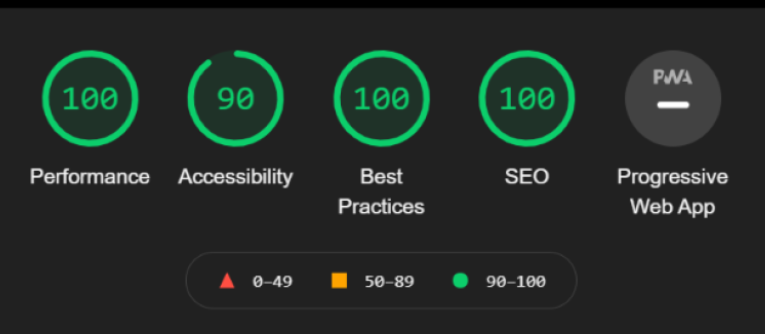
Ryact is similar to react, with components and state. The main difference, however, is that Ryact doesn't have a virtual dom; instead, each stateful element (element that uses setState) is assigned a unique id and is retrieved and changed(by dom-diffing) when necessary. There isn't much that I have added - just the bare minimum, for now. The source code is around 300 lines of code, including the pre-built hash router. You can find the tutorial at: https://dev.to/pixari/build-a-very-basic-spa-javascript-router-2k4p
Ryact is powered by rapydscript.
Installation
The repo is set up so that you can clone it. You can install it by doing git clone https://github.com/dewball345/ryact
If you haven't already, here are the steps in install RapydScript.
Type:
npm install rapydscript -g
Once, you have both cloned the repo and installed rapydscript, navigate to the directory and type:
rapydscript execute.pyj --output example/public/index.js --import_path ryact;example --beautify --es6
to view an example page
or type
rapydscript execute.pyj --output main_code/public/index.js --import_path ryact;main_code --beautify --es6
to see the output of your development code.
Features
- 🐍 The most obvious: Use python(rapydscript, which shares the same syntax as python) instead of javscript
- ⚛️ Work with a component-based system with state-management when developing SPA's
- ✨Use preexisting libraries like bootstrap, tailwind, and more!
- 🔥 Create webpages that are blazing fast
Usage
View this tutorial to learn how to make a todo list using ryact!
Directory Structure
These are the main directories you should worry about
example/
├─ some .pyj files
├─ public/
│  ├─ index.html
│  ├─ index.js
main_code/
├─ main.pyj
├─ public/
│  ├─ index.html
│  ├─ index.js
ryact/
...
the main_code directory is where you type your, well, main code, and the example folder has an example of an app made with ryact.
Caveats - When to use this vs Breact
| Breact | Ryact | | ------------- | ------------- | | Designed for easy development | Designed for speed; development may be harder | | Full python syntax | Mostly python syntax, but some things, like: casting, lambdas, etc. may not work. Check the rapydscript documentation for more info | | Super slow speed | Blazing fast code | | Code is not precompiled in advance, and supports live reload | Code is precompiled in advance, which makes things faster; you have to run the compile function before seeing changes| | You can use custom python modules | you cannot use many custom python modules |
Choose Wisely.
Homepage - Ryact vs Breact
Ryact:
def homePage():
    thing = cre(
        "div",
        {
            "class":
            "container-sm d-flex flex-column justify-content-center align-items-center",
            "style": css({"min-height": "100vh"}),
        },
        [
            cre(
                "h1", {
                    "innerText":
                    "Ryact: A super-fast python library for single page webapps",
                    "class": "text-center"
                }),
            cre(
                "code", {
                    "innerText": '''
            #Ryact can be thought of as a continuation of Breact. The main difference is that Ryact is more than 10x faster
            #than its sister framework, but with most of the features still avaiable.
        ''',
                    "class": "text-center m-2"
                }),
            cre("h2", {
                "innerText": "Sample Apps",
                "class": "text-center m-2"
            }),
            Link('/counter').render(
                cre("button", {
                    "class": "btn btn-primary m-2",
                    "innerText": "counter"
                })),
            Link('/stls').render(
                cre(
                    "button", {
                        "class": "btn btn-primary m-2",
                        "innerText": "stateless widget example"
                    })),
            Link('/todo').render(
                cre("button", {
                    "class": "btn btn-primary m-2",
                    "innerText": "todo list"
                }))
        ])
Breact
def homePage():
return group(DIV(Class="container d-flex flex-column justify-content-center align-items-center", style={
"height":"100vh"
}), [
H1("Breact: A python library for single page webapps", Class="text-center"),
P('''
This app was coded in python in Breact. Look in the inspector, and you will see
<br>
<code><script src="text/python" > </code>
''', Class="text-center"),
H3("Sample Apps:"),
Link("/todo").render(BUTTON("Simple Todolist", Class="btn btn-primary m-2")),
Link('/quiz').render(BUTTON("Small Quiz", Class="btn btn-primary m-2")),
Link('/playground').render(BUTTON("A Little Playground", Class="btn btn-primary m-2")),
Link('/router-playground').render(BUTTON("Router Playground", Class="btn btn-warning m-2"))
])
Api Calls in Ryact
Api Calls are supported. You can use the fetch api, which is supported in rapydscript.
Here are two ways to do this:
- Using the .then() function in javascript
def apiCallThen():
    result = fetch('https://jsonplaceholder.typicode.com/todos/1').then(
        def(result):
            result.json().then(
                def(mjson):
                    print(mjson)
            )
    )
- Using the asyncSequence() function from ryact
def apiCallSequence():
    def a(): return fetch('https://jsonplaceholder.typicode.com/todos/1')
    def b(result): return result.json()
    def c(json): print(json)
    asyncSequence([a, b, c])
Contribute
- Issue Tracker: github.com/dewball345/ryact/issues
- Source Code: github.com/dewball345/ryact
Make sure that you follow the Code of Conduct
Support
Please write issues in the issue tracker
License
dewball345/ryact is licensed under the BSD 2-Clause "Simplified" License
Related Skills
node-connect
350.1kDiagnose OpenClaw node connection and pairing failures for Android, iOS, and macOS companion apps
frontend-design
109.9kCreate distinctive, production-grade frontend interfaces with high design quality. Use this skill when the user asks to build web components, pages, or applications. Generates creative, polished code that avoids generic AI aesthetics.
openai-whisper-api
350.1kTranscribe audio via OpenAI Audio Transcriptions API (Whisper).
qqbot-media
350.1kQQBot 富媒体收发能力。使用 <qqmedia> 标签,系统根据文件扩展名自动识别类型(图片/语音/视频/文件)。
