
Skidl
SKiDL is a library that lets you design electronic circuits using Python.
Install / Use
/learn @devbisme/SkidlREADME







Never use a lousy schematic editor again!
SKiDL is a Python package that lets you describe electronic circuits using code instead of schematic editors. Write your circuit as a Python program, and SKiDL outputs a netlist for PCB layout tools. It's "infrastructure as code" for electronics.
- Free software: MIT license
- Documentation: http://devbisme.github.io/skidl
- User Forum: https://github.com/devbisme/skidl/discussions
Why SKiDL?
Textual Circuit Design: Use any text editor and enjoy version control with git, code reviews, and diff for circuit changes.
Compact & Powerful: Describe complex circuits in a fraction of the space. No more tracing signals across multi-page schematics.
Reusable Design: Share circuit modules on PyPI and GitHub. Create parametric "smart" circuits that adapt based on requirements.
Design Automation: Build circuits algorithmically. Generate repetitive structures, automatically size components, and create design variants programmatically.
Electrical Rules Checking: Catch common mistakes like unconnected pins, drive conflicts, and power connection errors.
Hierarchical Design: Mix linear, hierarchical, and modular design approaches as needed.
Tool Independence: Works with any PCB tool. Currently supports KiCad, but can be extended to other tools.
Python Ecosystem: Leverage Python's vast ecosystem for simulation, analysis, documentation, and automation.
Quick Example
Here's a simple voltage divider that demonstrates SKiDL's syntax:
from skidl import *

# Create input & output voltages and ground reference
vin, vout, gnd = Net('VI'), Net('VO'), Net('GND')

# Create two resistors with values and footprints
r1, r2 = 2 * Part("Device", 'R', dest=TEMPLATE, footprint='Resistor_SMD.pretty:R_0805_2012Metric')
r1.value, r2.value = '1K', '500'

# Connect the circuit elements.
vin & r1 & vout & r2 & gnd

# Or connect pin-by-pin if you prefer
# vin += r1[1]
# vout += r1[2], r2[1]
# gnd += r2[2]

# Check for errors and generate netlist
ERC()
generate_netlist(tool=KICAD9)
For a more complex example, here's a two-input AND gate built from discrete transistors:
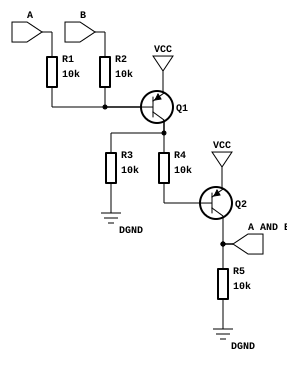
from skidl import *

# Create part templates
q = Part("Device", "Q_PNP_CBE", dest=TEMPLATE)
r = Part("Device", "R", dest=TEMPLATE)

# Create nets
gnd, vcc = Net("GND"), Net("VCC")
a, b, a_and_b = Net("A"), Net("B"), Net("A_AND_B")

# Instantiate parts
gndt = Part("power", "GND")             # Ground terminal
vcct = Part("power", "VCC")             # Power terminal
q1, q2 = q(2)                           # Two transistors
r1, r2, r3, r4, r5 = r(5, value="10K")  # Five 10K resistors

# Make connections - notice the readable topology
a & r1 & q1["B C"] & r4 & q2["B C"] & a_and_b & r5 & gnd
b & r2 & q1["B"]
q1["C"] & r3 & gnd
vcc += q1["E"], q2["E"], vcct
gnd += gndt

generate_netlist(tool=KICAD9)
Advanced Features
Hierarchical Design: Create reusable subcircuits and build complex systems from modular blocks.
Part & Net Classes: Apply design constraints, manufacturing requirements, and electrical specifications systematically.
Smart Part Libraries: Search parts by function, automatically assign footprints, and access any KiCad library.
Multiple Output Formats: Generate netlists for KiCad, XML for BOMs, or go directly to PCB layout.
Visual Output: Create SVG schematics, KiCad schematic files (currently V5 only), or DOT graphs for documentation.
SPICE Integration: Run simulations directly on your SKiDL circuits.
Installation
pip install skidl
Set up KiCad library access (optional but recommended):
# Linux/Mac
export KICAD_SYMBOL_DIR="/usr/share/kicad/symbols"

# Windows
set KICAD_SYMBOL_DIR=C:\Program Files\KiCad\share\kicad\symbols
Getting Started
- Learn the basics: Check out the documentation for comprehensive tutorials
- Try examples: Explore the
tests/examples/directory in the repository - Get help: Join discussions in our user forum
- Convert existing designs: Use the
netlist_to_skidltool to convert KiCad designs to SKiDL
Related Skills
claude-opus-4-5-migration
83.4kMigrate prompts and code from Claude Sonnet 4.0, Sonnet 4.5, or Opus 4.1 to Opus 4.5
model-usage
338.0kUse CodexBar CLI local cost usage to summarize per-model usage for Codex or Claude, including the current (most recent) model or a full model breakdown. Trigger when asked for model-level usage/cost data from codexbar, or when you need a scriptable per-model summary from codexbar cost JSON.
diffs
338.0kUse the diffs tool to produce real, shareable diffs (viewer URL, file artifact, or both) instead of manual edit summaries.
mcp-for-beginners
15.7kThis open-source curriculum introduces the fundamentals of Model Context Protocol (MCP) through real-world, cross-language examples in .NET, Java, TypeScript, JavaScript, Rust and Python. Designed for developers, it focuses on practical techniques for building modular, scalable, and secure AI workflows from session setup to service orchestration.
