
md-redline
Inline review comments for markdown specs. Built-in MCP server hands feedback directly to your AI agent.
Install / Use
claude mcp add dejuknow -- npx -y github:dejuknow/md-redlineIf the server publishes to npm under a different name, use that package instead — check the repo README.
MCP Server
Model Context Protocol server
Quality Score
Category
Content & MediaSupported Platforms
Our assessment of md-redline
md-redline scores 84/100 on our quality scale, 858th of 1,178 Content & Media skills we index.
Its MCP Server is 20 KB long, well organised into 32 sections with 12 code examples: a thorough specification that gives an agent plenty to work with.
It has 42 GitHub stars, so there is little community track record yet; judge it on its content.
Maintenance, license and trust
- The repository was last updated 16 days ago, so md-redline is actively maintained.
- It is released under the MIT license, a permissive license that allows use, modification and commercial use with attribution.
- Its trust signals score 97/100, with no cautions. These come from repository metadata, not a code audit — read the skill file before letting an agent act on it.
md-redline compared with similar skills
All 4 of these similar skills score higher than md-redline; compare them before choosing.
| Skill | Score | Stars | Updated | Format |
|---|---|---|---|---|
| md-redline (this skill)by dejuknow | 84 | 42 | 16d ago | MCP Server |
| Agent-Reachby Panniantong | 100 | 96.4k | 4d ago | CLAUDE.md |
| headroomby headroomlabs-ai | 100 | 75.1k | 1d ago | CLAUDE.md |
| CowAgentby zhayujie | 100 | 47.4k | today | CLAUDE.md |
| Scraplingby D4Vinci | 100 | 87.0k | 1d ago | MCP Server |
Frequently asked questions
- How do I install md-redline?
- Run
claude mcp add dejuknow -- npx -y github:dejuknow/md-redline. The install tabs above show the steps for each supported agent. - Which AI agents does md-redline work with?
- It is written for Claude Code, Claude Desktop, Gemini CLI and OpenAI Codex, as a MCP Server file. Other agents that read the same format can often use it too.
- Is md-redline safe to use?
- It is MIT-licensed and scores 97/100 on trust signals. Skills are instructions an agent will follow, so read the file before installing it and do not approve commands you do not understand.
- Is md-redline still maintained?
- The repository was last updated 16 days ago, so md-redline is actively maintained.
Skill content
View source on GitHub<img src="public/favicon.svg" width="30" align="center" /> md-redline

Inline review comments for markdown specs, prompts, and design docs.
Highlight text in a rendered document, leave comments, and your AI agent can read and address them directly. Comments are stored as invisible HTML markers in the .md file itself. No sidecar files, no database, no external service. The markdown file stays the source of truth.
With the built-in MCP server, review runs in both directions. Your agent can request your review mid-task and pause until you send your feedback, or review a doc you wrote and leave anchored comments for you. Either way: no copy-paste, no context switching.
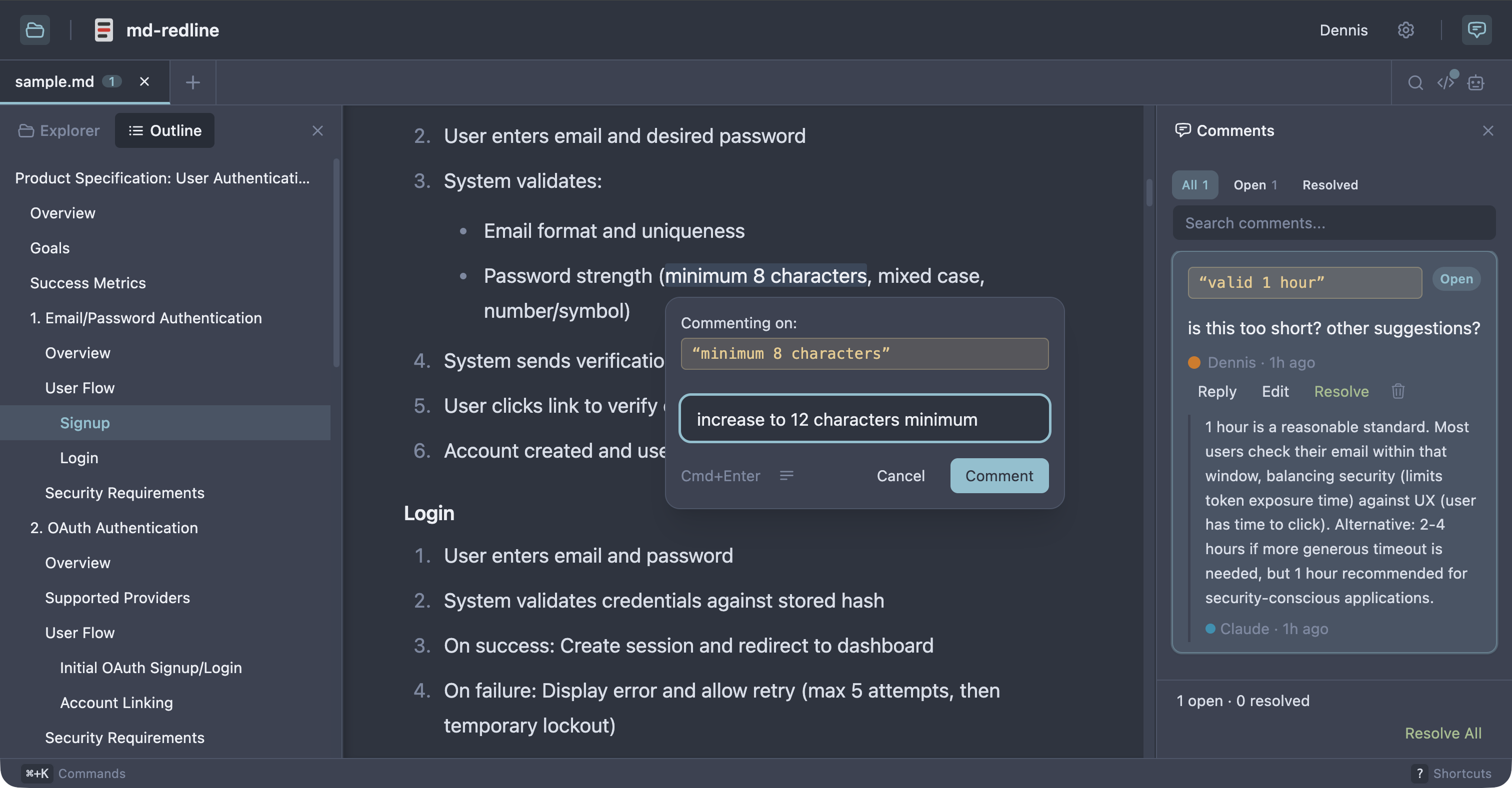
See the full review workflow in about 30 seconds:
https://github.com/user-attachments/assets/8b9b3546-a895-42e1-b3cc-5ee5b2c00398
Works with Claude Code, Claude Desktop, Codex CLI, Gemini CLI, and any other MCP client that supports stdio servers. As Sean Grove argues in specs are the new code, specs are becoming the primary unit of work in agentic development. mdr gives that workflow review tooling closer to code review.
Quick start
Prerequisite: Node 20 or newer.
npx md-redline /path/to/spec.md
This starts the local app if needed and opens it in your browser.
Or install globally:
npm install -g md-redline
mdr /path/to/spec.md        # Open a file
mdr /path/to/dir             # Open a directory
mdr --stop                   # Stop the running server
mdr sessions                 # List open review sessions (--kill ID ends one)
md-redline also works as an alias for mdr.
That gives you the viewer and commenting. The agent integration (reviews in both directions, anchored questions) comes from the MCP server, registered in the next section.
Updating
mdr checks npm once a day (from its local server, never blocking anything) and shows a small notice in the viewer and the terminal when a new version is out. Upgrading is one command:
npm install -g md-redline@latest
The running server restarts itself on the next mdr invocation after an
upgrade. To disable update checks entirely, set NO_UPDATE_NOTIFIER=1 (or
run in CI, which is auto-detected). Note this is a presence check, following
the ecosystem convention: any value, even 0 or empty, disables the checks.
MCP setup
Register the MCP server with your agent so it can request reviews mid-task.
Claude Code or Claude Desktop
mdr mcp install                   # register with both clients (default)
mdr mcp install --claude-code     # just Claude Code (via `claude mcp add`)
mdr mcp install --claude-desktop  # just Claude Desktop (JSON config file)
Codex CLI
codex mcp add md-redline -- mdr mcp
Gemini CLI
gemini mcp add --scope user md-redline mdr mcp
The --scope user flag is important. Gemini defaults to per-project scope, which only registers mdr for the current directory.
Other MCP clients
Add this server entry to your client's MCP config file:
{
  "mcpServers": {
    "md-redline": {
      "command": "mdr",
      "args": ["mcp"]
    }
  }
}
Prerequisite: mdr must be on your PATH (e.g. via npm install -g md-redline). If your client spawns subprocesses without inheriting your shell's PATH, use the absolute path from which mdr as the command value.
After installing, restart your MCP client; most clients only discover new servers at launch. To verify, ask your agent "what mdr tools do you have?" and it should list mdr_request_review, mdr_comment, mdr_ask, mdr_wait, mdr_baseline, and mdr_add_files. (mdr_comment was called mdr_review before 0.9; the old name still works if you have it saved in a prompt, but agents are no longer offered it.)
Review workflow
With MCP registered, review runs in both directions. Pick by who is giving the feedback:
| | You review the agent's doc | The agent reviews your doc | |---|---|---| | Typical moment | The agent just drafted or edited a spec; you want to mark it up before it continues | You wrote a PRD (or received one) and want a critique | | What you say | "Let me review specs/feature-x.md in mdr before you continue." | "Use mdr to review prd.md and leave comments." | | Who comments | You | The agent | | How it ends | You click Send & finish | You click End review |
1. You review the agent's doc
The common flow right after an agent drafts a document. Tell the agent:
"Let me review docs/specs/feature-x.md in mdr before you continue."
The agent calls mdr_request_review and pauses. mdr opens the file, you highlight text and leave comments, then click Send N comments. The agent receives your feedback as a structured prompt and starts addressing your comments. You can keep sending follow-up batches while it works; Send N & finish sends the last batch and closes the loop. The review is opt-in per request. The agent only pauses when you ask for it. If the agent edits the document before asking you to review it, it calls mdr_baseline first, so the diff shows its changes on the first round.
Automatic before copies. A capable agent calls mdr_baseline on its own, but a smaller or hurried one skips it, and then the diff button is greyed out on the round you most want it. A hook makes it automatic. Add this to ~/.claude/settings.json:
{
  "hooks": {
    "PreToolUse": [
      {
        "matcher": "Edit|Write|MultiEdit",
        "hooks": [{ "type": "command", "command": "mdr baseline --hook --agent Claude" }]
      }
    ]
  }
}
It acts only on markdown files. It keeps the first copy it takes of a file rather than replacing it on every edit, so the diff covers the whole editing session. It starts mdr if nothing is running. Add --no-start to the command if you would rather it skip the capture than start one, for when you do not want a markdown edit anywhere on your machine to boot mdr. Either way it never blocks an edit: every failure gets out of the way quietly.
2. The agent reviews your doc
The reverse direction, for docs the agent did not just write: your own draft, a teammate's PRD, a spec from another repo. Tell the agent:
"Use mdr to review prd.md and leave comments."
The agent calls mdr_comment. Its findings land as inline comments anchored to the exact text, and the browser opens so you can read them as they arrive. The agent then waits (via mdr_wait) while you work through the feedback: reply on any card, edit the doc, delete comments you disagree with. When you are done, click End review in the banner. That click is the signal for the agent to re-read the file and pick up your replies and edits, so the session stays open until you press it. The agent is not stuck; it is listening.
https://github.com/user-attachments/assets/a695017d-ed59-4fe8-8a29-e5306dab788c
Either direction: the agent can ask you questions
Inside any active session, the agent can hit a fork where your answer changes what it should do next. Rather than guessing, it can call mdr_ask to post anchored questions into the doc and block until you answer:
- You get a toast with a View button, a banner chip ("N questions awaiting your reply"), and a "(N questions)" tab title, so you notice even from another window.
- Each question is a normal comment card anchored to the sentence it is about. Reply right on the card.
- The moment every question has an answer, the agent unblocks with your reply text. No End review needed.
This shines during hand-offs. Leave a comment like "this conflicts with what we decided, fix it," and instead of guessing, the agent asks "which decision: per-seat or flat-rate?" anchored where it matters. You can also request the pattern directly:
"Review prd.md with mdr. For your top 2 open questions, use mdr_ask and incorporate my answers before summarizing."
Questions and reviews survive in the file as ordinary comment markers, so nothing is lost if a session ends early: the agent is always told to re-read the file.
Without MCP
- Open a markdown file with
mdr /path/to/spec.md. - Highlight text and leave inline comments.
- Copy the hand-off prompt.
- Paste the prompt into your AI agent.
- The agent edits the file, addresses the feedback, and removes the comment markers it handled.
- Review the result in diff view.
Optional: resolve workflow
Enable resolve mode in Settings for human review with explicit open and resolved states.
Who this is for
- People writing specs, prompts, or design docs locally with file-based AI agents
- Teams reviewing docs before they are committed or sent out for wider review
- Anyone in a human + agent editing loop who wants structured inline feedback in plain files
Non-goals
- Not a collaborative multi-user editing tool.
- Not a replacement for GitHub PR reviews (use those once the file is in git).
- Not designed for untrusted content. This is a local dev tool for your own files.
How comments are stored
Comments are stored as invisible HTML markers directly in the markdown, immediately before the text they refer to, so both humans and agents can work from the same file.
Some text <!-- @comment{
  "id":"uuid",
  "anchor":"highlighted text",
  "text":"Rewrite this section to be clearer.",
  "author":"User",
  "timestamp":"2026-03-26T12:00:00.000Z",
  "replies":[]
} -->highlighted text continues here.
This makes feedback:
- visible to AI agents via a plain file read
- portable with the markdown file
- invisible in normal renderers (GitHub, VS Code preview)
Features
Review and commenting
- Inline comments anchored to rendered text, including overlapping comments
- Two-way agent review over MCP: agents request your review, review your docs, and ask anchored questions
- Threaded replies and optional
open/resolvedreview states - Adjustable anchors with drag handles
- Touch and pen commenting: select with the native handles, then tap the floating Comment button when done (nothing pops up while you adjust)
- Rendered, raw, and diff views
- Hand-off prompt copying for one or multiple files
Navigation and editing
- Multi-tab editing with session persistence and tab context menus
- File explorer, recent files, and native OS file picker
- Find in document (
Cmd+F) with match navigation - Table of contents with scroll spy
- Command palette (
Cmd+K), keyboard shortcuts, and settings panel (Cmd+,) - Resizable panels and right-click context menus
Rendering and integrations
- Real-time reload via SSE when files change externally
- Mermaid diagram rendering with commentable text
- YAML and TOML frontmatter rendered as commentable content, not hidden
- HTML comments rendered muted and monospaced in the rendered view (with visible
<!--/-->), not dropped - Local image embeds and clickable links between markdown files
- Customizable comment templates
- 8 themes: Light, Dark, Sepia, Nord, Solarized, GitHub, Rosé Pine, Catppuccin
Supported platforms
- macOS: supported
- Linux: supported; system file picker requires
zenity - Windows: supported; system file picker uses PowerShell
- Touch browsers (iPad Safari and similar): supported for reviewing and commenting; selections made by touch or pen use the floating Comment button flow
Permissions
By default, md-redline can read any markdown file in your home directory. The first time you run mdr (or the first time after upgrading from a version without the trusted-roots feature), your home folder is added to a trusted-roots list at
Truncated for display — read the full file on GitHub.
Related Skills
Agent-Reach
96.4kGive your AI agent eyes to see the entire internet. Read & search Twitter, Reddit, YouTube, GitHub, Bilibili, XiaoHongShu — one CLI, zero API fees.
headroom
75.1kCompress tool outputs, logs, files, and RAG chunks before they reach the LLM. 20% fewer tokens for coding agents, 60-95% fewer tokens for JSON, same answers. Library, proxy, MCP server.
CowAgent
47.4kOpen-source personal AI assistant & Agent Harness. Plans tasks, runs tools and skills, self-evolves with memory and knowledge. Multi-agent, multi-model, multi-channel. Lightweight, extensible, one-line install.
Scrapling
87.0k🕷️ An adaptive Web Scraping framework that handles everything from a single request to a full-scale crawl! Don't be shy, join here: https://discord.gg/EMgGbDceNQ and follow here for daily tips and tricks: https://x.com/Scrapling_dev

Languages
Trust signals
From repository metadata: license, adoption, age and documentation. Not a code audit — see the Safety scan above for what the skill file itself contains.