
MultiLevelExpandableIndentableListView
A multi-level collapsible/expandable indentable list view for Android
Install / Use
/learn @defacto133/MultiLevelExpandableIndentableListViewREADME
MultiLevelExpandableIndentableListView
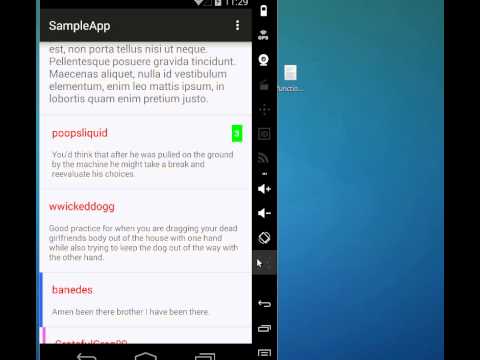
This component is an adapter that can handle hierarchical data (e.g. comments) in a RecyclerView, so that the user can collapse and expand elements inside the hierarchy.
Here's a video of the SampleApp demo
How to import the library in your probject
There are three ways to import the library. The easiest way is this:
-
Clone the repository
$ git clone https://github.com/defacto133/MultiLevelExpandableIndentableListView.git -
Add these two lines to your
settings.gradlefileinclude ':multilevelexpindlistview'project(':multilevelexpindlistview').projectDir = new File('<path-to-cloned-repo>/MultiLevelExpandableIndentableListView/multilevelexpindlistview')
An alternative way is this :
-
Clone the repository
$ git clone https://github.com/defacto133/MultiLevelExpandableIndentableListView.git -
In Android Studio open the Module Settings (press F4)
-
Click on the top left green cross to add a new module
-
Select "Import Existing Project"
-
As Source Directory select the directory where you cloned the repository
-
The module :multilevelexpindlistview contains the library so you have to import this. The module :sampleapp is optional and it's a simple example of how to use the library.
-
Click Finish
-
Now in the Modules listing you see a new library module multilevelexpindlistview (and a project module sampleapp if you decided to import that too). In the Modules listing select your project module (usually is called app) and click on Dependencies.
-
Click on the top right green cross and select Module dependency
-
Select :multilevelexpindlistview
If you just want to import the aar file:
-
Clone the repository
$ git clone https://github.com/defacto133/MultiLevelExpandableIndentableListView.git -
cd to the direcotry created
$ cd MultiLevelExpandableIndentableListView/ -
Set a variable with the path to the Android SDK
$ export ANDROID_HOME=<path-to-andoid-sdk> -
Build the project
$ ./gradlew buildThis will make multilevelexpindlistview-release.aar in
<path-to-cloned-repo>/MultiLevelExpandableIndentableListView/multilevelexpindlistview/build/outputs/aar/
-
In Android Studio open the Module Settings (press F4)
-
Click on the top left green arrow to add an new module
-
Select "Import .JAR or .AAR Package" and select the .aar file from step 4
-
Now in the Modules listing you see a new module multilevelexpindlistview. In the Modules listing select your project module (usually is called app) and click on Dependencies.
-
Click on the top right green cross and select Module dependency
-
Select :multilevelexpindlistview
Usage
You should extend the abstract class MultiLevelExpIndListAdapter (see MyAdapter.java in sampleapp for an example) and then associate your adapter with a RecyclerViw.
The data that you pass to your MultiLevelExpIndListAdapter should implement the interface MultiLevelExpIndListAdapter.ExpIndData (see MyComment.java in sampleapp for an example).
Related Skills
node-connect
354.3kDiagnose OpenClaw node connection and pairing failures for Android, iOS, and macOS companion apps
frontend-design
112.3kCreate distinctive, production-grade frontend interfaces with high design quality. Use this skill when the user asks to build web components, pages, or applications. Generates creative, polished code that avoids generic AI aesthetics.
openai-whisper-api
354.3kTranscribe audio via OpenAI Audio Transcriptions API (Whisper).
qqbot-media
354.3kQQBot 富媒体收发能力。使用 <qqmedia> 标签,系统根据文件扩展名自动识别类型(图片/语音/视频/文件)。

Languages
Security Score
Audited on Mar 5, 2026