
Dpti
A Python Package to Automate Thermodynamic Integration Calculations for Free Energy
Install / Use
/learn @deepmodeling/DptiREADME
deepmodeling, deepmd, dpti, free energy, phase diagram
🏞brief Introduction
dpti (deep potential thermodynamic integration) is a python package for calculating free energy, doing thermodynamic integration and figuring out pressure-temperature phase diagram for materials with molecular dynamics (MD) simulation methods.
<br />The user will get Gibbs (Helmholtz) free energy of a system at different temperature and pressure conditions. With these free energy results, the user could determine the phase transition points and coexistence curve on the pressure-volume phase diagram. <a name="xuFE2"></a>
useful docs:
github README.md: https://github.com/deepmodeling/dpti/README.md
some discussion notes: https://www.yuque.com/dpti/manual/ilzmlb
intruction to free energy calculation: https://nb.bohrium.dp.tech/detail/18465833825
<a name="0487c87d66ac0af8f7df818b7e010bd0"></a>
🌾OutPut show
for water and ice
see: PRL:Phase Diagram of a Deep Potential Water Model
Phase diagram of water. DP model (red solid lines) and experiment (gray solid lines) for $T<420K$. Black letters indicate phases that are stable in the experiment and model. The original figure is in article。
for metal Tin(Sn)
We could use dpti to calculate out the Press-Volume phase diagram of metals.<br />The picture below shows the metal Sn phase diagram results calculated by one of the authors.
<br />The left subgraph shows the experiment phase diagram results.(see:https://aip.scitation.org/doi/10.1063/1.4872458)<br />
<br />The middle subgraph shows the DP phase diagram based on SCAN functional DFT calculation results.<br />
<br />The right subgraph shows the DP phase diagram base on PBE functional DFT calculation results.<br />
<br />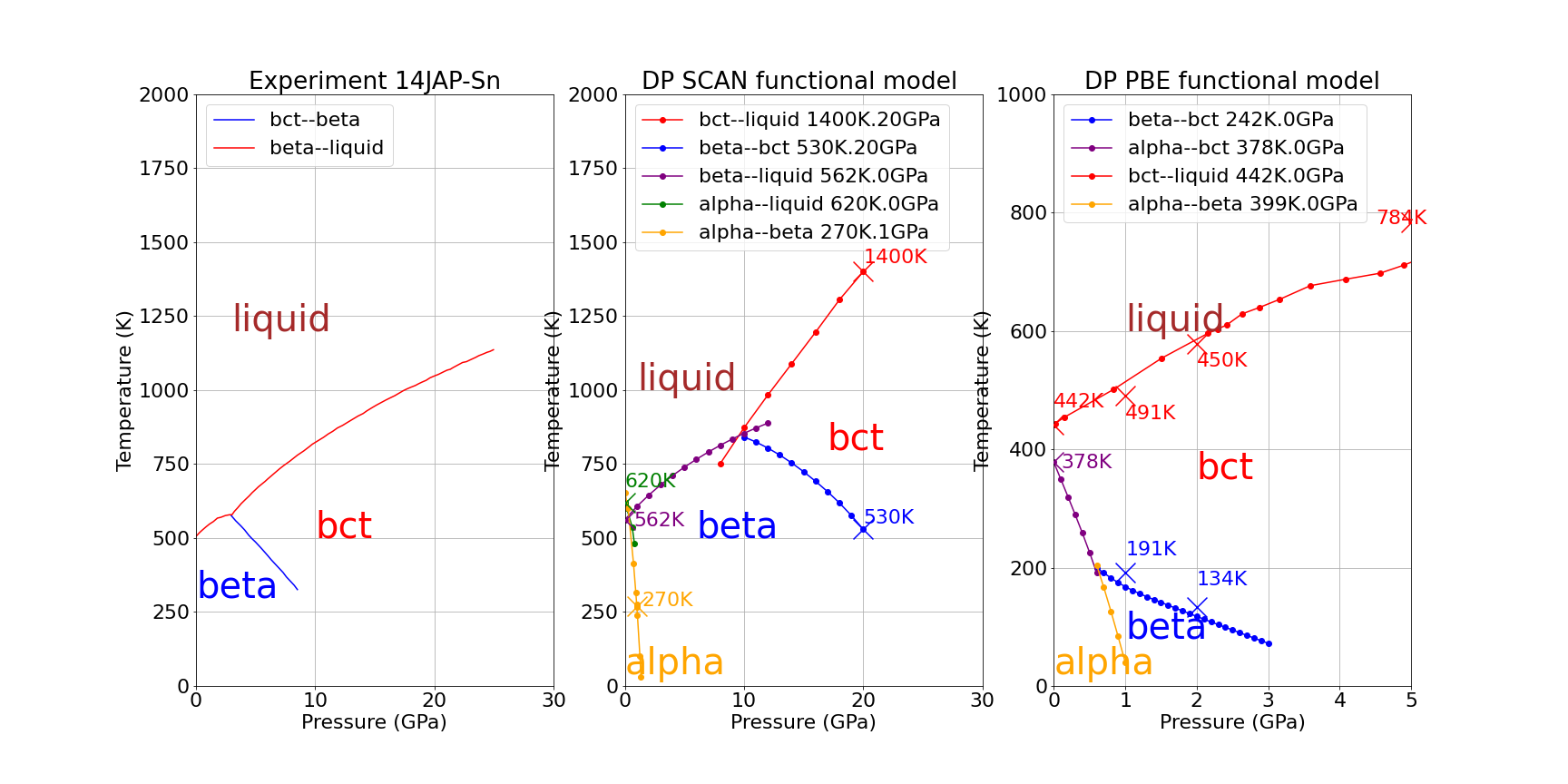 <br />
<br />
<br />
<a name="ad44045ba5f9b5ebf81388ff611d8d5b"></a>
🦴software introduction
At first, dpti is a collection of python scripts to generate LAMMPS input scripts and to anaylze results from LAMMPS logs.<br /> <br />In dpti, there are many MD simulations tasks and scripts need to be run sequentially or concurrently. Before and after these MD simulation tasks, we may run a lot of MD scirpts to prepare the input files or analyze the logs to extract the useful data.<br /> <br />Then the dpti developers use apache-airflow to resolve the MD tasks dependencies and managing running tasks. <br />
Software Usage:
the examples dir
examples/in source code contains the essential files and jsons.
for CLI tools:
The following scripts can be used by Python CLI to generate essential scripts for LAMMPS simulation.
the CLI entry:
# after installation: pip install .
dpti --help
Equi(npt and nvt simulation)
The following scripts are used to generate essential tools.
cd exampls/equi/
dpti equi --help`
dpti equi gen npt.json
dpti equi gen nvt.json
The dir new_job/ contains the simulation files
HTI
This is an example for HTI three-step simulations.
cd examples/hti/
dpti hti --help
dpti hti gen hti.json -s three-step
TI
For temperature 200K, in order to generate integration path pressure from 0 to 10000 of interval 500.
in ti.p.json, we writes
"temp":200,
"pres_seq":[
    "0:10000:500",
    "10000"
]
cd examples/ti/
dpti ti gen ti.t.json
In order to generate TI path changing temperature, we use
dpti ti gen ti.p.json
GDI
An example for finding coexisting line between Sn beta and alpha phase.
by gdidata.json:
starting point is 1GPa,270K. (calculated by HTI method)
We want to extend to 1.35 GPa.
cd examples/gdi/
dpti gdi pb.json machine.json -g gdidata.json
For airflow workflow:
Sometimes, we need to do high-throughput calculations(which means we need to calculate a series of temperature, pressure points for multiple phases).
It would be a great burden for users to execute these tasks manually and monitor the tasks' execution.
We provide the workflow tools based on apache-airflow workflow framework.
we refer this docs airflow official docs for more instructions.
TI_Workflow
We implement a workflow de
implemented at workflow/DpFreeEnergy.py
example dir and json:
cd examples/
cat examples/FreeEnergy.json
Requirement: setup apache-airflow or use the docker version dpti
docker run --name dpti -p 9999:8080 -it deepmodeling/dpti:latest /bin/bash
docker exec -it dpti /bin/bash
Then we provide a basic example for apache-airflow usage
# pwd at /home/airflow/
cd dpti/examples/
airflow dags trigger  TI_taskflow  --conf $(printf "%s" $(cat FreeEnergy.json))
Input: Lammps structure file.
Output: free energy values at given temperature and pressure.
Parameters: Given temperature(or the range), Given pressure(or therange), force field,Lammps simulation ensemble and etc.
we implement a workflow called TI_taskflow: It includes these steps:
- npt simulation to get lattice constant.
- nvt simulation.
- HTI: free energy at given temperature and pressure
- TI: free energy values at the given range of temperature/pressure.
website to manage and monitor these jobs.
``
<a name="46bdda688b5bc33d261bccfb389fdf55"></a>
📃Installation
local CLI tools installtion
# usually create a new python environment
# conda create --name dpti
# conda activate dpti
cd dpti/
pip install .
# use this command to check installation
dpti --help
docker image:
docker pull deepmodeling/dpti
The useful files and command see [this file](docker/README.md
Manually installation
the Dockerfile at
docker/dir may be helpful for mannually installation.
dpti use apache-airflow as workflow framework, and dpdispatcher to interact with the HPC systems (slurm or PBS).
airflow use realation database (PostgreSQL, MySQL or Sqlite) as backend to store the metadata, DAGs definetion and nodes state etc.
<a name="d3066b89f26f2ffcef7d0f8647512881"></a>
install dpti and dpdispatcher.
git clone the following packages and install.<br /> https://github.com/deepmodeling/dpti
cd dpti/
pip install .
install postgresql backend
apahche-airflow require a database backend.Here we refer to this doc postgresql offical docs for download
and use this command
psql -h
<a name="dcbb10cafb9005833579166f3acad127"></a>
configure apache-airflow.
airflow user manual: https://airflow.apache.org/docs/apache-airflow/stable/index.html
# airflow will create at ~/airflow
airflow -h
cd ~/airflow

# usually the configuration file location
# we refer this doc for further information
# https://airflow.apache.org/docs/apache-airflow/stable/configurations-ref.html
vi ~/airflow/airflow.cfg

# airflow will initialize datebase with sqlite
airflow db init

# create a user
airflow users create \
    --username airflow \
    --firstname Peter \
    --lastname Parker \
    --role Admin \
    --email spiderman@superhero.org

 # you will be requested to enter the password here.


 # start airflow's webserver to manage your workflow use "-D" option to daemon it
 airflow webserver --port 8080 --hostname 127.0.0.1

 # start airflwo scheduler
 airflow scheduler

 # if ariflow web server start at the personal computer,
 # you could go to http://localhost:8080/ to view it
 # if airflow runs on remote server
 # you could use ssh to conntect to server
 # ssh -CqTnN -L localhost:8080:localhost:8080 someusername@39.xx.84.xx
<a name="1f33d89b89d0c8f710b7496190e86666"></a>
🚀Quick Start
with docker
docker pull deepmodeling/dpti
further information(useful command and files, examples):see docker README.md
manually
 # copy dpti'workflow file
 cp /path-to-dpti/workflow/DpFreeEnergy.py ~/airflow/dags/

 # create a workdir and copy example files
 cp /path-to-dpti/examples/*json /path-to-a-work-dir/

 # start our airflow job
 cd /path-to-a-work-dir/
 cat ./airflow.sh

 airflow dags trigger  TI_taskflow  --conf $(printf "%s" $(cat FreeEnergy.json))
<a name="262831afc14feddc64db20cb6be8fd0d"></a>
<a name="ad87a3d8509a6920e3e849cb1b423f31"></a>
🕹install postgresql database
Airflow use relation database as backend. And PostgreSQL is widely used in airflow community.<br />
<a name="nppPR"></a>
install database
airflow's introduction on how to set up database backend: apache-airflow:set up database
# install apache-airflow postgresql module
pip install apache-airflow-providers-postgres

# install postgresql
yum install postgresql

# enable postgresql service
systemctl start postgresql

# enter posgresql
psql
<a name="iFkxm"></a>
create database and database user
CREATE DATABASE airflow_db1;
CREATE USER airflow_user1 WITH PASSWORD 'airflow_user1';
GRANT ALL PRIVILEGES ON DATABASE airflow_db1 TO airflow_user1;
<a name="Glyxy"></a>
<a name="gQvK2"></a>
configure airflow configure file to connect database
configure ~/airflow/airflow.cfg<br />
# change the following item with t
