Vulnscan
Vulnerability Scanner Suite based on grype and syft from anchore
Install / Use
/learn @davideshay/VulnscanREADME
Vulnscan Suite
Vulnscan is a suite of reporting and analysis tools built on top of anchore's syft utility (to create software bills of material) and grype utility (to scan those SBOMs for vulnerabilities). This suite is designed to be run on a kubernetes cluster, and scan all running containers. Once scanned and the vulnerability list has been generated (and stored in a local postgres database), a web UI is available to report on your containers, SBOMs and scanned vulnerabilities. In addition, you can create an "ignore list" at any desired level to ignore false positives from grype and/or ignore vulnerabilities which you may have resolved in other ways or aren't otherwise applicable.
Web UI Sample
The UI has a few tabs at the top to access a list of containers/images, a list of vulnerabilities, and a list of Software BOMs:

The vulnerability list allows you to filter at any desired level across the cluster or by severity, etc:

The SBOM list is similar, with details of every software component running in your landscape:

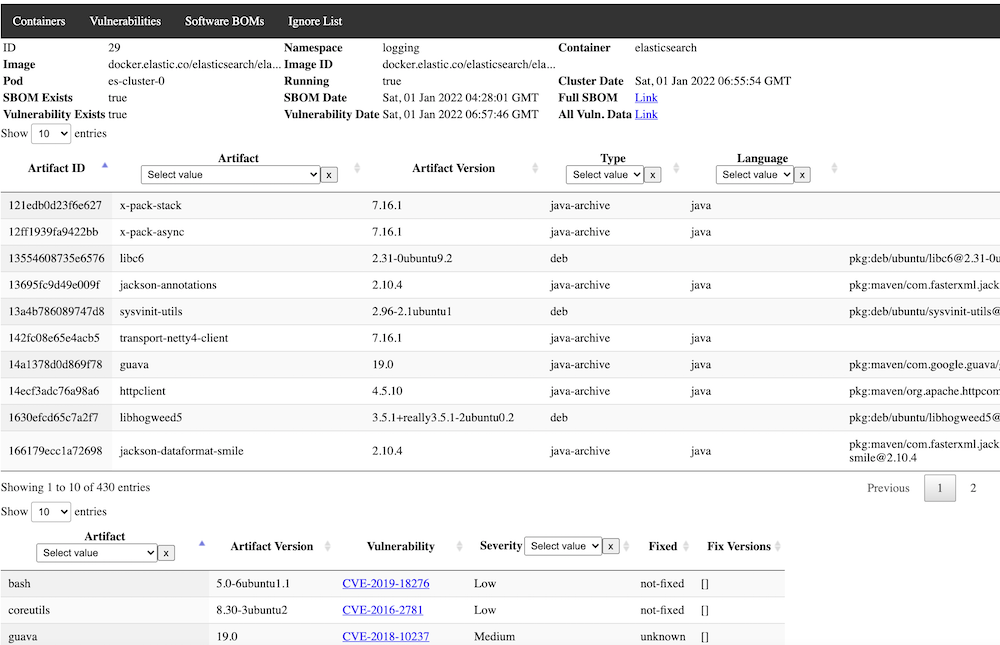
Clicking on a container provides a detailed view, including both SBOMs and Vulnerabilities for the selected image:
Components of Vulnscan
There are 4 main components to the suite:
- Podreader -- this application scans all available pods running in the database and adds any newly discovered pods to the database to be scanned. It optionally (recommended) expires older non-running pods from the database.
- Sbomgen -- this application looks for any newly available containers in the database that have not yet had a software BOM generated and generates one, storing the results in a json field in the database.
- Vulngen -- this application looks for any newly available containers in the database that have an SBOM generated but have not been scanned for vulnerabilities. Results are stored in a json field in the database and available for query and display. It optionally (recommended) can be set to always refresh the vulnerability scan, in case new vulnerabilities have been added to the database after the initial SBOM generation.
- Vulnweb -- this is the Web GUI for the application, with a backend application to serve and process requests, and the frontend files for viewing, as well as providing the "Ignore List" functionality.
- Jobrunner -- this is an optional component that can be used to run any set of containers in sequence in Kubernetes. In this use case, it can be used to run Podreader, Sbomgen, and Vulngen sequentially in order, and optionally only proceed to the next component if the last one succeeds. If you elect to not use this component, you can simply schedule the components as individual Cronjobs with enough time between them to allow for normal execution speed. Alternatively, you could use some other sort of DAG tool such as tekton-pipelines. This utility could also be useful outside of vulnscan and is written generically enough to be used for other purposes where sequential jobs are required.
Recommended Deployment And Installation Approach
If you don't currently have postgres installed, follow a guide elsewhere to create a postgres environment that you can use for Vulnscan. It doesn't technically have to be running in the cluster as long as your pods will have access to it. Once installed, create a new database such as "vulnscan" and a new user , i.e. "vulnscan-admin" that has all administrative privileges to the database. The database host, database name, user, and password are all passed to the pods as environment variables, and I would recommend you use a secret in order to load them.
The recommended deployment approach uses the Jobrunner component scheduled as one Cronjob, however frequently you would like (the example below uses daily). This will run Podreader followed by Sbomgen followed by Vulngen. Execution of these jobs will require a service account with permissions to list.watch all pods. The job runner itself also requires the ability to list/create jobs.
Separately, run a deployment and optionally ingress (recommended) to run vulnweb. As this application currently stands, no in-built security mechanisms are provided, so it is recommended to do this at the ingress level or otherwise provide another security mechanism to prevent unauthorized use.
Recommended YAML for deployment:
Basics - Namespace & ServiceAccounts/Roles
apiVersion: v1
kind: Namespace
metadata:
  name: vulnscan
---
apiVersion: v1
kind: ServiceAccount
metadata:
  name: vulnscan-serviceaccount
  namespace: vulnscan
---
apiVersion: rbac.authorization.k8s.io/v1
kind: ClusterRole
metadata:
  name: vulnscan-role
rules:
- apiGroups: ["extensions","apps","batch",""]
  resources: ["endpoints","pods","services","nodes","deployments","jobs"]
  verbs: ["get", "list", "watch", "create", "delete"]
---
apiVersion: rbac.authorization.k8s.io/v1
kind: ClusterRoleBinding
metadata:
  name: vulnscan-role-binding
  namespace: vulnscan
subjects:
- kind: ServiceAccount
  name: vulnscan-serviceaccount
  namespace: vulnscan
roleRef:
  kind: ClusterRole
  name: vulnscan-role
  apiGroup: rbac.authorization.k8s.io
---
Permissions could be less if you elect to not use the jobrunner.
Secrets
Not shown here, but recommended to use a secret for providing access to your database, encoding both the username and password. The remaining examples below assume you have created a secret called 'vulnscan-db-auth' in the vulnscan namespace.
Job Configmap
The job runner assumes the target container has a list of job YAML files in a configurable directory, i.e. /jobs. Multiple ways of doing this, but I've elected to put these job yaml's in a configmap and then mapping them into the directory as volumes. That approach is shown below.
apiVersion: v1
kind: ConfigMap
metadata:
  namespace: vulnscan
  name: vulnscan-jobs-config
  labels:
    app: vulnscan
data:
  1-podreader.yaml: |-
    apiVersion: batch/v1
    kind: Job
    metadata:
       namespace: vulnscan
       generateName: vulnscan-podreader-
       labels:
          app: vulnscan-podreader
    spec:
      ttlSecondsAfterFinished: 180
      template:
         metadata:
            labels:
               app: vulnscan-podreader
         spec:
           restartPolicy: OnFailure
           serviceAccountName: vulnscan-serviceaccount
           containers:
           - name: podreader
             image: davideshay/vulnscan-podreader:latest
             env:
             - name: DB_HOST
               value: 'postgres.postgres'
             - name: DB_NAME
               value: 'vulnscan'
             - name: DB_USER
               valueFrom:
                 secretKeyRef:
                   name: vulnscan-db-auth
                   key: DB_USER
             - name: DB_PASSWORD
               valueFrom:
                 secretKeyRef:
                   name: vulnscan-db-auth
                   key: DB_PASSWORD
             - name: EXPIRE_CONTAINERS
               value: 'true'
             - name: EXPIRE_DAYS
               value: "5"
             tty: true
             imagePullPolicy: Always
  2-sbomgen.yaml: |-
    apiVersion: batch/v1
    kind: Job
    metadata:
       namespace: vulnscan
       name: vulnscan-sbomgen
       labels:
          app: vulnscan-sbomgen
    spec:
      ttlSecondsAfterFinished: 180
      template:
         metadata:
            labels:
               app: vulnscan-sbomgen
         spec:
           restartPolicy: OnFailure
           serviceAccountName: vulnscan-serviceaccount
           containers:
           - name: sbomgen
             image: davideshay/vulnscan-sbomgen:latest
             env:
             - name: DB_HOST
               value: 'postgres.postgres'
             - name: DB_NAME
               value: 'vulnscan'
             - name: DB_USER
               valueFrom:
                 secretKeyRef:
                   name: vulnscan-db-auth
                   key: DB_USER
             - name: DB_PASSWORD
               valueFrom:
                 secretKeyRef:
                   name: vulnscan-db-auth
                   key: DB_PASSWORD
             tty: true
             imagePullPolicy: Always
             resources:
               requests:
                 memory: 12Gi
               limits:
                 memory: 16Gi
  3-vulngen.yaml: |-
    apiVersion: batch/v1
    kind: Job
    metadata:
       namespace: vulnscan
       name: vulnscan-vulngen
       labels:
          app: vulnscan-vulngen
    spec:
      ttlSecondsAfterFinished: 180
      template:
         metadata:
            labels:
               app: vulnscan-vulngen
         spec:
           restartPolicy: OnFailure
           serviceAccountName: vulnscan-serviceaccount
           containers:
           - name: vulngen
             image: davideshay/vulnscan-vulngen:latest
             env:
             - name: DB_HOST
               value: 'postgres.postgres'
             - name: DB_NAME
               value: 'vulnscan'
             - name: DB_USER
               valueFrom:
                 secretKeyRef:
                   name: vulnscan-db-auth
                   key: DB_USER
             - name: DB_PASSWORD
               valueFrom:
                 secretKeyRef:
                   name: vulnscan-db-auth
                   key: DB_PASSWORD
             - name: REFRESH_ALL
               value: 'true'
             - name: SEND_ALERT
               value: 'true'
             - name: ALERT_MANAGER_URL
               value: 'https://alert.prometheus:9093'
             - name: APP_URL
               value: '