
OfficeJS.dialogs
MessageBox, InputBox and Forms helpers for OfficeJS
Install / Use
/learn @davecra/OfficeJS.dialogsREADME
Introduction
The OfficeJS.dialogs library provides simple to use dialogs in OfficeJS/Office Web Add-in (formally called Apps for Office) solutions. The secondary purpose of the library is to help bring some familiarity (from VBA/VB/C#) into OfficeJS development. Currently, the following dialogs types are present:
Update History
Current version: 1.0.9 Publish Date: 3/4/2020
This is a breif history of updates that have been applied:
- Version 1.0.1 - support for MessageBox, InputBox and custom Form
- Version 1.0.2 - bug fixes, streamlining code
- Version 1.0.3 - better error handling, cancel code
- Version 1.0.4 - support for Wait form, Progress Dialog, and async updates on MessageBox and ProgressBar while forms are still loaded.
- Version 1.0.5 - removed external image references, converted to inline base64 strings. Bug fixes.
- Version 1.0.6 - converted to classes, bug fixes, updated inline jsdoc documentation, standardized, fixed issues with close dialog - one after another - known bug in OfficeJS/Outlook/OWA
- Version 1.0.7 - bug fixes, code cleanup, documentation added README.md
- Version 1.0.8 - support for PrintPreview, code cleanup , bug fixes
- Version 1.0.9 - fixed an issue with dialogs closing, updated warning on using CDN
In the following sections each of these will be details with proper usage.
Installation
To install OfficeJS.dialogs, you can either pull in this repository from GitHub, by cloning it and then importing it into your project, or using the following command in your preferred coding environment with Node installed:
npm install officejs.dialogs
NOTE: There is a CDN on https://cdn.jsdelivr.net/gh/davecra/officejs.dialogs/dialogs.js. However, this will not function as expected. First, to use the CDN you will need to add "https://cdn.jsdelivr.net" as an AppDomain in your manifest file:
  <AppDomains>
    <AppDomain>https://cdn.jsdelivr.net</AppDomain>
  </AppDomains>
However, as of this writing, the displayDialogAsync command does not support CDN for HTML pages. This library requires the dialogs.html page in the same folder to be able to display the dialog. There are even more limitations to be aware of. At this point it is suggested you only use a local NPM copy.
NOTE: If you were using the OLD CDN, please stop using it: https://cdn.rawgit.com/davecra/OfficeJS.dialogs/master/dialogs.js. This was on RAWGIT and that site is being archived soon.
Please note, the CDN has CORS issues with any of the Update() commands below. As such, you will be able to display a Progress dialog, but you will be completely unable to update it (increment). You will also be unable to use the MessageBox.Update() command as well. If you have no need for these commands, by all means, please use the CDN, but be aware of these limitations.
For now, the guidance is to use Node Package Manager (NPM) to import the library into your solution.
Follow
Please follow my blog for the latest developments on OfficeJS.dialogs. You can find my blog here:
 http://theofficecontext.com
You can use this link to narrow the results only to those posts which relate to this library:
- https://theofficecontext.com/?s=officejs.dialogs
 You can also follow me on Twitter: @davecra
 And also on LinkedIn: davidcr
MessageBox<a name="MessageBox"></a>
The MessageBox class has the following public methods:
- Reset()
- Show([text],[caption],[buttons],[icon],[withcheckbox],[checkboxtext],[asyncResult],[processupdates])
- Update([text],[caption],[buttons],[icon],[withcheckbox],[checkboxtext],[asyncResult])
- UpdateMessage([text],[asyncResult])
- Displayed()
- CloseDialogAsync([asyncresult])
MessageBox.Reset()<a name="MessageBoxReset"></a>
You can issue command each time you are about to request a messagebox dialog to assure everything is reset (as it is in the global space). This resets the MessageBox global object so that no previous dialog settings interfere with your new dialog request. You should only use this if you encounter issues.
MessageBox.Show()<a name="MessageBoxShow"></a>
The Show method will display a MessageBox dialog with a caption, a message, a selection of buttons (OK, Cancel, Yes, No, Abort, and Retry) and an icon (Excalation, Asterisk, Error, Hand, Information, Question, Stop, Warning), an optional checkbox with its own text messge, a callback when the user pressses any of the buttons and an option to keep the dialog open until you issue a DialogClose(). The following paramaters are used in this method:
- [text: string] (required) - this is the main message you want to display in the dialog.
- [caption: string] (optional) - this is the caption to appear above the main message. Default is blank.
- [buttons: MessageboxButtons] (optional) - this is a member of the MessageBoxButtons enumeration. You can pick between: OkOnly, OkCancel, YesNo, YesNoCancel, RetryCancel, AbortRetryCancel. Default is OkOnly.
- [icon: MessageBoxIcons] (optional) - this is a member of the MessageBoxIcons enumeration. Default is None.
- [withcheckbox: boolean] (optional) - if this is enabled a checkbox will appear at the bottom of the form. Should be used in conjunction with the [checkboxtext] parameter below. This is useful for providing an option like: "Do not show this message again." The default is false.
- [checkboxtext: string] (optional) - if the [withcheckbox] option is enabled, this is the text that will appear to the right of the checkbox. Default is blank.
- [asynResult: function(string,boolean)] (required) - this is the callback function that returns which button the user pressed (as a string) and whether then user checked the checkbox (is the [withcheckbox] option is enabled). If the user presses the (X) at the top right of the dialog, "CANCEL" will be returned.
- [processupdates: boolean] (optional) - if this option is true, the dialog will remain open after the user presses a button. The message will be sent to the callback but the dialog will continue to remain. This is useful if you have a series of questions to ask the user in rapid succession, rather than closing the dialog and reopening it each time (returning control temporarily to the Office application), you can issue UpdateMessage() or Update() to change the message, buttons, caption, icon and callback. If this option is true, you are responsible for closing the dialog when complete by issuing a MEssageBox.CloseDialog() command. The default is false. This means that when the user presses any button the dialog closes.
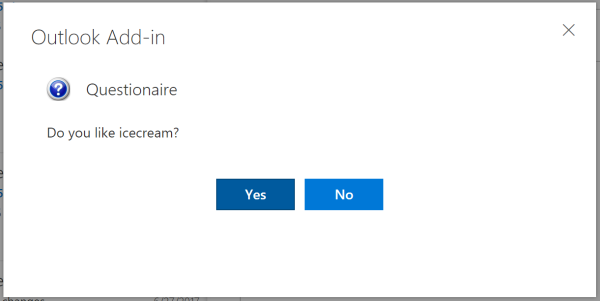
  MessageBox.Show("Do you like icecream?", "Questionaire", MessageBoxButtons.YesNo,
      MessageBoxIcons.Question, false, null,function(buttonFirst) {
      /** @type {string} */
      var iceCream = (buttonFirst == "Yes" ? "do" : "dont");
      MessageBox.UpdateMessage("Do you like Jelly Beans?", function(buttonSecond) {
        /** @type {string} */
        var jellyBeans = (buttonSecond == "Yes" ? "do" : "dont");
        MessageBox.UpdateMessage("Do you like Kit Kat bars?", function(buttonThird) {
          /** type {string} */
          var kitkat = (buttonThird == "Yes" ? "do" : "dont");
          MessageBox.CloseDialogAsync(function() {
            Alert.Show("You said you " + iceCream + " like ice cream, you " +
                        jellyBeans + " like jelly beans, and you " +
                        kitkat + " like kit kat bars.");
          });
        });
      });
    }, true);
This is an example of one MessageBox from the above code:
MessageBox.Update()<a name="MessageBoxUpdate"></a>
If you issue a MessageBox.Show() and you set the [processupdated] flag to true, then you can use this method. Otherwise this will fail. What this method does is update a currently displayed messagebox with new information. This has all the same paramaters as the MessageBox.Show() with the exception of the processupdated flag (since the dialog is already setup to allow you to issue updates). You must issue a new callback as well to handle the new updated response. For information on what each paramater does, and defaults, see the MessageBox.Show() method.
MessageBox.UpdateMessage()<a name="MessageBoxUpdateMessage"></a>
If you issue a MessageBox.Show() and you set the [processupdated] flag to true, then you can use this method. Otherwise this will fail. What this method does is updates just the text message of a currently displayed messagebox. This accepts only the [text] paramater and a [asyncResult] callback. The text and callback are both required. You must issue a new callback as well to handle the new updated response. For information on what each paramater does, and defaults, see the MessageBox.Show() method.
MessageBox.Displayed()<a name="MessageBoxDisplayed"></a>
This method returns true if a MessageBox dialog is currently being displayed to the user. This is provided in case you wish to verify the dialog is still opened before issuing a [MessageBox.CloseDia
