
Dbachecks
✔ SQL Server Environmental Validation
Install / Use
/learn @dataplat/DbachecksREADME
dbachecks
<a href="https://star-history.com/#dataplat/dbachecks&Date"><img align="right" height="300" src="https://api.star-history.com/svg?repos=dataplat/dbachecks&type=Date"></a>




Please note - development on v2 has stopped and all efforts are focused on the v3 improvements to use Pester v5 and improve performance.
You are welcome to help by picking something from the project https://github.com/orgs/dataplat/projects/2 or by contacting @SQLDBAWithABeard @jpomfret @ClaudioESSilva or @shaneis
dbachecks is a framework created by and for SQL Server pros who need to validate their environments. Basically, we all share similar checklists and mostly just the server names and RPO/RTO/etc change.
This open source module allows us to crowd-source our checklists using Pester tests. Such checks include:
- Backups are being performed
- Identity columns are not about to max out
- Servers have access to backup paths
- Database integrity checks are being performed and corruption does not exist
- Disk space is not about to run out
- All enabled jobs have succeeded
Interactive dbachecks PowerShell Notebooks for Azure Data Studio
You can find a set of interactive PowerShell Notebooks which will introduce you to all of the core concepts in Robs GitHub. There is a set of .NET interactive Jupyter Notebooks
https://github.com/SQLDBAWithABeard/JupyterNotebooks/tree/main/notebooks/dotNETNotebooks/dbachecks
and a set of Jupyter Notebooks that will run in Azure Data Studio
https://github.com/SQLDBAWithABeard/JupyterNotebooks/tree/main/notebooks/NotDotNet/dbachecks
Both will use a docker container to show you how dbachecks works.
There is a zip file containing the Notebooks here
https://github.com/SQLDBAWithABeard/Presentations/raw/main/Notebooks/dbachecks/Notebooks.zip
Have questions about development? Please visit our Wiki. Anyone developing this module should visit that Wiki page (after fully reading this readme) for a brief overview.
Build Status
<table> <tbody> <tr> <td><a href="https://sqlcollaborative.visualstudio.com/dbachecks/_build/index?context=mine&path=%5C&definitionId=3&_a=completed" target="_blank"><img align="left" src="https://sqlcollaborative.visualstudio.com/_apis/public/build/definitions/a0deae7b-ae38-4ecc-a836-5f79cc561140/3/badge"></a></td> <td>Development Branch Build - Unit testing <a href="https://sqlcollaborative.visualstudio.com/dbachecks/_build/index?context=mine&path=%5C&definitionId=3&_a=completed" target="_blank">Click Here</a></td> </tr> <tr> <td><a href-"https://sqlcollaborative.visualstudio.com/dbachecks/_build/index?context=mine&path=%5C&definitionId=2&_a=completed"><img align="left" src="https://sqlcollaborative.visualstudio.com/_apis/public/build/definitions/a0deae7b-ae38-4ecc-a836-5f79cc561140/2/badge"></a></td> <td>Main Branch Build - Module version update and Code Signing <a href="https://sqlcollaborative.visualstudio.com/dbachecks/_build/index?context=mine&path=%5C&definitionId=2&_a=completed" target="_blank">Click Here</a></td> </tr> <tr> <td><a href = "https://sqlcollaborative.visualstudio.com/dbachecks/_releases2?definitionId=3&view=mine&_a=releases"><img align="left" src="https://sqlcollaborative.vsrm.visualstudio.com/_apis/public/Release/badge/a0deae7b-ae38-4ecc-a836-5f79cc561140/2/2"></a></td> <td>Main Branch Release - Release to PowerShell Gallery <a href="https://sqlcollaborative.visualstudio.com/dbachecks/_releases2?definitionId=3&view=mine&_a=releases" target="_blank">Click Here</a></td> </tr> </tbody> </table>Want to know how our CD process works? Read this blog post and see how the team manage it
Prerequisites
Client requirements
- PowerShell 5 + is required.
- Automatic installation of the dependent modules will only be provided via the PowerShell Gallery.
When you install from the Gallery, it'll auto-install:
- dbatools
- PSFramework
You will also need to manually install the Pester module at version 4.10.0, this is due to inconsistencies between dbachecks and Pester v5. If you have Pester v5 installed it is recommended to remove this and use Pester 4.10.0 or force an import of 4.10.0 when running dbachecks
Install-Module Pester -SkipPublisherCheck -Force -RequiredVersion 4.10.0
Import-Module Pester -Force -RequiredVersion 4.10.0
When you import, it'll auto-import
- dbatools
- Pester
- PSFramework
If you have already installed the module and you update it, you may be required to update the Pester or the PSFramework modules before it will import. If you see a message like

Then you need to
Install-Module Pester -SkipPublisherCheck -Force -RequiredVersion 4.10.0
Import-Module Pester -Force -RequiredVersion 4.10.0
You may need to do the same thing for the PSFramework or dbatools modules also
SQL requirements
dbachecks uses dbatools for most of it's data gathering so it supports SQL Versions from SQL 2000 to SQL vNext including SQL running on Linux. (dbachecks will not install on PowerShell Core yet so can not be run on a Linux client) Obviously some of the Services and disk space checks will not work against instances running on Linux as they are using gWindows API calls.
Getting started
Checks are performed using Invoke-DbcCheck which is basically a wrapper for Invoke-Pester. This means that supported Invoke-Pester parameters work against Invoke-DbcCheck.
In this module, a "Check" is synonymous with a "Tag" in Pester. So you can Invoke-DbcCheck and specify a Check that you want to run. You can see a list of the available Checks with Get-DbcCheck.
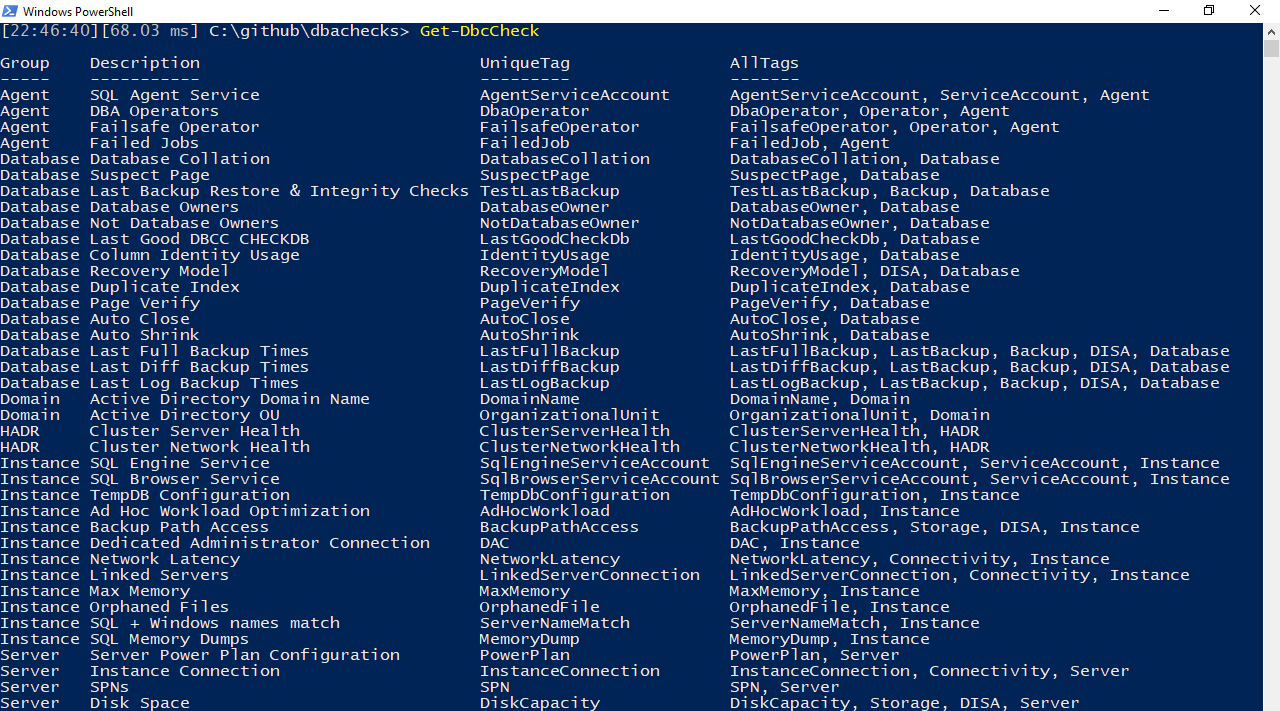
Once you've decided on the Check(s) you want to run, it's time to ensure you have a list of servers to run the checks against.
Making server lists
Similar to the dbatools module, dbachecks accepts -SqlInstance and -ComputerName parameters.
Invoke-DbcCheck -SqlInstance $servers -Checks SuspectPage, LastBackup
If you have a simplified (single) environment, however, you can set a permanent list of servers. "Servers" include both SQL Server instances and Windows servers. Checks that access Windows Server (e.g. disk space checks) will utilize -ComputerName parameter. A pure SQL Server command(s) (such as the backup check) utilizes the -SqlInstance parameter.
# Set the servers you'll be working with
Set-DbcConfig -Name app.sqlinstance -Value sql2016, sql2017, sql2008, sql2008\express
Set-DbcConfig -Name app.computername -Value sql2016, sql2017, sql2008

# Look at the current configs
Get-DbcConfig

# Invoke a few tests
Invoke-DbcCheck -Checks SuspectPage, LastBackup
What it looks like

Other ways to execute checks against specific servers
Additional Invoke-DbcCheck examples:
Invoke-DbcCheck -Check Backup -SqlInstance sql2016
Invoke-DbcCheck -Check RecoveryModel -SqlInstance sql2017, sqlcluster

$sqlinstance = Get-DbaRegisteredServer -SqlInstance sql2017 -Group Express
Invoke-DbcCheck -Check Backup -SqlInstance $sqlinstance

Invoke-DbcCheck -Check Storage -ComputerName server1, server2
Check and ExcludeCheck
We tag each of our Checks using singular descriptions such as B
