
Seqcli
The Seq command-line client. Administer, log, ingest, search, from any OS.
Install / Use
/learn @datalust/SeqcliREADME
seqcli 

The Seq client command-line app. Supports logging (seqcli log), searching (search), tailing (tail), querying (query) and JSON or plain-text log file ingestion (ingest), and much more.
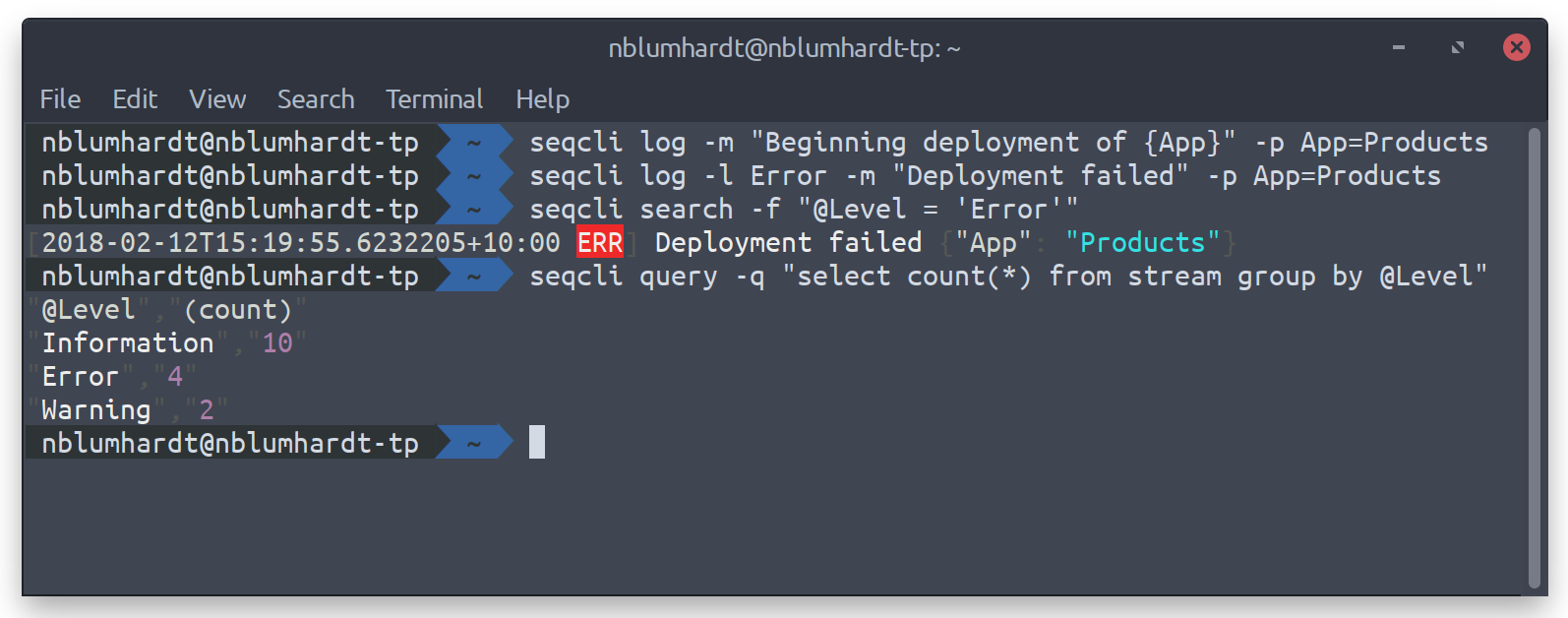
Getting started
The Seq installer for Windows includes seqcli. Otherwise, download the release for your operating system. Or, if you have dotnet installed, seqcli can be installed as a global tool using:
dotnet tool install --global seqcli
To set a default server URL and API key, run:
seqcli config set -k connection.serverUrl -v https://your-seq-server
seqcli config set -k connection.apiKey -v your-api-key
The API key will be stored in your SeqCli.json configuration file; on Windows, this is encrypted using DPAPI; on Mac/Linux the key is stored in
plain text unless an encryptor is defined in encryption.encryptor. As an alternative to storing the server URL and API key in configuration,
they can be passed to each command via the --server= and --apikey= arguments, or in the SEQCLI_CONNECTION_SERVERURL and
SEQCLI_CONNECTION_APIKEY environment variables.
seqcli is also available as a Docker container under datalust/seqcli:
docker run --rm datalust/seqcli:latest <command> [<args>]
To connect to Seq in a docker container on the local machine use the machine's IP address (not localhost) or specify docker host networking with --net host.
Use Docker networks and volumes to make local files and other containers accessible to seqcli within its container.
Environment variable overrides
Each setting value can be overridden at runtime by specifying an environment variable of the form SEQCLI_<setting path>, where <setting path> contains one element for each dotted segment of the setting name, separated by underscores.
For example the setting connection.serverUrl can overridden with the SEQCLI_CONNECTION_SERVERURL variable.
Connecting without an API key
If you're automating Seq setup, chances are you won't have an API key yet for seqcli to use. During the initial Seq server configuration, you can specify firstRun.adminUsername and firstRun.adminPasswordHash (or the equivalent environment variables SEQ_FIRSTRUN_ADMINUSERNAME and SEQ_FIRSTRUN_ADMINPASSWORDHASH) to set an initial username and password for the administrator account. You can use these to create an API key, and then use the API key token with the remaining seqcli commands.
The seqcli apikey create command accepts --connect-username and --connect-password-stdin, and prints the new API key token to STDOUT (PowerShell syntax is used below):
$user = "admin"
$pw = "thepassword"
$token = (
  echo $pw |
  seqcli apikey create `
    -t CLI `
    --permissions="Read,Write,Project,Organization,System" `
    --connect-username $user --connect-password-stdin
)
Contributing
See CONTRIBUTING.md.
Permissions
When connecting with an API key the allowed operations are determined by the permissions assigned to that API key.
To determine the permission required for a command check the 'Permission demand' column of the equivalent server API operation. For example, the command apikey create uses the POST api/apikeys endpoint, which requires the Write permission.
Usage
All seqcli commands follow the same pattern:
seqcli <command> [<args>]
Command help
The complete list of supported commands can be viewed by running:
seqcli help
To show usage information for a specific command, run seqcli help <command>, for example:
seqcli help apikey create
This also works for command groups; to list all apikey sub-commands, run:
seqcli help apikey
Available commands:
apikeyapikey create— Create an API key for automation or ingestion.apikey list— List available API keys.apikey remove— Remove an API key from the server.apikey update— Update an existing API key.
appapp define— Generate an app definition for a .NET[SeqApp]plug-in.app install— Install an app package.app list— List installed app packages.app run— Host a .NET[SeqApp]plug-in.app uninstall— Uninstall an app package.app update— Update an installed app package.
appinstanceappinstance create— Create an instance of an installed app.appinstance list— List instances of installed apps.appinstance remove— Remove an app instance from the server.appinstance update— Update an existing app instance.
bench— Measure query performance.cluster health— Probe a Seq node's/health/clusterendpoint, and print the returned status. This command can also be used to wait on a timeout until the cluster is healthy..configconfig clear— Clear fields in theSeqCli.jsonfile.config get— View a field from theSeqCli.jsonfile.config list— View all fields in theSeqCli.jsonfile.config set— Set a field in theSeqCli.jsonfile.
dashboarddashboard list— List dashboards.dashboard remove— Remove a dashboard from the server.dashboard render— Produce a CSV or JSON result set from a dashboard chart.
diagnostics ingestionlog— Retrieve the ingestion log.expressionindexexpressionindex create— Create an expression index.expressionindex list— List expression indexes.expressionindex remove— Remove an expression index from the server.
feedfeed create— Create a NuGet feed.feed list— List NuGet feeds.feed remove— Remove a NuGet feed from the server.feed update— Update an existing NuGet feed.
forwarderforwarder install— Install the forwarder as a Windows service.forwarder restart— Restart the forwarder Windows service.forwarder run— Listen on an HTTP endpoint and forward ingested logs to Seq.forwarder start— Start the forwarder Windows service.forwarder status— Show the status of the forwarder Windows service.forwarder stop— Stop the forwarder Windows service.forwarder truncate— Empty the forwarder's persistent log buffer.forwarder uninstall— Uninstall the forwarder Windows service.
help— Show information about available commands.indexindex list— List indexes.index suppress— Suppress an index.
ingest— Send log events from a file orSTDIN.licenselicense apply— Apply a license to the Seq server.license show— Shows license applied to the Seq server.
log— Send a structured log event to the server.nodenode health— Probe a Seq node's/healthendpoint, and print the returned HTTP status code, or 'Unreachable' if the endpoint could not be queried; note that no API key is required.node list— List nodes in the Seq cluster.
print— Pretty-print events in CLEF/JSON format, from a file orSTDIN.profileprofile create— Create or replace a connection profile.profile list— List connection profiles.profile remove— Remove a connection profile.
query— Execute an SQL query and receive results in CSV format.retentionretention create— Create a retention policy.retention list— List retention policies.retention remove— Remove a retention policy from the server.retention update— Update an existing retention policy.
samplesample ingest— Log sample events into a Seq instance.sample setup— Configure a Seq instance with sample dashboards, signals, users, and so on.
search— Retrieve log events that match a g
