
Nav3D
3D Pathfinding system plugin for Unreal Engine 5.6, using Sparse Voxel Octrees. Now overhauled for UE5 with optimisations and tactical reasoning
Install / Use
/learn @darbycostello/Nav3DREADME
Nav3D - 3D Navigation Plugin for Unreal Engine 5

A comprehensive 3D navigation system for Unreal Engine 5, providing true volumetric pathfinding and tactical reasoning using Sparse Voxel Octrees. This plugin enables AI agents to navigate freely in 3D space with advanced pathfinding algorithms including A*, Theta*, and Lazy Theta*.
Overview
Nav3D extends Unreal Engine's navigation system to support true 3D movement, perfect for:
- Flying units (aircraft, drones, birds)
- Swimming creatures
- Zero-gravity environments
- Complex 3D level geometry
- Multi-level architectural spaces
The system implements Daniel Brewer's "3D Flight Navigation Using Sparse Voxel Octrees" from Game AI Pro 3, providing both advanced pathfinding and sophisticated tactical reasoning capabilities for AI decision-making.
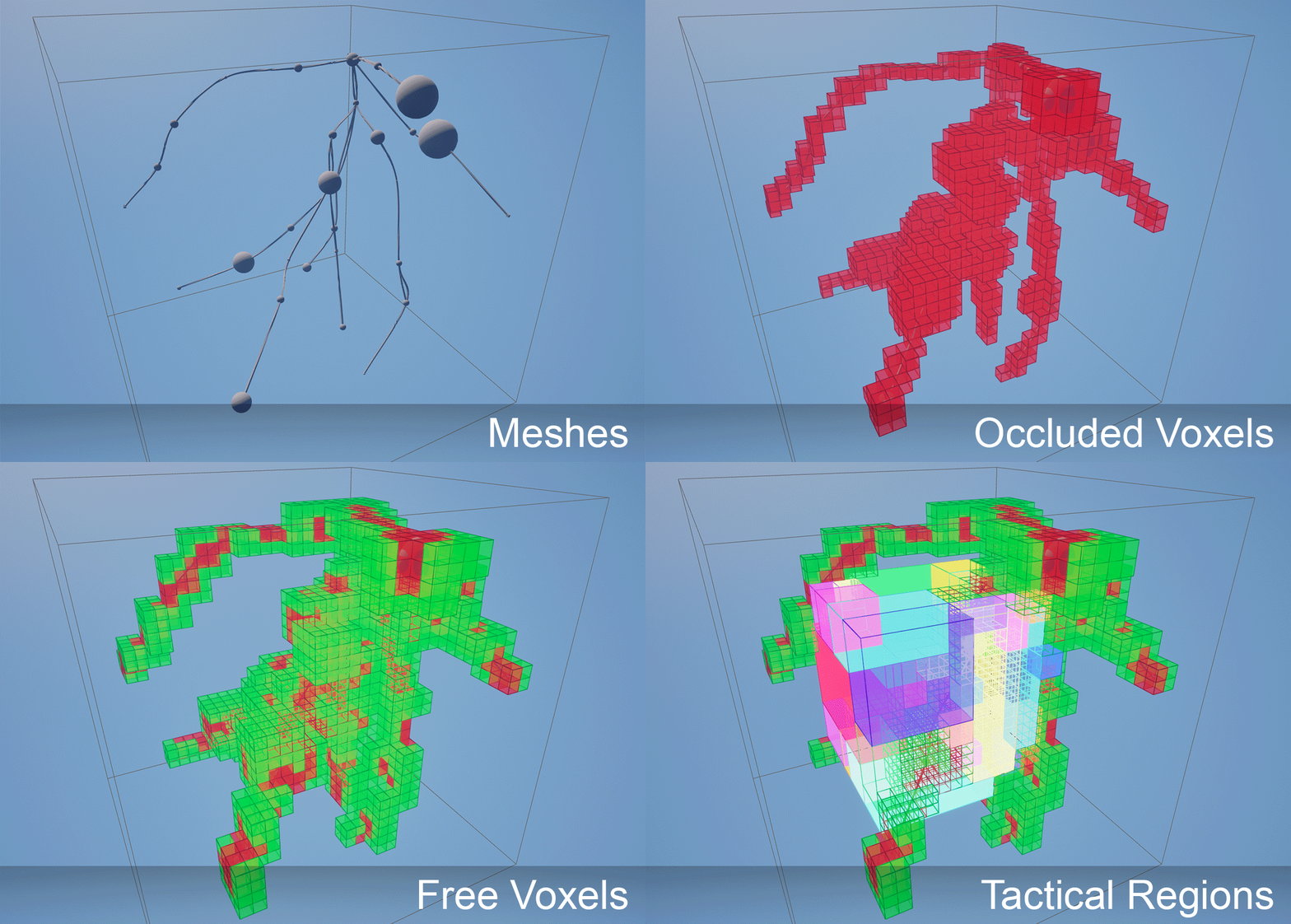
Key Features
✈️ True 3D Navigation
- Full volumetric pathfinding without height restrictions
- Sparse Voxel Octree (SVO) data structure for efficient 3D space representation
- Multi-scale voxel resolution based on agent size
- Considers all static meshes and instanced static meshes for navigation obstacle detection
🎯 Tactical Reasoning System
- Region-based spatial analysis with automatic free space identification
- Visibility analysis between regions using sample-based line-of-sight testing
- Adjacency graphs for tactical movement planning
- Best position finding with configurable visibility/distance/region size preferences
🔧 Advanced Cost & Smoothing Systems
- Dynamic cost calculation (Distance vs Fixed cost models)
- Multiple heuristic functions (Euclidean, Manhattan)
- Node size compensation for hierarchical optimization
- Configurable path smoothing with CatmullRom interpolation
⚡ Seamless UE5 Integration
- Drop-in replacement for standard navigation
- Works with existing MoveTo behavior tree nodes
- Automatic pathfinding query routing
- No code changes required for basic usage
🚀 Performance Optimized
- Asynchronous path generation and data building
- Multi-threaded octree traversal
- Early line-of-sight optimization
- Dynamic navigation data updates
🧩 Automated Volume Chunking System
- Intelligent volume chunking for large-scale environments
- Automatic chunk management with adjacency mapping
- Scalable architecture supporting vastly larger volumes
- Granular rebuild system for efficient updates
- World partition support allowing nav data chunks to load with your partition
Installation & Setup
1. Project Configuration
Add the plugin to your project and enable it in the Plugin Manager.
2. Navigation System Configuration
Open Project Settings → Game → Navigation System:
- Expand the Supported Agents array
- Add a new agent configuration:
- Nav Data Class:
Nav3DData - Preferred Nav Data:
Nav3DData - Agent Radius: Critical setting - determines minimum voxel size (voxel = 2 × radius)
- Agent Height: Used for collision detection
- Nav Data Class:
Important: You only need one agent configuration with Nav Data Class and Preferred Nav Data set to Nav3DData. Set the Agent Radius to match your smallest agent - the system automatically routes larger agents to higher octree layers with appropriately sized voxels. For example, if your smallest pawn has radius 50, set Agent Radius to 50. Larger agents (radius 100, 200, etc.) will automatically use coarser layers for better performance while maintaining appropriate navigation granularity.
3. Level Setup
- Add Nav3D Bounds Volume: Place a
Nav3DBoundsVolumeactor in your level - Set Navigation Extents: Use the brush settings in the volume's details panel to set the extents rather than scaling the volume actor
- Configure Chunking Settings:
- Enable Automatic Volume Partitioning is configured in Project Settings → Nav3D Settings
- Max Volume Partition Size: Controls how large volumes are automatically divided (default: 250,000 units = 2.5km)
- Max Sub Volumes Per Axis: Limits subdivision density (default: 8)
- Prefer Cube Partitions: Creates cubic chunks rather than elongated ones
- Build Settings:
- Automatic Generation is configured in Edit → Editor Preferences → Level Editor - Miscellaneous
- For large 3D levels, disable automatic generation and use the Build button in the
Nav3DDataactor inspector instead
Note: The actual octree bounds may differ from your volume due to power-of-2 constraints required by the octree structure.
4. Character Setup
Movement Component Configuration
On your flying Character's Movement Component:
- Nav Movement → Preferred Nav Data:
Nav3DData
AI Controller Setup
- Create a Navigation Query Filter Blueprint based on
Nav3DQueryFilter - Configure pathfinding options (see Query Filter Configuration)
- Set as Default Nav Filter Class in your AI Controller
5. Query Filter Configuration
Create a Blueprint from Nav3DQueryFilter to define pathfinding behavior:
Algorithm Selection
- A-Star: Fastest, jaggy paths along voxel centers
- Theta-Star: Most accurate with line-of-sight shortcuts
- Lazy Theta-Star: Recommended balance of speed and quality
Cost Calculation
- Traversal Cost Calculator:
Distance: Standard distance-based costFixed: Equal cost regardless of voxel size (favors larger voxels)
- Heuristic Calculator:
Euclidean: Direct distance to goalManhattan: Taxicab geometry distance
- Heuristic Scale: Bias toward goal-oriented exploration
- Use Node Size Compensation: Makes larger voxels cheaper to traverse
Path Smoothing
- Enable Smoothing: Apply CatmullRom algorithm
- Smoothing Subdivisions: Control smoothness level
Core Systems
Automated Volume Chunking
Nav3D features an intelligent automated chunking system that handles large 3D environments by dividing them into manageable pieces:
Key Benefits:
- Scalability: Support for vastly larger navigation volumes
- Build Performance: Shorter build times through parallel chunk processing
- Memory Efficiency: Each chunk manages its own serialized data
- Granular Updates: Rebuild individual chunks without affecting the entire volume
- Adjacency Optimization: Automatic inter-chunk connectivity with portal mapping
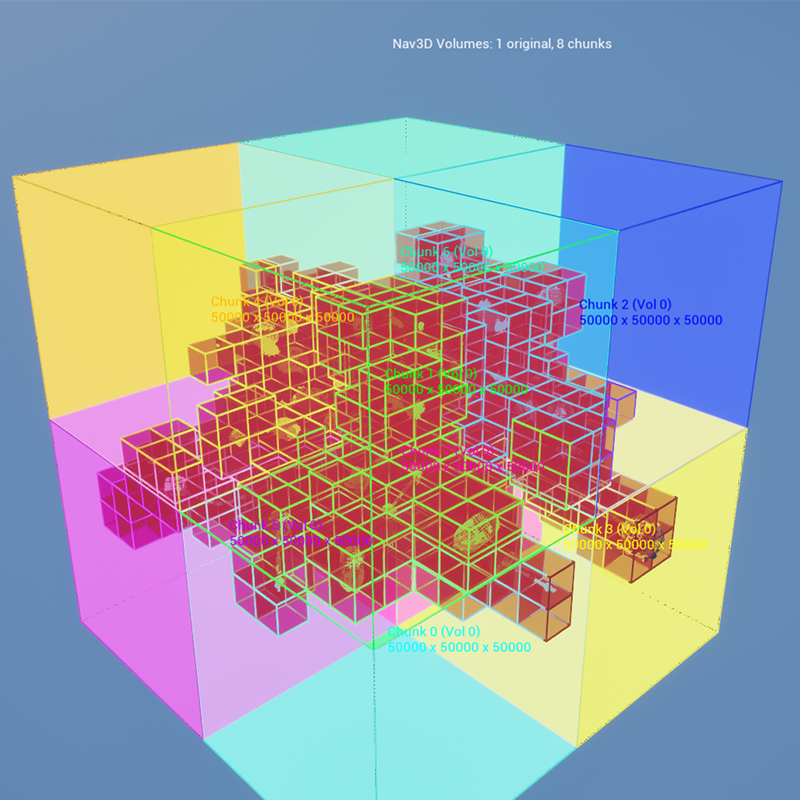
How It Works:
- Volume Analysis: The system analyzes your
Nav3DBoundsVolumebounds - Intelligent Subdivision: Automatically partitions volumes exceeding
MaxVolumePartitionSize - Chunk Actor Creation: Each partition becomes a
Nav3DDataChunkActorwith its own navigation data - Adjacency Mapping: Automatic connectivity between adjacent chunks using boundary voxel analysis
- Management Integration: The central
Nav3DDataactor coordinates all chunks seamlessly
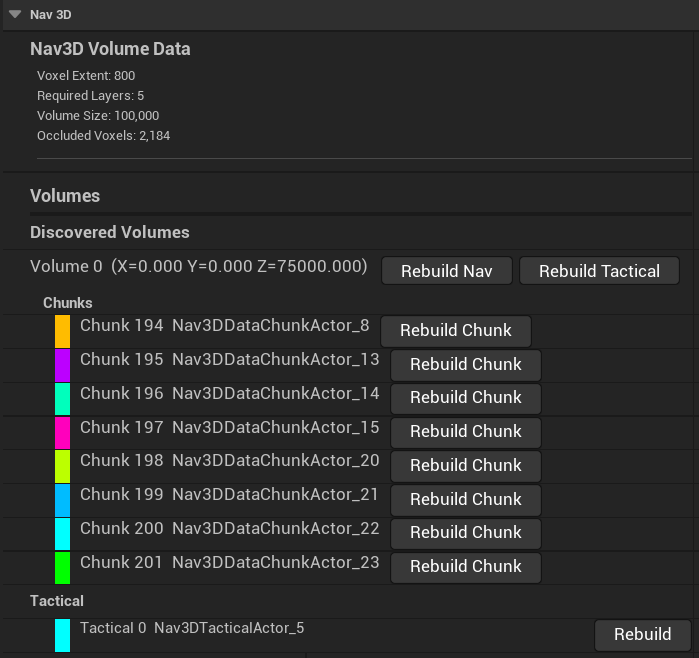
Configuration Settings (Project Settings → Nav3D Settings → Volume Partitioning):
bEnableAutomaticVolumePartitioning = true   // Enable/disable system
MaxVolumePartitionSize = 250000.0f          // 2.5km max chunk size
MaxSubVolumesPerAxis = 8                    // Prevent excessive subdivision
bPreferCubePartitions = true                // Favor cubic over elongated chunks
Chunk Actor System
The chunk-based architecture provides several management capabilities:
Nav3DData Actor (Main coordinator):
- Rebuild Volume: Rebuilds an entire volume, destroying and recreating all relevant chunks
- Build Status: Shows comprehensive status of all chunks and volumes
- Chunk Management: Automatic registration and coordination of all chunk actors
Individual Chunk Actors:
- Rebuild This Chunk: Button allowing developers to rebuild just a single chunk
- Build Status Indicators:
bIsBuilt,bIsBuilding,bNeedsRebuildproperties - Automatic Registration: Self-registers with the navigation system on creation
- Adjacency Data: Stores connections to neighboring chunks for seamless pathfinding
- World Partition Support: Based on
UPartitionActorfor automatic streaming load/unload
Tactical Actors (when tactical reasoning is enabled):
- Volume-Spanning Coverage: One tactical actor per volume, spanning all adjacent chunks
- Rebuild This Tactical Data: Button to rebuild tactical reasoning for the volume
- World Partition Compatible: Also based on
UPartitionActorfor streaming support - Centralized Management: Listed under "Tactical" section in Nav3DData volumes list
Debug Visualization:
- Debug Draw Chunks: Visualize chunk boundaries within your Nav3DBoundsVolume
- Chunk Information: Each chunk displays its index, parent volume, and dimensions
- Color-Coded Display: Different colors for easy chunk identification
- Adjacency Visualization: Show connections between chunks
Sparse Voxel Octree (SVO)
The foundation of Nav3D is a hierarchical 3D grid system with dynamically determined layers. The system creates as many layers as needed to:
- Provide appropriately sized voxels at layer 0 to meet agent dimensions
- Fill the entire Nav3D bounds volume created by the user
- Maintain power-of-2 octree constraints
Larger volumes require more octree layers to maintain the hierarchical structure.
Layer N: Largest voxels (coarse pathfinding, covers entire volume)
Layer N-1: Medium voxels
...
Layer 1: Smal
