
nxm-webtomd
A small, dependency-light MCP server that fetches web articles and converts them to clean Markdown (stdio).
Install / Use
claude mcp add dangranaz -- npx -y github:dangranaz/nxm-webtomdIf the server publishes to npm under a different name, use that package instead — check the repo README.
MCP Server
Model Context Protocol server
Quality Score
Category
AI & Machine LearningSupported Platforms
Our assessment of nxm-webtomd
nxm-webtomd scores 78/100 on our quality scale, 807th of 963 AI & Machine Learning skills we index.
Its MCP Server is 6.5 KB long, well organised into 12 sections with 8 code examples: a thorough specification that gives an agent plenty to work with.
It has 3 GitHub stars, so there is little community track record yet; judge it on its content.
Maintenance, license and trust
- The repository was last updated 26 days ago, so nxm-webtomd is actively maintained.
- It is released under the Apache-2.0 license, a permissive license that allows use, modification and commercial use with attribution.
- Its trust signals score 92/100, with 1 caution from licensing, adoption, age or documentation. These come from repository metadata, not a code audit — read the skill file before letting an agent act on it.
nxm-webtomd compared with similar skills
All 4 of these similar skills score higher than nxm-webtomd; compare them before choosing.
| Skill | Score | Stars | Updated | Format |
|---|---|---|---|---|
| nxm-webtomd (this skill)by dangranaz | 78 | 3 | 26d ago | MCP Server |
| claude-memby thedotmack | 100 | 100.1k | today | CLAUDE.md |
| Agent-Reachby Panniantong | 100 | 96.5k | 4d ago | CLAUDE.md |
| Understand-Anythingby Egonex-AI | 100 | 86.1k | today | CLAUDE.md |
| headroomby headroomlabs-ai | 100 | 75.1k | today | CLAUDE.md |
Frequently asked questions
- How do I install nxm-webtomd?
- Run
claude mcp add dangranaz -- npx -y github:dangranaz/nxm-webtomd. The install tabs above show the steps for each supported agent. - Which AI agents does nxm-webtomd work with?
- It is written for Claude Code and Claude Desktop, as a MCP Server file. Other agents that read the same format can often use it too.
- Is nxm-webtomd safe to use?
- It is Apache-2.0-licensed and scores 92/100 on trust signals. Skills are instructions an agent will follow, so read the file before installing it and do not approve commands you do not understand.
- Is nxm-webtomd still maintained?
- The repository was last updated 26 days ago, so nxm-webtomd is actively maintained.
Skill content
View source on GitHubnxm-webtomd





nxm-webtomd turns any web article into clean Markdown — right inside your AI agent.
Point it at a URL and it fetches the page, strips the navigation, ads, and boilerplate, and hands back the main article content as tidy Markdown (with optional YAML front‑matter). It speaks the Model Context Protocol (MCP) over stdio, so it plugs straight into agents like OpenCode, Claude Code, Cursor, and Kiro as a callable tool.
It is small, fast, and dependency‑light — a single self‑contained binary, no runtime downloads, nothing to configure beyond one line in your agent.
Fully open source (MIT / Apache‑2.0). Written in Rust.
Demo
From a noisy web page to clean, structured Markdown:
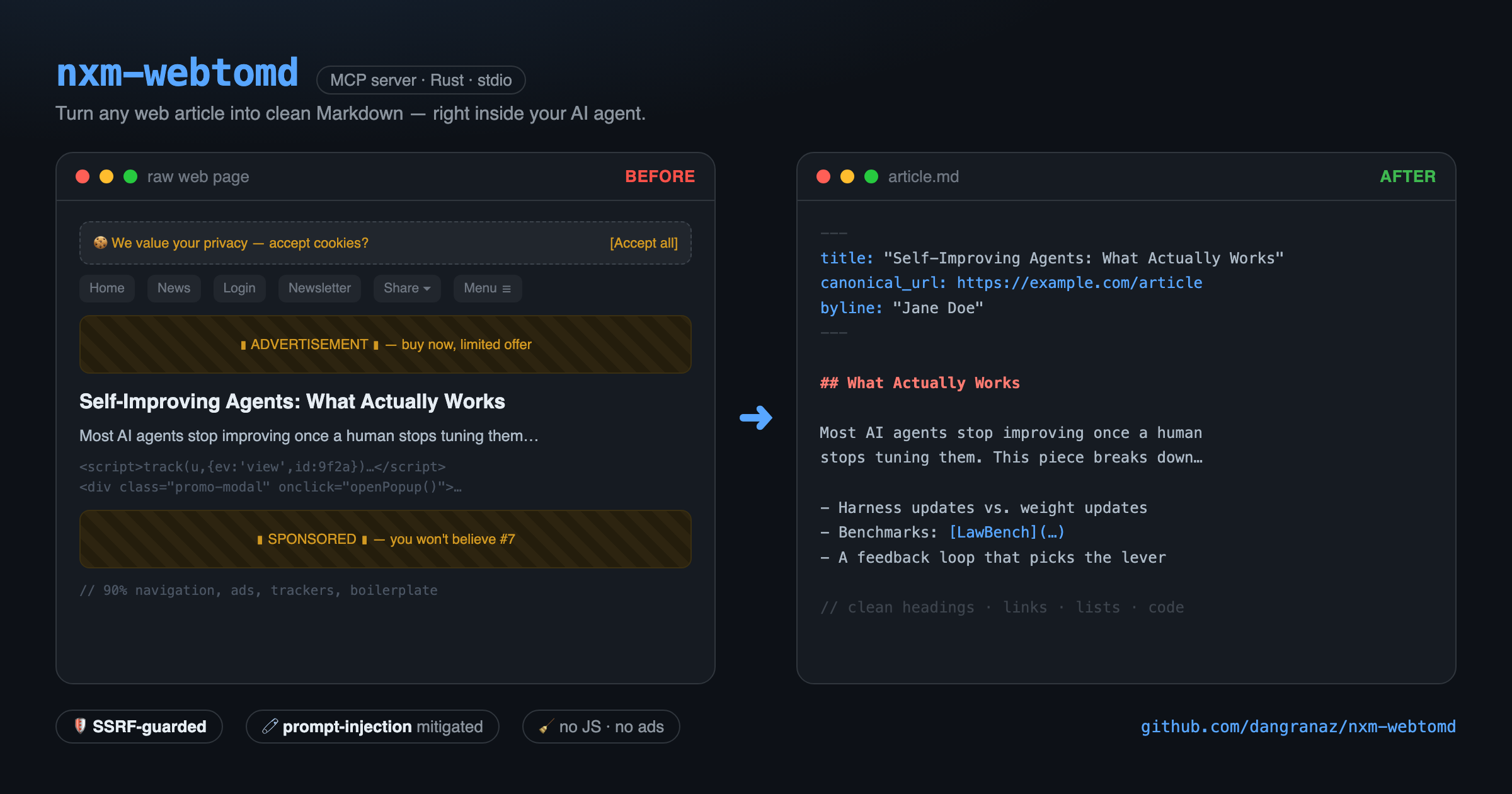
A real conversion, live in the terminal:

Why it exists
Agents are great at reasoning over text, but terrible at reading the raw web: a modern article page is 90% chrome — menus, cookie banners, share widgets, tracking scripts. Feeding all of that to a model wastes tokens and invites prompt‑injection from hidden page content.
nxm-webtomd does the dirty work first:
- 🧷 Safe by design. Strict fetch policy — request timeout, response size limit, SSRF protection (blocks requests to private/link‑local networks), and content‑type validation.
- 🧹 Clean extraction. A readability‑style engine keeps the article body — headings, paragraphs, lists, links, code blocks — and drops the rest.
- 🛡️ No active content. Raw HTML/JavaScript is never executed or propagated; all active content is stripped to mitigate prompt‑injection. Images are kept as
references only — no image bytes are downloaded. - 🗂️ Structured output. Optional YAML front‑matter with title, canonical URL, byline, and publish date.
Everything runs locally. Only the article you ask for is fetched; nothing else leaves your machine.
1. Install
One command. It auto‑detects your system (macOS Apple Silicon or Linux x86_64), downloads the matching binary from the latest GitHub release, verifies its SHA‑256, and installs it to ~/.local/bin:
curl -fsSL https://raw.githubusercontent.com/dangranaz/nxm-webtomd/main/install.sh | sh
If ~/.local/bin is not on your PATH, add it:
export PATH="$HOME/.local/bin:$PATH"
Supported platforms: macOS arm64 (Apple Silicon) and Linux x86_64.
<details> <summary>Build from source instead</summary>Requires a Rust toolchain (1.75+):
git clone https://github.com/dangranaz/nxm-webtomd.git
cd nxm-webtomd
cargo build --release
# binary at target/release/nxm-webtomd
2. Configure it in your agent
nxm-webtomd is a standard MCP server over stdio, so you configure it like any other MCP tool — the agent manages the process lifecycle.
Here is an example for OpenCode — add it to your opencode.json (global) or opencode.jsonc under the mcp key:
{
  "$schema": "https://opencode.ai/config.json",
  "mcp": {
    "nxm-webtomd": {
      "type": "local",
      "command": ["nxm-webtomd"],
      "enabled": true
    }
  }
}
The configuration follows the same pattern in other agents (Claude Code, Cursor, Kiro…): a local MCP server whose command is nxm-webtomd over stdio. For example, in a mcpServers‑style config:
{
  "mcpServers": {
    "nxm-webtomd": {
      "command": "nxm-webtomd",
      "args": [],
      "env": {}
    }
  }
}
Then just ask, in a prompt:
"use nxm-webtomd to fetch
https://example.com/articleand save it as Markdown to ./article.md"
3. The tool
The server exposes a single, focused MCP tool:
| Tool | Input | Output |
|------|-------|--------|
| web_to_md | url (required), output_path (optional) | Clean Markdown — returned inline, or written to output_path |
- Omit
output_path→ the Markdown comes back inline in the tool response. - Provide
output_path→ the Markdown is written to that file and the tool reports how many bytes it wrote.
4. Real output
Fetching a dense technical article and converting it produces Markdown like this (front‑matter + body):
---
title: "Hexo Labs Open-Sources SIA: A Self-Improving Agent That Updates Both the Harness and the Model Weights"
canonical_url: "https://www.marktechpost.com/2026/05/29/hexo-labs-open-sources-sia-.../"
byline: "Asif Razzaq"
published_time: "2026-05-29T07:28:37+00:00"
---
Most AI agents stop improving once a human stops tuning them. The model is fixed.
The scaffold around it is fixed. Hexo Labs wants to move both at once...

## What is SIA (Self-Improving AI)

SIA splits a task-specific agent into two parts. The first is the harness...

| Task | Initial | Prev. SOTA | SIA-H | SIA-W+H |
| ---- | ------- | ---------- | ----- | ------- |
| LawBench (top-1 acc) | 13.5% | 45.0% | 50.0% | 70.1% |
Tables, headings, links, and code blocks survive the trip; navigation, ads, and scripts do not.
5. Manual smoke test
The server reads one JSON‑RPC object per line on stdin and replies on stdout:
printf '%s\n%s\n' \
  '{"jsonrpc":"2.0","id":1,"method":"initialize","params":{}}' \
  '{"jsonrpc":"2.0","id":2,"method":"tools/list","params":{}}' \
  | nxm-webtomd
Call the tool directly:
{"jsonrpc":"2.0","id":1,"method":"tools/call","params":{
  "name":"web_to_md",
  "arguments":{"url":"https://example.com/article","output_path":"./article.md"}}}
⭐ Support the project
If nxm-webtomd saves you time or tokens, please give the repository a star and share it — it is the simplest way to help the project reach other developers. Feedback and suggestions are welcome via issues.
License
Licensed under either of
- Apache License, Version 2.0 (LICENSE-APACHE)
- MIT license (LICENSE-MIT)
at your option.
Related Skills
claude-mem
100.1kPersistent Context Across Sessions for Every Agent – Captures everything your agent does during sessions, compresses it with AI, and injects relevant context back into future sessions. Works with Claude Code, OpenClaw, Codex, Gemini, Hermes, Copilot, OpenCode + More
Agent-Reach
96.5kGive your AI agent eyes to see the entire internet. Read & search Twitter, Reddit, YouTube, GitHub, Bilibili, XiaoHongShu — one CLI, zero API fees.
Understand-Anything
86.1kGraphs that teach > graphs that impress. Turn any code into an interactive knowledge graph you can explore, search, and ask questions about. Works with Claude Code, Codex, Cursor, Copilot, Gemini CLI, and more.
headroom
75.1kCompress tool outputs, logs, files, and RAG chunks before they reach the LLM. 20% fewer tokens for coding agents, 60-95% fewer tokens for JSON, same answers. Library, proxy, MCP server.

Languages
Trust signals
From repository metadata: license, adoption, age and documentation. Not a code audit — see the Safety scan above for what the skill file itself contains.