
Krypto Trading Bot
Self-hosted crypto trading bot (automated high frequency market making) written in C++
Install / Use
npx skills add ctubio/Krypto-trading-botInstalls into whichever agent you are using.
README
<img align="left" src="https://user-images.githubusercontent.com/1634027/36237231-e611590e-11fa-11e8-8486-6675078501dc.jpg" /><p align="right">self reminder:<br><b>patience is the mother of science</b></p><br><a href="http://ciutatrefugi.barcelona/en/welcome-barcelona">*** REFUGEES WELCOME! ***</a><br/> <a href="http://missingmigrants.iom.int/">*** FATAL ROUTES? ***</a> <br clear="left">





K is a family of (very customizable) very low latency market making trading bots with a fully featured web interface.<br />It can place or cancel orders on compatible exchanges in less than a few milliseconds per order on a decent machine.
If you don't want to configure or hardcode your own trading strategies in your own machine,<br /> you can fund liquidity pools of automated market makers at tinyman.org (or at any other defi out there),<br />just remember:
- <b><ins>never write on any defi website your private keys</ins></b> (you have to sign transactions, not to share your wallet keys)
- <b><ins>never tell anyone on any chat your private keys</ins></b> (if you have questions, use a public forum and reject impostors)
<img src="https://github.githubassets.com/images/icons/emoji/unicode/1f4be.png" height="64" width="64" align="middle" /> Latest version at https://github.com/ctubio/Krypto-trading-bot <img src="https://github.githubassets.com/images/icons/emoji/unicode/1f51e.png" height="64" width="64" align="middle" /> <img src="https://github.githubassets.com/images/icons/emoji/unicode/1f4b8.png" height="64" width="64" align="middle" />






Our bots run on unix-like systems. Persistence is achieved through a built-in server-less SQLite C++ interface.<br>Data transfers are directly done from your machine to the exchange using the latest CURL and OpenSSL versions.<br>Installation in a dedicated Debian, Raspberry, Red Hat, CentOS or macOS instance without Docker is recommended.
The web UI is compatible with most web browsers/resolutions, but Brave or Firefox at 1600px are recommended.<br />Doesn't require configuration of any web server (unless installed behind your own reverse proxy).
<details><summary><b>K-trading-bot</b> <sup>(web UI + CLI)</sup></summary> to control a fully configurable high frequency trading engine, with all features suggested by the community:<br />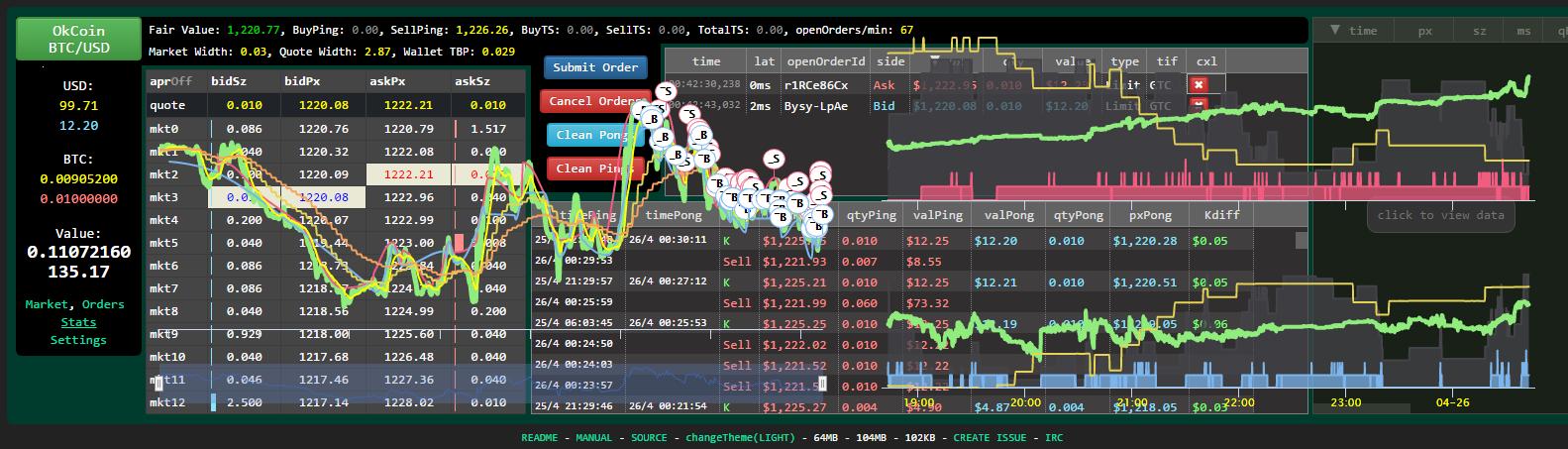
Compatible Exchanges
All currency pairs are supported (use --list argument to see all currently tradable pairs on a given exchange).
If you ask me, <img height="20px" src="https://github.com/user-attachments/assets/e84f2708-d29a-423d-a702-42c87a8ffe5b"> is the best and most secure by far, so here is my referral link for both of us to enjoy.
In case you are looking for referral links to other exchanges, feel free to post a new issue asking to other active users.
README
- Documentation
- Installation
- Information
- Development
- Humans and Milk Mammals
Docker Installation
See etc/Dockerfile file.
Windows Installation
Before starting with a manual installation, ensure your target machine has Windows 7 or greater and MSYS2 installed.
Use MSYS2 Terminal to install make (with command pacman -S make), then proceed as usual with the installation.
Manual GIT Instal
Related Skills
node-connect
385.6kDiagnose OpenClaw Android, iOS, or macOS node pairing, QR/setup code, route, auth, and connection failures.
blender-python-addon
40.5kBlender Python add-on rules for operators, panels, properties, registration, testing, and API-safe scripting
flutter-development-guidelines-cursorrules-prompt-file
40.5kCursor rules for Flutter development with MVVM architecture, Riverpod state management, Material widgets, and Dart style guidelines.
commit-push-pr
140.7kCommit, push, and open a PR
