GoogleTestAdapter
Visual studio extension that adds support for the C++ testing framework Google Test.
Install / Use
/learn @csoltenborn/GoogleTestAdapterREADME



Looking for a Maintainer
As you might have noticed, this project is not maintained any more (I have moved to different technologies and are not even working as a developer any more). Since it still has a few features which the MS clone (which is still developed and delivered with Visual Studio) does not support, there still seems to be some interest in the project. Thus, if anybody wants to take over this project, please get in touch - I will certainly try to get you up and running!
Google Test Adapter
Google Test Adapter (GTA) is a Visual Studio extension providing test discovery and execution of C++ tests written with the Google Test framework.
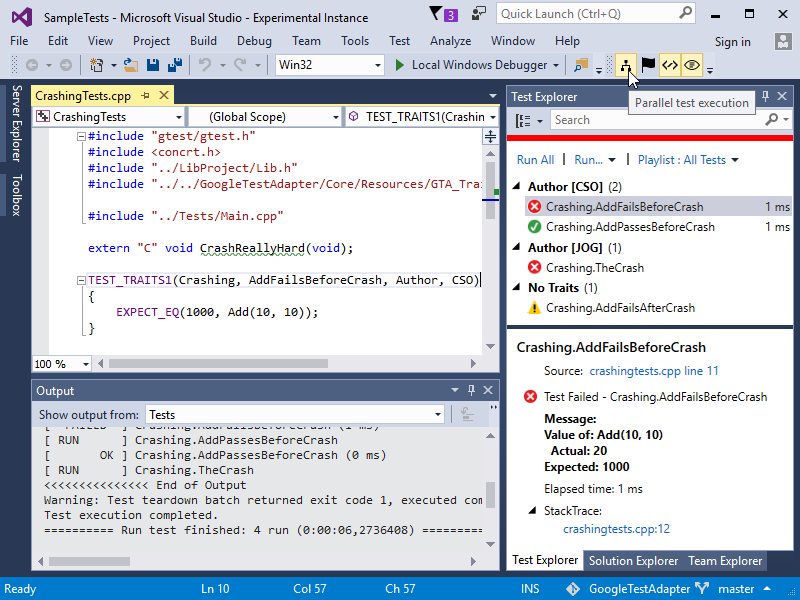
Features
- Sequential and parallel test execution
- Traits support by means of custom C++ macros and/or trait assignment by regexes
- Support for value-parameterized, typed, and type-parameterized tests
- Google Test's runtime behavior (handling of exceptions, break on assertion failure) can be controlled via VS options
- Most important runtime options can be controlled via toolbar without entering VS's options
- Support for all Google Test command line options, including test shuffling and test repetition
- TFS support by means of
VSTest.Console.exe - Support for test case filters
- Failed assertions and SCOPED_TRACEs are linked to their source locations
- Identification of crashed tests
- Test output can be piped to test console
- Exit code of test executables can be reflected as an additional test
- Execution of parameterized batch files for test setup/teardown
- Automatic recognition of gtest executables (which can be overridden by using a custom regex or an indicator file)
- Settings can be shared via source control
- Installable as Visual Studio extension or NuGet development dependency
History
- See releases
Usage
Installation



Google Test Adapter can be installed in three ways:
- Install through the Visual Studio Marketplace at Tools/Extensions and Updates - search for Google Test Adapter.
- Download and launch the VSIX installer from either the Visual Studio Marketplace or GitHub
- Add a NuGet dependency to the Google test adapter nuget package to your Google Test projects. Note, however, that Visual Studio integration is limited this way: VS can discover and run tests, but no debugging, options or toolbar will be available; configuration is only possible through solution config files (see below).
After restarting VS, your tests will be displayed in the Test Explorer at build completion time. If no or not all tests show up, have a look at the trouble shooting section.
Note that due to Microsoft requiring VS extensions to support asynchronous package loading, the last version of Google Test Adapter which supports Visual Studio 2012 is 0.14.4.
<a name="gta_configuration"></a>Configuration
GTA provides different ways of configuration:
- <a name="global_settings"></a>The Google Test Adapter section of Visual Studio's Tools/Options (not available if installed via NuGet). These options are referred to as global options in the following.
- <a name="toolbar"></a>The GTA toolbar (not available if installed via NuGet). The most important runtime options (i.e., Parallel test execution, Break on failure, Catch exceptions, and Print test output) can also be set via a toolbar; this is equivalent to setting the according options via Tools/Options/Google Test Adapter.
- <a name="solution_settings"></a>Solution settings files (not available if run via VsTest.Console.exe). They are provided by means of an XML configuration file; this allows sharing of settings via source control. The configuration file must be placed in the same folder as the solution's
.slnfile, and must have the same name as that file, but with extension.gta.runsettings. E.g., if the solution file's name isFoo.sln, the settings file must be namedFoo.gta.runsettings. - Visual Studio user settings files. VS allows for the selection of test settings files via the Test/Test Settings menu, and to pass such settings files to
VsTest.Console.exevia the/Settingsparameter. - Environment variable
GTA_FALLBACK_SETTINGS. The settings file referred to from that environment variable will be used only if GTA fails to receive settings from the VS test framework; currently, this is only known to happen when running GTA throughVsTest.Console.exeon VS 2017 V15.5 and later (see #184).
The format of solution and user settings files is the same: a <GoogleTestAdapterSettings> node contains the solution settings and the (possibly empty) set of project settings and is itself contained in a <RunSettings> node (which in the case of user settings files might contain additional, e.g. VS specific settings). In contrast to solution settings, each set of project settings additionally has a regular expression to be evaluated at test discovery and execution time.
The final settings to be used are computed by merging the available settings, vaguely following Visual Studio's approach of configuration inheritance. Merging is done in two stages:
- The available global, solution file, and user file settings are merged into solution settings and a set of project settings. This is done in increasing priority, i.e., solution file settings override global settings, and user file settings override solution settings. Project settings of solution and user settings files are merged if they share the exact same regular expression.
- At test discovery and execution time, each test executable's full path is matched against the project settings' regular expressions; the first matching project settings are used for the particular test executable. If no project settings are found, the solution settings are used.
Overall, given a test executable mytests.exe, the following settings apply to that executable in decreasing priority:
- Project settings of a user settings file, the regular expression of which matches the full path of
mytests.exe. - Project settings of a solution settings file, the regular expression of which matches the full path of
mytests.exe. - Solution settings of a user settings file.
- Solution settings of a solution settings file.
- Global settings.
Note that due to the overriding hierarchy described above, you probably want to provide only a subset of